
Legacy system modernization means updating, wrapping, moving or replacing aging software so it supports what the business needs now. IBM describes it as upgrading or transforming outdated, often monolithic systems into more efficient and adaptable ones. The real decision is rarely whether to modernize. It is how much to change at once, in what order, and who carries the risk while you do it.
This guide covers the main approaches, how to choose among them, what typically goes wrong, and how a phased, modular path keeps operations running while the foundation changes.
TL;DR
- Modernization is a spectrum, from wrapping a system in an API to replacing it outright. Most organizations need a mix, applied system by system.
- Large, single-event rewrites carry the highest schedule and budget risk. Public-sector examples show how far plans can drift.
- Start with the manual processes and integrations that hurt most, not with the oldest code.
- Pre-built modular components (financial processing, workflow automation, CRM, AI assistants) shorten the path from decision to a working replacement.
- Modernization that skips CI/CD, automated testing and clear ownership tends to recreate the legacy problem in newer technology.
What counts as a legacy system
Age alone does not make a system legacy. A system becomes a problem when it is hard to change, hard to staff, hard to integrate, or hard to secure. Google Cloud frames modernization as the strategic process of updating or replacing outdated software, architectures and infrastructure so they align with current and future business objectives, which is a useful reminder that the target is business fit, not a newer stack for its own sake.
In practice, the warning signs are consistent:
- Only one or two people understand how a core process works, and one of them is close to retirement.
- Every change request needs weeks of regression checking because nothing is automated.
- Data lives in a mainframe, a spreadsheet farm or a database no modern tool can read without custom glue.
- Vendor support has ended, or the language and framework are no longer taught or hired for.
- Finance and operations rely on manual re-keying between systems, and errors surface at month end.
The scale of the problem is visible at the top of the US government. In July 2025 the GAO reported that in 2019 it had identified 10 critical federal legacy systems most in need of modernization, and that only three of those modernizations had been completed as of February 2025. The same report scored 69 systems submitted by 24 agencies. Private-sector estates are rarely that visible, but the pattern is familiar: modernization gets deferred until a failure forces it.
The main modernization approaches
The vocabulary varies by vendor, but the options sit on a ladder of increasing change. The table below summarizes the trade-offs we see most often.
| Approach | What changes | Best when | Main risk |
|---|---|---|---|
| Encapsulate (API wrapper) | Legacy logic stays; new interfaces expose it | The core is stable but isolated from new channels | Preserves the underlying constraints |
| Rehost | Same application, new infrastructure | Hardware or data center costs drive the decision | Moves the problem without solving it |
| Replatform | Minor changes to use managed services | The code is sound but operations are painful | Limited agility gain |
| Refactor or re-architect | Code and structure reworked, often into modules | Business logic is valuable but tangled | Needs deep domain knowledge and tests |
| Rebuild | New system built to the same or revised requirements | The code is unmaintainable, requirements are changing | Longest timeline, highest scope risk |
| Replace | Off-the-shelf product or modular platform adopted | The process is commodity or well covered by existing components | Fit gaps and data migration |
Encapsulation and rehosting are the quick wins. They are legitimate steps, but they relocate complexity rather than remove it. A wrapped mainframe still needs mainframe skills. A rehosted monolith is still a monolith.
Rehosting and replatforming: what the cloud move actually delivers
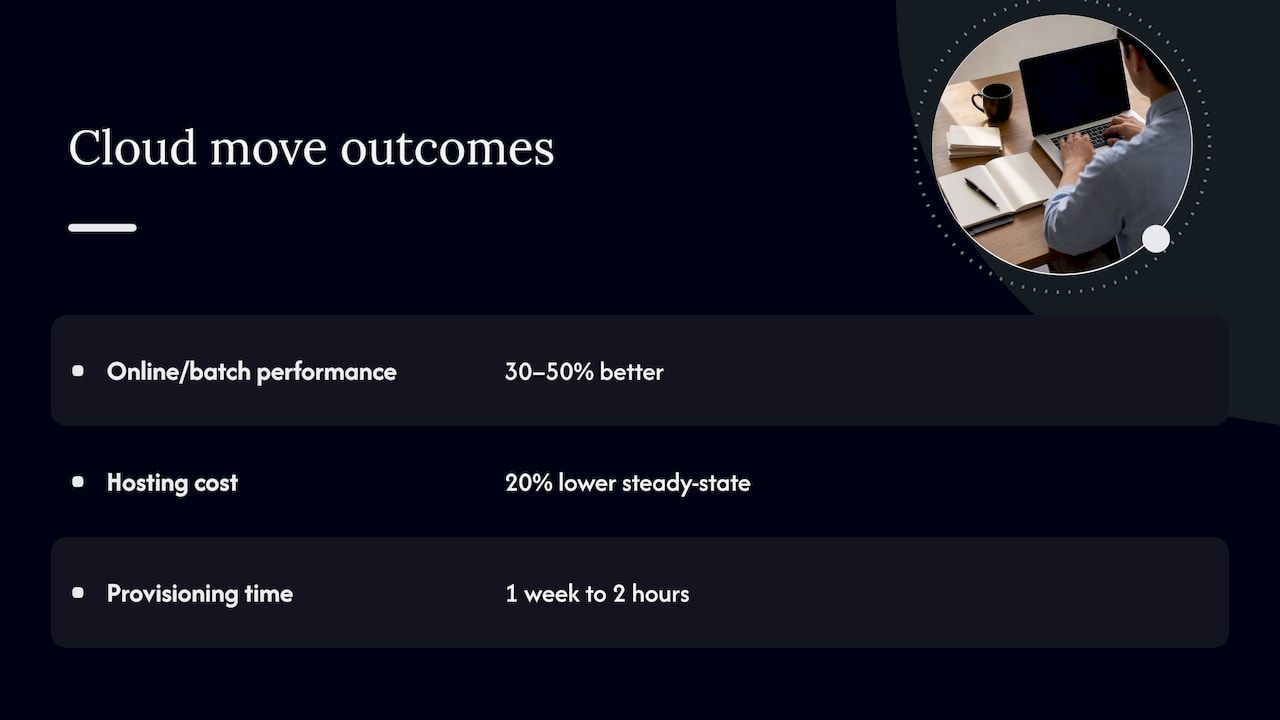
Infrastructure moves can pay off when they come with engineering changes. A 2026 AWS Public Sector case study of the GSA Pegasys financial management system reports 30 to 50 percent better performance in online response and batch jobs, a 20 percent lower steady-state hosting cost and environment provisioning cut from one week to two hours. Note what drove that: cloud-native infrastructure combined with modern delivery practices, not a lift-and-shift alone. That is a vendor-published case on a single system, so treat the figures as an example of what is possible, not a forecast for your estate.
The same source stresses that successful programs go beyond code. CI/CD, DevOps habits and automated testing are what let a modernized system keep changing safely. Without them, a team has swapped an old bottleneck for a new one.
Rebuilding and replacing
Rebuilds fit when the existing code encodes little worth keeping, or when the business process itself has changed. They are also where budgets slip. A well-documented public example: a federal personnel vetting IT program was reported to have spent $1.345 billion on a project originally scoped at $700 million, years behind its original schedule. Few companies run projects of that size, but the mechanics scale down: broad scope, a single cutover, and requirements discovered late.
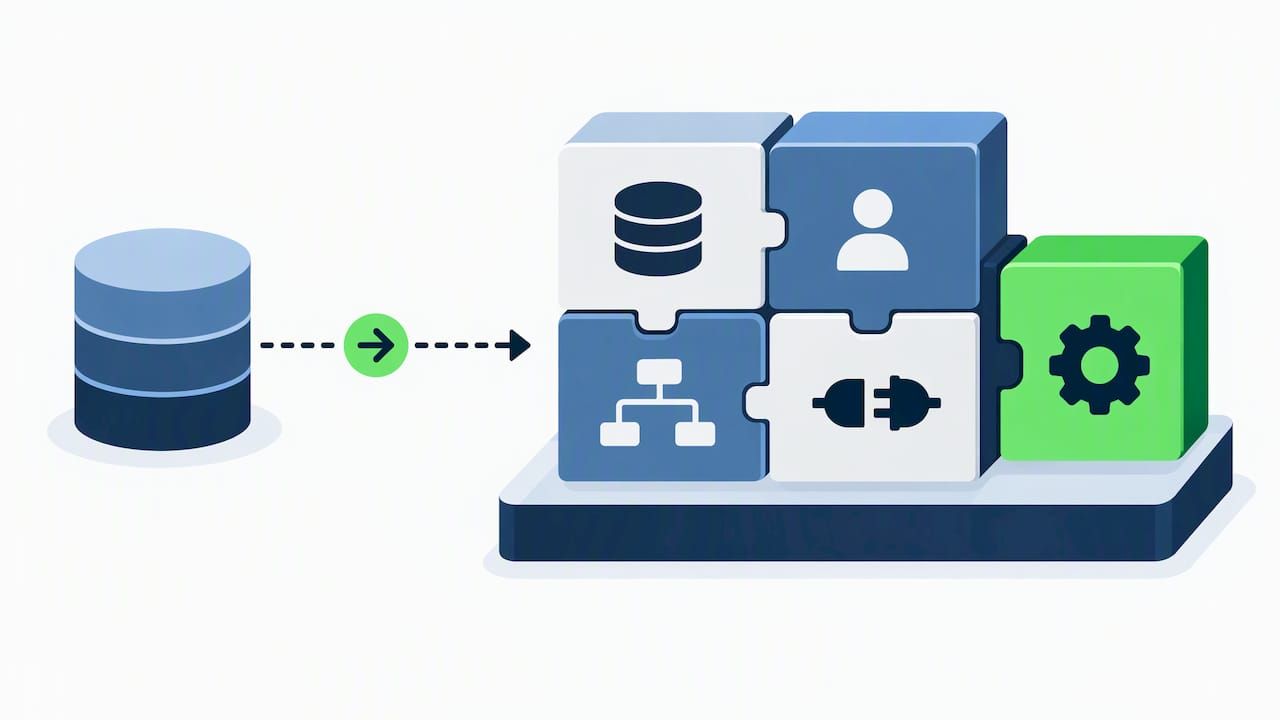
Replacement with pre-built components reduces that exposure, because the riskiest part, designing and testing generic capabilities such as ledgers, user management, approval flows and integrations, has already been done. The work shifts to configuring, extending and migrating data.
How to choose: six questions before you commit
Before picking an approach, answer these for each system, not for the estate as a whole.
- What business outcome is blocked? Faster close, new product launch, audit readiness, lower run cost. If you cannot name it, the project will drift.
- How stable are the requirements? Stable, well-understood logic favors refactoring or wrapping. Shifting requirements favor a modular rebuild.
- What is the data situation? Data quality and migration effort often outweigh code effort. Profile the data early.
- Who understands the domain today? If knowledge is concentrated in one person, capture it first through documentation, recorded walkthroughs and test cases.
- What is the failure cost? Payment processing and compliance records justify parallel runs and phased cutovers. An internal reporting tool does not.
- What can you run yourself? Self-hosting, audit trails and control over customization matter more in regulated sectors than headline speed.
Why big-bang rewrites fail, and what to do instead
The failure modes repeat across industries.
- Scope inflation. Teams rebuild every feature, including those nobody uses. Interview users and read usage logs before listing requirements.
- Hidden business rules. Legacy code holds decades of exceptions. Without characterization tests that capture current behavior, a rewrite loses them silently.
- Single cutover. One go-live date concentrates all risk in one weekend. Incremental migration spreads it.
- Moving the vendor black box. Replacing a legacy system with a closed platform you cannot inspect or host can swap one dependency for another.
The antidote is slicing. Pick one workflow or one domain, deliver it end to end, run it beside the old system if needed, then move on. This is the idea behind the strangler pattern: new capability gradually surrounds and replaces the old one. Our guide on why scalable enterprise systems matter for growth covers the architectural principles that make slicing possible, and our piece on blue-green deployments explains how to switch traffic between old and new releases without a risky cutover.
Start with manual processes, not old code
Many teams find the fastest return not in rewriting a core system but in automating the manual work around it: re-keying between systems, emailed approvals, spreadsheet reconciliations. This is also where readers asking how to automate manual processes should begin.
Workato’s guide to automating manual processes starts with identifying improvements, and notes that internal technology teams are well placed to spot weak points because they know the applications, processes and data. We agree, and would add a filter: rank candidates by volume, error cost and dependency on a system you plan to retire. High volume, high error cost and a short remaining system lifespan means automate through an integration layer. Low volume and a long lifespan means leave it alone.
There are three common routes:
- Robotic process automation on the screen layer. Tools that click through legacy user interfaces can bridge a system with no API. Microsoft describes desktop RPA with prebuilt or custom UI actions for automating legacy systems. It is fast to start, but brittle when screens change, so treat it as a bridge.
- Workflow and business process automation. IBM defines business process automation as software that automates complex, repetitive processes to keep day-to-day operations running smoothly. It works best when processes have clear rules, owners and exception paths.
- Purpose-built modules. For finance, case handling or customer data, a pre-built module with its own database and API avoids both the fragility of screen scraping and the cost of a full custom build.
Our article on case management automation lays out a pilot, govern, then scale sequence, including how to bring AI into approvals without losing control.
A phased plan for modernizing legacy systems
The sequence below works for most mid-sized and large organizations. Timelines depend on scope, so we avoid promising a fixed number of months.
Phase 1: Inventory and score
List every system, its owners, integrations, data stores, hosting, support status and compliance duties. Score each on business criticality and technical risk. The GAO’s approach is instructive: it scored systems against 16 attributes including age, vendor support and use of legacy programming languages. You do not need 16, but you do need a repeatable score so that politics does not set priorities.
Phase 2: Choose the slice
Pick a first target that is meaningful but bounded. A good first slice has a visible pain point, a clear owner, a manageable data set and few downstream dependents. Payment reconciliation, onboarding workflows or an internal CRM often fit.
Phase 3: Build the safety net
Before touching logic, write characterization tests, set up CI/CD and stand up a staging environment. This is the engineering foundation the AWS material above points to, and it is the step most often skipped under schedule pressure. Our enterprise software best practices article covers the baseline we expect on every engagement.
Phase 4: Deliver, run in parallel, cut over
Build the slice on a modular foundation, migrate data in rehearsals, run the new and old paths side by side for a defined period, and reconcile outputs. Cut over only when the differences are explained. Keep a rollback path for the first weeks.
Phase 5: Retire and repeat
Decommission the old component. This step is often forgotten, and unretired systems keep consuming licenses, patches and attention. Then take the next slice, using what the first one taught you.
Protecting search visibility when public systems change
If the system you are replacing powers a public website, customer portal or documentation area, URL changes can quietly cost you traffic. Map every old URL to its new destination before launch. This site migration SEO checklist walks through URL mapping and ranking protection during a move, and it is worth handing to whoever owns your web presence.
Our perspective: modernize on a modular foundation
We build custom business systems from modular, ready-made components, and that shapes how we see modernization. Three convictions come from that work.
Starting from zero is the most expensive way to replace a system. Most enterprise software shares a core: users and permissions, workflows, ledgers, notifications, audit trails, integrations. When a project begins with up to 60 percent of the baseline system already in place, the team spends its budget on the business-domain complexity that is unique to you, not on rebuilding boilerplate. That is the claim we make about our approach, and it is why we favor it over a greenfield build for most replacement projects.
Control matters as much as speed. A platform you cannot inspect, host or extend can relocate complexity into the vendor relationship. We design for client-controlled customization, audit readiness, multi-currency handling and self-hosted modules, so the new system does not become the next legacy dependency.
Accelerate work without accelerating chaos. Pre-built components shorten delivery only when paired with tests, deployment discipline and a phased cutover. Speed that skips those steps simply moves the failure later.
We also do not believe every system should be replaced. A stable, well-understood core with a clean API may be best left alone, with new modules built around it. The honest answer often mixes approaches.
— Bitecode
Where modular components shorten the path
Some capabilities recur in almost every modernization, and these are where pre-built modules help most:
- Financial processing. Replacing batch-driven ledgers and manual reconciliation with auditable, multi-currency processing. Our guide to financial processing systems and the piece on how to automate financial transactions go deeper.
- Workflow automation. Turning email chains and spreadsheet handoffs into governed workflows with clear exception handling.
- CRM and customer data. Consolidating scattered customer records into one system with a proper API.
- AI assistants. Adding search, summarization and routing over existing data, with permissions and audit trails kept intact.
- Blockchain and token settlement. For organizations exploring crypto settlement, a token module avoids building that layer from scratch. Our article on SaaS for finance and blockchain integration covers where this fits.
If you are earlier in the journey and still weighing the case for leaving paper and spreadsheets behind, why migrate to digital systems is the place to start.
Working with Bitecode on a replacement or modernization project
We scope each engagement individually, from a small MVP that proves one workflow to larger programs that replace several systems in sequence. Our custom business software service covers tailored internal systems and SaaS products, advanced cloud applications cover scalable cloud-hosted builds, and AI business process automation targets the manual work around your core systems. The available AI, financial, automation, CRM and token modules are the components we start from. We do not publish fixed prices, because scope, data volume and integrations vary too much. If you have a system in mind, contact us through our site and we will help you pick a first slice.
What to measure
Agree on measures before the first sprint, and baseline them on the old system.
- Lead time for changes: how long from request to production.
- Run cost: hosting, licenses and support, per month.
- Manual touchpoints: the number of hand-offs or re-keying steps per process.
- Error and rework rate: exceptions per thousand transactions.
- Audit effort: hours to produce evidence for a review.
The AWS case above is a good model for reporting: it named performance, hosting cost and provisioning time, each with a before and after. Pick the three that map to your original business outcome and report them every quarter.
FAQ
What is an example of legacy modernization?
A common example is replacing a batch-run, spreadsheet-supported finance process with a modular system that posts transactions in real time and keeps an audit trail. Another is wrapping a mainframe application with APIs so web and mobile channels can use it. A third is a federal agency moving a financial system to cloud-native infrastructure, as in the GSA case cited above.
Should we replace or modernize in place?
It depends on how stable the logic is and how much the process has changed. If the core is sound but isolated, wrap or refactor it. If the code is unmaintainable or the business process is different today, replacing it in slices usually carries less risk than a single rewrite.
How long does legacy modernization take?
There is no honest universal number. Scope, data quality, integrations and regulatory duties drive the timeline, and large programs often run longer than planned, as the federal examples above show. Delivering a first bounded slice early gives you a real estimate for the rest.
What is the difference between legacy modernization and digital transformation?
Modernization updates or replaces specific systems, while digital transformation is the wider change in how a business operates, using technology to alter processes and customer experience. Modernization is usually one of the building blocks of a transformation program.
Sources
- IBM: What Is Legacy Application Modernization?
- Google Cloud: What is legacy modernization?
- GAO-25-107795: Agencies Need to Plan for Modernizing Critical Decades-Old Legacy Systems
- AWS Public Sector Blog: GSA’s financial management system
- Air & Space Forces Magazine: DOD personnel vetting process
- Workato: How to automate any manual process
- Microsoft Power Automate
- IBM: What Is Business Process Automation?


