
Blue-green deployment runs two identical production environments, sends live traffic to one while the other stays idle, then flips a switch to cut over. Teams with fast rollback requirements and a stateless or migration-tolerant data tier get the most from it, since near-zero downtime comes at the cost of running two full environments and managing database compatibility across both. If your database schema changes with every release or your infrastructure budget is tight, blue-green needs guardrails before it earns its keep.
TL;DR:
- Blue-green deployment requires managing two full environments, which increases infrastructure costs significantly, especially if you forget to decommission the standby.
- Payload database migrations must follow expand-migrate-contract practices to prevent data loss and schema incompatibility during switchovers.
- Automated pipeline gates, including schema compatibility checks, approval steps, and rollback rehearsals, are critical for safe, repeatable blue-green releases.
- Proper access control and synchronized security policies must be maintained across both environments to prevent credential drift and security breaches.
- Combining blue-green with phased traffic split and low-traffic scheduling minimizes end-user impact and ensures seamless, invisible cutovers.
How Blue-Green Deployments Work: Traffic Switching Explained
The mechanics are simple in theory. You provision two environments (call them blue and green) that are configuration-identical. Blue serves production traffic while green receives the new release. Once green passes verification, you redirect traffic and blue becomes the standby, ready for rollback or the next release cycle.
The redirect itself happens at whichever layer controls routing, and the choice matters for how fast and how reversible your cutover is:
- Load balancer rule changes point an application load balancer or reverse proxy at the green target group, often in a single atomic update.
- DNS weight shifts update record weights to move traffic gradually, though DNS caching can delay full propagation by minutes.
- Kubernetes service selector updates repoint a service’s label selector from the blue deployment to the green one, a pattern Kubernetes’ ecosystem tooling and tools like Argo Rollouts automate directly.
- Container app traffic weights let platforms split percentages between revisions before a full cutover, which is how many teams blend blue-green with canary exposure.
A full swap makes sense when the release is low risk and rollback speed matters more than staged validation. That hybrid move, borrowed from canary releases, is quickly becoming the default rather than the exception among teams running Blue/Green Deployments on AWS.
What Happens to the Database During a Blue-Green Cutover?
The database is where blue-green deployments actually break. Application servers are stateless and disposable, but a shared database, or two databases that must stay in sync, does not tolerate an instant flip nearly as well. If green writes data in a new format and you roll back to blue, blue may not understand what green just wrote, and you lose data or corrupt state.
The fix practitioners rely on is the expand-migrate-contract pattern, laid out clearly in Martin Fowler’s writing on blue-green deployment:
- Expand: add new columns, tables, or fields without removing anything the old version depends on.
- Migrate: deploy the new application version that can read and write the new structure while remaining compatible with the old one, sometimes called N minus 1 compatibility, since blue and green must both function against the same schema during overlap.
- Contract: once blue is fully decommissioned and no rollback path is needed, remove the deprecated schema elements.
Three additional mitigations are worth building into the pipeline: keep every schema change backward compatible for at least one release cycle; consider a brief read-only cutover window if writes during the switch are a real risk; and for high-write systems, use change-data-capture or dual-write with a reconciliation step rather than a hard cutover.
Pro Tip: If your system takes writes during the green window, a plain traffic flip can silently drop them on rollback. A read-only cutover window or CDC-based dual-write closes that gap without adding a second database.
Blue-green is a poor fit when every release includes a breaking schema change and the team has no appetite for expand-migrate-contract discipline. In that case, a slower rolling deployment with careful migration ordering is usually safer.
Blue-Green vs. Canary vs. Rolling: Which Should You Use?
No single pattern wins on every axis. Blue-green gives you the fastest rollback, since standby infrastructure is already warm, but it costs the most and forces the data-tier discipline described above. Canary releases, per Martin Fowler’s canary release notes, cost less because they don’t require a full duplicate environment, but they roll back more slowly and need solid metric-based gating. Rolling deployments sit in between: cheap and gradual, but harder to reason about mid-rollout when old and new versions run side by side indefinitely.
| Attribute | Blue-Green | Canary | Rolling |
|---|---|---|---|
| Rollback speed | Fastest (flip traffic back) | Moderate (shift weight back) | Slowest (redeploy previous version) |
| Infrastructure cost | Highest (2x during overlap) | Lower (partial new capacity) | Lowest (incremental replacement) |
| Operational complexity | Moderate | Higher (metric gating required) | Lower |
The strongest pattern in practice is a hybrid: blue-green infrastructure with a canary-style weighted split during cutover, so you get full-environment rollback plus staged exposure before committing. CircleCI’s guidance on deployment strategies notes that monoliths tend to favor straightforward blue-green because the whole application moves as one unit, while microservices architectures often lean toward per-service progressive delivery since duplicating dozens of services doubles cost fast.
Building a Blue-Green CI/CD Pipeline: Stages and Gates
A blue-green release that isn’t automated end to end is a liability waiting for a tired engineer at 11 PM. The pipeline should enforce the sequence, not rely on someone remembering it.
- Run predeploy schema work (the expand step) against the shared or replicated data tier.
- Deploy the release to the green environment while blue keeps serving live traffic.
- Run automated smoke and integration tests against green, exercising the same paths real users take.
- Require an approval gate, human or automated, before any traffic shifts.
- Execute the cutover per your traffic-switch method, ideally with a partial weight shift first.
- Run post-cutover verification, confirming error rates, latency, and business metrics hold steady.
CircleCI’s deployment guidance frames this gating discipline as the difference between blue-green being repeatable infrastructure and blue-green being a one-off manual exercise nobody wants to repeat. Observability needs to match that discipline:
- Synthetic checks hitting critical endpoints on green before real traffic ever arrives.
- Real-user metrics (latency, error rate, saturation) compared side by side between blue and green.
- Log and trace correlation tagged by environment so a spike is diagnosable in seconds, not minutes.
Two operational controls prevent the pipeline from becoming a cost trap: set a decommission date for the old environment the moment cutover completes, and configure cost ceiling alerts that fire if duplicate infrastructure runs longer than planned. Bitecode’s IT automation governance checklist covers approval-gate and rollback-readiness patterns that map directly onto this pipeline structure.
What Does Blue-Green Deployment Cost, and How Do You Control It?
Running two full production environments means paying for two full production environments, even if only briefly. CloudZero’s analysis of deployment strategy costs documents real cases where teams forgot to decommission the standby environment, turning a planned overlap into a sustained duplicate line item on the cloud bill. For GPU-backed or AI inference workloads, that duplication hits the single most expensive resource a team has.
Three practices keep this in check: a hard decommission date tied to the pipeline itself, not a calendar reminder; automated billing alerts that fire the moment spend crosses a set ceiling during overlap; and scale-down windows that shrink the standby environment’s capacity once it’s no longer serving live traffic. The cost is justified when SLA commitments, regulatory validation, or high-traffic risk make instant rollback worth the premium. It’s harder to justify for low-traffic internal tools where a five-minute rolling redeploy carries little downside.
Where Blue-Green Deployments Go Wrong
Most blue-green failures trace back to a handful of repeat offenders, and none of them are exotic.
- Forgotten decommissioning, where the standby environment quietly runs (and bills) for months after cutover.
- Incompatible database migrations that break rollback because blue can’t read what green wrote.
- Weak smoke tests that check whether the app boots but miss the actual user paths that matter.
- No rollback rehearsals, so the first real rollback happens under pressure instead of on a Tuesday afternoon drill.
The mitigations are unglamorous but effective: automate teardown so decommissioning isn’t a task someone has to remember, rehearse rollback on a schedule the way you’d rehearse a fire drill, and keep feature flags in your back pocket as a second rollback lever that doesn’t depend on infrastructure at all.
Pro Tip: Run a rollback rehearsal every quarter even when nothing is currently broken. Teams that only practice rollback during an actual incident tend to discover their runbook is stale exactly when they can least afford it.
What Enterprise Teams Get Wrong About Blue-Green at Scale
Enterprise teams adopting blue-green often underestimate how much of the pattern’s success depends on infrastructure as code rather than the traffic-switch mechanism itself. If your blue and green environments aren’t provisioned from the same declarative templates, “identical” becomes an assumption instead of a guarantee, and that’s where subtle configuration drift creeps in.
Some software vendors build modular, pre-integrated components for enterprise workflow, financial, and automation systems, which can shorten the path to a blue-green-ready architecture. When a meaningful share of the baseline system arrives pre-built, teams can spend less time wiring up parallel environments from scratch and more time on parts that differentiate their deployment, like migration sequencing and cutover gating.
A few things enterprise teams should expect going in:
- Timeline and ROI depend heavily on how modular the existing system already is; retrofitting blue-green onto a monolith with tangled dependencies takes longer than adding it to a system built on components designed for parallel operation.
- Financial and blockchain workloads carry stricter audit requirements during cutover, which favors platforms with built-in audit trails over bolt-on logging.
- Self-hosted deployments need the decommission and cost-ceiling controls discussed earlier built into the platform, not layered on afterward.
Who Can Access What During the Switch?
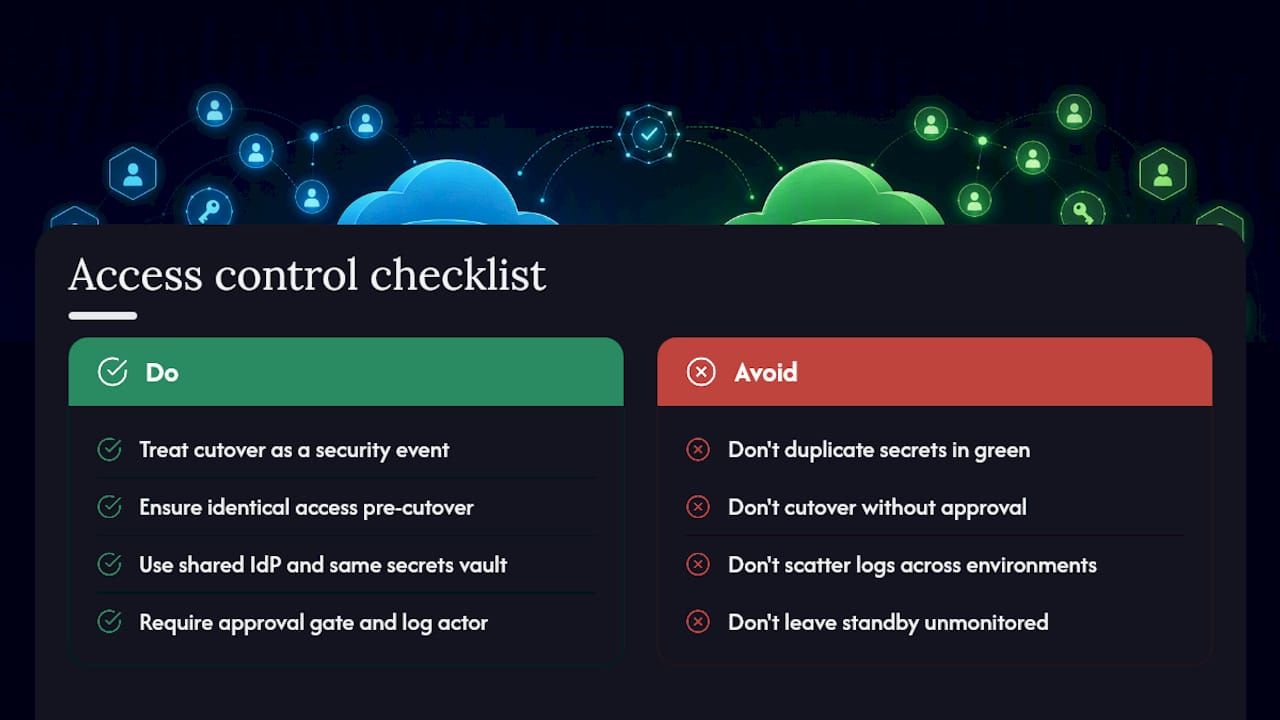
The moment traffic starts moving toward green, you have two live production environments with production data, production credentials, and production attack surface, doubled. Treat the switch window as a security event, not just an operational one.
Access control needs to be identical across blue and green before cutover begins, not synchronized after the fact. That means shared identity providers, matching IAM roles or Kubernetes RBAC policies, and secrets pulled from the same vault rather than duplicated and potentially stale copies sitting in green’s configuration. If green was provisioned weeks ago as a template and only recently activated, its credentials and access policies can drift out of sync with blue without anyone noticing until an audit flags it.
The cutover mechanism itself, whether it’s a load balancer rule change or a DNS update, is a privileged action and needs its own guardrail: require an approval gate tied to a specific identity, log who triggered the switch, and alert if a cutover happens outside expected deployment windows. During the overlap period, both environments should log to the same centralized system so a security event on either side is visible in one place, not scattered across two sets of logs someone has to correlate manually.
The standby environment deserves the same scrutiny as the active one. An idle blue environment with stale credentials and no active monitoring is still a target, and it’s often the one nobody is watching closely during a live cutover. Bitecode’s guidance on secure software deployment covers the access-control patterns that hold up during exactly this kind of dual-environment exposure window.
Can You Run Stateful Applications With Blue-Green?
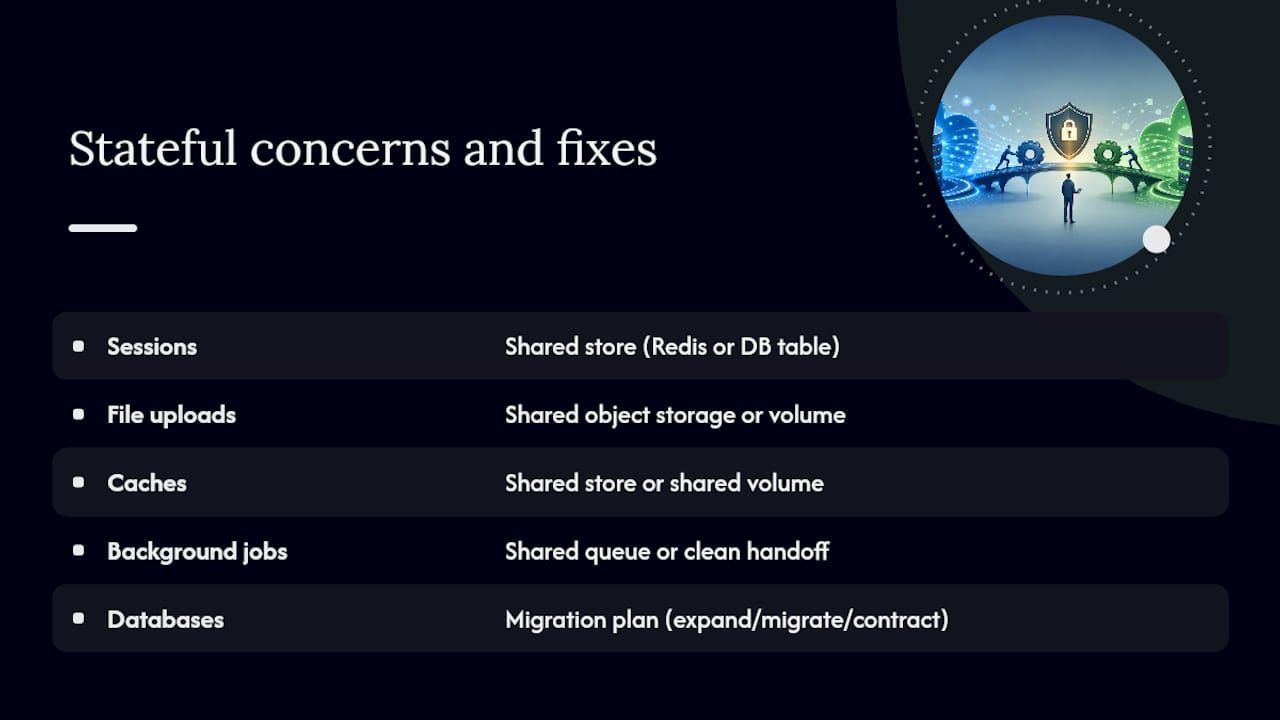
Stateless services are the easy case for blue-green: spin up green, redirect traffic, done. Stateful applications, anything holding sessions, file uploads, caches, or in-memory data that isn’t in the shared database, need a deliberate strategy or they lose that state the moment traffic moves.
Session state is the most common trip-up. If user sessions live in memory on the blue servers, a cutover to green logs every active user out simultaneously. The standard fix is externalizing session state to a shared store, such as Redis or a database table, so either environment can read it regardless of which one currently holds the traffic. The same logic applies to file uploads and cached assets: point both environments at the same object storage or shared volume rather than local disk unique to each.
Background jobs and queues need equal care. If blue is mid-processing a job when the cutover happens, green needs either shared access to that same queue or a clean handoff mechanism, otherwise jobs get dropped or double-processed. Idempotent job design, where reprocessing the same job twice causes no harm, is cheap insurance during any cutover.
Databases, covered in the expand-migrate-contract discussion earlier, are the largest stateful concern, but they’re not the only one. Any stateful component that isn’t explicitly shared between blue and green should be treated as a migration risk in its own right, not an afterthought to the database plan.
Will Users Notice a Blue-Green Deployment?
Done correctly, a blue-green cutover is invisible to end users. Done poorly, it produces the exact downtime the pattern was supposed to eliminate: dropped sessions, brief 502 errors during the traffic switch, or a jarring UI change mid-session if the frontend and backend aren’t cut over in a coordinated way.
The weighted traffic-split approach, discussed earlier for reducing blast radius, does double duty here. Instead of every user hitting the new version at the exact same instant, exposure ramps gradually, which means a subtle bug affects a small percentage of sessions instead of all of them at once. Combine that with sticky sessions during the transition window, so a user who lands on green doesn’t bounce back and forth between blue and green mid-session, and the experience stays consistent for each individual visitor even while the backend is in flux.
Timing matters too. Cutovers scheduled during known low-traffic windows reduce the number of users who could notice anything at all, and synthetic monitoring that checks core user journeys immediately after the switch catches problems before real users do. The goal isn’t just avoiding an outage. It’s avoiding the smaller, harder-to-detect friction that erodes trust in the product without ever showing up as a formal incident.
A Blue-Green Best Practices Checklist
Every recommendation in this guide collapses into a short list of habits worth enforcing as pipeline policy rather than as good intentions:
- Provision both environments from the same infrastructure-as-code templates, so “identical” is guaranteed rather than assumed.
- Gate every cutover behind automated smoke tests and an explicit approval step.
- Apply expand-migrate-contract discipline to every schema change, no exceptions for “small” migrations.
- Set a decommission date and a cost ceiling alert the moment a release cycle begins, not after it ends.
- Externalize session state and shared files so either environment can serve any user at any time.
- Run rollback rehearsals on a schedule, not just after something breaks.
- Centralize logging and monitoring across both environments during every overlap window.
None of these are exotic practices. What separates teams that run blue-green safely from teams that get burned by it is whether these habits are enforced by the pipeline itself or left to memory.
The Real Lesson From Blue-Green Post-Mortems
The conventional pitch for blue-green deployment sells the traffic switch as the hard part. It isn’t. Flipping a load balancer rule or updating a Kubernetes selector takes minutes to implement and minutes to master. The actual difficulty, the one that shows up in nearly every post-mortem worth reading, sits in the data tier and in the calendar.
Teams that get burned by blue-green almost never get burned by the switch itself. They get burned by a schema migration that assumed the old version was already gone, or by a standby environment nobody remembered to decommission until the invoice arrived. That’s not a technology problem. It’s a discipline problem, and discipline is exactly what automated pipelines are good at enforcing when humans aren’t reliable enough to be trusted with it manually.
If there’s one priority to take from this guide, it’s this: build the expand-migrate-contract pattern and the decommission date into the pipeline itself, not into a runbook someone reads under pressure. Enterprise teams evaluating custom deployment architecture or looking to automate the governance around it with workflow automation tend to get more mileage from that structural discipline than from any specific traffic-switch tool they pick.
— Bitecode
Sources
- Blue/Green Deployments on AWS
- Blue Green Deployment — Martin Fowler
- Deployment strategies explained: types, trade-offs, and costs — CloudZero
- Deployment strategies: Types, trade-offs, and how to choose — CircleCI


