
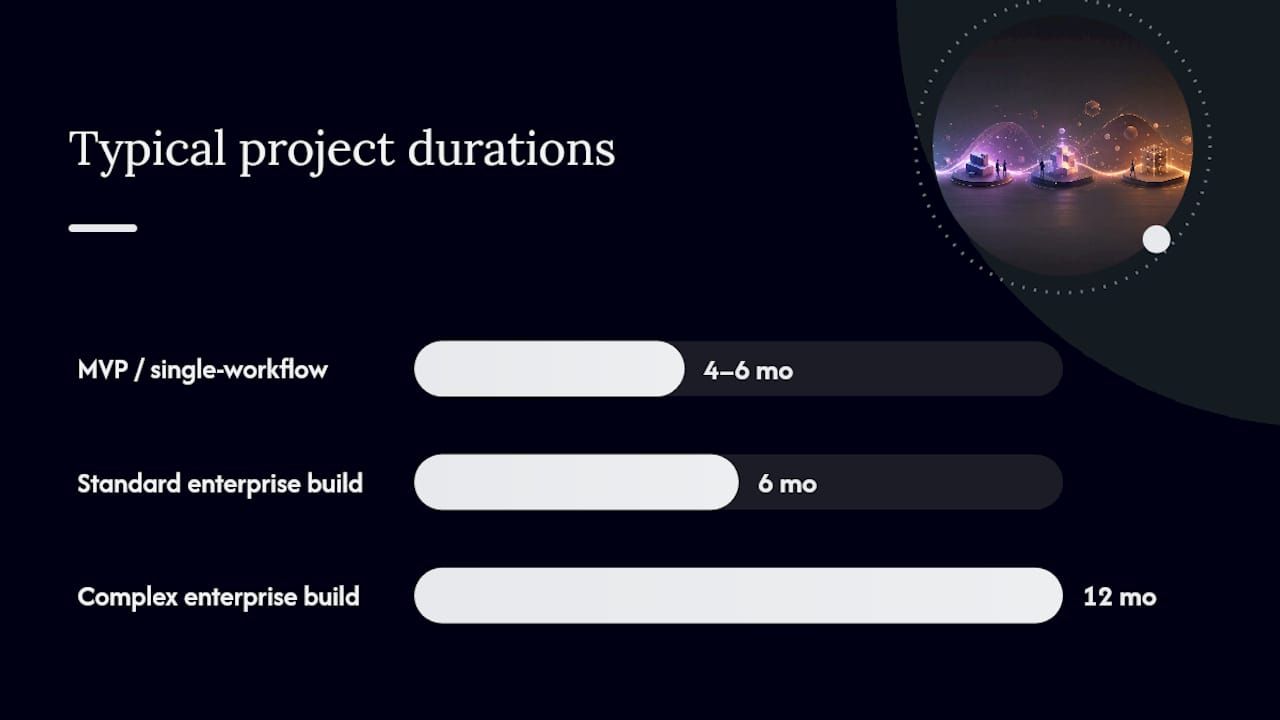
A focused MVP or internal workflow tool typically launches in 2 to 4 months. A standard enterprise application runs 6 to 12 months. Complex legacy modernization programs often stretch 8 to 18+ months. The spread comes down to four variables: how many systems you integrate, how messy your data is, how deep your compliance and testing requirements go, and how much you customize versus configure. Modular, pre-built components (the approach Bitecode uses) can compress several of these phases considerably, particularly design and configuration, without cutting the testing and governance work that actually protects your go-live date.
Quick reference for planning conversations:
- MVP / focused workflow tool: 2 to 4 months
- Standard enterprise system: 6 to 12 months
- Complex modernization or legacy replacement: 8 to 18+ months
Key Takeaways
Modular pre-built components shorten design and configuration phases significantly, but data migration, integration testing, and UAT still require their full duration regardless of the technology stack chosen.
| Point | Details |
|---|---|
| Baseline ranges | MVPs run 2 to 4 months, standard enterprise systems 6 to 12 months, complex modernization 8 to 18+ months. |
| Phases don’t compress equally | Design and configuration shrink with modular components; data migration and UAT do not. |
| Contingency scales with complexity | Budget 10% buffer for low-complexity projects, higher buffers for high-complexity ones with multiple integrations. |
| Hypercare needs dedicated staffing | Keep 4 to 12 weeks of elevated support after go-live instead of demobilizing the team at launch. |
| Bitecode compresses the front half | Its modular baseline covers up to 60% of common components, cutting design and configuration time while leaving testing and governance intact. |
Software Project Timeline Phases and How Long Each One Takes
Every custom enterprise build, regardless of size, tends to move through the same seven-phase rhythm. Mid-market implementations commonly run 6 to 18 months total across these phases, and compressing any single one below its floor usually shows up as rework later, not as time saved.
- Kickoff and planning (2 to 6 weeks). This phase produces the project charter, governance structure, and a signed scope baseline. Skipping it to “save time” is the single most common reason projects blow past their own deadlines.
- Process design and fit-gap analysis (6 to 12 weeks). Workshops map current-state processes against the target system and produce a design document. Microsoft’s guidance recommends anchoring this stage to a business process catalog that translates business goals into scoped, prioritized work items rather than vague requirements.
- Configuration and customization (8 to 24 weeks). The widest range in the entire lifecycle, driven almost entirely by how much you build from scratch versus configure from existing components.
- Data migration and integration testing (4 to 10 weeks). The quiet risk zone. More projects slip here than anywhere else, usually because data quality issues surface only once migration scripts actually run.
- User acceptance testing (4 to 8 weeks). Business users validate against defined acceptance criteria, not just “does it work.”
- Training and cutover (3 to 6 weeks). Includes end-user enablement and detailed cutover weekend planning.
- Hypercare and stabilization (4 to 12 weeks post-go-live). Elevated support staffing while the system absorbs real production volume.
Projects that shorten design or testing to hit an arbitrary date typically surface defects and support spikes within the first months after launch. The enterprise system design workflow you set up in phase two is what makes phases three through five predictable instead of chaotic.
What Does a Realistic Milestone Schedule Look Like?
A milestone schedule only works if it’s specific enough to paste into a project plan. Here’s what that looks like for two common project types.
MVP or single-workflow build:
- Discovery and requirements: 2 to 4 weeks
- Design and architecture: 2 to 4 weeks
- Development sprints: 6 to 8 weeks
- UAT: 2 to 4 weeks
- Cutover and hypercare: 4 weeks
That totals roughly 16 to 24 weeks, consistent with the 2 to 4 month MVP range cited earlier.
Full enterprise rollout stacks the same phases but runs integration and data migration as parallel tracks rather than sequential ones, which is why total elapsed time doesn’t scale linearly with scope. A six-month standard build and a twelve-month complex one often share the same phase sequence, just with wider timeboxes and more concurrent workstreams.
Sprint cadence matters more than most procurement teams realize. Two-week sprints with a demo at the end of each one, backed by nightly CI builds and automated regression testing, catch integration problems while they’re still cheap to fix. Waiting for a single big-bang test phase at the end is how a four-week slip becomes a ten-week one.
What Actually Drives Timeline Length?
Scope size is the obvious driver. The less obvious ones are what actually blow up schedules.
- Third-party integrations typically add 2 to 6 weeks each, depending on API maturity and whether the vendor has a sandbox environment ready on day one.
- Complex data migration (multiple legacy sources, inconsistent formats, no data dictionary) adds 4 to 10 weeks on its own.
- Regulatory or compliance requirements (audit trails, data residency, financial controls) extend both design and testing phases.
- Heavy customization versus configuration is the single biggest lever, since custom code always costs more calendar time than adapting an existing component.
A simple three-level sizing model helps convert these into schedule buffers before you sign a contract:
Pro Tip: During RFP evaluation, ask vendors directly for their integration partner’s SLA response times and whether your data has been profiled for quality issues. Vague answers to either question are the clearest early warning sign of a schedule that will slip.
Which Governance Roles Keep a Timeline on Track?
Schedule slip is rarely a technical problem. It’s a decision-making problem. The projects that stay on track have a small number of clearly accountable roles and a fixed cadence for resolving issues.
- Executive sponsor: owns budget and removes organizational blockers.
- Product owner: makes day-to-day scope calls and prioritizes the backlog.
- Subject matter experts (SMEs): validate design decisions and sign off on UAT criteria.
- QA lead: owns test coverage and go/no-go recommendations.
- Release manager: owns the cutover sequence and rollback plan.
Pair these roles with a signed baseline plan, a change-control process, a live risk register, and a defined escalation path. A practical rule that keeps momentum: three-business-day signoff windows for non-technical scope changes, plus a standing weekly steering committee review. Conservative, well-governed scheduling consistently produces better adoption outcomes than aggressive timelines managed reactively.
How Does Cutover and Hypercare Actually Work?
Cutover weekend is where months of planning compress into 48 hours of execution.
- T minus 0 to T plus 12 hours: final data sync, system freeze, initial reconciliation checks against legacy records.
- T plus 12 to 24 hours: functional smoke tests, go/no-go decision from the release manager and QA lead.
- T plus 24 to 48 hours: full user access restored, monitoring dashboards live, fallback plan on standby if reconciliation fails.
Go/no-go criteria should be defined before cutover weekend starts, not debated during it: data reconciliation within an agreed tolerance, core transactions processing correctly, and no unresolved critical defects.
Hypercare typically runs 4 to 12 weeks with elevated staffing (extra help desk coverage, on-call developers, daily standups). Demobilizing the implementation team right at go-live is one of the most common and avoidable causes of a longer, costlier stabilization period. Exit criteria should include ticket volume returning to a defined baseline and no open severity-one issues for two consecutive weeks.

What Usually Causes Delays, and How Do You Prevent Them?
Most schedule slippage traces back to five repeat offenders: scope creep, SME unavailability, late-arriving third-party APIs, poor data quality discovered mid-migration, and under-resourced testing.
- Lock scope with a fixed-scope MVP before adding enhancement requests to a later phase.
- Run integration and data-migration workstreams in parallel rather than sequentially where dependencies allow.
- Dedicate an entire sprint to data cleanup before migration testing begins, not during it.
- Invest in automated regression testing early. It pays for itself the first time you catch a break before UAT.
- Roll out in stages (pilot group, then full population) instead of one company-wide switch.
Pro Tip: Replacing custom-built modules with tested, pre-configured components removes an entire category of risk. Untested code is where most defects hide; a component that has already run in production elsewhere carries far less unknown risk. See Bitecode’s guide to software risk management for a fuller risk register template.
What Do Modular Components Actually Change About the Schedule?
Bitecode’s model starts custom projects with up to 60% of the baseline system pre-built, covering AI automation, financial processing, and workflow modules. That compresses the design and configuration phases meaningfully, since teams are adapting proven components rather than writing them from scratch.
It does not compress data migration, integration testing, or UAT. Those phases depend on your data and your business processes, not on how much boilerplate exists elsewhere. When evaluating any vendor’s modular claims, ask precisely which phases shrink, request evidence from a comparable project, and confirm their component library has handled your specific integration pattern before.
— Bitecode
Get a Baseline Timeline Built From Modular Components
Most custom software quotes give you a range and a shrug.
If you’re planning a custom enterprise system, an internal automation tool, or a bespoke SaaS product and need dates you can actually defend to a steering committee, Bitecode’s custom software development team can map your requirements against existing components and tell you exactly which phases compress and which still need full-duration effort. Start with a discovery call to lock a baseline plan before you commit to a vendor or a delivery date.
Where to Verify These Timelines and Plan Your Own
- Microsoft’s process-focused implementation guidance for structuring design-phase scope.
- Seven-phase ERP implementation guidance for phase-by-phase duration benchmarks.
- Bitecode’s CRM implementation roadmap for a detailed cost and timeline model on customer-facing modules.
- Bitecode’s handover checklist for cutover and go-live planning.
Sources
- process-focused-solution-implementation-lifecycle
- ERP Implementation 2026 — Seven Phases, Pitfalls, Hypercare
- Custom Enterprise Software Development Guide 2026
- ERP Implementations


