A data migration plan is the document that tells your team what data moves, from where to where, in what order, how it is checked and who signs off. It is a separate artifact from the project plan, and it is the one that decides whether the new system starts life with trustworthy records or with inherited problems. This guide walks through the phases, a working checklist, a testing approach, the real limits of zero-downtime cutovers and the special case of moving spreadsheets into a proper system.
TL;DR
- Write the data migration plan as its own document, with named owners, validation criteria, rollback steps and a decommissioning timeline.
- Spend the most time on discovery and data assessment. It is the stage most often rushed and the one that most affects whether the project stays on track.
- Test in layers: unit tests of each conversion, mock migrations, reconciliation of counts and totals, then real transactions in the new system.
- Zero downtime is a goal for users, not a property of the cutover itself. Plan a short, rehearsed window instead of promising none.
- Spreadsheets need a data model, cleaning rules and a rejection queue before any import.
What a data migration plan actually covers
US federal IT guidance is blunt on one point: a data migration plan should be distinct and separate from the project plan and prepared specifically for the data effort. The project plan tracks budget, staffing and milestones across the whole program. The migration plan tracks data: sources, quality, mappings, transformations, test cycles, cutover and retirement of the old system. If you need help with the broader planning layer, resources on building project plans and documentation cover it, and your migration plan then plugs into that structure.
A useful plan answers six questions:
- Scope: which entities, tables, files and history move, and which are archived or left behind?
- Source reality: what is the actual content, quality and structure of the data today?
- Target rules: what must the data look like to be valid in the new system?
- Method: big bang, phased or parallel, and why?
- Proof: how will you demonstrate that the data arrived complete and correct?
- Exit: what triggers rollback, and when is the old system switched off?
Choosing a migration strategy
The two strategies most guides identify are big bang and trickle (phased) migration. Big bang moves everything inside a single downtime window. Trickle moves data in incremental stages while the old system keeps running.
| Approach | How it works | Best fit | Main risk |
|---|---|---|---|
| Big bang | One cutover window, all data at once | Smaller datasets, systems that can tolerate a planned outage | A failure inside the window leaves little room to recover |
| Phased or trickle | Data moves in stages, by entity, business unit or time slice | Large estates, complex integrations | Two systems must coexist and stay consistent |
| Parallel run | Old and new operate side by side until the new one is validated | Finance, compliance and other high-consequence data | Highest cost and double data entry |
The choice is rarely ideological. It follows from how long your business can pause, how many systems read the data, and how expensive an error is. A ledger that auditors will inspect justifies a parallel run. A reference catalog does not.
For very large tables that cannot move in one run, teams commonly use incremental backfill with checkpoints, so a failed load restarts from the last good position rather than from zero. Design this in from the start, because retrofitting restartability into a script that assumed a single pass is painful.
The phases of an enterprise data migration
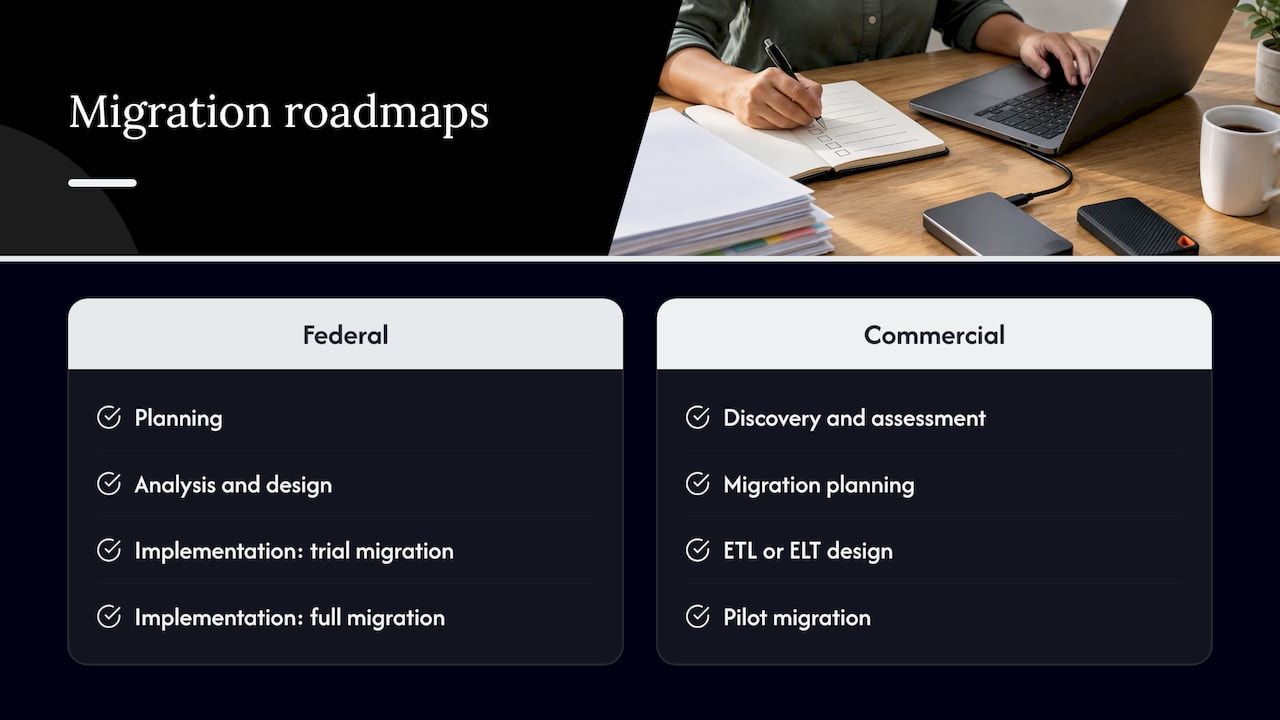
The federal roadmap describes four phases: planning, analysis and design, implementation, and closeout, with implementation including a trial migration, the full migration and post-migration validation. Commercial practice looks similar. One enterprise guide lists six steps: discovery and assessment, migration planning, ETL or ELT design, pilot migration, full-scale execution and post-migration validation.
Discovery and assessment
This is where projects are won or lost. The same enterprise guide observes that discovery is the most commonly rushed stage even though it largely determines whether the project stays on track. The federal guidance calls a comprehensive overview of data content, quality and structure a critical success factor.
In practice, discovery produces:
- An inventory of every source, including shadow databases and departmental files.
- Profiling results: null rates, duplicate keys, orphaned references, format drift, encoding problems.
- A list of downstream consumers: reports, integrations, APIs, scheduled jobs.
- A decision, per dataset, to migrate, archive, correct or delete.
Analysis and design
Here you map source fields to target fields and write the transformation rules. Evaluate formats and mappings explicitly, and decide how to handle values that have no clean equivalent: default them, flag them or reject them. Write each rule down with an owner, because transformation logic is business logic, not only technical logic. Teams that treat it as a pure engineering task end up with a status code that means one thing in finance and another in operations.
If the target is a custom or modernized system, this is also the moment to decide what the new data model should look like instead of copying the old one. Our overview of legacy system modernization options and a phased plan covers how that decision connects to the migration sequence.
Implementation
Implementation runs in rounds: a trial migration on a copy, fixes, another trial, then the full migration. Microsoft’s guidance for complex migrations recommends a staging layer where source values are transformed, incomplete records filtered, integrity checks run for missing references, and counts or financial totals audited before the final load.
The same guidance covers failures. Do not halt the whole run for one bad record. Log the failure, resolve its cause and reprocess so that invalid records never disappear silently. A rejection queue with an owner is one of the cheapest controls you can build.
Closeout
Closeout means final validation, sign-off, a defined hypercare period, archiving of the source and a dated plan to decommission the old system. Leaving the legacy system running indefinitely creates two sources of truth, which is the problem the migration was meant to remove.
A data migration checklist you can copy
The federal guidance expects checklists to cover pre-migration audits, cleanup, mock conversions, integration inventory, cutover runbooks, validation criteria, rollback procedures and decommissioning timelines, with a named owner for each phase. Turned into a working list:
Before migration
- Scope signed off, with an explicit list of excluded data.
- Full backup of every source, and a tested restore. CISA advises regularly testing backups for full and partial restoration, including the ability to roll back at least seven days.
- Data profiled for quality, anomalies and duplicates, a step also recommended in TechTarget’s migration guidance.
- Field mappings and transformation rules documented and reviewed by business owners.
- Integration inventory complete: every system that reads or writes the data.
- Acceptance criteria and rollback triggers agreed in writing.
During migration
- Cutover runbook rehearsed at least once end to end, with timings.
- Change freeze on source data, or a defined method for capturing changes in flight.
- Counts, totals and referential checks run at each stage.
- Failed records logged, triaged and reprocessed.
- A go or no-go checkpoint with a named decision maker.
After migration
- Final reconciliation over the full cutover scope.
- Critical queries, reports and integrations verified against the new system.
- Users confirm real tasks work with migrated data.
- Audit trail and migration documentation stored.
- Source system set to read-only, then retired on the planned date.
How to test a data migration
No single check proves a migration worked. CockroachDB’s validation guidance recommends defining a validation plan and combining complementary checks: row counts and hashes, sampled records, column comparisons, business rules, boundary values and data types, null and default behavior, referential integrity, ETL log inspection, and automated mismatch detection. Each catches a different class of defect. Counts miss corrupted values. Hashes flag differences but not their meaning. Business rules find what both ignore.
Decide how accurate is accurate enough
The Rational Unified Process guidance on migration testing says to set the acceptable accuracy level by data criticality: accounting figures may need summary-level accuracy, while critical inventory records may need to match exactly. The same guideline suggests manual review of all data or a representative sample before and after conversion, or checking reports generated from the data. Agree these thresholds before testing starts, not after the first discrepancy appears.
Test in layers
- Unit tests of individual conversions, such as date formats, currency rounding and code translations.
- Mock migrations on production-sized copies, to measure duration and expose volume problems.
- End-to-end integration cycles, where downstream systems consume migrated data.
- Transactability tests, where real transactions are processed through the new system. Consulting practice on ERP projects, including this ERP data migration white paper, treats these as a distinct stage, because data that loads can still fail when a business process touches it.
When data keeps changing during a long migration, repeat validation periodically. CockroachDB recommends live-aware validation to reduce false positives from in-flight changes, then a final validation over the full cutover scope after replication drains, plus critical application queries and smoke tests.
For financial data, reconciliation should be exact and auditable. Our piece on audit-ready finance data pipelines describes the controls that make that possible.
Zero-downtime migration: what is realistic
Vendors like to promise it. Google Cloud’s database migration guidance is more candid: truly zero downtime for clients is not possible during cutover, but downtime can be minimized. Its recommendations include testing read-only clients against the target early, minimizing data in flight and preparing target clients concurrently. It also notes that the acceptable downtime must be long enough for the migration and the follow-up testing.
That shapes a sound plan:
- Define the window as a requirement. Ask the business how many minutes of write interruption are tolerable, then design to that number.
- Replicate continuously, cut over briefly. Keep source and target in sync, pause writes, let replication drain, validate, then switch.
- Rehearse the switch and the way back. A rollback that has never been run is a hope, not a procedure.
- Separate schema change from data move. Blue-green style releases reduce risk, but databases need extra care. Our article on database-safe blue-green deployments explains the pitfalls, including duplicated infrastructure cost.
Moving from spreadsheets to a business system
Spreadsheet migrations are deceptively risky because spreadsheets have no enforced schema. One column may hold dates, text notes and the word “TBD”. The same customer may appear under four spellings. Formulas hide business rules that nobody documented.
A workable approach:
- Inventory the workbooks. Find every version, tab and linked file, and identify who maintains each. The real master is rarely the file everyone assumes.
- Extract the logic. List formulas, color coding and manual conventions, and decide which become system rules, validations or workflows.
- Design the target model first. Decide entities, required fields, unique keys and allowed values. Then map columns to it, not the other way round.
- Clean in a staging area. Standardize formats, deduplicate, split overloaded columns and resolve missing values with the data owners, not by guessing.
- Import with validation and a rejection queue. Rows that fail rules are rejected with a reason, reviewed and reloaded.
- Reconcile against the source. Compare record counts, totals and a sampled set of rows before anyone starts working in the new system.
- Freeze and retire the workbooks. Make them read-only on cutover day, or users will keep editing them.
This is also an opportunity to close the gap between the process and the tool. Our guide on why organizations migrate to digital systems looks at what changes beyond the data once spreadsheets are replaced.
Common mistakes that derail a migration plan
- Treating migration as the last sprint. It needs its own workstream from the start, because data problems found late are expensive.
- Migrating everything. Years of obsolete records inflate load times, test effort and risk. Archive what has no operational use.
- Skipping business owners. Engineers can move data. Only the people who use it can say whether it still means the right thing.
- No definition of done. Without acceptance criteria, validation becomes a debate.
- Ignoring master data. Duplicate customers and products migrate faithfully into the new system. For that problem, see our approach to enterprise master data management.
Our perspective
We see the same pattern in migration projects: the data is rarely the hardest part. The hard part is that the business rules embedded in the old system were never written down, so they surface during testing or, worse, after go-live.
That is why we favor a modular foundation over a blank page. When roughly 60% of the baseline system, such as the financial module, workflow automation and CRM structures, is already built, the team spends its early weeks on the questions that matter: what the data means, how it maps and how it will be proven correct. Audit-ready, multi-currency handling and client-controlled hosting are part of that foundation, not afterthoughts.
A migration plan should accelerate work without accelerating chaos. Short rehearsed cutovers, rejection queues and reconciliation reports beat heroic weekend efforts every time.
Bitecode
Where Bitecode fits
If your migration is part of building or replacing a business system, we start projects with a large share of the baseline already pre-built, so the data model, validation rules and reconciliation can be designed alongside the application instead of after it. Explore our custom business software service, or the financial module if your migration involves ledgers, multi-currency records and audit requirements.
For teams still choosing the target system, the business software selection checklist is a good place to start. Or talk to us about your project.
FAQ
How long should a data migration plan be?
As long as it needs to be to remove ambiguity, and no longer. For a small system, a few pages covering scope, mappings, test approach, cutover steps and rollback can suffice. For an enterprise estate, expect a master plan plus per-dataset appendices for mappings and validation rules.
What is the difference between a data migration plan and a data migration strategy?
The strategy is the high-level choice: big bang, phased or parallel, and the principles behind it. The plan is the executable detail: who does what, in which order, with which tests, timings and rollback triggers. The strategy is decided once. The plan is revised through every trial run.
Is zero-downtime data migration possible?
Not strictly at the moment of cutover. Google Cloud’s guidance says clients cannot avoid a brief interruption, but continuous replication, early testing of the target and minimal data in flight can shrink it substantially. Plan for a short, rehearsed window.
How do I migrate spreadsheet data without losing quality?
Design the target data model first, clean data in a staging area with the data owners, import with validation rules and a rejection queue, and reconcile counts and totals against the source. Then make the old workbooks read-only so edits do not continue in two places.
Sources
- Data Migration Roadmap Guidance
- What is data migration? Definition, strategy and best practices
- Enterprise Data Migration: Strategy, Steps & Best Practices
- Suggested workflow for a complex data migration
- Back Up Business Data, CISA
- Validation Strategy, CockroachDB
- Guideline: Defining Test Strategy for Data Migration
- Data Migration in ERP Projects
- Database migration: Concepts and principles (Part 1)
- AI Project Planning: Build Plans and Docs You Can Trust