
An effective customer portal lets people manage their own accounts, billing, and support requests without waiting on a human, while quietly routing every action through clean integrations to the systems that already run the business. We recommend a modular or custom build for organizations with layered compliance needs or multiple backend systems, and a templated platform when speed to a working MVP matters more than depth. From here, review the examples below, shortlist your must-have features, then map your integrations before writing a line of interface code.
TL;DR:
- Keep the MVP to profile management, billing, history, and support; add documents next, then defer team controls and analytics until usage warrants them.
- Require multifactor authentication for billing access, log customer actions, and tokenize payments to keep raw card numbers outside your systems, limiting PCI scope.
- Choose a template for a simple account page and fast launch; multiple systems, layered compliance, or complex billing call for modular or custom builds.
- Track self service completion, support deflection, and task time from launch; use feature flags and test one copy or offer change at a time.
- Put pause, skip, and swap controls on the dashboard, where customers can act before contacting support; keep billing status and open tickets above secondary details.
Examples and UI Patterns Worth Copying
Good portals borrow from a small set of patterns that have already proven themselves across SaaS and subscription businesses. Design galleries and example collections are useful here because they surface proven micro-patterns for billing, subscriptions, and support that teams can adapt rather than invent from scratch.
- Billing overview with a plain-language summary: a single card showing current plan, next charge date, and payment method reduces billing-related support tickets before they get opened.
- Subscription controls (pause, skip, swap): DTC-focused portals typically surface these actions prominently because they intercept a cancellation before it happens.
- Order and usage history with filters: a searchable list beats a flat table, especially once a customer has more than a few months of activity.
- Support center with a visible ticket status: showing “in progress” or “waiting on you” cuts down on repeat “any update?” messages.
- Personalized recommendations or usage-based prompts: a module that suggests an upgrade based on actual usage converts better than a generic banner.
- Empty states with a next action: a blank orders page with a clear “browse plans” button does more work than blank space and a gray icon.
One pattern worth tracking closely: subscription controls. When skip, swap, and pause actions sit on the main dashboard instead of buried in settings, portals tend to see fewer cancellation requests reach support, according to examples from DTC subscription tools that emphasize in-portal retention actions.
Write microcopy for these patterns in plain terms: “Pause for 30 days” reads better than “Modify subscription status,” and an error state that says “Card declined, try another” beats a generic failure message every time.
Core Features to Prioritize for MVP and Beyond
Scoping a portal starts with separating what customers need on day one from what can wait. Each feature below ties to a backend dependency, so the list doubles as an integration map.
- Account profile and preferences (needs: auth system) lets customers update contact details and notification settings without a support ticket.
- Billing and payment management (needs: billing/payment processor) covers invoice history, payment method updates, and plan changes.
- Order or subscription history (needs: CRM or order database) gives customers a record they can search without asking support to pull it.
- Support ticketing or a help center link (needs: support/helpdesk system) routes issues into a trackable queue instead of an inbox.
- Document access (needs: document storage or CRM) covers contracts, receipts, and compliance records customers request repeatedly.
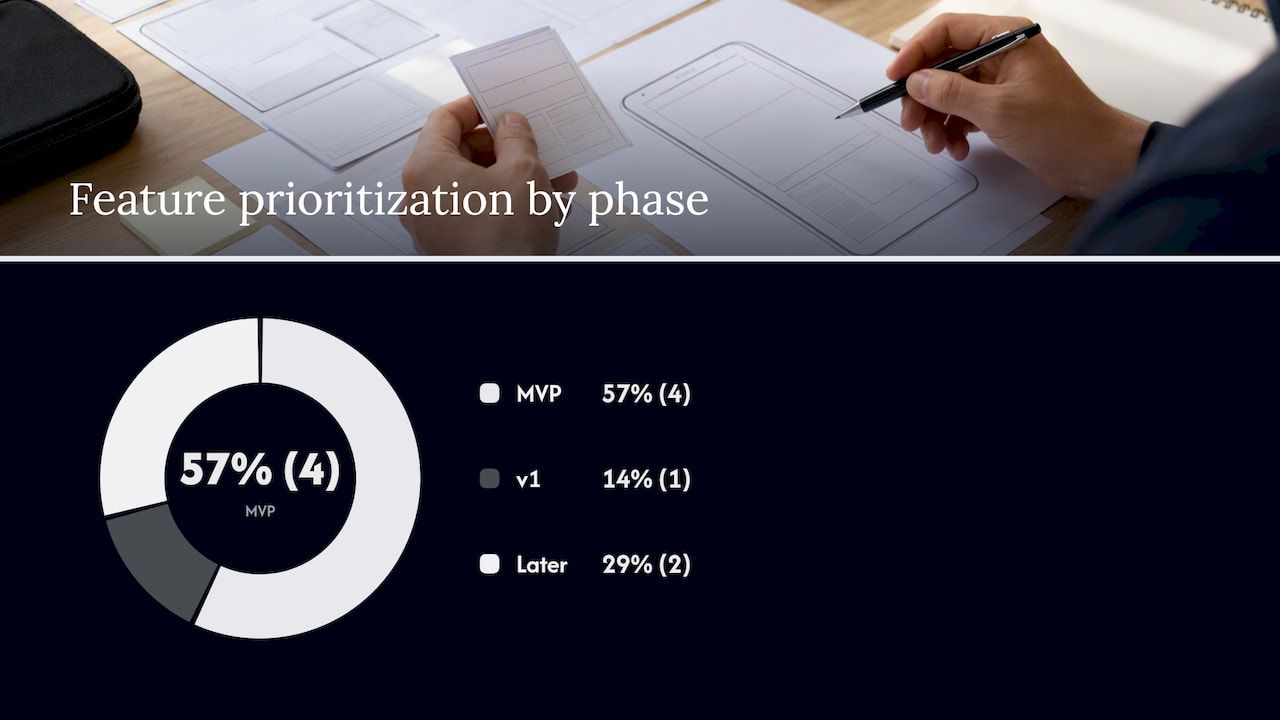
- Role-based team management (needs: auth/RBAC), typically a v1 or advanced feature, lets enterprise customers add or remove seats themselves.
- Usage dashboards and in-portal upsell prompts (needs: analytics pipeline), an advanced feature, turns the portal into a quiet revenue channel.
Define your MVP as items 1 through 4, treat 5 as v1, and hold 6 and 7 for a second phase once usage data justifies the build.
Pro Tip: Triage scope by counting workflow branches, not screens, since a feature with five conditional states will cost more than three simple ones combined.
Designing Interaction Flows That Finish Fast
The fastest portals lead with a dashboard hierarchy that puts the most common task, usually billing status or an open ticket, above anything else. Progressive disclosure keeps secondary details (invoice line items, past addresses) one click away instead of cluttering the main view, and contextual quick actions (“Update card,” “Pause plan”) sit next to the data they affect rather than in a separate settings menu.
- Change a billing card: profile menu to payment methods to a form with inline validation, with the new card confirmed on the same screen, no redirect.
- Pause a subscription: one visible button on the dashboard opens a short reason prompt, then confirms the pause date without a page reload.
- Submit a support ticket: a persistent help icon opens a form pre-filled with account context, cutting fields the customer would otherwise retype.
Inline edits (editing a field directly on the page rather than opening a separate screen) reduce the number of steps for small changes, and mobile-first layouts matter more than most teams expect since portal visits skew toward quick checks between other tasks.
For accessibility and localization, write labels and error messages in plain sentences rather than codes (“Email already in use” instead of “Error 409”), and leave enough room in buttons and form fields for languages that run longer than English.
Integration and Architecture Checklist
Portal architecture decisions matter as much as the interface sitting on top of them. Authentication should support single sign-on where customers already have one, OAuth for third-party connections, and short-lived JWT sessions paired with role-based access control so a support agent view never exposes finance-only data. Multi-factor authentication is worth defaulting to for any account with billing or admin access.
- Webhooks for event-driven updates (a payment succeeding, a ticket closing) keep the portal in sync without constant polling.
- Synchronous APIs for on-demand reads (pulling a live invoice) work better where the customer is waiting on the response.
- Feature flags and staged rollouts let a new module reach a subset of accounts before a full release.
- A clear data migration plan matters before cutover, since customer-facing downtime during a billing sync is the fastest way to generate a support spike.
For SaaS architecture decisions at this scale, mapping each portal feature to its backend endpoint early prevents rework later.
| Portal feature | Typical integration endpoint |
|---|---|
| Account profile | Auth/identity provider |
| Billing and invoices | Billing/payment processor |
| Order or subscription history | CRM or order database |
| Usage dashboards | Analytics pipeline |
Metrics That Prove the Portal Is Working
A portal earns its budget through measurable shifts in support load and customer behavior, not screenshots. Track self-service rate (the share of account actions completed without a ticket), support deflection, task completion time, in-portal upsell conversion, and CSAT or NPS tied specifically to portal interactions.
- Instrument events for every completed self-service action (card updated, plan paused, ticket submitted) so deflection is measurable, not assumed.
- Run A/B tests on microcopy and offer placement, one variable at a time, since wording changes on a pause button can shift completion rates on their own.
Automating the workflows behind these actions is a common driver of measurable gains: SaaS automation projects are frequently justified by the operational efficiency they unlock once manual steps move into the portal itself.
Security and Compliance Baselines
A portal handling account or billing data needs MFA and SSO support, encryption in transit and at rest, and audit logging on every action tied to a customer record. PCI scope applies the moment raw card data touches your systems, so tokenized flows through a processor or a dedicated billing module are the standard way to keep that scope small while still supporting full charge and refund workflows.
- Store PII with field-level encryption where the data is sensitive enough to warrant it, not just database-level defaults.
- Reduce PCI scope through tokenization rather than storing card numbers directly.
- Add consent management, a data export option, and a documented retention policy before launch, not after a customer asks.
Choosing a Platform or Build Approach
The right build approach depends on three constraints: how fast you need to launch, how many systems the portal has to talk to, and how strict your compliance requirements are. A templated or white-label builder gets a simple account page live quickly, which fits a smaller catalog of needs. A modular platform or custom build makes more sense once billing, CRM, and compliance requirements start layering on top of each other.
- Ask any vendor about API coverage, webhook support, and how theming works without forking their codebase.
- Confirm security certifications and data residency options before evaluating anything else.
- Check whether modular components can be swapped out individually as requirements change, rather than requiring a full rebuild.
Validating a modular, prebuilt baseline against these questions is a reasonable way to compare vendors on substance instead of demos.
How Bitecode Approaches Portal Builds
Projects typically move from a small MVP into targeted modules, then into deeper customization as requirements solidify.
- A Financial Module supports portals with complex billing, multi-currency invoicing, or audit requirements.
- An Automation Module fits portals that need workflow automation layered on top of customer actions.
- A Token Module suits portals that need blockchain-based transaction flows alongside standard billing.
Personalization and Customization for Portal Users
Personalization in a customer portal works best when it is tied to actual account data rather than generic marketing logic. A usage dashboard that flags an account approaching a plan limit, paired with a relevant upgrade prompt, reads as helpful rather than promotional because it answers a question the customer already has.
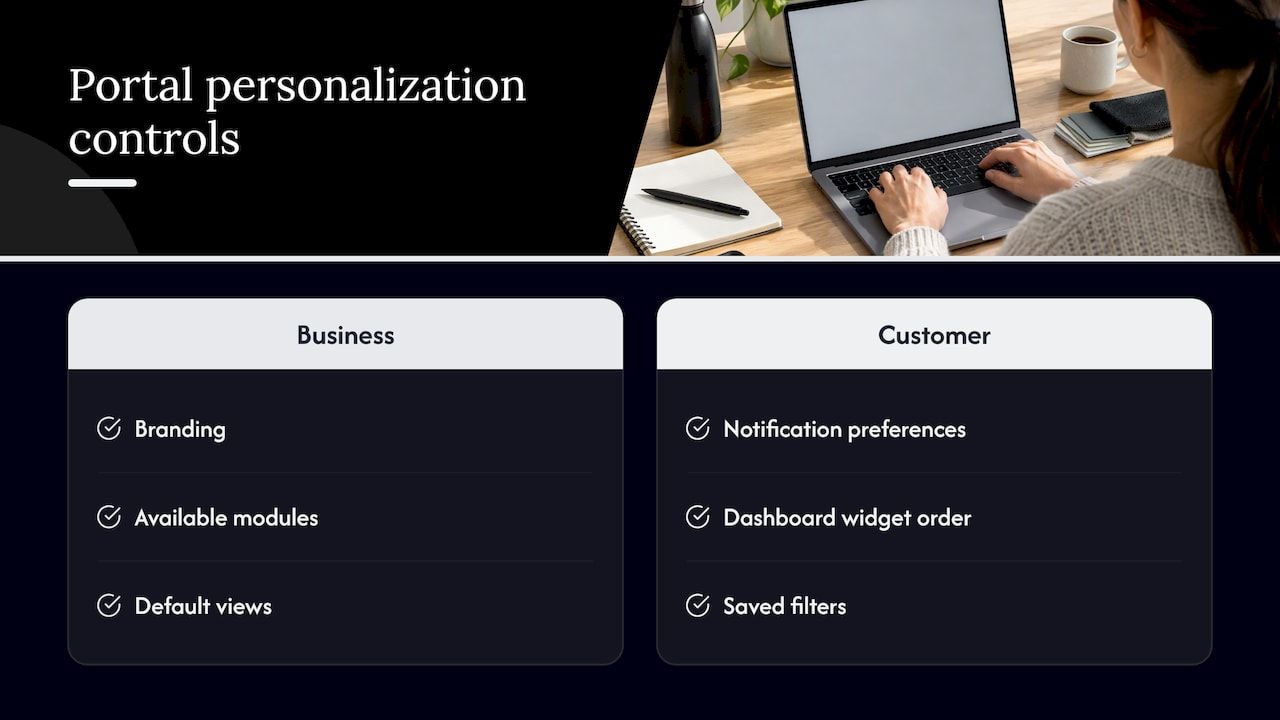
Customization options fall into two categories worth keeping separate: what the business controls (branding, available modules, default views) and what the end customer controls (notification preferences, dashboard widget order, saved filters). Giving customers control over the second category without touching the first keeps the portal consistent across accounts while still feeling tailored.
Conditional visibility is a smaller but effective tool here: hiding a billing tab entirely for a free-tier account, rather than showing it grayed out, removes a confusing dead end. The same logic applies to role-based views, where a finance contact sees invoice detail a general user does not need.
Avoid personalization that depends on data the portal cannot reliably gather. A recommendation engine built on three data points will produce worse suggestions than a simple rules-based prompt tied to plan tier or usage threshold, and customers notice when a suggestion misses the mark.
Onboarding and Training Inside the Portal
A portal’s first session sets the tone for every session after it. A short, skippable walkthrough that points to three or four core actions (where billing lives, how to open a ticket, where to update account details) tends to work better than a long feature tour that front-loads everything at once.
Contextual tooltips triggered by first use of a feature, rather than a single onboarding sequence, spread the learning curve across real sessions instead of asking customers to absorb everything before they have a reason to care. A searchable help center linked directly from the dashboard covers the questions a walkthrough cannot anticipate.
For teams managing multiple seats, role-specific onboarding matters: an admin needs to understand user management and billing, while a general team member mostly needs to know how to submit requests. Separating these paths avoids showing every customer every feature regardless of relevance.
Supporting Multiple Languages and Regions
A portal serving customers across regions needs more than translated strings. Date formats, currency display, and number formatting all need to match the customer’s locale, and form fields need enough flexibility to handle address formats, phone number lengths, and name structures that do not follow a single template.
Error messages and legal text deserve particular care in translation since a mistranslated billing term can create a support ticket on its own. Where possible, route compliance-specific content (terms, consent language, data rights) through region-specific versions rather than a single translated master document, since requirements vary by jurisdiction.
Right-to-left language support, where relevant, affects more than text direction: icon placement, form field order, and navigation layout often need mirroring rather than just a font swap.
Performance Optimization for Customer Portals
A slow portal pushes customers back toward support, which defeats the purpose of building one. Lazy-loading secondary data (full invoice history, past tickets) while the dashboard’s primary view loads first keeps the initial experience fast even when the underlying dataset is large.
Caching frequently accessed, rarely changing data (plan details, account settings) reduces repeated calls to backend systems, while real-time data (ticket status, payment confirmation) should stay on a live or webhook-driven path rather than being cached and going stale. Pagination or infinite scroll on long lists, rather than loading everything at once, keeps order history and usage logs responsive as accounts age.
Mobile performance deserves its own attention since portal sessions on mobile networks are more sensitive to payload size than desktop sessions on a stable connection.
Rolling Out New Portal Features Without Disruption
Shipping a new portal feature to every customer at once is rarely the right call. Feature flags let a new module reach a small percentage of accounts first, which surfaces usability issues before they reach a full customer base. Pairing a rollout with in-portal messaging (“new: pause your subscription anytime”) gives customers a reason to notice the change instead of discovering it by accident.
Internal change management matters just as much as the technical rollout: support and success teams need advance notice of what changed and why, since they will field the first questions from confused customers. A short rollback plan for each feature, built before launch rather than during an incident, keeps a rough release from turning into an extended outage.
What We Think Matters Most When Shipping Portals at Scale
The biggest risk in portal work is not a missing feature, it is rework caused by skipping staged rollouts and measurable goals. We favor modular components with stable API contracts and a shared design system, since both let teams add features without re-litigating the same integration decisions every quarter.
— Bitecode
Start Building Your Customer Portal
We build customer portals from a modular baseline covering billing, CRM, and automation, which cuts the setup work a fully custom build usually requires. Most engagements start with a small MVP or a targeted module and grow from there.
- Start with a custom business software engagement scoped to your core portal features.
- Add AI automation workflows once the base portal is live and usage data points to where it helps most.
Request a project scope to see which modules fit your billing and compliance needs.
FAQ
What features should a customer portal MVP include?
An MVP should cover account profile management, billing and payment visibility, order or subscription history, and a basic support path. These four map to the backend systems most organizations already have in place, which keeps the first release achievable.
Should we build a custom portal or use a templated platform?
A templated platform fits a simple account page with minimal integrations and a tight timeline, while a modular or custom build fits complex billing, CRM, or compliance requirements. Organizations juggling multiple backend systems tend to outgrow templated tools quickly.
How do we reduce PCI compliance scope in a portal?
Tokenizing card data through a processor or dedicated billing module keeps raw card numbers out of your systems, which narrows PCI scope significantly. Pairing tokenized flows with webhook-driven order states and audit logging covers most of the baseline compliance work.
What metrics show a customer portal is working?
Self-service rate, support deflection, task completion time, and in-portal upsell conversion are the core metrics worth tracking from launch. CSAT or NPS scored specifically on portal interactions adds a qualitative check on whether the numbers reflect actual customer satisfaction.
Does Bitecode build customer portals for enterprise clients?
Projects typically combine a core portal build with modules like the Financial Module for complex billing needs.


