A change management workflow is the defined path a change takes from the first request to a documented close. It records the change, assesses its risk, routes it to the right approvers, schedules and implements it, and reviews the result. The goal is to protect the live environment without making every small change wait in the same queue as a risky one. The same structure is often called a change control workflow. This guide covers the stages, the three change types, the roles, risk scoring and the points where automation helps.
TL;DR
- A sound workflow follows seven stages: request, review, approve, design and build, test, implement, verify and close. Official US guidance uses almost exactly this sequence.
- Split changes into standard, normal and emergency. Each type needs a different approval path, and that split matters more than any tool you pick.
- Score risk on a few factors, such as users affected, ability to back out and number of teams involved, and let the highest factor set the overall level.
- Automate routing, pre-approved standard changes, notifications and record-keeping. Keep people on risk judgment, emergency decisions and post-implementation review.
- Treat “change control” and “change management” as the same discipline in IT: control of a change from request to closure.
What a change management workflow covers
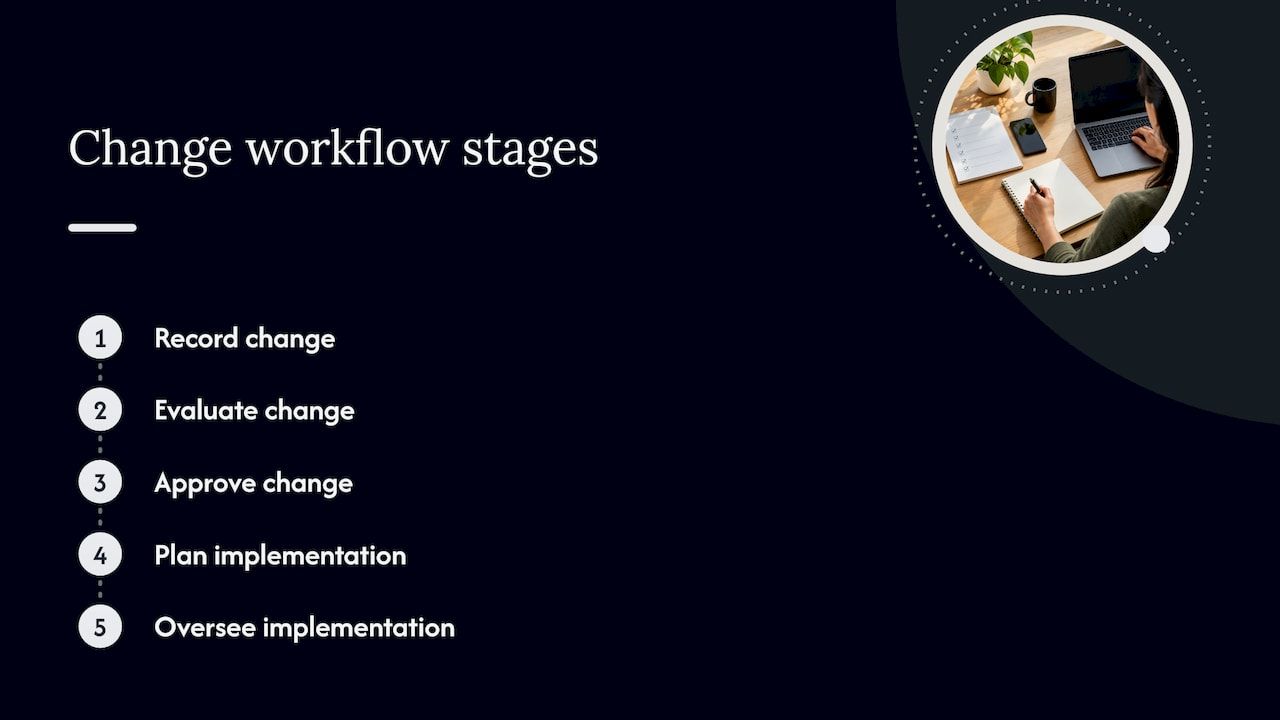
Boston University’s change management guide defines the discipline as recording, evaluating, approving, planning and overseeing the implementation of a change in a controlled and efficient manner, so that the live environment stays protected. That definition is the practical test of any workflow. If a change can reach production without a record, an assessment and an authorization, the workflow has a hole.
The workflow differs from the broader idea of organizational change management, which deals with people adopting new ways of working. Here the subject is operational: patches, configuration changes, releases, infrastructure moves and application updates. In regulated sectors the stakes are explicit. The FFIEC IT Examination Handbook says changes can put confidentiality, integrity and availability at risk, and that changes made without testing, approval or documentation can cause crashes, unexpected results, malicious code insertion or hard-to-trace faults.
A workflow therefore does two jobs at once. It reduces the chance that a change breaks something, and it leaves an audit trail that shows who approved what and why.
The stages from request to closure
Institutions describe the stages in slightly different words, but the shape is stable. The FFIEC handbook lays out a process of request, review, approve, design and build, test, implement, and verify and close, including a post-implementation review and documented closure.
Other published frameworks map to the same arc:
- The University of Wisconsin’s DoIT framework lists eight activities: plan, create the change record, submit, evaluate, approve, implement and update (including the configuration database), close and review.
- Wharton’s standard describes a workflow that covers planning, submitting, approving, implementing and reviewing changes to production and disaster recovery environments.
- North Carolina State University’s IT guide uses lifecycle states from New and Assess through Authorize, Scheduled, Implement, Review and Closed.
A working version of the stages
- Request. The requester records what will change, why, which systems are affected, the proposed window and the back-out plan. A request with these fields blank should not move forward.
- Review. A change manager or owner checks the request for completeness and classifies it as standard, normal or emergency.
- Risk assessment. The reviewer scores the change and identifies who must weigh in. The next sections cover how.
- Approval. The right authority decides: the pre-approved procedure for standard changes, the manager or board for normal ones, an emergency group for urgent ones.
- Design, build and test. The team prepares the change and tests it in an environment that predicts production behavior.
- Implementation. The change is deployed in the agreed window, and the change record is updated as it happens.
- Verification and closure. The service owner or customer validates the outcome, the team records whether the change was successful, and the record is closed with its disposition.
Every stage should leave a trace in the record: who acted, when, and on what basis. That is what makes the workflow audit-ready rather than merely orderly.
Standard, normal and emergency changes
A single path for every change is the most common design mistake. It either burdens routine work with unnecessary review or lets risky work slip through on the same light touch. Most frameworks solve this with three types.
| Type | When it applies | Approval | Typical examples |
|---|---|---|---|
| Standard (routine) | Low risk, repeatable, documented procedure | Pre-approved ahead of time | Routine patching, repeatable configuration tasks |
| Normal (planned) | Not urgent, needs planning and carries meaningful risk | Full review and authorization | Application releases, infrastructure changes |
| Emergency | Needed fast to resolve an outage or severe impact | Abbreviated, reviewed after the fact | Fix for an outage or a severe security exposure |
Standard changes
The Louisiana Office of Technology defines standard changes as pre-authorized, low-risk, predictable and repeatable work governed by defined procedures that the service owner and a change control group have approved in advance. Staff can use them without further approval at the time of the request. Virginia Tech’s guide describes its routine change in similar terms: fast execution of low-risk, well-understood activities that follow a standardized, documented and approved procedure.
The discipline sits in the pre-approval. A procedure earns standard status by being reviewed once, carefully, instead of being waved through each time.
Normal changes
Virginia Tech’s guide treats normal changes as those that are not urgent but require planning and coordination and involve meaningful risk or impact. These travel the full path: assessment, authorization by the right approvers, scheduling, implementation and review. The FFIEC handbook likewise says planned changes follow the complete change management process.
Emergency changes
Emergency changes exist for outages and severe business or security impact. The Louisiana policy says they follow an abbreviated process and must be followed by a post-implementation review with root cause analysis. The FFIEC handbook makes the same point: emergency changes may shorten or skip parts of the process and should be reviewed and approved after implementation.
Wharton’s standard shows how to make this workable. It designates an emergency approval group with 24x7 authorization and allows verbal approval for immediate implementation. Deciding who can say yes at 3 a.m. is a design task for a quiet afternoon, not something to improvise during an incident.
Who does what: roles and approval authority
A workflow without named roles stalls at the first ambiguous handoff. Published frameworks converge on a small set.
- Change requester. Initiates the request and prepares the request for change (RFC).
- Change owner. Per Wharton’s standard, owns the RFC from submission through closure and makes sure implementation, documentation, testing, communication and the post-implementation review are completed.
- Change manager. Boston University describes this role as accountable for planning, implementation and improvement: validating RFC accuracy, taking part in authorization, maintaining the change calendar, ensuring post-implementation reviews and reporting.
- Technical or subject matter review team. Reviews feasibility, risk and impact, and approves or rejects within its authority.
- Change advisory board (CAB). Members review changes before meetings and recommend approval or rejection from technical and business perspectives. An emergency CAB authorizes urgent changes when the regular board cannot convene.
- Change approver. NC State’s guide says the approver must decide whether the change is well planned and its risks mitigated. For non-standard changes, the primary approver is the group or team manager who validates technical accuracy and completeness.
The FFIEC handbook adds a control that auditors look for: segregation of duties and monitoring throughout the process. In practice, the person who requests or builds a change should not be the only person who approves it.
How to assess change risk
Risk assessment decides which path a change takes and who must approve it. Keep it simple enough that people use it every time.
The Washington State technology agency’s process guide recommends keeping a business-impact focus when identifying risks: adverse business impact, effects on other services, unexpected process impact, higher support load, compatibility with concurrent changes, whether test results predict production, and whether service level targets can still be met. It scores risk as high, moderate or low using inputs such as complexity, prior success, number of users affected, groups involved, implementation time and back-out time.
Virginia Tech evaluates user impact, business impact if the change fails, the number of teams involved, the ability to test and back out, and timing, and its guide states that the highest-risk factor determines overall risk. That rule is worth copying. Averaging factors lets a low score on three of them hide a serious problem on the fourth.
For teams building a wider risk practice around the workflow, our guide to software risk management for IT teams goes deeper on categories and ownership, and testing methodology covers the evidence an approver should expect to see before the test stage is signed off.
A practical scoring approach
Choose five or six factors, define what low, moderate and high mean for each in one sentence, and require the requester to score them on the form. The reviewer confirms or overrides. Anything high on any factor goes to the full board; anything low on all factors and matching a catalogued procedure can qualify as standard.
Documenting the change and closing it properly
Closure is where many workflows quietly fail. The change is live, the pressure is off and the record stays open or gets closed with no verdict. Atlassian’s support documentation describes the closing step as the change manager reviewing the change and noting whether it was successful, timely, accurately estimated and within budget.
A closure checklist that works in practice:
- The implementer confirms the change was deployed as planned, or records the deviation.
- The service owner or customer validates the result.
- Documentation and the configuration records are updated.
- The record states the outcome: successful, successful with issues, backed out or failed.
- Any emergency change has a post-implementation review with root cause analysis.
If your changes include public-facing updates, the principles carry over to content and site releases too. This overview of managing website updates shows how implementation, review and closure apply to a live website.
What to automate and where people stay in the loop
Automation pays off where the work is rule-based and repetitive, and it should never replace the judgment calls. The structure of the standard, normal and emergency types already shows the dividing line. Standard changes rely on pre-approved procedures, so execution can proceed without per-request approval, while normal and emergency changes require broader review and, for emergencies, a root cause analysis afterward.
| Workflow step | Good candidate for automation | Keep a person on |
|---|---|---|
| Request intake | Required-field validation, templates, duplicate detection | Whether the change is really needed |
| Classification | Suggesting a type from the catalog and risk inputs | Overrides and unusual cases |
| Approval routing | Sending to the right approver, reminders, escalation on delay | The decision itself on normal and emergency changes |
| Standard changes | Auto-approval against the catalog, scheduled execution | Maintaining and reviewing the catalog |
| Scheduling | Conflict checks against the change calendar | Trade-offs between competing changes |
| Implementation | Pipeline steps, notifications, record updates | Go or no-go at the window |
| Closure | Reminders, status prompts, report generation | Verdict and lessons learned |
Two cautions follow from this table. First, automation of a bad process only speeds up the bad process, so settle the stages, types and roles first. Second, every automated approval should be traceable to a named human decision made earlier, such as the approval of the standard change procedure. Our guides on approval workflow automation and an IT automation governance checklist describe how to design routing rules and keep automated steps accountable.
Safer deployment patterns also reduce what the workflow has to catch. Techniques such as blue-green deployments shrink back-out time, one of the risk inputs above, because a failed change can be reversed by switching traffic back.
Common implementation problems and how to handle them
The frameworks above suggest several recurring pressure points. These are patterns drawn from how those documents are built, not measured failure rates.
Everything goes through the board. If every request waits for a meeting, people route around the process. Build a catalog of standard changes and give the approval for them once. The Louisiana model of delegated pre-approval is the template.
No one knows who can approve. Name approvers by change type and by system, and publish the list. Include a deputy for each, and define the emergency group and its hours the way Wharton does.
Risk scoring is vague. Replace “assess the impact” with defined factors and levels, and use the highest-factor rule so a single serious exposure cannot be averaged away.
Records close without a verdict. Make the outcome a required field at closure, and prevent closing without it.
Emergency becomes the default. Because emergency changes may shorten or skip steps, they need a mandatory review afterward. Track how many changes use the emergency path. A rising count points to planning gaps upstream.
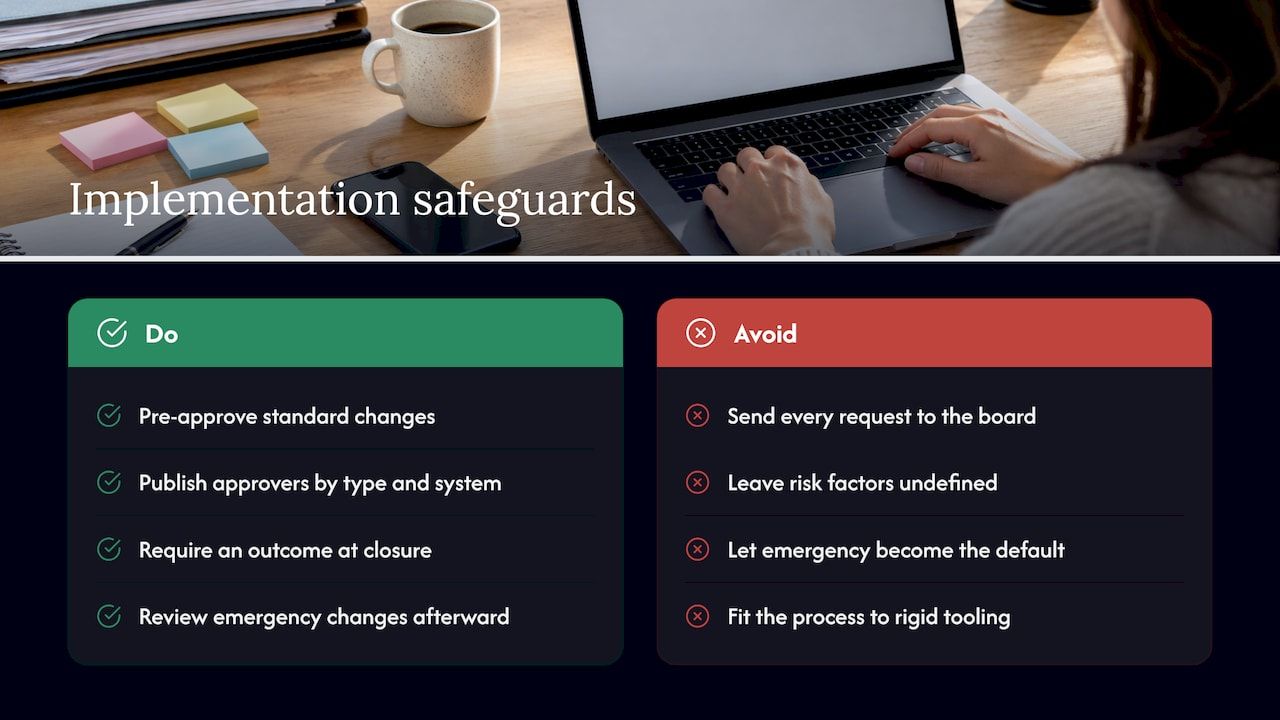
The tool outgrows the process. A workflow built on a rigid off-the-shelf configuration can force teams into its assumptions. Define the process first, then fit the tooling to it.
Our perspective
Most change workflows fail at the seams, not at the stages. The stages are well known. What breaks is the handoff between a request form, an approval inbox, a deployment pipeline and a closure report that live in four different places and share no common record.
We build business software from modular, ready-made components, and the same logic applies here. A change workflow is a modular foundation: intake, classification, risk scoring, approval routing, scheduling and closure are separate components that should connect through one auditable record. Starting with a large part of that foundation already in place lets a team spend its effort on the business-domain rules that make its process its own: its change types, its approvers, its risk factors.
We also think automation should accelerate work without accelerating chaos. Pre-approved standard changes, automatic routing and conflict checks remove waiting time. Approval of normal changes, emergency decisions and post-implementation review stay with accountable people, and every automated action stays traceable to them.
For organizations in regulated or audit-heavy environments, self-hosted, client-controlled systems matter too. The change record is evidence, and the organization should control where it lives and how it is retained.
Bitecode
Building the workflow into your own systems
If your change process is stuck in email threads and spreadsheets, or your current tool forces your team into a process that does not match how you work, we can help. Bitecode builds AI-driven business process automation workflows and custom business software from modular components, with audit-ready records and self-hosted options. Our approach starts with up to 60% of the baseline system pre-built, which shortens the path from design to a working workflow.
To scope a change workflow with intake forms, risk scoring, approval routing and closure reporting, start from our automation module and related modules, or talk to us about your project. For the architecture side, our enterprise system design workflow and handover checklist show how we plan and hand over systems that teams can maintain.
FAQ
What is a change management workflow?
It is the defined sequence a change follows from request to closure: record, review, assess risk, approve, build and test, implement, verify and close. Frameworks such as the FFIEC handbook describe this sequence to protect the confidentiality, integrity and availability of IT systems. The workflow also produces the record auditors ask for.
Is change control the same as change management?
In IT operations the terms are used for the same discipline: controlling a change through recording, evaluation, approval, implementation and review. Some organizations use “change control” for the approval gate and “change management” for the whole lifecycle. Pick one definition, write it in your policy and use it consistently.
How do standard, normal and emergency changes differ?
Standard changes are low-risk, repeatable and pre-approved, so they need no further approval when requested. Normal changes need planning, risk assessment and authorization. Emergency changes address outages or severe impact, follow an abbreviated path and are reviewed afterward, with root cause analysis.
Which parts of the workflow can be automated?
Intake validation, routing, reminders, conflict checks, execution of pre-approved standard changes and closure reporting suit automation. Risk judgment on normal changes, emergency approvals and the post-implementation verdict should stay with accountable people. Automated steps should trace back to a human-approved rule.
Who should approve a change?
It depends on type and risk. Standard changes are covered by the earlier pre-approval, normal changes go to the responsible manager and, where risk warrants, a change advisory board, and emergencies go to a designated emergency group. Define each approver by name or role in advance.
Sources
- FFIEC IT Examination Handbook: Change Management
- Boston University Change Management guide
- Wharton Change Enablement Standard
- NC State OIT Change Management Process
- DoIT Operational Framework, Change Management (Wisconsin)
- Louisiana Office of Technology Change Management Policy
- Virginia Tech Operational Change Management Practical Guide
- WaTech Change Management Process Guide
- How To Manage Website Updates