
TL;DR:
- Effective business automation relies on thorough process documentation, disciplined prioritization, and staged testing to ensure reliable and scalable results.
- Organizations that focus on documenting actual workflows and handling exceptions early tend to achieve faster payback and reduce technical debt.
Business automation is defined as technology executing repetitive, rule-based tasks in place of human effort, freeing teams to focus on work that actually requires judgment. The discipline most practitioners recognize is business process automation (BPA), and the step by step business automation approach covered here is its most practical implementation path. Tools like Zapier, Odoo, and CRM-native automation engines make the mechanics accessible. What separates teams that get measurable results from those that waste months rebuilding broken workflows is one thing: disciplined process clarity before any code or configuration is written. This guide walks through that disciplined path from audit to scaled deployment.
What is step by step business automation?
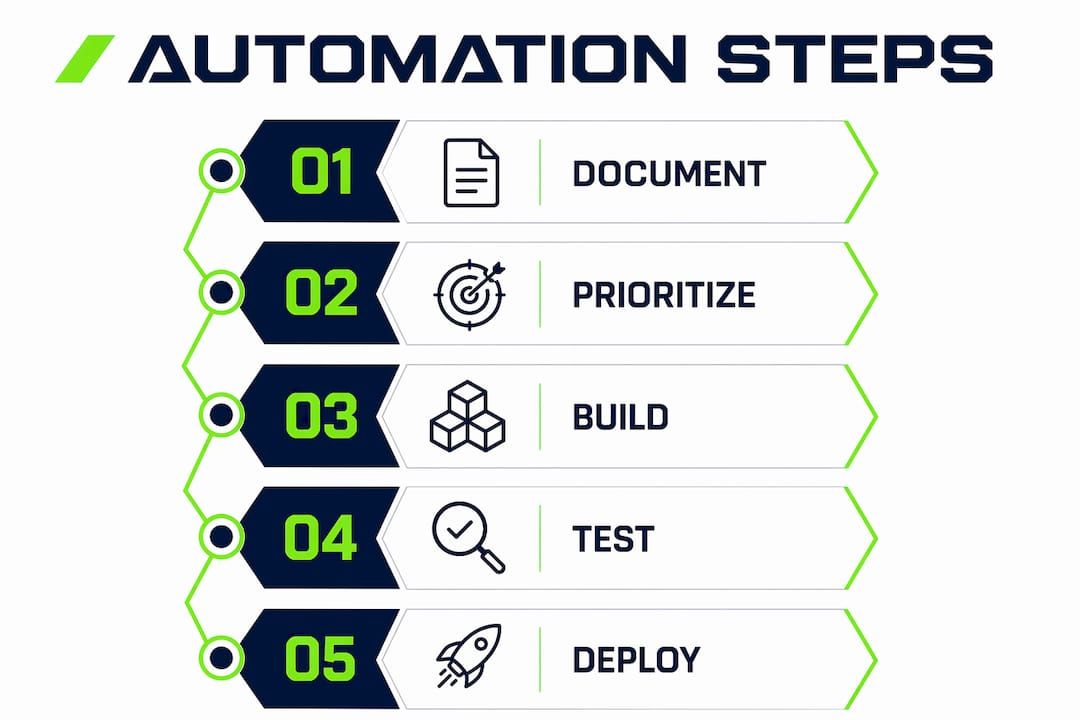
Step by step business automation means applying technology to handle defined, repeatable tasks in a deliberate sequence: document first, prioritize second, build third, test fourth, then scale. Skipping any step in that order is where most implementations fail. Automating broken or unclear workflows produces broken automation at higher speed, which is worse than the manual process it replaced. The sequence matters because each phase depends on the output of the previous one. A trigger cannot be defined reliably until the process is documented. A workflow cannot be tested meaningfully until the trigger is defined.

The core unit of any automation is three parts: a trigger (what starts the process), an optional condition (what qualifies the trigger), and a concrete action (what the system does). Platforms like Zapier, Make, and HubSpot all use this model. Understanding it before touching any tool prevents the most common failure mode: building a workflow that handles the expected case but collapses on the first exception.
Why you must document processes before automating anything
Most teams fail by automating how they think a process works rather than how it actually operates. The gap between assumption and reality is where automation breaks quietly. A team might believe their invoice approval process has three steps. The person who actually runs it knows there are seven, including two workarounds for a legacy system that nobody has documented.
A process audit captures the following fields for each candidate workflow:
- Trigger: What event or condition starts this process?
- Inputs: What data or documents does the process require?
- Steps: What actions happen, in what order, and who performs them?
- Decision points: Where does the process branch based on a condition?
- Exceptions and workarounds: What happens when the normal path fails?
- Tools used: Which systems, spreadsheets, or apps are involved?
- Output: What does a completed process produce?
The exceptions field is the one most teams skip. Exception inventory and handling must be planned explicitly early, because exceptions that are invisible during documentation become silent failures at scale. If your invoice approval process has a workaround for vendors who submit PDFs instead of the required format, that workaround needs to be in the documentation before you build anything.
The audit should be done by the person who actually performs the task, not a manager describing it from memory. Video recordings of the task being performed are more reliable than written descriptions. Once recorded, validate the steps with at least one other person who has done the same task. Discrepancies between their accounts reveal the hidden complexity that will break your automation.
Pro Tip: Have the person who performs a task most frequently record a screen capture while narrating each step. Then have a second person attempt to follow those steps exactly. Every point where they get stuck is a documentation gap that will become an automation failure.
How to identify and prioritize automation candidates
Not every repetitive task is worth automating. The right candidates share three characteristics: they occur frequently, they follow clear rules with no subjective judgment required, and errors in them carry measurable cost. Prioritizing quick wins like onboarding sequences, invoice follow-ups, and data entry tasks builds the confidence and organizational trust needed to tackle more complex workflows later.
Use a simple scoring framework to rank candidates before committing build time:
- Frequency: How many times per week or month does this process run? Higher frequency means higher ROI potential.
- Time per execution: How long does one manual run take? Multiply by frequency to get total weekly hours at stake.
- Rule complexity: Can the process be described as a clear set of if-then rules? Processes requiring human judgment are poor candidates.
- Error cost: What is the business impact of a mistake in this process? High error cost makes automation more valuable.
- Data quality: Is the input data consistent and clean? Poor data quality makes automation fragile regardless of how well it is built.
Score each candidate on these five dimensions and sort by total score. The top three to five candidates are your first automation targets. Well-scoped automation pays back build time within the first month when it is focused on high-volume repetitive tasks. That payback window matters because it determines whether your team maintains momentum or loses confidence in the program.
Avoid the temptation to automate everything at once. Sequencing builds by dependency or impact prevents the situation where five automations are half-built and none are delivering value. A business automation guide that prioritizes ROI will always recommend finishing and measuring one automation before starting the next.
Pro Tip: Track every repetitive task you and your team perform for one week, logging the task name, time spent, and how often it occurs. This time audit consistently surfaces two or three high-frequency tasks that nobody had identified as automation candidates because they had become invisible through habit.
How to build and test your first automation workflows
Building automation in a disciplined sequence prevents scope creep and produces reliable results faster than attempting to handle all cases in the first build. The process follows a clear path:
- Define the trigger precisely. Specify the exact event that starts the workflow. “A new lead is added to the CRM” is precise. “When we get a new lead” is not. Triggers, conditions, and actions must be clearly defined before building begins.
- Build the happy path first. The happy path is the workflow as it runs when everything goes correctly. Ignore exceptions in the first build. A clean happy path that works reliably is more valuable than a complex build that handles every edge case but breaks on the core scenario.
- Test with real data. Use actual records from your system, not synthetic test data. Real data surfaces formatting inconsistencies, missing fields, and timing issues that clean test data never reveals.
- Document the automation itself. Write a plain-language description of what the automation does, what triggers it, what it produces, and what it depends on. This documentation protects the team when the person who built it is unavailable.
- Run parallel with the manual process for one week. Execute both the automated and manual versions simultaneously and compare outputs. Discrepancies reveal edge cases that the happy path missed.
- Extend the parallel run to 30 days before full rollout. Running manual and automated processes in parallel for approximately 30 days catches the low-frequency exceptions that a one-week test misses entirely.
The tools available for this work range from no-code platforms like Zapier and Make to CRM-native automation in HubSpot or Salesforce. Most SMBs achieve meaningful automation using affordable tools already in their stack rather than purchasing dedicated automation platforms. The right tool is the one that connects your existing systems without requiring a separate integration layer.
Once the happy path is stable and the parallel run is complete, add exception handling. Design exception paths as explicit branches in the workflow, not as afterthoughts. Each exception path should either resolve automatically or route to a human checkpoint with enough context for that person to act without investigating.
Pro Tip: Keep your first three automations narrow in scope. A workflow that handles exactly one trigger, one condition, and one action and does it reliably is more valuable than a multi-branch workflow that occasionally misfires. Narrow scope also makes debugging faster when something does go wrong.
Common mistakes that break automation programs
The most damaging mistake in any automation program is not a technical failure. It is proceeding to the next build before the current one is stable and measured. Teams that rush the sequence end up with a portfolio of fragile automations, each one dependent on the others, none of them fully understood.
The following failure patterns appear consistently across automation programs of all sizes:
- Automating a broken process. If the manual process has known problems, automation amplifies those problems at scale. Fix the process first, then automate it.
- Skipping exception handling. Workflows that have no defined behavior for unexpected inputs fail silently. Silent failures are worse than visible ones because they produce incorrect outputs that nobody catches.
- Over-automating too early. Adding complexity before the core workflow is proven creates systems that are difficult to debug and impossible to hand off to other team members.
- Ignoring data quality. Automation is only as reliable as its inputs. Inconsistent naming conventions, missing required fields, and duplicate records all cause automation failures that look like workflow bugs.
Human approval gates prevent automation from proceeding when an exception occurs, and they must be built architecturally into the workflow rather than added as an afterthought. A human-in-the-loop checkpoint that surfaces the right information at the right moment keeps teams in control without requiring them to monitor every automated step.
Monitoring should track three metrics for each live automation: process completion rate (what percentage of triggers result in a completed output), time recovered (hours per week no longer spent on the manual version), and downstream business outcomes (did the automation actually improve the result it was designed to improve?). Measuring these three numbers monthly gives teams the data to decide whether to iterate, expand, or retire each automation.
Fixing one broken process thoroughly and measuring the result before moving to the next is the single practice that separates automation programs that compound value from those that accumulate technical debt.
Pro Tip: When an automation fails, fix the input data or process logic before adjusting the workflow itself. Most automation failures are data quality problems wearing the costume of workflow problems.
Key takeaways
Effective business automation requires process documentation, disciplined prioritization, and staged rollout before any workflow delivers reliable value at scale.
| Point | Details |
|---|---|
| Document before you build | Capture triggers, exceptions, and workarounds from the person who actually performs the task. |
| Score candidates by impact | Rank automation candidates by frequency, time cost, rule clarity, and error impact before committing build time. |
| Build the happy path first | Prove the core workflow works reliably before adding exception branches or scaling to edge cases. |
| Run parallel for 30 days | Keep the manual process running alongside automation for approximately 30 days to catch low-frequency exceptions. |
| Measure before expanding | Track completion rate and time recovered for each automation before starting the next build. |
What Bitecode has learned from real automation programs
The teams that get the most from automation are rarely the ones with the largest budgets or the most sophisticated tools. They are the ones that treat documentation as the actual work, not the prerequisite to the work. At Bitecode, the pattern we see repeatedly is that organizations underestimate how much clarity they gain simply by writing down how a process actually operates. That clarity alone, before any automation is built, often surfaces three or four process improvements that deliver immediate value.
The compounding effect of fixing one hidden broken step at a time is real and measurable. A team that fixes one process per month, documents it properly, automates it, and measures the result will outperform a team that attempts a large-scale automation overhaul every two years. The former builds institutional knowledge and confidence. The latter builds risk.
Staged rollouts feel slow. They are not. Running a manual process in parallel with automation for 30 days costs almost nothing compared to the cost of a production failure that corrupts customer data or misses a payment cycle. Patience at the rollout stage is not caution. It is precision. The enterprise automation programs that scale reliably are the ones that were built this way from the start.
— Bitecode
How Bitecode can accelerate your automation program
Bitecode’s AI Assistant Module is built for organizations that need to move from process documentation to working automation without lengthy development cycles. The module connects to your existing tech stack, supports trigger-condition-action workflow design, and includes human-in-the-loop checkpoint architecture out of the box. Because Bitecode starts projects with up to 60% of the baseline system pre-built, teams reach their first tested automation in days rather than months. Whether you are automating a single invoice follow-up sequence or building a multi-department workflow automation system, the modular foundation means you are not starting from a greenfield build every time. Explore the AI Assistant Module to see how quickly a well-scoped automation can move from documented process to live deployment.
FAQ
What is the first step in business automation?
The first step is documenting how the process actually works, including all exceptions and workarounds, before selecting any tool or building any workflow. Automating without documentation produces automation that fails on the first edge case.
How do I choose which processes to automate first?
Score candidates by frequency, time per execution, rule clarity, and error cost. High-frequency, low-complexity tasks like onboarding sequences and invoice follow-ups deliver the fastest measurable return and build team confidence for more complex builds.
How long should I test an automation before going live?
Run the automation alongside the manual process for at least one week, then extend the parallel run to approximately 30 days. This staged approach catches low-frequency exceptions that a short test window misses entirely.
What tools do most businesses use for workflow automation?
Most SMBs start with tools already in their stack. Zapier, Make, HubSpot, and Salesforce all include native automation capabilities that connect existing apps without requiring a separate platform. The right automation tool selection depends on which systems you already use and how complex your trigger logic needs to be.
What is a human-in-the-loop checkpoint and when should I use it?
A human-in-the-loop checkpoint is an architectural gate in a workflow that pauses automation and routes a task to a human when an exception occurs. Use it whenever an unexpected input could produce an incorrect output with real business consequences, such as a payment amount outside a normal range or a customer record with missing required fields.


