
Approval workflow automation replaces manual sign-off chains, email threads, and paper trails with a structured, rule-based system that routes requests to the right approver automatically. For managers, the immediate payoff is faster cycle times, a defensible audit trail, and fewer errors from missed or duplicated approvals. This guide covers the business case, common workflow patterns, implementation steps, and the metrics that prove the investment worked.
TL;DR:
- Automating approval workflows is most justified for high-volume, repetitive requests like purchase orders or invoices, especially when thresholds or multiple approvers are involved.
- Proper process mapping, explicit decision rules, backup approvers, and thorough training are crucial to avoid failures and ensure smooth adoption.
- Integration with existing systems such as ERP, CRM, and document management tools, along with secure access controls and audit logs, are essential for effective and compliant workflows.
- Key success metrics include approval cycle time, SLA compliance, error rates, and ROI, with significant improvements often observed within a few months of implementation.
- Automating complex or judgment-heavy requests is rarely effective initially; starting with simple, well-defined processes yields faster returns and clearer validation.
What approval workflow automation is and when to use it
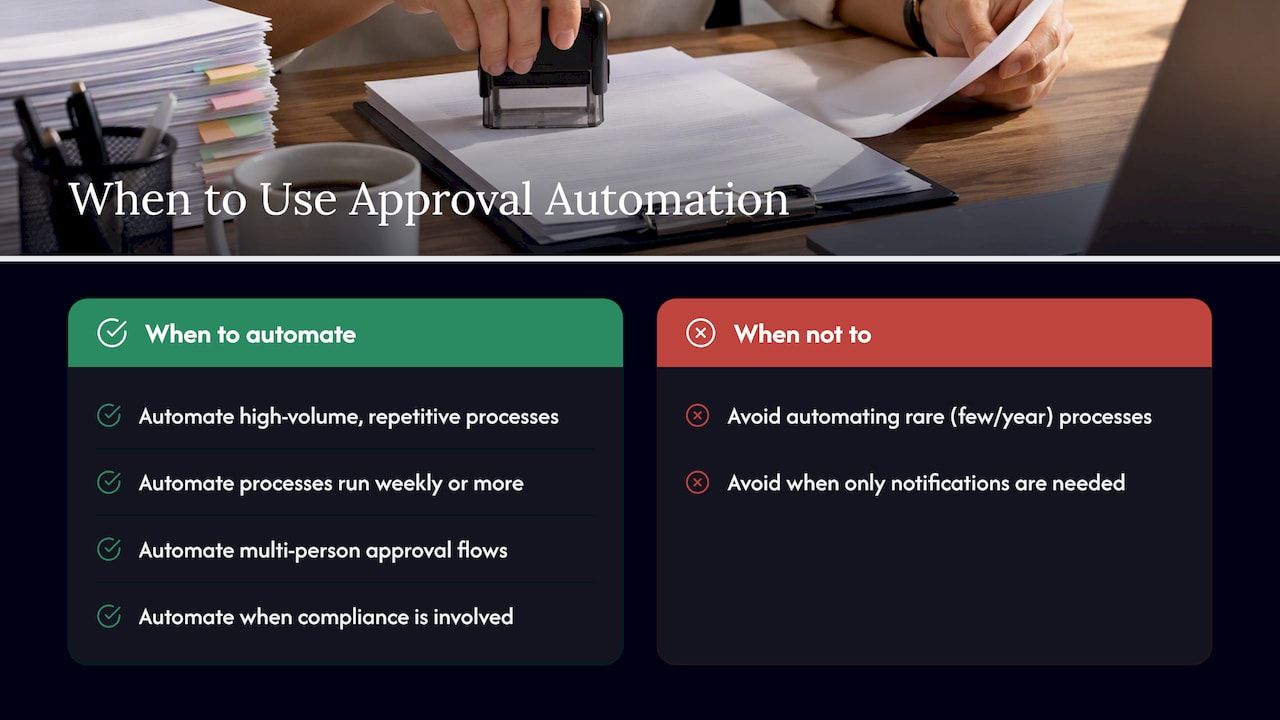
Approval workflow automation applies to decisions that require a formal yes or no before work proceeds: an invoice gets paid, a contract gets signed, a purchase order gets issued. It differs from general task automation or notification systems, which move information around but do not gate a decision behind a designated approver. If your process just needs someone informed, you likely need a notification rule, not an approval workflow.
The signal that automation will help is usually volume combined with repetition. A process that runs a handful of times a year rarely justifies the setup work. One that runs weekly, involves multiple people, or carries compliance exposure is a strong candidate. Purchase order approval workflow patterns are a common starting point because the rules (spend thresholds, budget owners, vendor status) are usually already documented somewhere, even if only in a policy PDF nobody reads.
Other frequent candidates include invoice approvals tied to accounts payable, contract review cycles involving legal and finance, expense reimbursements, and content or creative sign-off before publication. Each shares the same underlying shape: a request, a set of conditions, one or more approvers, and a recorded outcome. Recognizing that shape is the first step toward automating it without over-engineering the solution.
Business benefits and core use cases
The business case for approval process software rests on four measurable improvements: speed, transparency, compliance, and error reduction. Automated routing removes the delay caused by an approver being out of office, unaware a request exists, or simply buried in email. Every step is logged, so managers can see exactly where a request sits and who is holding it up, instead of chasing status updates manually.
Common use cases map cleanly to existing pain points:
- Invoice approvals: automating the invoice approval workflow reduces handoffs between accounts payable and department heads, which speeds vendor payment cycles and improves compliance.
- Contract approvals: legal, finance, and business stakeholders review in parallel or sequence, with version control replacing email attachments.
- Purchase orders: spend thresholds trigger automatic routing to the correct budget owner, cutting manual triage.
- Content and creative approvals: marketing and communications teams route drafts through brand, legal, and compliance checks before publication.
Automating invoice approvals reduces manual handoffs and shortens payment cycles, improving efficiency and compliance, according to Foxit’s analysis of invoice approval workflows, which matters directly for vendor relationships and early-payment discounts.
Conservative improvement targets are realistic even in a first rollout: fewer duplicate payments, fewer approvals lost in inboxes, and a searchable record that shortens audit preparation from days to hours. Most of the return comes not from replacing people but from removing the friction between them.
Common approval workflow types and example process maps
Most approval processes fall into a handful of reusable patterns. Picking the right one for each use case avoids the common mistake of building an overly complex workflow for a simple decision.
- Single-step approval: one designated approver signs off, suited to low-risk, low-value requests like small expense claims.
- Sequential multi-level approval: a request moves through approvers in order, common in purchase orders that cross spend thresholds.
- Parallel approval: multiple approvers review simultaneously, useful for contracts needing legal and finance input at the same time.
- Conditional routing: the workflow branches based on request data, such as amount, department, or vendor risk score.
An invoice workflow typically starts with an automated form or an inbound document capture step, validates the invoice against a purchase order, routes to the department owner if it matches, and escalates to finance leadership if it exceeds a threshold or lacks a matching PO. A contract workflow usually starts with intake, runs parallel review by legal and the requesting department, then routes to e-signature once both sign off.
Integration touchpoints are where these maps become real systems rather than diagrams. Forms capture the request, e-signature tools close it out, and connectors to ERP or CRM systems pull in the underlying data, such as vendor records or deal terms, so approvers are not asked to re-enter information that already exists elsewhere. Practitioner write-ups on implementation patterns commonly describe BPMN-style diagrams paired with webhook or API connectors to link approvals with collaboration tools, ERP systems, and document storage, which keeps the workflow synchronized with the systems approvers already use.
Plan and design: roles, rules, and decision criteria
Before any tool gets configured, the workflow needs to be mapped and the decision rules made explicit. Skipping this step is the most common reason automated approval processes fail to match how the business actually operates.
- Identify every stakeholder, not just the final approver, including requesters, reviewers, and anyone who currently handles exceptions manually.
- Assign primary and backup approvers for every role, since a workflow with no backup stalls the moment someone takes leave.
- Define decision criteria and thresholds explicitly, such as spend limits, contract value bands, or risk scores that trigger escalation.
- Document exception handling as a formal path in the workflow rather than an informal email override, which keeps the audit trail intact.
- Establish data retention and governance requirements early, since compliance teams often have opinions about how long approval records must be kept and who can access them.
This design phase is also where managers should resist the urge to automate a process before simplifying it. A workflow with seven inconsistent exceptions does not need seven automated branches; it usually needs the policy tightened first. Automating a messy process just makes the mess move faster.
Implementation steps: tools, integrations, and an example rollout plan
Once the process is mapped, implementation moves through tool selection, build, and testing. The choice between a low-code platform, a built-in approval feature inside an existing system, or a dedicated BPMN engine depends on how complex the routing logic needs to be and how much the workflow will change over time. Low-code modular platforms tend to shorten delivery time because they start from a pre-built baseline for common approval patterns rather than a blank canvas.
- Select the tool based on integration needs first, not feature lists: does it connect natively to your ERP, CRM, and document storage, or will it require custom connectors?
- Design the intake form with validation rules built in, so incomplete or malformed requests never reach an approver.
- Build the routing logic, mapping each condition from the design phase to a specific path.
- Configure approval actions and post-approval steps, such as triggering payment, generating a signed document, or updating a CRM record.
- Test with synthetic data before touching production records, covering both the expected path and every exception branch.
- Run a pilot with a limited group and a real but low-risk process.
- Run a parallel period, where the old manual process and the new automated one operate side by side, to catch discrepancies before full cutover.
- Plan a rollback path in case the pilot surfaces a rule that was misdefined.
Integration patterns generally rely on APIs and webhooks to connect the approval engine to ERP, CRM, and document systems, plus notification channels like Slack or email so approvers are alerted without needing to check a separate dashboard. CRM-tailored automation, for instance, can route deal approvals directly from the sales pipeline rather than a separate form, which reduces the handoffs that slow down sales operations approval flows.
Pro Tip: Run the pilot on a process with a clear cost or risk metric, like invoice payment delays, so the before-and-after comparison is obvious to stakeholders without extra analysis.
Security, compliance, and auditability best practices
An approval workflow that cannot withstand an audit is not an improvement over the manual process it replaced, just a faster version of the same risk. Security and compliance controls need to be built into the design, not added afterward.
- Role-based access control ensures only designated approvers can act on a request, and that requesters cannot approve their own submissions.
- Segregation of duties keeps the person who creates a request separate from the person who approves it, especially for financial and procurement workflows.
- Tamper-evident, immutable logs record every action taken on a request, including timestamps and the identity of the actor, so the audit trail cannot be edited after the fact.
- Retention policies define how long approval records are kept, aligned with the compliance requirements of finance, legal, or procurement functions.
- E-signature and identity verification confirm that the person approving a contract or high-value transaction is actually who the system says they are.
- API security matters as much as the workflow itself, since a poorly secured connector between systems can expose the same data the workflow was built to protect.
These controls matter most for high-risk categories like finance, legal, and procurement, where a missing audit trail or an unauthorized approval carries real financial or legal exposure. Building compliance-aware automation from the start also reduces the manual effort auditors otherwise spend reconstructing what happened after the fact.
Measure success: KPIs, timelines, and ROI
The metrics that matter most to managers are the ones that translate directly into cost or risk: approval cycle time, SLA compliance rate, error or rework rate, and cost per approval. Cycle time, measured from request submission to final decision, is usually the first number to improve and the easiest to communicate to leadership.
Baselining starts before the automated workflow goes live: pull the current average cycle time, the rate of late or missed approvals, and the frequency of rework caused by incomplete requests. Realistic improvement targets should be set against that baseline rather than an industry benchmark, since starting conditions vary widely between organizations.
Workflow automation optimization can deliver up to 85% faster ROI by 2026, according to Bitecode’s analysis of scalable efficiency strategies, which underscores how much of the return comes from compressed cycle times rather than headcount reduction.
A simple ROI calculation compares the fully loaded cost of the manual process (hours spent chasing approvals, rework, late payment penalties) against the cost of implementing and maintaining the automated workflow. Most organizations see the payback period shrink as approval volume increases, since the fixed cost of building the workflow gets spread across more transactions.
Common pitfalls, change management, and quick tips
Most failed rollouts trace back to a handful of avoidable mistakes rather than a flawed tool choice.
- Automating a broken process instead of simplifying it first, which just moves the confusion faster.
- Skipping backup approvers, so the workflow stalls the first time someone is unavailable.
- Underestimating training needs, since approvers accustomed to email often resist a new interface without clear guidance.
- Treating exceptions as afterthoughts rather than designing them into the workflow from the start.
Change management works best when it is treated as part of the build, not a step after launch. Clear documentation, a short training session for approvers, and a visible support channel for the first few weeks prevent the workflow from being quietly bypassed. Templates for approval request communications can also speed adoption during the pilot phase by giving requesters and approvers a consistent format to follow.
Pro Tip: Publish a one-page cheat sheet showing exactly how to submit and approve a request in the new system. Most adoption resistance comes from uncertainty, not preference for the old process.
How Bitecode approaches approval workflow automation
Bitecode builds approval workflows on a modular foundation rather than starting each engagement from a blank slate, which shortens the path from process design to a working system. The approach draws on several ready-made components:
- Automation Module for routing logic, thresholds, and conditional approval paths.
- AI Assistant capabilities that can summarize contracts or flag anomalies before a request reaches a human approver.
- Financial Module for invoice and payment-linked approval flows that need to connect directly to accounting data.
- CRM Module for approval steps tied to sales or account management processes.
Bitecode’s pattern generally moves from a scoped MVP through a limited pilot before scaling to the full process, which keeps risk contained while the routing rules are validated against real requests. Technical teams evaluating this pattern for their own AI-augmented approval flows can review the module-level detail before scoping a pilot.
Which workflows to automate first
The workflows worth automating first are high-volume, high-risk, and repetitive: invoice approvals, purchase orders above a set threshold, and standard contract renewals. These carry clear cost or compliance exposure and produce enough transactions to make the ROI visible within a few months.
Judgment-heavy decisions, like strategic vendor selection or nonstandard contract terms, resist automation and often should not be forced into a rigid workflow before the criteria are well understood. A good first pilot targets one narrow, well-documented process rather than an entire department’s approval load.
— Bitecode
How Bitecode can help with your rollout
Choosing between building an approval workflow in-house, retrofitting an existing ERP module, or using a point solution usually comes down to how much custom logic your process needs and how fast you need it running. Bitecode’s automation services start from a modular baseline, which means a working pilot can be scoped without the months-long setup typical of a fully custom build.
A pilot engagement typically covers process mapping, routing rule design, integration with your existing ERP or CRM, and a limited rollout to validate the rules before scaling. Services that support this include:
- Small MVP builds for a single approval process before wider rollout.
- Custom business software for organizations with approval logic too specific for off-the-shelf tools.
- Advanced cloud applications for teams that need the workflow accessible across multiple locations or business units.
Reach out through Bitecode’s services overview to scope a pilot around your highest-friction approval process.
FAQ
How can I automate the approval process?
Start by mapping the current process end to end, defining decision rules and thresholds, then building the workflow in a tool that connects to your existing ERP, CRM, or document systems. Test with a small pilot group before rolling out to the full team, and run a parallel period to catch discrepancies before fully retiring the manual process.
Can you give me an example of workflow automation?
A common example is a purchase order approval workflow, where a request automatically routes to a department manager for amounts under a set threshold and escalates to finance leadership above it. Another is an invoice approval workflow that validates the invoice against a purchase order before routing it for sign-off, which reduces manual handoffs and speeds payment.
What is an approval workflow?
An approval workflow is a structured process that routes a request, such as an invoice, contract, or purchase order, to designated approvers before it moves forward. It typically includes defined roles, decision criteria, and a record of who approved what and when.
How do I approve a workflow request?
In an automated system, an approver typically receives a notification through email or a collaboration tool like Slack, reviews the request details within the platform, and selects approve, reject, or request more information. The action is logged automatically, creating an audit trail without any manual record-keeping.
What KPIs should I track after automating approvals?
Track approval cycle time, SLA compliance rate, error or rework rate, and cost per approval, comparing each against a baseline measured before the rollout. These metrics show whether the automation is actually reducing delays and errors rather than just changing where the bottleneck sits.


