
AI workflow automation orchestrates multi-step business processes across systems using AI agents, large language models (LLMs), and integration layers, replacing manual handoffs with intelligent, auditable execution. If you’re evaluating where to start, three actions will orient your pilot decision:
- Pick a high-value, low-risk candidate process — one with measurable volume, clear inputs and outputs, and no hard regulatory ambiguity (invoice processing, IT ticket triage, and HR onboarding are proven starting points).
- Capture baseline metrics now — cycle time, error rate, and cost per case before any automation touches the process.
- Shortlist a platform category — no-code/low-code platforms (Zapier, Make), RPA vendors (UiPath), enterprise orchestration (IBM, Microsoft Power Automate), developer-first engines (n8n), or a modular custom build — based on your integration complexity and team’s technical depth.
The platform you choose matters far less than the process discipline you bring to the pilot.
Key Takeaways
AI workflow automation delivers measurable ROI when teams sequence the work correctly: baseline first, governance early, and pilot scope kept deliberately narrow before scaling.
| Point | Details |
|---|---|
| Start with one bounded process | Pick a high-volume, rule-adjacent workflow with clean data and measurable KPIs before expanding scope. |
| Baseline before you build | Capture cycle time, error rate, and cost per case before any automation is deployed, or you cannot prove ROI. |
| Match platform to integration depth | Low-code tools fit SaaS-to-SaaS needs; complex legacy environments need developer-first engines or a modular custom build. |
| Governance is a launch prerequisite | Audit logs, RBAC, and human-in-the-loop gates must be in place before production, not added afterward. |
| Bitecode for complex or compliance-heavy builds | When off-the-shelf platforms require costly customization or cannot meet data residency requirements, Bitecode’s modular custom approach starts 60% pre-built and deploys on-premises or in a private VPC. |
What does AI workflow automation actually do?
At its core, AI workflow automation replaces the human coordination layer in multi-step processes. A traditional workflow routes a document from inbox to approver to system of record. An AI-driven workflow reads the document, extracts structured data, applies a decision model, routes exceptions to a human reviewer, and writes results back to the system of record, all without a queue manager in the middle.
The distinction from conventional robotic process automation (RPA) is meaningful. Classic RPA follows deterministic rules: if field A equals value B, do action C. AI workflow automation adds a reasoning layer. An LLM can interpret an ambiguous vendor invoice, a natural-language support ticket, or a partially completed form, and still produce a structured output a downstream system can consume. That reasoning capability is what makes the technology useful for processes that were previously too variable to automate reliably.
Generative AI embedded into workflows demonstrably raises productivity for knowledge workers, particularly in drafting, summarization, and data synthesis tasks. The productivity gain, however, depends heavily on how well the model is embedded into the existing process and how carefully the organization measures baseline performance before and after.
Core technical components every architect should map
Understanding the building blocks lets teams evaluate vendor claims against actual architectural requirements rather than marketing language. An AI workflow automation system typically consists of these layers:
- Orchestrator: The control plane that sequences tasks, manages state, handles retries, and routes exceptions. Think of it as the process engine that decides what runs next and what to do when something fails.
- Agent framework: One or more AI agents that can reason, call tools, and take actions autonomously within defined boundaries. Multi-agent setups coordinate specialized agents (a document reader, a decision agent, a writer) across a single workflow.
- LLM / model layer: The generative models that handle language understanding, summarization, classification, and generation. Model selection affects latency, cost, and data residency.
- RAG / knowledge layer: Retrieval-augmented generation connects the model to your organization’s proprietary data, policy documents, and knowledge bases via vector stores and semantic search, so the model answers from your context rather than general training data.
- Connectors and APIs: The integration fabric that links the automation to source systems (CRMs, ERPs, ticketing platforms, databases). Connector quality and coverage are often the real bottleneck.
- RPA and OCR layer: For document-heavy processes, robotic process automation handles UI-level interactions and optical character recognition extracts structured data from PDFs, scanned forms, and images.
- Monitoring and observability: Distributed tracing, structured logs, and alerting that give engineering teams visibility into what the automation did, when, and why. Without this layer, debugging production failures becomes guesswork.
- Governance and audit layer: Immutable audit logs, model and prompt versioning, and approval workflow hooks that create an evidence trail for compliance reviews.
- Identity and access (RBAC): Role-based access controls that determine which users and services can trigger, modify, or inspect automation flows.
- Data pipelines and MLOps: The infrastructure that keeps models current, manages feature stores, and handles retraining or fine-tuning cycles as business data evolves.
Architecture principle: Build the observability and governance layers before you build the agent logic. A production AI workflow that cannot explain its decisions or produce an audit trail is an operational liability, regardless of how well it performs in a sandbox.
Pro Tip: When mapping components to vendor capabilities, ask each vendor to show you a live trace of a failed workflow run. How they surface errors, what metadata they capture, and how quickly an engineer can diagnose the root cause tells you more about operational maturity than any feature checklist.
How to run an AI workflow automation pilot step by step
The recommended approach: scope a single, well-bounded process, instrument it before you touch it, and treat the pilot as a learning exercise rather than a production deployment. Vendor-provided timelines suggest a small proof-of-concept can run in as little as two to six weeks, with production rollout taking two to six months depending on integration complexity.
Phase 1: Discovery (weeks 1–2) Map the current process end-to-end. Identify every handoff, every system touched, and every exception path. Capture baseline KPIs: cycle time, volume per period, error rate, and cost per case. A process that handles high volume with repetitive decision logic and clean data is a strong pilot candidate.
Phase 2: Design (weeks 2–3) Define success metrics before writing a line of configuration. What error rate is acceptable in production? Document the happy path and the three most common exception paths. Assign a human-in-the-loop gate for any decision with financial or legal consequence.
Phase 3: Build (weeks 3–8) Choose your platform category based on team skill and integration requirements. Configure connectors, build the agent or rule logic, and set up the observability stack. For teams following a step-by-step AI automation implementation, the connector build and data preparation phases typically consume more time than the model configuration itself.
Phase 4: Validation Run the automation in shadow mode alongside the existing process. Compare outputs, measure KPI lift, and log every exception. A/B testing against the manual baseline gives you defensible evidence for the production business case.
Phase 5: Scale and govern Promote to production with a runbook, an incident response plan, and a rollback procedure. Expand to adjacent processes only after the first flow has demonstrated stability for at least 30 days.
Cost factors to budget for:
- Integration complexity (custom connectors, legacy system APIs, authentication overhead)
- Data preparation for RAG (document cleaning, chunking, indexing, privacy redaction)
- Security and compliance review cycles
- Licensing versus engineering effort trade-off (SaaS platforms shift cost to subscription; custom builds shift cost to development time)
- Professional services for change management and user training
Pilot acceptance checklist:
- KPI lift meets or exceeds the pre-defined threshold
- Exception rate is within the agreed tolerance
- Audit logs are complete and queryable
- Human-in-the-loop gates are functioning for flagged cases
- Rollback procedure has been tested and documented
- Stakeholders in the affected team have signed off on the output quality
Which platform category fits your team’s needs?
Pick by target user and integration complexity. Business users who need to connect SaaS tools without engineering support belong in the no-code/low-code tier. Teams orchestrating complex, multi-system workflows with custom logic need developer-first engines, agentic platforms, or a modular custom build.
Platform categories and representative examples
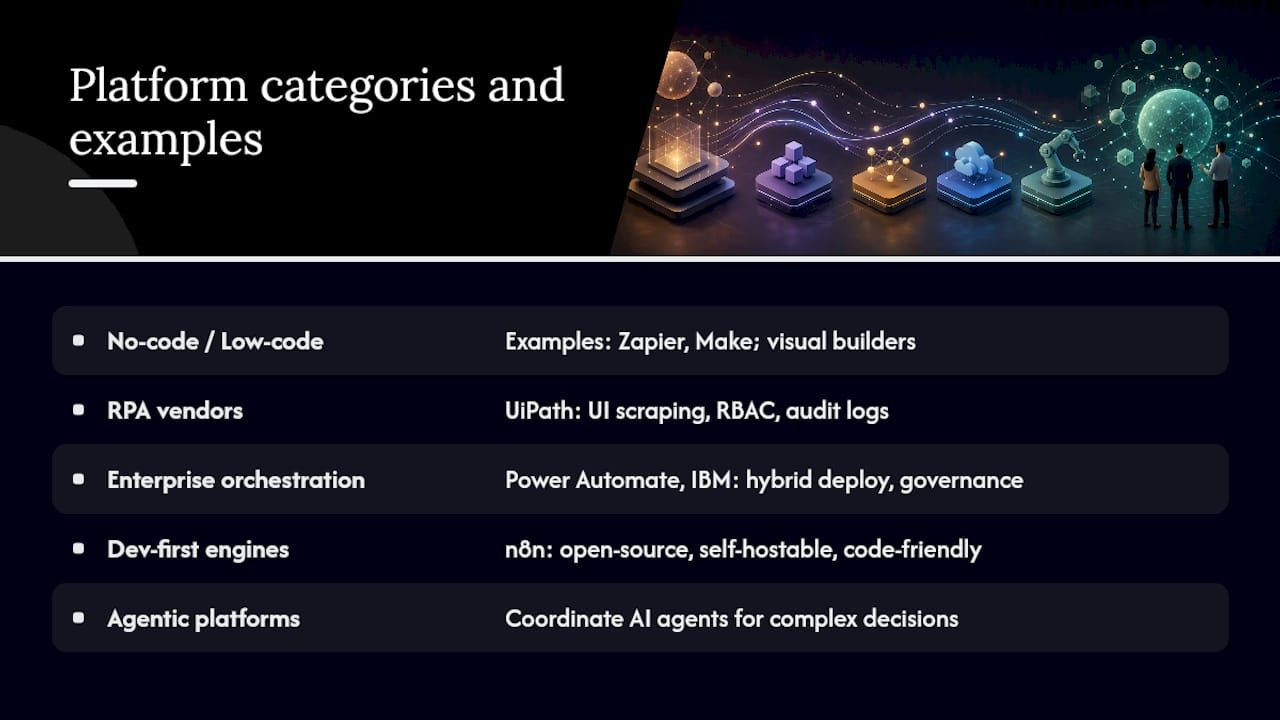
No-code / low-code automation platforms Zapier and Make (formerly Integromat) sit here. Both offer large libraries of pre-built connectors and visual workflow builders that non-technical users can operate. Zapier suits teams that need fast SaaS-to-SaaS automation with minimal configuration; Make offers more complex branching and data transformation for users willing to invest a few hours in the builder. Neither is designed for on-premises deployment or deep enterprise governance requirements.
RPA vendors UiPath leads this category for enterprise buyers. It handles UI-level automation (scraping legacy screens, filling forms) alongside modern API-based integrations, and its enterprise tier includes audit logs, RBAC, and orchestration capabilities. UiPath’s strength is in process-heavy environments where legacy systems lack APIs. The trade-off is licensing cost and the engineering effort required to maintain bots as UIs change.
Enterprise orchestration platforms Microsoft Power Automate integrates tightly with the Microsoft 365 and Azure ecosystem, making it the default choice for organizations already standardized on that stack. Its hybrid deployment options and connector library position it as a credible enterprise platform. IBM offers automation capabilities through its Watson Orchestrate and business automation portfolio, targeting regulated industries that need on-premises or private-cloud deployment with strong governance controls.
Developer-first workflow engines n8n is the representative example here. It is open-source, self-hostable, and code-friendly, giving engineering teams full control over workflow logic, data handling, and deployment environment. Community reviews on G2 consistently highlight the trade-off: n8n rewards technical teams with deep customizability but has a steeper learning curve than drag-and-drop alternatives. For teams with integration requirements that outpace what pre-built connectors can handle, that trade-off is often worth it.
Agentic and orchestration platforms Platforms in this tier coordinate multiple AI agents across systems, handling multi-step reasoning workflows like HR onboarding, IT issue resolution, and cross-system finance processes. They are best suited for workflows where the decision logic is too variable for rule-based automation but too consequential for a fully autonomous model.
Modular custom builds When off-the-shelf tools require so much customization that the licensing cost exceeds the engineering cost of building, or when compliance requirements demand full data residency control, a modular custom build becomes the rational choice. Bitecode’s approach sits here, covered in detail later.
Comparison dimensions to evaluate any platform
| Dimension | What to assess |
|---|---|
| Target user | Business users (low-code) vs. engineering teams (code-first) |
| Ease of use | Visual builder quality, documentation depth, time-to-first-flow |
| Integrations | Connector count, popular apps covered, custom connector support |
| AI capability | LLM support, RAG integration, multi-agent orchestration |
| Deployment options | SaaS only, self-hosted, on-premises, VPC/private cloud |
| Security and governance | Audit logs, RBAC, data residency controls, SOC 2 / HIPAA coverage |
| Scalability | Throughput limits, concurrency, enterprise SLAs |
| Pricing shape | Per-user, per-run, flat license, professional services required |
When evaluating AI capability specifically, ask whether the platform supports model-agnostic LLM routing (so you can swap providers without rebuilding flows) and whether it can connect to a private RAG knowledge base rather than only public model endpoints.
How do you get data integration and deployment right?
Integration and RAG readiness are the most common friction points in automation rollouts. Teams that underestimate the data preparation work routinely discover it mid-pilot, when timelines are already committed.
Technical integration patterns to address before building:
- Connector and middleware patterns: Prefer event-driven triggers (webhooks, message queues) over polling where latency matters. Batch triggers work for overnight reconciliation jobs but introduce lag in customer-facing flows.
- Secure API design: Use OAuth 2.0 or service account tokens with least-privilege scopes. Never embed credentials in workflow configuration files.
- Document ingestion and OCR: For unstructured document workflows, establish a consistent ingestion pipeline: ingest, classify, extract with OCR, validate extracted fields, then route. Skipping the validation step is the most common source of downstream data quality failures.
- RAG indexing: Chunk documents at a granularity that matches the expected query type. Metadata tagging (document type, date, owner, access classification) is what makes retrieval precise rather than approximate.
- Vector stores: Choose a vector database that supports metadata filtering and access-control-aware retrieval. Returning a confidential document to an unauthorized user because the retrieval layer lacks access controls is a governance failure, not a model failure.
- Access controls and tokenization: Apply field-level tokenization for PII before documents enter the RAG pipeline. Redaction at ingestion time is simpler to audit than redaction at retrieval time.
Pro Tip: Choose on-premises or self-hosted deployment when your data residency requirements, regulatory environment, or latency constraints make SaaS untenable. Financial services firms subject to OCC guidance, healthcare organizations under HIPAA, and defense contractors under CMMC requirements often cannot route sensitive data through a third-party SaaS platform. Self-hosted options like n8n or a Bitecode custom deployment give engineering teams full control over where data lives and who can access it.
RAG readiness checklist:
- Document quality is sufficient for OCR or direct extraction (no handwritten forms, no corrupted PDFs).
- Every document has a canonical identifier that survives updates and version changes.
- Change cadence is understood: how often does source content update, and does the index refresh before the model serves stale answers?
- Privacy redaction has been applied to PII fields before ingestion.
- Access classification metadata is attached to every document so retrieval can enforce the same permissions as the source system.
For teams building AI-driven content workflows, a partner case study on AI-powered content automation illustrates how the same data-readiness principles apply outside enterprise IT contexts.
What governance and security controls does production AI require?
Governance is non-negotiable. Require auditability, RBAC, and explainability before any AI-driven workflow touches production data or makes decisions with financial, legal, or operational consequence. Retrofitting governance after deployment is significantly more expensive than building it in from the start.
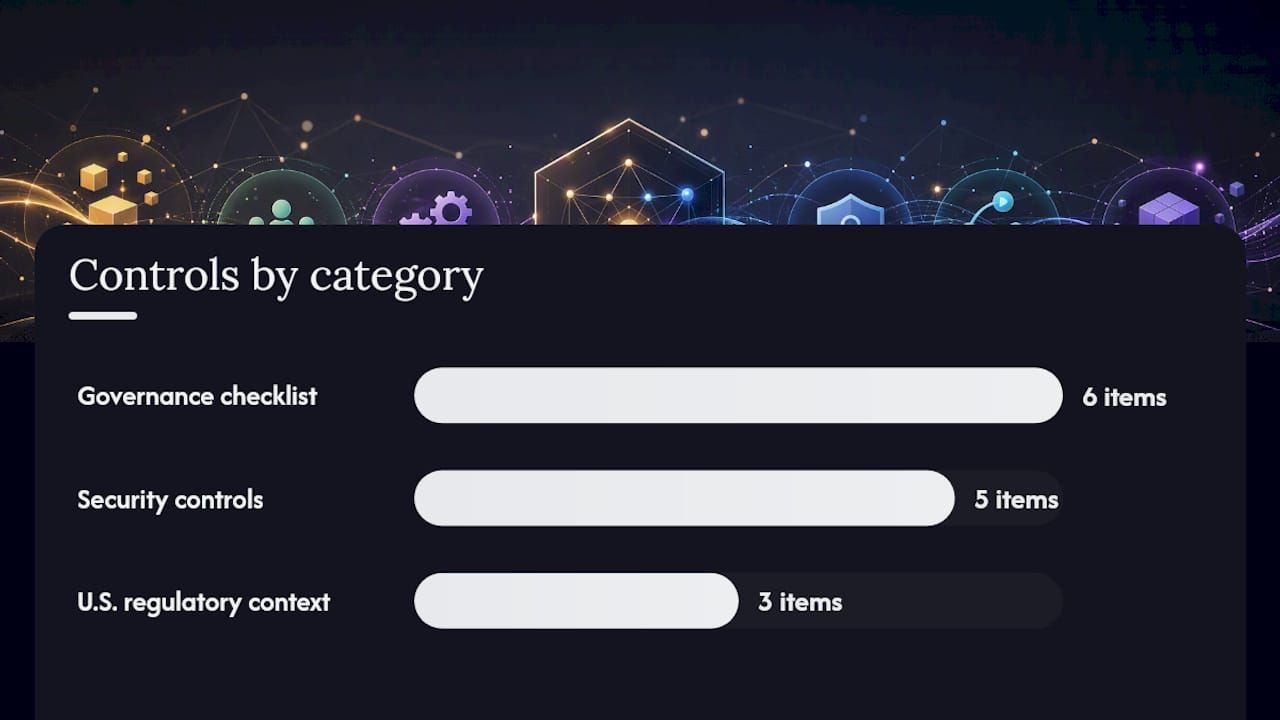
Governance checklist:
- Data residency and encryption: Confirm where model inference occurs and where logs are stored. Encrypt data in transit and at rest. For regulated industries, document the data flow explicitly.
- Audit logs and immutable traces: Every workflow execution should produce a structured, tamper-evident log: what triggered it, what data it processed, what decision it made, and what action it took.
- Model and prompt versioning: Treat prompts as code. Version them, review changes, and maintain a rollback path when a prompt update degrades output quality.
- Human-in-the-loop gates: Any decision with financial, legal, or safety impact should route to a human reviewer before execution. The gate should be configurable by confidence threshold, not hardcoded.
- Approval workflows: Multi-step approvals for high-stakes actions (large payment releases, access grants, contract generation) should be enforced at the orchestration layer, not left to downstream systems.
- Incident response plans: Define what happens when the automation produces an incorrect output at scale. Who gets paged, what is the rollback procedure, and how are affected records corrected?
Security controls:
- Least-privilege service accounts for every integration
- Secrets management via a dedicated vault (HashiCorp Vault, AWS Secrets Manager) rather than environment variables
- Input and output sanitization to prevent prompt injection attacks
- Anomaly detection on workflow execution patterns (sudden volume spikes, unusual output distributions)
- SLA definitions and runbooks for on-call engineers
U.S. regulatory context: The U.S. Department of Labor’s AI principles call for transparency, fairness, and worker protections in AI deployments, which translates directly into the human-in-the-loop and explainability requirements above. In financial services, OCC and CFPB guidance on model risk management applies to AI-driven credit and fraud decisions. In healthcare, HIPAA’s minimum necessary standard governs what data an AI workflow can access and process. These are one-sentence callouts, not legal advice; confirm applicability with qualified counsel.
Governance is also where many vendor evaluations break down. A platform that cannot produce a queryable audit log of every model call, every decision, and every data access event is not enterprise-ready, regardless of its feature list.
How do you measure whether AI automation is working?
Measure both process efficiency and outcome quality. Cycle time and throughput tell you whether the automation is faster; error rate and compliance rate tell you whether it is better.
Core KPIs to track:
- Cycle time: End-to-end elapsed time from trigger to completion, compared against the pre-automation baseline
- Mean time to resolution (MTTR): For IT and support workflows, how long from incident detection to resolution
- Automation rate: Percentage of cases handled end-to-end without human intervention
- Exception rate: Percentage of cases routed to human review; a rising exception rate signals model drift or data quality degradation
- Cost per case: Total operational cost divided by case volume, including licensing, infrastructure, and human review time
- NPS / CSAT impact: For customer-facing workflows, whether automation has improved or degraded the experience
- Time-to-value: How quickly the automation delivered measurable ROI after production deployment
Baseline measurement steps:
- Instrument the current process before any automation is deployed. Use sampling if full instrumentation is impractical.
- Run shadow mode for at least two weeks to capture natural variation (end-of-month spikes, seasonal patterns).
- Define the comparison period and hold it constant across pilot and post-pilot measurement.
- Separate human-reviewed cases from fully automated cases in your metrics to avoid averaging out the signal.
ROI formula (template):
Savings = (Hours saved per period × loaded hourly rate) + (Error reduction × average cost per error) − (Licensing cost + infrastructure cost + human review overhead)
Plug in your organization’s numbers. The formula works at the case level or the process level; just keep the unit consistent. For a worked example, the workflow automation ROI analysis from Bitecode’s implementation data provides a concrete reference.
What questions should you ask vendors before signing?
Prefer vendors that demonstrate secure connectors, transparent model controls, observability, and a realistic integration plan over those leading with demo environments and reference customer counts. The procurement conversation is where you surface the operational reality behind the marketing.
Vendor questions checklist:
- What deployment models do you support: SaaS, self-hosted, on-premises, VPC?
- List your native connectors and your process for building custom connectors. What is the typical timeline and cost?
- What are your SLAs for uptime, latency, and support response? What are the remedies for breach?
- Show me a live audit log from a production workflow. What fields are captured, and how long are logs retained?
- How does RBAC work? Can permissions be scoped to individual workflow steps, not just the platform level?
- What models does your AI layer use? Can we bring our own model or restrict inference to a private endpoint?
- Provide a scalability example: what is the highest concurrent workflow volume you have run in production, and what was the infrastructure configuration?
- Where is data stored and processed? What certifications cover data residency (SOC 2, HIPAA BAA, FedRAMP)?
- Walk me through your pricing model. What triggers overage charges, and what does the contract look like at 3× current volume?
- Can we run a sandbox POC against our own data before committing to a contract?
- What are the exit terms? How do we export our workflow configurations, connector credentials, and audit logs if we migrate?
Red flags:
- The vendor cannot produce a sample audit log or deflects the question
- Model usage is opaque: you cannot determine which model version processed a given request
- Data access is vendor-only: your team cannot query logs or execution history directly
- Pricing requires a long minimum commitment before you have demonstrated value
- No professional services or integration support is available, and the documentation assumes a greenfield environment
Procurement tips:
- Start with a time-boxed POC contract with defined success milestones, not a full-year license
- Require rollback and data deletion clauses in writing before signing
- Include a milestone-based payment structure so the vendor’s incentives align with your outcomes
For broader enterprise automation strategy, the top automation strategies for enterprises guide covers additional procurement and architecture considerations.
When does a modular custom build outperform off-the-shelf platforms?
A modular custom build is the rational choice for mid-to-large enterprises with complex legacy integrations, strict data residency requirements, or workflow logic that off-the-shelf tools cannot model without heavy, expensive customization. When the configuration effort required to make a SaaS platform fit your environment approaches the engineering effort of building a tailored system, the economics shift decisively toward a custom modular approach.
Bitecode’s model addresses this directly. Teams get the speed of a pre-built foundation without the constraints of a black-box platform.
When to choose a modular custom build:
- Complex legacy system integrations where pre-built connectors do not exist or are unreliable
- Specialized finance, blockchain, or multi-currency processing requirements that SaaS platforms do not natively support
- Strict data residency mandates that prohibit routing sensitive data through third-party cloud infrastructure
- Need for a white-labeled SaaS product built on top of the automation layer
- Vendor licensing costs at scale exceed the engineering cost of a purpose-built system
- Compliance requirements (HIPAA, SOC 2, FedRAMP) that demand full auditability and self-hosted deployment
Bitecode’s AI solutions for business include audit-ready features, on-premises or VPC deployment, and low-code customization that lets domain experts configure workflow logic without requiring a full engineering sprint for every change.
What most teams get wrong about AI workflow automation
The most consistent failure mode in enterprise automation projects is not a technology failure. It is a sequencing failure: teams invest in sophisticated agent frameworks before they have clean data, clear baselines, or governance controls in place. The result is an automation that works brilliantly in the demo environment and fails unpredictably in production.
Common pitfalls and how to avoid them:
- Scope creep: The pilot starts as one invoice-processing flow and expands to cover three document types, two ERP systems, and a new approval chain before the first deployment. Fix: define the pilot scope in writing and treat any expansion as a separate project.
- Poor baseline measurement: Teams skip the instrumentation phase and then cannot demonstrate ROI because they have no pre-automation data to compare against. Fix: spend the first week of discovery doing nothing but capturing current-state metrics.
- Insufficient monitoring: The automation runs in production without structured logging or alerting. A model drift event goes undetected for weeks. Fix: treat the observability stack as a launch prerequisite, not a post-launch enhancement.
- Missing rollback plans: When a production failure occurs, there is no documented procedure for reverting to the manual process. Fix: write and test the rollback runbook before go-live.
- Ignoring edge cases: The happy path works; the 15% of cases that fall outside it break silently. Fix: map the three most common exception paths during design and build explicit handling for each.
Broad organizational buy-in is equally critical. Automation projects that exclude the teams whose work will change tend to surface edge cases late, generate resistance during rollout, and produce systems that technically function but are quietly worked around. Involve process owners and frontline staff in the design phase, not just the UAT phase.
One practical discipline that separates successful implementations from stalled ones: scope a single flow, instrument it aggressively, and fail fast in a controlled environment. The teams that try to automate five processes simultaneously in the first quarter rarely have a single one in stable production by the end of it.
Ready to run a Bitecode pilot engagement?
When a team wants a turnkey proof-of-concept without the overhead of assembling a vendor stack from scratch, Bitecode delivers a modular pilot with outcome-based milestones rather than open-ended consulting hours.
A Bitecode pilot engagement includes:
- Discovery: Process mapping, baseline KPI capture, and integration audit to identify the highest-value automation candidate
- Connector build: Custom connector development for legacy or proprietary systems that pre-built libraries do not cover
- Small-production deployment: A governed, monitored automation running against real data with full audit logging and RBAC from day one
- Governance and handover: Runbooks, incident response documentation, and a handover session so your engineering team owns the system after delivery
The AI Business Process Automation Service page outlines the full engagement model. For teams evaluating a custom enterprise software build as the foundation for a broader automation program, that path is also available. Contact Bitecode to scope a pilot against your specific process and integration environment.
Sources
- How generative AI can boost highly skilled workers’ productivity
- For success with AI, bring everyone on board


