
TL;DR:
- AI-powered workflows automate complex decision processes with four key components, improving accuracy and scalability. Successful implementation relies on structured outputs, early threshold setting, ongoing measurement, and a modular baseline to reduce risks and accelerate deployment. Organizations should focus on stakeholder engagement and proper architecture to ensure reliable, compliant, and maintainable AI automation at scale.
An AI-powered workflow is a repeatable sequence consisting of four core components: trigger, action, rules, and logic, replacing manual decision-making with automated, intelligent execution. Unlike a simple rule-based script, it can handle unstructured data, adapt to variable inputs, and escalate exceptions without human intervention at every step.
Six steps to start planning your implementation today:
- Identify a single, high-volume use case with measurable outcomes.
- Map every process step, data source, and handoff point.
- Audit and prepare your data for AI model consumption.
- Select a platform that supports deterministic routing and AI nodes.
- Build, integrate, and test with human-in-the-loop (HITL) checkpoints.
- Deploy gradually, then monitor and iterate on performance metrics.
TL;DR: Teams that execute these steps typically report faster case-processing times, lower error rates on unstructured data tasks, and reduced manual touchpoints per transaction. The four-component model (triggers, actions, rules, logic) is the standard anatomy; the distinction between task automation and full AI orchestration is autonomy over decision chains.
What is an AI-powered workflow, and how does it differ from basic automation?
Most teams conflate “automation” with “AI workflow,” and that confusion leads to the wrong platform choice. A rule-based automation fires a fixed action when a fixed condition is met. An AI-powered workflow does something categorically different: it evaluates unstructured or variable inputs, applies model inference, and makes branching decisions that no static rule set could anticipate.
The standard anatomy of an AI-powered workflow consists of four core components: a trigger, an action, rules, and logic. Simple automation covers triggers, actions, and rules; the logic layer is what AI adds.
Robotic Process Automation (RPA) sits between the two. It automates UI interactions and structured data tasks but still follows deterministic scripts. When the input varies, RPA breaks. AI orchestration, by contrast, manages entire chains of events including decision-making and exception handling using intelligent logic, not just a sequence of clicks.
A practical illustration: a rules-based system routes every support ticket tagged “billing” to the billing queue. An AI-powered workflow reads the ticket body, classifies intent, scores urgency, drafts a suggested response, and routes to the right agent tier, all before a human touches it. Same trigger, fundamentally different outcome.
What are the core components every AI workflow needs?
Every production AI workflow is a graph of typed nodes connected by data contracts. Understanding each node type before you build prevents the most common architectural mistakes.
- Triggers: Webhooks, scheduled jobs, database change events, or API calls that initiate execution. The trigger payload defines what data enters the workflow.
- Data ingestion and preprocessing: Steps that fetch, clean, normalize, and format raw data into a shape the AI model can consume. This is where most data-quality debt surfaces.
- AI/model nodes: The inference step. The model receives a structured prompt or payload and returns a prediction, classification, summary, or generated text.
- Orchestration engine: The workflow runtime that sequences nodes, manages state, passes variables between steps, and handles retries and timeouts.
- Rules and branching: Deterministic conditional logic that routes execution based on model outputs or data values. This is where structured outputs become critical.
- Integrations and APIs: Connectors to external systems (CRMs, ERPs, databases, communication tools) that read or write data as part of the workflow.
- Monitoring and logging: Observability nodes that capture execution traces, latency, model confidence scores, and error events for post-deployment analysis.
One design detail that separates fragile prototypes from production-ready systems: structured outputs and dedicated parsers reduce fragility in downstream conditional logic. When an AI node returns free-text, every downstream branch must parse natural language, which introduces ambiguity and failure modes. Forcing the model to return JSON or a fixed category set, then running a dedicated parser step to populate workflow variables, makes branching deterministic again.
Pro Tip: Use template variable patterns such as {{trigger.payload.FIELD}} to pass data between nodes rather than hardcoding values. Pair this with an outputVar pattern on every AI node so downstream conditions reference a named variable, not raw model text. This single practice eliminates the most common source of production breakage.
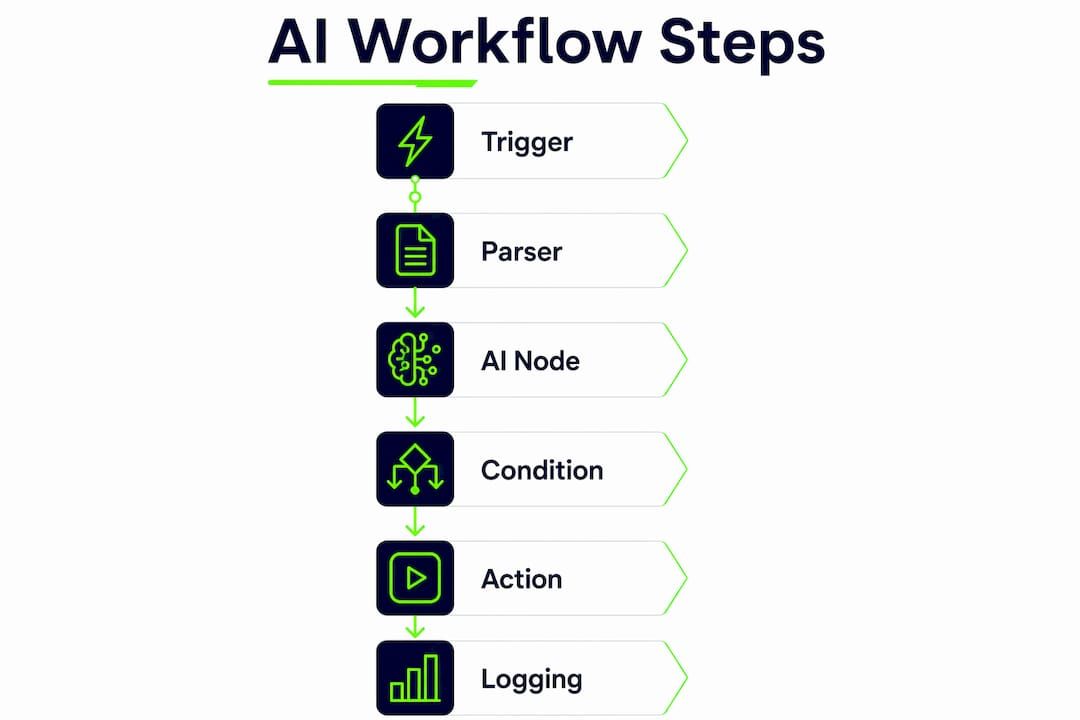
A useful mental model for the node graph: trigger → parser → AI node → condition → action → logging. Every arrow is a typed data contract. If you cannot name the schema at each arrow, the workflow is not ready to build.

What business benefits do AI workflows actually deliver?
The honest case for AI workflows is not that they eliminate headcount. It is that they let existing teams handle volumes and decision complexity that would otherwise require linear staffing growth. The categories of automation span rules-based, RPA, intelligent automation, and integration automation; AI workflows occupy the intelligent automation tier, where task predictability is low and data structure is variable.
Core benefits, with the KPIs that measure them:
- Fewer manual touchpoints: Track human touchpoints avoided per 100 transactions as a baseline metric.
- Faster decision cycles: Measure processing time per case before and after deployment; invoice triage and ticket routing are the clearest examples.
- Improved accuracy on unstructured data: Error rate reduction on classification tasks (misrouted tickets, miscategorized invoices) is the most defensible metric.
- Predictive routing: Lead scoring workflows, for instance, use a webhook trigger → AI scoring node → conditional branch to route high-value leads directly to sales without a human qualifier in the loop.
- Capacity scaling: Volume can increase without proportional headcount growth, which is the ROI argument procurement teams respond to most directly.
Department-level examples make this concrete. In finance, AI workflows triage incoming invoices, extract line items, match against purchase orders, and flag exceptions for human review. In customer support, they classify tickets, generate draft responses, and route by urgency tier. In HR, they screen resumes against structured criteria, score candidates, and schedule first-round interviews automatically. Each of these use cases has a measurable baseline: average handling time, error rate, and time-to-action.
For measurement, the discipline is straightforward: establish baseline metrics before deployment, run a canary or A/B rollout to a subset of traffic, and compare the two cohorts on your target KPIs. Continuous monitoring after full deployment catches operational drift before it degrades performance. Teams that skip the baseline step cannot demonstrate ROI, which is the single most common reason AI workflow projects lose executive sponsorship after the pilot.

How do you implement an AI workflow? A step-by-step roadmap
A realistic implementation follows seven sequential phases. Skipping phases, particularly data audit and testing, is the primary cause of failed deployments.
- Discovery and use-case selection: Define the process, the pain point, and the success metric. One use case per pilot.
- Data audit and preparation: Inventory data sources, assess quality, and build preprocessing pipelines. This phase consistently takes longer than teams expect.
- Platform selection: Evaluate orchestration engines, AI model hosting, and connector libraries against your security and compliance requirements.
- Build and integrate: Wire triggers, AI nodes, parsers, and connectors. Define API contracts and output schemas before writing a single node.
- Test and validate: Run end-to-end tests with real payloads, inspect execution traces, and apply HITL checkpoints for low-confidence outputs.
- Deploy: Use canary or gradual activation to validate behavior at scale before full rollout.
- Monitor and iterate: Track KPIs, review logs, retrain or adjust models as data distribution shifts, and expand scope incrementally.
Typical timeline for a medium-complexity workflow
| Phase | Typical duration | What drives longer delivery |
|---|---|---|
| Discovery and use-case scoping | 1–2 weeks | Stakeholder misalignment, unclear success metrics |
| Data audit and preparation | 2–4 weeks | Poor data quality, access restrictions, schema inconsistencies |
| Platform selection | 1–2 weeks | Procurement cycles, security review requirements |
| Build and integration | 3–6 weeks | Integration complexity, custom connector development |
| Testing and HITL validation | 2–3 weeks | Edge case volume, compliance review |
| Canary deployment | 1–2 weeks | Change management friction, rollback requirements |
| Monitoring and first iteration | Ongoing | Model drift, expanding scope |
Cost drivers to budget for:
- Data operations effort (cleaning, labeling, pipeline engineering)
- Integration complexity (custom connectors vs. pre-built)
- AI model licensing (API-based inference vs. self-hosted)
- Engineering hours for orchestration logic and parser development
- Observability tooling and ongoing monitoring infrastructure
Deliverables checklist per phase:
- Discovery: documented use case, success metrics, data inventory
- Data prep: cleaned dataset, preprocessing pipeline, data contract
- Platform selection: scored evaluation matrix, security sign-off
- Build: API contracts, node graph, output schemas, test payloads
- Testing: test report, HITL threshold definitions, acceptance criteria
- Deploy: runbook, rollback plan, monitoring dashboard
- Monitor: KPI report cadence, iteration backlog
For fintech-specific timelines and sector examples, Bitecode’s AI automation in fintech guide covers phase-by-phase delivery in regulated environments.
Which tools and platform capabilities should you evaluate?
Platform selection is an architectural decision, not a procurement one. The wrong platform relocates complexity into the vendor relationship rather than resolving it. Evaluate by capability category, not by brand name.
Platform categories to assess:
- Orchestration engines and flow builders: The runtime that sequences nodes, manages state, and handles retries. Evaluate for determinism support, visual debugging, and execution trace access.
- MLOps and model hosting: Where AI models live and how inference is served. Assess latency, versioning, and rollback capability.
- RPA connectors: For workflows that must interact with legacy UI-based systems where APIs are unavailable.
- Low-code and no-code builders: Reduce engineering time for standard integration patterns; useful for business-led pilots. A practical example: a content repurposing workflow built with a Google Sheet trigger, an AI text-generation step, a parser, and a write-back to the sheet can be assembled in under an hour with no-code tooling.
- API gateways: Manage authentication, rate limiting, and routing for external integrations.
- Observability tools: Capture execution traces, latency distributions, model confidence scores, and error events.
Selection criteria checklist:
- Determinism support: can the platform enforce ordered, auditable execution paths?
- AI node capabilities: does it support structured output enforcement and parser steps?
- Connector library depth: how many pre-built integrations cover your existing stack?
- Security and IAM: role-based access, secrets management, and data-at-rest encryption
- SLA and support: what is the vendor’s uptime commitment and incident response time?
- Open standards: does the platform use standard data contracts, or does it lock you into proprietary schemas?
The canonical integration pattern worth standardizing on is: event → transform → AI node → write-back. Every connector in your stack should conform to this shape. Platforms that combine deterministic flow control with agentic nodes produce repeatable, debuggable automations while retaining LLM reasoning where the task demands it. For a broader view of the vendor landscape, the workflow automation manager’s guide covers platform categories and evaluation criteria useful for procurement teams.
What design patterns make AI workflows reliable in production?
Production reliability comes from architectural discipline, not from the AI model itself. The model is one node. The workflow around it determines whether the system is maintainable.
Core patterns:
- Determinism + agentic intelligence: Use deterministic routing with intelligent nodes for predictable flows with intelligent reasoning inside steps. The flow graph is deterministic; the AI node inside it is not. Keeping these concerns separate is what makes the system debuggable.
- Parser-first design: Every AI node output passes through a parser before any branching logic reads it. The parser enforces schema, populates named variables, and fails loudly on malformed output rather than silently corrupting downstream state.
- Explicit output variables: Name every variable the AI node produces (
lead_score,intent_class,confidence). Downstream conditions reference the variable, never the raw model response. - Router nodes: A dedicated routing node reads output variables and directs execution to the correct branch. This separates routing logic from AI logic and makes both independently testable.
Error handling patterns:
- Idempotency: design every action node so re-running it on the same input produces the same result. This makes retries safe.
- Circuit breakers: if an external integration fails repeatedly, halt execution and alert rather than retrying indefinitely.
- Fallback edges: every AI node should have an explicit fallback path for when the model returns an error or a confidence score below threshold.
Pro Tip: Always define HITL checkpoints before you build, not after. When model confidence falls below your defined threshold, pause execution and route to a human reviewer before resuming. Set the threshold, the notification channel, and the escalation path as configuration, not as hardcoded logic, so they can be adjusted without a code change.
Three pattern examples that cover most enterprise use cases: score-and-route (AI scores an entity, router branches on score), summarize-then-decide (AI summarizes a document, a rule applies a policy decision to the summary), and extract-then-validate (AI extracts structured fields from unstructured text, a validation step checks against a schema before writing to a system of record).
What are the key risks and U.S. compliance considerations?
AI workflows introduce risks that standard software deployments do not. Most of them are manageable with the right controls, but they require deliberate design rather than retrofit.
Major risk categories:
- Data privacy and leakage: Sensitive data passed to external AI model APIs may leave your security perimeter. Data minimization and tokenization before inference are the primary controls.
- Model bias and unfair outcomes: Classification models trained on historical data can encode historical biases. HR resume screening and credit decisioning are the highest-risk use cases in U.S. regulatory terms.
- Explainability and traceability gaps: When a workflow makes a consequential decision, you need an audit trail. Black-box model outputs without logged inputs and confidence scores create compliance exposure.
- Connector security: Every API integration is an attack surface. Secrets management, least-privilege IAM, and encrypted transit are baseline requirements.
- Operational drift: Model performance degrades as real-world data distribution shifts away from training data. Without continuous monitoring, a workflow that performed well at launch silently degrades.
Risk-mitigation controls
| Risk | Practical control |
|---|---|
| Data privacy and leakage | Data minimization before inference; tokenize PII; use self-hosted models for sensitive data |
| Model bias | Bias audits on training data; HITL checkpoints for high-stakes decisions; regular output audits |
| Explainability gaps | Log all model inputs, outputs, and confidence scores; maintain immutable audit trails |
| Connector security | Secrets management vault; least-privilege API keys; encrypted transit |
| Operational drift | Continuous KPI monitoring; model performance dashboards; scheduled retraining triggers |
U.S. compliance considerations: Data residency requirements vary by sector. Health data processed in AI workflows is subject to HIPAA, which imposes specific requirements on Business Associate Agreements with any AI model provider that touches protected health information. Financial services workflows must account for Fair Credit Reporting Act (FCRA) constraints on automated decisioning. Documentation best practices across sectors include immutable audit logs, version-controlled model artifacts, and change records for every workflow modification. Adversarial test cases, bias checks against protected class proxies, and post-deployment monitoring are not optional for any workflow that makes consequential decisions about people.
This article provides general information on AI workflow implementation and compliance considerations. For specific legal, regulatory, or sector compliance requirements, consult qualified legal counsel and your organization’s compliance team.
Why a modular baseline accelerates AI workflow delivery
The build-from-scratch approach to AI workflow implementation puts all the risk into the boilerplate: authentication, data pipelines, connector scaffolding, logging infrastructure, and security controls. These components are not differentiating. They are table stakes, and building them from greenfield on every project is where timelines slip and budgets overrun.
A modular baseline approach starts with up to 60% of the system pre-built, covering the foundational components that every enterprise workflow requires. The remaining effort concentrates on business-domain complexity: the specific AI nodes, routing logic, and integrations that are actually unique to the use case. This is where engineering time creates value.
The decision between modular baseline and fully custom development turns on three factors: security and compliance requirements (self-hosted, audit-ready infrastructure is easier to deliver from a pre-certified baseline), integration complexity (a rich connector library in the baseline reduces custom connector development), and timeline pressure (a pre-built foundation compresses the data prep and platform selection phases significantly). For teams with aggressive timelines or regulated-data constraints, the modular path reduces both delivery risk and time to first measurable ROI. Bitecode’s internal framing on this is covered in more depth in the workflow automation ROI guide.
Fully custom development remains the right choice when the use case requires a genuinely novel architecture, when the organization has strong existing infrastructure that a modular baseline would duplicate, or when the team has the engineering depth and timeline to absorb greenfield risk. The honest answer is that most medium-complexity enterprise workflow projects do not meet those criteria.
How should teams train and upskill employees for AI workflows?
The technical implementation of an AI workflow is rarely the limiting factor. The limiting factor is whether the people who interact with it, whether as operators, reviewers, or decision-makers, understand what it does and what it cannot do. Upskilling is not a one-time training event. It is an ongoing practice that evolves as the workflow does.
Three distinct skill layers need development. Operators need to understand the workflow’s inputs, outputs, and escalation paths. They do not need to understand the model, but they do need to know when to trust its output and when to escalate. Reviewers in HITL checkpoints need enough model literacy to evaluate confidence scores and recognize edge cases. Platform engineers and data leads need hands-on proficiency with the orchestration engine, the parser patterns, and the observability tooling.
Practical upskilling approaches that work in enterprise contexts: structured walkthroughs of the workflow graph with the team that will operate it, sandbox environments where reviewers can run test cases and see how confidence scores map to output quality, and documented escalation playbooks that remove ambiguity from the HITL decision. Role-specific training, rather than generic “AI literacy” programs, produces faster competency gains. The HBR research on AI adoption consistently shows that broad organizational buy-in, not just technical training, determines whether AI initiatives sustain their gains past the pilot phase.
Data readiness is a parallel upskilling need that is often underestimated. Teams that understand how data quality affects model performance make better decisions about preprocessing, labeling, and monitoring. A data lead who can articulate why a particular input distribution causes model confidence to drop is more valuable to a workflow project than one who can only run the pipeline.
How do you manage change and stakeholder engagement for AI workflow adoption?
AI workflow adoption fails more often for organizational reasons than technical ones. The pattern is consistent: a technically sound pilot delivers measurable results, then stalls at scale because affected teams were not engaged early, success metrics were not shared broadly, or the workflow’s decision logic was not explained to the people whose work it changes.
Stakeholder engagement needs to start at the use-case selection phase, not at the deployment phase. The business sponsor who owns the process being automated must be a co-author of the success metrics, not a passive recipient of a dashboard. Process owners who understand the workflow’s logic are more likely to trust its outputs and less likely to route around it. The HBR framing on AI success is direct: bringing everyone on board is a prerequisite for sustained results, not a nice-to-have.
A practical change management structure for a pilot deployment:
- Communicate the “why” before the “what.” Teams that understand the business problem being solved are more receptive than teams that receive a new tool without context.
- Define who owns the HITL checkpoints. Ambiguity about who reviews escalated cases is the fastest way to create a backlog that undermines confidence in the system.
- Run a parallel period. For the first two to four weeks of deployment, run the AI workflow alongside the existing process and compare outputs. This builds trust and surfaces edge cases simultaneously.
- Share KPI results broadly. When the workflow reduces processing time or error rates, make those numbers visible to the teams involved. Demonstrated results sustain adoption better than mandates.
Executive sponsorship is not optional for workflows that cross departmental boundaries. A workflow that touches finance, operations, and IT requires a sponsor with authority over all three. Without it, integration access, data sharing agreements, and process changes stall at departmental boundaries. For strategic framing on enterprise-wide adoption, Bitecode’s enterprise automation strategies guide covers organizational patterns for scaling past the pilot.
How do you measure AI workflow performance with the right KPIs?
Measurement is where most AI workflow projects either build credibility or lose it. The discipline is to define metrics before deployment, not after, and to tie them directly to the business problem the workflow was built to solve.
Operational KPIs measure how the workflow performs as a system:
- Processing time per case (before vs. after)
- Error rate on classification or extraction tasks
- Human touchpoints avoided per 100 transactions
- HITL escalation rate (the percentage of cases routed to human review)
- Workflow execution latency (end-to-end time from trigger to outcome)
Business outcome KPIs measure whether the workflow is solving the right problem:
- Lead-to-conversion time for sales qualification workflows
- Invoice processing cost per document for finance automation
- First-contact resolution rate for support ticket workflows
- Time-to-hire reduction for HR screening workflows
Model health KPIs catch operational drift before it degrades business outcomes:
- Average model confidence score over time
- Confidence score distribution (watch for shifts toward the threshold boundary)
- Retraining frequency and performance delta after retraining
The measurement cadence matters as much as the metrics themselves. Weekly KPI reviews during the first 90 days of deployment catch drift early. Monthly reviews are appropriate once the workflow is stable. Any significant change to the underlying data distribution, a new product line, a regulatory change, a seasonal pattern, should trigger an immediate model performance review rather than waiting for the next scheduled review.
Connecting measurement to the enterprise value framing that executives respond to requires translating operational KPIs into financial terms: hours saved × fully-loaded labor cost, error-related rework cost avoided, and revenue impact of faster lead qualification. Teams that present KPIs in operational terms only often struggle to sustain budget approval for the monitoring and iteration work that keeps the workflow performing.
Key Takeaways
Effective AI workflow implementation requires a structured approach across technical design, organizational readiness, and continuous measurement, with the modular baseline approach consistently reducing delivery time and risk for medium-to-large enterprise deployments.
| Point | Details |
|---|---|
| Start with one use case | Pilot a single, high-volume process with clear baseline metrics before expanding scope. |
| Enforce structured outputs | Force AI nodes to return JSON or fixed categories and parse before branching to prevent fragile conditionals. |
| Define HITL thresholds early | Set confidence thresholds, escalation paths, and reviewer ownership before building, not after deployment. |
| Measure operationally and financially | Track processing time, error rates, and touchpoints avoided, then translate to cost and revenue impact for executive reporting. |
| Bitecode’s modular baseline | Bitecode starts projects with up to 60% of the system pre-built, concentrating delivery effort on business-domain logic rather than boilerplate infrastructure. |
The part of AI workflow implementation most teams get wrong
The most common failure mode Bitecode observes is not a bad model choice or a weak integration. It is a workflow built around free-text AI outputs with no parser layer and no structured output enforcement. Teams prototype quickly, the demo works, and then the first edge case in production returns an unexpected string format and the entire conditional logic collapses. The fix is architectural, not a patch.
The second pattern worth naming: organizations that treat the pilot as the destination rather than the starting point. A successful pilot with 50 transactions per day does not automatically scale to 5,000. The observability infrastructure, the HITL review capacity, and the change management work that sustains adoption at scale are all different problems from the ones the pilot solved. Teams that plan for scale from the pilot design phase, rather than retrofitting it later, avoid the most expensive rework.
One practical governance note: the cross-functional squad composition that consistently produces the best outcomes in Bitecode’s delivery experience is a product manager who owns the business metric, a data engineer who owns the preprocessing pipeline, a platform engineer who owns the orchestration layer, and a compliance owner who reviews the audit trail design before the first node is built. Four roles, clearly scoped, with no ambiguity about who makes which decision. That structure accelerates work without accelerating chaos.
Bitecode delivers AI workflow projects from modular baseline to production
Most AI workflow projects spend the majority of their budget on infrastructure that is not differentiated: authentication, logging, connector scaffolding, and security controls. Bitecode’s approach starts with up to 60% of that baseline pre-built, so the engineering effort concentrates where it creates value: the AI nodes, routing logic, and integrations specific to your use case.
Bitecode delivers end-to-end AI workflow projects including discovery and use-case scoping, modular baseline implementation, custom AI node and parser development, third-party integrations, HITL checkpoint design, and post-deployment monitoring with defined SLAs. The result is a production-ready system on a timeline that traditional greenfield development cannot match, without the vendor lock-in of a black-box platform. For teams in regulated industries, the baseline is built with audit-ready logging, data residency controls, and role-based access from day one.
To scope a pilot or request a proposal for your specific use case, contact Bitecode through the AI automation service page or review the full range of custom software capabilities to understand where modular delivery fits your architecture.
Useful sources and further reading
- Workflow Automation: Definition, Process & Benefits — Covers the four-component model (triggers, actions, rules, logic) and the distinction between task automation and AI orchestration. A solid reference for teams defining scope.
- No-Code Automation Workflow Tutorial (2026) — Practical walkthrough of structured output enforcement and parser-first design, with a working content repurposing example. Useful for engineers building their first AI node.
- How to Build Your First AI Workflow — Step-by-step lead qualification example using webhook triggers, AI scoring nodes, and conditional routing. Good reference for the score-and-route pattern.
- Build a Document Processing Workflow in 30 Minutes — Covers HITL checkpoint implementation with confidence score thresholds and human review routing. Essential reading before designing escalation paths.
- Workflow Automation: Definition, Tutorial, and Tools — Overview of automation categories (rules-based, RPA, intelligent, integration) with guidance on selecting the right tier for a given task type.
- HBR: For Success with AI, Bring Everyone on Board — Research-backed case for broad organizational engagement as a prerequisite for sustained AI adoption. Relevant for change management planning.
- Bitecode AI Solutions — Overview of Bitecode’s AI workflow capabilities, including modular baseline delivery, integration patterns, and deployment options for enterprise teams.
- Bitecode AI Integration Step-by-Step Guide — Practical integration guidance that complements the implementation roadmap, covering tool selection and connector patterns in detail.


