
TL;DR:
- AI integration embeds AI into workflows to automate tasks and improve decisions rapidly. Proper preparation, clear goals, and safety features are essential for successful, scalable deployment. Organizational change and ongoing governance are more challenging than the technical implementation itself.
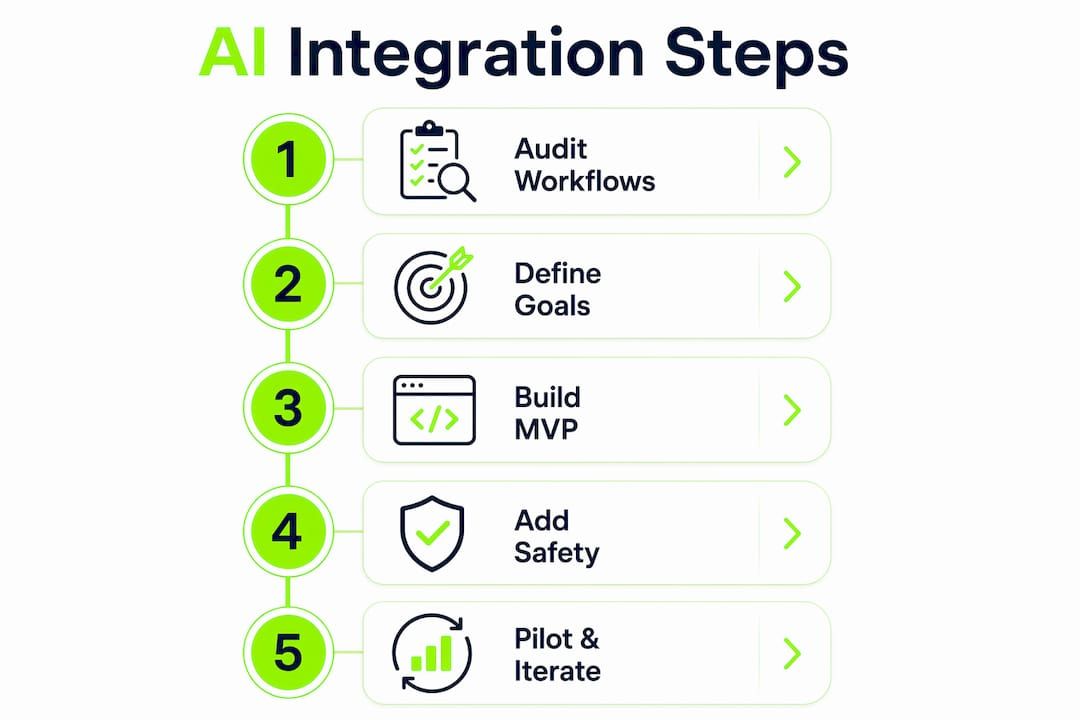
AI integration is the process of embedding AI capabilities directly into business workflows to automate tasks, augment decisions, or generate outputs that previously required manual effort. Done with a structured approach, the ai integration step by step process moves from a single well-defined use case to a production system in weeks, not months. A focused AI minimum viable product can be built in 2–3 weeks for around $8,000 with a pilot group of 5–10 users. That timeline is achievable because the real complexity in any AI integration process is not the model itself. It is the organizational alignment, data readiness, and change management surrounding it.
What prerequisites are essential before starting AI integration?
The most common reason AI projects stall is that teams skip the preparation phase. Before any code is written or model is selected, the groundwork must be solid.
Audit your workflows and data first
Mapping current processes and establishing performance baselines for 2–4 weeks before automation prevents a critical mistake: the “automation-first, audit-second” trap. Without a baseline, teams cannot prove that AI made anything better. Concrete metrics to capture before rollout include task completion time, error rates, handoff frequency, and manual review volume.
Data readiness is equally non-negotiable. AI models produce outputs only as reliable as the data fed into them. Teams should audit data sources for completeness, consistency, and access permissions before selecting any tooling.
Define the problem and success criteria
The use case must be specific. “Use AI to improve customer service” is not a use case. “Reduce first-response time on support tickets from 4 hours to under 30 minutes using an AI triage classifier” is. That specificity drives every downstream decision, from model selection to evaluation criteria.
Success criteria should be measurable and tied to the baseline metrics captured during the audit. Without them, post-launch reviews become subjective.
Pro Tip: Write your success criteria before you write a single line of code. If you cannot define what “working” looks like, the project has no finish line.
The infrastructure checklist for this phase covers four areas:
- Data access: Can the AI system read from the relevant data sources via API or direct connection?
- Output destination: Where does the AI result land? A database, a UI, a webhook?
- Security and compliance: Does the use case involve regulated data (PII, financial records, health data)?
- Team ownership: Who owns the AI system post-launch? Name the person now.
| Preparation area | Key action |
|---|---|
| Workflow audit | Document each manual step and measure current performance |
| Data readiness | Check for completeness, format consistency, and access rights |
| Use case definition | Write a one-sentence problem statement with measurable outcome |
| Infrastructure | Confirm API access, output routing, and compliance requirements |
| Team ownership | Assign a named owner for the AI system before build begins |
How to execute AI integration step by step during development and piloting
With preparation complete, the build phase follows a clear sequence. The goal is the smallest end-to-end loop that proves the concept works in a real environment.
Step 1: Define the minimal viable AI scope
Scope the first version to one input type, one model call, and one structured output. Resist the pull to add features before the core loop is validated. A document classification system, for example, should first classify one document type correctly before handling edge cases or multiple categories.

Step 2: Choose a thin, familiar tech stack
A simple stack reduces integration risk and speeds development. A combination like Next.js, Supabase, Vercel, and a single LLM API covers most web-based AI use cases without introducing unnecessary moving parts. The principle is to use tools the team already knows. Unfamiliar infrastructure during a pilot creates two problems at once.
Step 3: Build the core loop with structured outputs
The loop has three components: input collection, model call, and structured output. Defining an output schema upfront, such as a JSON schema with typed fields, prevents the most common production failure: outputs that look correct but cannot be parsed or acted upon downstream. JSON validation at the output layer catches errors before they propagate.
Step 4: Add safety features before piloting
Safety features are not optional polish. They are production requirements. The four minimum safety layers are:
- Evals: Automated tests that check model output quality against known examples
- Guardrails: Input and output filters that block out-of-scope or harmful content
- Termination conditions: Clear failure thresholds that stop the agent if it loops or produces unusable results
- Traceability: Logging of inputs, outputs, and reasoning steps for every model call
Agents without defined termination conditions risk endless loops or outputs that appear plausible but fail to meet business requirements.
Step 5: Pilot with real users and iterate
Deploy to 5–10 real users in a controlled environment. Collect structured feedback: what worked, what broke, and where users built workarounds. Streaming AI responses token-by-token improves perceived performance during the pilot, since users tolerate longer processing times when they see incremental output appearing immediately.
Pro Tip: During the pilot, watch for workarounds. If users are copy-pasting AI output into a spreadsheet to fix it, that is a signal the output schema or accuracy needs work before scaling.
What are the common challenges during AI integration?
The technology rarely fails first. The organization does. Change management is the hardest part of AI integration, not the model or the API.
Resistance and workarounds
Teams that built manual processes over years have institutional knowledge embedded in those processes. When AI replaces a step, that knowledge does not automatically transfer. Users often revert to old methods or build parallel workarounds rather than trust the new system. The fix is not more training decks. It is involving those users in the pilot phase so they shape the output criteria.
“Change management should be viewed as an ongoing process beyond mere implementation to ensure AI becomes part of the team’s daily work.” — Teamwork.com
Measurement gaps post-launch
Monitoring AI impact monthly during the first quarter after launch is the minimum standard for responsible deployment. Monthly reviews should compare current performance against the pre-launch baseline on the same metrics. Teams that skip this step lose the ability to distinguish AI-driven improvement from seasonal variation or other operational changes.
The practical monitoring checklist for the first quarter includes:
- Track the defined success metrics weekly for the first month, then monthly
- Log all user-reported errors and categorize them by type
- Identify any process steps where users are bypassing the AI system
- Review model output quality on a sample of recent cases
- Adjust prompts, guardrails, or output schemas based on findings
Pro Tip: Assign one person to own the monthly AI review. Shared ownership means no ownership. That review meeting is where integration either compounds or quietly degrades.
How to scale AI integration for broader business impact
Scaling AI is not simply running the pilot on more users. It requires governance, iteration cycles, and a clear connection between AI outputs and business goals.
Expand thoughtfully across workflows
The pilot proved one use case works. Scaling means identifying the next highest-value use case and repeating the same structured process. Each new use case should go through its own preparation, build, and pilot cycle. Skipping steps because “we’ve done this before” is where scaling projects introduce technical debt and user friction.
Integrating native AI features in existing platforms is often more efficient than building custom APIs for every new use case. Start with what the platform already provides, then add middleware only where gaps exist.
Governance and policy alignment
As AI touches more workflows, governance becomes a real operational requirement. Teams need written policies covering data retention for AI inputs and outputs, human review requirements for high-stakes decisions, and model update protocols. Without these, a model update from a third-party provider can silently change system behavior.
Building traceability and error handling into every AI integration avoids silent failures. Every model call should produce a log entry. Every failure should trigger an alert, not a silent null result.
Integration approach comparison
| Approach | Best for | Key trade-off |
|---|---|---|
| Platform-native AI features | Teams already using enterprise platforms | Limited customization, faster deployment |
| API-connected custom build | Specific use cases needing tailored outputs | More control, higher build cost |
| Modular foundation (e.g., Bitecode) | Organizations needing multiple AI features fast | Relocates complexity into the vendor relationship |
| Greenfield custom development | Highly specialized or regulated use cases | Maximum flexibility, longest timeline |
Iterative improvement cycles informed by KPI tracking keep AI systems aligned with business goals over time. The AI automation trends for 2026 point clearly toward process orchestration, where multiple AI agents handle different workflow steps in sequence, as the next frontier for teams that have mastered single-use-case integration.
Key takeaways
Successful AI integration requires a structured sequence: audit first, define measurable goals, build the smallest working loop, pilot with real users, and govern continuously after launch.
| Point | Details |
|---|---|
| Baseline before automating | Map workflows and capture performance metrics 2–4 weeks before any AI build begins. |
| Scope the MVP tightly | Build one input, one model call, one structured output before adding complexity. |
| Safety features are required | Add evals, guardrails, and termination conditions before any real-user pilot. |
| Change management is the hard part | Involve end users in the pilot phase to reduce resistance and surface real friction points. |
| Govern and iterate post-launch | Review AI impact monthly during the first quarter and adjust based on data, not assumptions. |
What Bitecode has learned from real AI integration projects
The teams that struggle most with AI integration are not the ones with the weakest technical skills. They are the ones that treat AI deployment as a one-time project rather than an ongoing operational commitment. The technology gets deployed, the launch announcement goes out, and then the monitoring quietly stops after week two.
The uncomfortable truth is that most AI systems degrade without active attention. Prompts that worked in october may produce different results in march because the underlying model was updated, the input data distribution shifted, or the business context changed. Teams that build traceability and monthly review cycles into their process from day one catch these drifts early. Teams that do not discover them six months later when a user finally escalates a complaint.
Bitecode’s experience with modular AI deployment also shows that the organizational alignment work takes longer than the technical build. A well-scoped AI MVP can be production-ready in two to three weeks. Getting the team to trust it, use it consistently, and stop maintaining the old manual process alongside it often takes two to three months. That is not a failure. It is the normal adaptation curve, and teams should plan for it explicitly rather than treating it as a sign that the integration did not work.
The step-by-step AI automation guide Bitecode publishes reflects this reality: technical execution and organizational change are parallel workstreams, not sequential ones. Start both on day one.
— Bitecode
Bitecode’s AI Assistant Module for workflow integration
Teams that want to move from planning to production without building AI infrastructure from scratch have a direct path available.
Bitecode’s AI Assistant Module embeds an AI-powered chat interface directly into existing business workflows, with the core system up to 60% pre-built before customization begins. The module handles the boilerplate of API connection, output routing, and session management, so teams focus on the business logic rather than the infrastructure. For organizations that need business automation at scale, the module connects to broader workflow automation components within the Bitecode platform. It is a practical starting point for teams that want to accelerate AI adoption without accelerating chaos.
FAQ
What is AI integration in business?
AI integration is the process of embedding AI capabilities into existing business workflows to automate tasks or augment human decisions. It covers everything from a single classification model to multi-step AI agent pipelines.
How long does AI integration take?
A focused AI MVP can be built and piloted in 2–3 weeks. Full organizational adoption, including change management and process adjustment, typically takes 2–3 months after the initial launch.
What is the first step in an AI integration process?
The first step is auditing current workflows and establishing performance baselines before any build begins. Without a baseline, teams cannot measure whether the AI system actually improved anything.
Why do AI integration projects fail?
Most AI failures occur at the goal-setting stage, when output formats are undefined and success criteria are vague. Change management failures, where teams revert to old processes, are the second most common cause.
Do teams need to build custom AI systems to integrate AI?
Not always. Starting with platform-native AI features is often more efficient than building custom APIs. Custom builds make sense when the use case requires outputs or logic that existing platforms cannot provide.


