
Workflow automation promises efficiency gains, but many IT managers face unexpected challenges when scaling implementations across their organizations. Complex integrations, edge case failures, and poorly designed processes can turn automation initiatives into bottlenecks rather than accelerators. This guide walks you through a proven framework for designing, implementing, and verifying customized workflow automation that delivers measurable results. You’ll learn how to assess organizational readiness, execute robust automation designs that handle exceptions gracefully, and scale initiatives confidently while tracking ROI. Whether you’re launching your first automation project or optimizing existing workflows, these strategies help medium to large organizations achieve digital transformation without the typical pitfalls.
Key takeaways
| Point | Details |
|---|---|
| Design for the happy path | Focus workflows on the 80% majority case with clear exception handling for edge scenarios |
| Choose API-first platforms | Low-code, modular systems enable rapid deployment and easier integrations with existing enterprise tools |
| Redesign before automating | Fixing flawed processes first prevents magnifying inefficiencies and ensures automation delivers real value |
| Scale AI integrations carefully | Digital transformation with AI agents requires iterative rollouts and governance to achieve sustainable ROI |
| Measure baseline metrics | Track cycle time, error rates, and costs before automation to benchmark improvements and prove value |
Preparation: assessing your organization’s needs and prerequisites
Successful workflow automation starts long before you configure your first process flow. You need a clear understanding of where inefficiencies exist, what business outcomes matter most, and whether your organization has the technical foundation to support automation at scale. Many IT managers rush into implementation only to discover data silos, incompatible systems, or unclear requirements that derail projects months later.
Begin by mapping current workflows to identify bottlenecks, manual handoffs, and repetitive tasks that consume resources without adding strategic value. Interview stakeholders across departments to understand pain points from multiple perspectives. Document how information flows between systems, where approvals stall, and which processes generate the most support tickets. This discovery phase reveals not just what to automate, but which improvements will deliver the highest impact for your organization’s specific context.
Define concrete business objectives tied to measurable outcomes. Rather than vague goals like “improve efficiency,” target specific metrics such as reducing invoice processing time by 40% or cutting approval cycles from five days to two. Establish baseline measurements for cycle time, error rates, labor costs, and customer satisfaction scores. These benchmarks become your ROI proof points when you verify results later. Clear objectives also help you prioritize which workflows to automate first, focusing resources on initiatives that align with strategic priorities.
Assess your data readiness and existing system landscape. Automation depends on clean, accessible data flowing between applications. Audit your current tech stack to identify integration points, API availability, and data quality issues. Systems that lack modern APIs or contain inconsistent data formats create friction that undermines automation benefits. You may need to invest in data cleanup, middleware, or system upgrades before automation can succeed. This honest assessment prevents costly surprises during implementation.
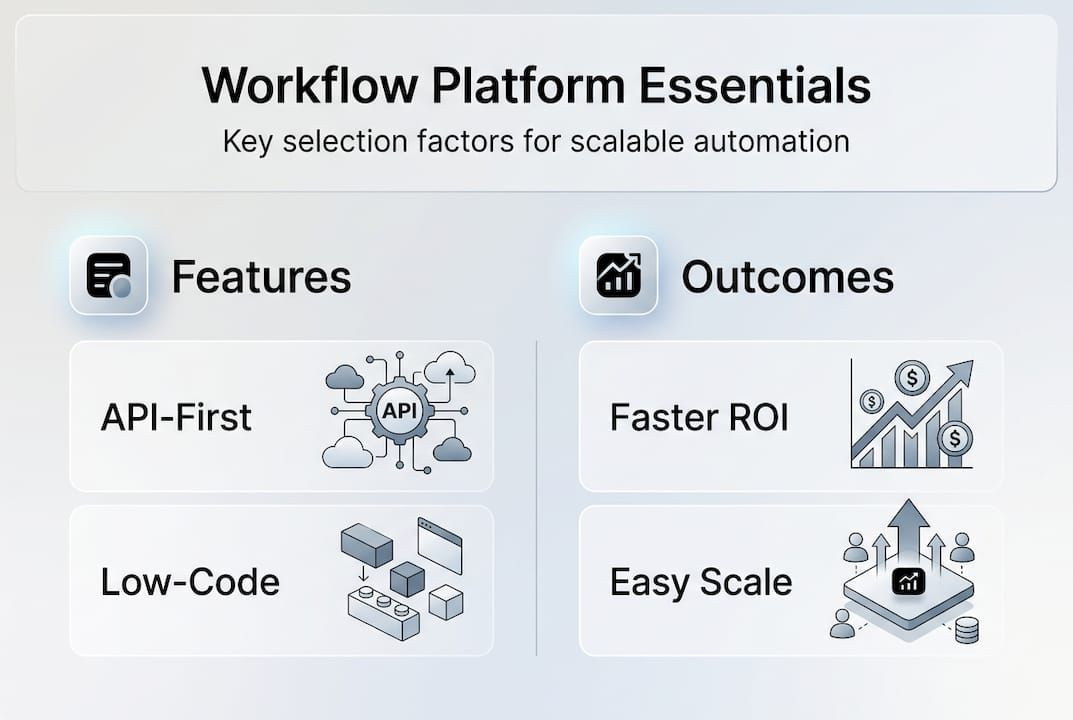
Select platforms that support scalable, flexible automation. Prioritize API-first platforms with low-code capabilities that let business analysts configure workflows without extensive coding. Look for solutions offering pre-built connectors to your ERP, CRM, and other enterprise systems. Modular platforms like API-first low-code platforms enable faster deployment and easier maintenance as requirements evolve. Avoid rigid, monolithic tools that lock you into proprietary ecosystems or require specialized developers for every change.
Establish a Center of Excellence for automation governance. As initiatives scale, you need standardized practices, reusable components, and oversight to prevent chaos. A CoE provides training, maintains best practices, reviews proposed automations for security and compliance, and tracks portfolio-wide metrics. This governance structure ensures automation efforts align with IT strategy rather than fragmenting into disconnected point solutions. It also builds internal expertise that accelerates future projects and reduces dependence on external consultants.
Pro Tip: Start with one high-impact, low-complexity workflow as a pilot. Success builds organizational confidence and provides practical lessons before tackling more ambitious automation projects.
Execution: designing and implementing your customized workflow automation process
Once preparation establishes your foundation, execution transforms plans into functioning automation. This phase demands careful design that balances simplicity with robust exception handling. Many workflow projects fail not from technical limitations but from poor logic design that creates deadlocks, ambiguous decision points, or unhandled edge cases.
Map your core happy path covering roughly 80% of typical scenarios. This mainstream flow should handle standard cases efficiently without unnecessary complexity. Document each step, decision point, data input, and system interaction. Use visual modeling tools to create clear diagrams stakeholders can review and validate. The happy path becomes your baseline automation, optimized for speed and reliability in normal operations. Resist the temptation to overengineer this primary flow with excessive conditional logic that slows processing.
Design explicit exception handling pathways with escalation triggers. Workflows fail if edge cases and exceptions remain unaddressed, creating execution deadlocks or silent failures. Identify scenarios that fall outside your happy path: incomplete data, approval timeouts, system unavailability, or unusual transaction amounts. Build alternative routes that capture these exceptions, log them appropriately, and escalate to human reviewers when automated resolution isn’t possible. Clear exception handling ensures reliability and prevents automation from becoming a black box that hides problems.
Apply decomposition techniques to avoid logic ambiguities. Complex workflows with multiple parallel paths and convergence points can create OR-join scenarios where the system can’t determine which incoming path should trigger the next step. Break complicated processes into smaller, well-defined subprocesses with clear entry and exit conditions. Use explicit synchronization points when parallel activities must complete before proceeding. This modular approach simplifies testing, troubleshooting, and future modifications while eliminating execution ambiguities that cause failures.
Integrate workflows tightly with existing enterprise systems. Automation delivers maximum value when it orchestrates activities across your ERP, CRM, financial systems, and other core platforms. Leverage APIs to read data, trigger actions, and update records in real time. Design integrations to handle common failure modes like network timeouts, rate limits, or temporary system unavailability. Implement retry logic, queue mechanisms, and graceful degradation so workflows continue functioning even when individual systems experience issues. Poor integration design creates brittle automation that breaks frequently and erodes user trust.
Implement monitoring and governance from day one. Instrument workflows with logging that captures execution details, timing, decision outcomes, and errors. Set up dashboards displaying key metrics like completion rates, average processing time, and exception frequency. Configure alerts for anomalies such as unusual failure rates or processing delays. This visibility enables proactive problem resolution and continuous improvement. Governance policies ensure changes follow approval processes, maintain security standards, and preserve audit trails for compliance requirements.
| Design Element | Purpose | Implementation Approach |
|---|---|---|
| Happy path optimization | Handle 80% of cases efficiently | Streamline standard flow, minimize conditional logic |
| Exception routing | Capture edge cases reliably | Define alternative paths with escalation triggers |
| Process decomposition | Eliminate execution ambiguities | Break complex flows into clear subprocesses |
| System integration | Orchestrate enterprise activities | Use APIs with retry logic and error handling |
| Monitoring and governance | Maintain visibility and control | Implement logging, dashboards, and approval workflows |
Pro Tip: Test workflows with realistic data volumes and edge cases before full deployment. Synthetic testing often misses performance bottlenecks and logic flaws that only appear under production conditions.
Verification: measuring success and scaling your workflow automation initiative
Verification transforms automation from a technical implementation into a proven business asset. This phase focuses on measuring actual results against your baseline metrics, identifying improvement opportunities, and building confidence to scale initiatives across the organization. Without rigorous verification, you can’t demonstrate ROI or justify expanding automation investments.

Establish comprehensive baseline metrics before comparing results. Track cycle time from initiation to completion, error rates requiring manual intervention, labor hours consumed, and associated costs for each workflow. Measure customer or employee satisfaction scores related to the automated process. These pre-automation baselines provide objective comparison points. Collect data over a sufficient period to account for seasonal variations or unusual events that might skew results. Solid baselines make ROI calculations credible and defensible to executive stakeholders.
Compare different automation approaches to optimize your strategy. Some organizations achieve better results from comprehensive process redesign before automation, while others benefit from quick automation wins that build momentum. Digital transformation integrating AI agents can deliver 200 to 400% ROI, but requires iterative scaling and redesign rather than big-bang implementations. Test both approaches on different workflows to understand which methodology fits your organizational culture and technical capabilities. Document lessons learned to refine your automation playbook.
Monitor system logs continuously for failures and bottlenecks. Automated workflows can fail silently, processing incorrectly or stalling without obvious indicators. Review execution logs regularly to identify patterns such as specific decision points that frequently trigger exceptions, integrations that timeout repeatedly, or processing steps that consume excessive time. These insights reveal optimization opportunities and potential design flaws. Address recurring issues promptly before they undermine user confidence or create data quality problems that require costly cleanup.
Apply iterative improvements based on operational data and user feedback. Automation isn’t a set-it-and-forget-it solution. As business requirements evolve, workflows need refinement to maintain effectiveness. Schedule regular reviews with stakeholders to discuss pain points, changing needs, and new automation opportunities. Use your governance framework to evaluate proposed changes, prioritize enhancements, and deploy updates systematically. This continuous improvement mindset keeps automation aligned with business value rather than becoming technical debt.
Benchmark ROI and operational benefits to justify scaling. Calculate hard savings from reduced labor hours, faster processing, and fewer errors. Quantify soft benefits like improved employee satisfaction, faster customer response times, and enhanced compliance. Compare these gains against implementation and maintenance costs to determine true ROI. Automation magnifies inefficiencies if processes remain flawed, with only 21% of organizations redesigning workflows to achieve significant EBIT impact. Present clear ROI evidence to secure executive support for expanding automation across additional workflows and departments.
| Metric Category | Measurement Focus | Success Indicators |
|---|---|---|
| Efficiency gains | Cycle time reduction | 40 to 60% faster processing vs baseline |
| Quality improvement | Error rate decrease | 50 to 80% fewer manual corrections needed |
| Cost reduction | Labor hours saved | 30 to 50% reduction in FTE requirements |
| Satisfaction impact | User experience scores | 20 to 40% improvement in stakeholder ratings |
| ROI achievement | Financial returns | 200 to 400% return within 12 to 24 months |
Scale automation strategically based on verified results. Start with workflows demonstrating clear wins, then expand to more complex processes as your team builds expertise. Prioritize automations that integrate naturally with existing implementations, leveraging shared components and established patterns. Consider AI integrations with workflow automation for processes requiring intelligent decision-making or natural language processing. Balance quick wins that build momentum against transformational initiatives that deliver breakthrough improvements. Your governance CoE should coordinate scaling efforts to maintain quality standards and prevent fragmentation.
Pro Tip: Create internal case studies documenting automation successes with specific metrics and lessons learned. These stories build organizational buy-in and accelerate adoption across skeptical departments.
Explore tailored workflow automation solutions with Bitecode
Building effective workflow automation requires both strategic thinking and technical execution. Bitecode accelerates your digital transformation with modular, ready-made components that jumpstart projects with up to 60% of baseline systems pre-built. Our automation module provides API-first, low-code capabilities designed specifically for medium to large organizations implementing customized workflows at scale.
Integrate intelligent automation with our AI assistant module to handle complex decision-making and natural language interactions. Connect seamlessly to your existing enterprise systems through custom CRM solutions that orchestrate data across platforms. Our approach emphasizes rapid deployment, scalability, and governance so you achieve measurable ROI faster while maintaining control and security. Contact our team to discuss how tailored automation solutions can transform your specific workflows and accelerate your digital transformation initiatives.
FAQ
How do I handle exceptions in a workflow automation process?
Design workflows around the 80% happy path covering typical scenarios, then create explicit exception handling routes for edge cases. Build escalation triggers that route unusual situations to human reviewers when automated resolution isn’t appropriate. Use clear decision logic and logging to track how exceptions flow through your system. This approach prevents execution deadlocks while maintaining reliability even when unexpected conditions occur.
Which platform features are essential for scalable workflow automation?
Prioritize API-first architecture enabling easy integrations with existing enterprise systems and external services. Look for low-code tools that empower business analysts to configure workflows without extensive programming. Ensure the platform offers robust governance features including version control, approval workflows, and audit trails. Modular design with reusable components accelerates development and simplifies maintenance as your automation portfolio grows.
How can organizations benchmark ROI for their automation initiatives?
Measure key performance indicators like cycle time, error rates, labor hours, and costs before implementing automation to establish solid baselines. Track the same metrics after deployment, accounting for implementation and maintenance expenses. Calculate both hard savings from reduced labor and soft benefits like improved satisfaction scores. Monitor results over sufficient time periods to account for seasonal variations and ensure gains sustain beyond initial deployment. Iterative tracking and continuous improvement help realize expected returns while identifying optimization opportunities.
What common mistakes derail workflow automation projects?
Automating flawed processes without redesigning them first simply magnifies existing inefficiencies faster. Neglecting exception handling creates brittle workflows that fail unpredictably when edge cases occur. Poor integration design with existing systems causes data inconsistencies and reliability issues. Lacking governance and monitoring allows automation to drift from business requirements or create compliance risks. Starting with overly complex workflows before building team expertise often leads to abandoned projects and wasted investments.
How does AI integration enhance workflow automation capabilities?
AI agents add intelligent decision-making to workflows, handling scenarios that require natural language understanding, pattern recognition, or predictive analytics. They can classify incoming requests, extract information from unstructured documents, or recommend next actions based on historical patterns. However, scaling AI in automation requires careful integration with existing ERP and business systems to avoid creating disconnected point solutions. Start with focused AI applications that solve specific problems, then expand as you build expertise and demonstrate value.


