
TL;DR:
- A ready-made workflow is a prebuilt, configurable automation template that simplifies connecting apps, data, and decision processes without custom coding. It saves time and costs by handling infrastructure complexities and error management, but may limit customization for high-scale or proprietary needs. Proper adoption involves testing, configuring security, and governing templates as controlled, versioned assets.
A ready-made workflow is a prebuilt, configurable sequence of automated tasks designed to connect apps, data sources, and decision logic without requiring custom development from scratch. The industry term for this concept is “workflow automation template,” and the two phrases are used interchangeably across platforms like n8n, GoHighLevel, and Wireflow. For project managers and business teams, understanding what a ready-made workflow delivers versus what it costs in flexibility is the difference between a fast deployment and a failed one. This article covers the definition, real efficiency gains, technical trade-offs, and practical adoption steps.
What is a ready-made workflow, and how does it work?
A ready-made workflow is a pre-configured automation template that ships with built-in task sequences, conditional logic, and integration connectors already assembled. Teams activate it, map their data sources, and adjust parameters rather than building the entire logic chain from the ground up. The template handles the structural boilerplate: trigger conditions, branching paths, error handling, and output formatting. What remains for the team is business-domain configuration, not engineering architecture.

Open-source repositories now offer over 6,400 ready-to-use automation workflows spanning categories from CRM updates to AI-driven document processing. That volume reflects how broadly the pattern has been adopted across industries. Low-complexity templates covering 2–4 nodes can be configured in 5–15 minutes. High-complexity templates with 10–25 or more nodes typically require 1–3 hours of setup time. The gap between a template and a custom build is measured in days, not minutes.
How much time and cost do ready-made workflows actually save?
The efficiency case for prebuilt automation templates is concrete, not theoretical. One documented example shows a company saved an estimated $1.1–1.7 million by deploying templates instead of commissioning custom builds, processing $400 million in applications over 18 months. That figure represents avoided engineering hours, reduced QA cycles, and faster time to production. The savings compound when teams deploy multiple workflows across departments.
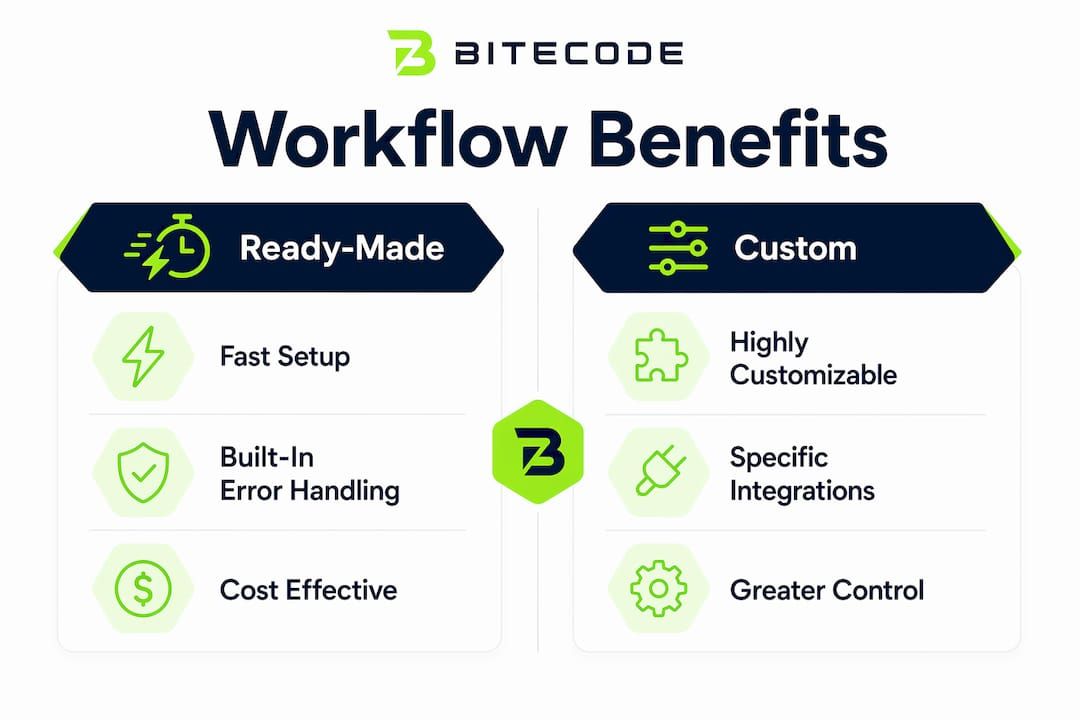
The time reduction is equally significant. Custom workflow development for a mid-complexity process typically runs 400–600 engineering hours. A comparable template deployment runs in days. Industries that have adopted this pattern most aggressively include financial services, healthcare operations, and SaaS product teams running high-volume lead processing.
Key categories where ready-made workflows deliver measurable gains:
- Lead scoring and CRM enrichment: Templates connect form submissions, scoring logic, and CRM writes in a single preconfigured chain.
- Invoice and payment processing: Financial automation templates handle approval routing, exception flags, and ledger updates without custom API work.
- AI triage and ticket routing: Support teams deploy AI classification templates that route tickets within a single business day rather than waiting weeks for a custom build.
- HR onboarding sequences: Templates automate account provisioning, document collection, and notification chains across multiple systems.
Pro Tip: Before deploying any template in production, run it against a representative sample of your actual data. Templates assume standard data models, and mismatches surface fastest under real conditions, not synthetic test cases.
What technical complexity do ready-made workflows handle for you?
The most underappreciated feature of prebuilt automation templates is what they manage invisibly. Teams focus on the business logic they configure. The template absorbs the infrastructure complexity underneath.
Built-in error handling is the clearest example. Production workflows fail in subtle ways: API rate limits hit unexpectedly, authentication tokens expire mid-run, and upstream services return malformed payloads. A well-constructed template ships with retry logic and fallback paths already wired in. Teams that build custom workflows from scratch must design and test each of these failure modes independently. That work is invisible to end users but accounts for a significant share of development time.
The table below compares what teams receive out of the box versus what they must build themselves:
| Feature | Ready-made workflow | Custom-coded workflow |
|---|---|---|
| Error handling and retries | Included | Must be designed and built |
| API timeout management | Included | Must be configured per integration |
| Conditional branching logic | Preconfigured | Built from scratch |
| AI triage or scoring modules | Available as template variants | Requires ML integration work |
| Data mapping to custom schemas | Requires manual adjustment | Fully custom from start |
| Governance and versioning | Built into template structure | Requires separate tooling |
Pro Tip: When evaluating a template for API-heavy workflows, check whether it includes rate-limit handling and exponential backoff. Templates that skip this detail will fail silently under production load.
Managing API timeouts and authentication edge cases is one of the most time-consuming parts of custom workflow development. Templates that handle this natively remove a category of risk entirely.
Ready-made vs. custom workflows: where do templates fall short?
Ready-made workflows are not the right answer for every automation problem. The trade-offs are real, and project managers who ignore them will hit friction during deployment or scaling.
The core limitation is customization depth. Templates are opinionated solutions that encode assumptions about data structure, process sequence, and integration patterns. When your organization’s data model diverges significantly from those assumptions, the template becomes a constraint rather than an accelerant. Teams end up working around the template’s structure rather than with it.
Performance at scale is a second limitation. High-volume operations often require custom-coded solutions that avoid unnecessary API calls and caching inefficiencies that templates abstract away. A template optimized for general use is not optimized for your specific throughput requirements. When processing millions of records per hour, those inefficiencies accumulate.
Situations where custom solutions are the better choice:
- Legacy system integration: When the target system has no standard API and requires proprietary connectors or direct database access.
- Regulatory compliance workflows: When audit trail requirements, data residency rules, or sector-specific logic cannot be satisfied by a general-purpose template.
- Peak-throughput processing: When the workflow must handle sustained high-volume loads and template overhead creates measurable latency.
- Proprietary business logic: When the competitive advantage of the process itself depends on logic that should not be exposed in a shared template structure.
The honest framing is this: templates accelerate work without accelerating chaos, but only when the underlying process fits the template’s assumptions reasonably well.
How to use ready-made workflows effectively in your organization
Treating a ready-made workflow as a finished product is the most common adoption mistake. Templates are 60–80% base solutions that require deliberate configuration to match your organization’s data models, security rules, and process nuances.
A structured adoption approach produces better results than ad-hoc deployment:
- Audit the template against your data model. Map every input field in the template to your actual data sources. Identify mismatches before touching configuration settings.
- Configure security and access rules first. Templates ship with generic permission structures. Apply your organization’s authentication and data access rules before connecting live systems.
- Run a production-traffic simulation. Test with actual production data for at least one week before going live. This surfaces API rate limit issues, unexpected data formats, and edge cases that synthetic tests miss.
- Fork or extend for domain-specific logic. Combining community-tested templates with custom extensions captures both the reliability of the template and the specificity your process requires. Extend rather than rewrite.
- Establish a governance process. Treat templates as versioned artifacts that teams clone from a central library. This prevents quality drift when distributed teams modify local copies independently.
The governance benefit is often underestimated. Reusable templates lock specific parameters and validation logic, ensuring that every team running the same process produces consistent results. That consistency is worth more than marginal customization freedom in most enterprise environments. Teams that adopt workflow automation with a template-first governance model report fewer process failures and faster onboarding for new team members.
Key Takeaways
Ready-made workflows deliver the fastest path to production automation, but only when teams treat them as configurable foundations rather than finished products.
| Point | Details |
|---|---|
| Definition and scope | A ready-made workflow is a prebuilt automation template with built-in logic, error handling, and integration connectors. |
| Time and cost savings | Template deployments replace hundreds of engineering hours and can save organizations over $1 million versus custom builds. |
| Technical coverage | Templates manage API timeouts, retry logic, and fallback paths that custom builds must design from scratch. |
| Known limitations | Templates fall short for legacy integrations, high-throughput processing, and workflows with proprietary business logic. |
| Adoption best practice | Treat templates as 60–80% solutions, run production-data simulations, and govern them as versioned artifacts across teams. |
The governance argument is stronger than the speed argument
The speed benefit of ready-made workflows gets most of the attention. It is real, but it is also the argument that leads teams to deploy templates carelessly and then blame the template when things break.
The more durable argument for prebuilt automation templates is governance. When a team builds a workflow from scratch, the logic lives in one engineer’s head and one codebase. When a team deploys from a shared template library, the logic is documented, versioned, and reproducible. New team members inherit a working process, not a tribal knowledge problem. Distributed teams run the same validated logic rather than diverging copies that drift over time.
At Bitecode, the projects that extract the most value from ready-made components are the ones where the team commits to the template structure early and customizes at the edges rather than in the core. Teams that try to bend a template into a fundamentally different shape end up with the worst of both worlds: the constraints of a template without the speed benefit. The pragmatic move is to select templates whose core logic already matches your process, then extend deliberately. That discipline is harder than it sounds, but it is what separates a fast deployment from a maintenance burden.
— Bitecode
Bitecode’s AI Assistant Module for workflow automation
Bitecode builds enterprise systems with up to 60% of the baseline already assembled, which means teams start with a working modular foundation rather than a blank project. The AI Assistant Module applies that same principle directly to workflow automation, combining prebuilt AI-driven templates with the configuration flexibility that production environments require.
For project managers who need AI-driven workflow automation deployed without months of custom development, the AI Assistant Module provides a tested starting point with room to extend. Teams get built-in error handling, AI triage logic, and integration connectors out of the box, with Bitecode’s modular architecture supporting customization at every layer. The result is a production-ready automation system that does not require starting from zero.
FAQ
What is a ready-made workflow in simple terms?
A ready-made workflow is a prebuilt automation template that connects apps, data, and decision logic without requiring custom code. Teams configure it to their specific data sources and deploy it in hours rather than weeks.
How are ready-made workflows different from custom-built workflows?
Ready-made workflows ship with built-in error handling, retry logic, and integration connectors already assembled. Custom workflows offer more flexibility but require hundreds of engineering hours to build and test equivalent functionality.
What industries use ready-made workflow templates most?
Financial services, healthcare operations, and SaaS product teams use prebuilt automation templates most actively, particularly for lead scoring, invoice processing, AI triage, and onboarding sequences.
Can ready-made workflows handle complex automation tasks?
Templates support complex logic including AI triage, lead scoring, and multi-step approval chains. High-complexity templates with 10–25 or more nodes typically require 1–3 hours of configuration before deployment.
When should a team choose a custom workflow over a ready-made template?
Custom workflows are the better choice when the process involves legacy systems without standard APIs, requires proprietary business logic, or must handle sustained high-volume loads where template overhead creates measurable performance issues.


