
A self-hosted AI assistant is a conversational or agentic system whose model, retrieval layer and logs all run on infrastructure you control: your servers, your colocation rack or your private cloud account. Prompts and company documents never reach a third-party model API. That is the entire appeal, and it comes with a price: your team inherits work a SaaS vendor used to do. This guide covers what the stack contains, what hardware it needs, how to secure and audit it, and when building on a modular foundation beats starting from a blank repository.
TL;DR
- Self-hosting removes third-party data exposure, but it moves patching, monitoring, audit logging and model governance onto your team.
- The stack is more than a model. Plan for an inference server, a retrieval layer, a vector database, an interface, identity and logging.
- Quantization decides hardware cost: a 70B model needs roughly 40 to 45 GB of VRAM at 4-bit versus about 140 GB at FP16.
- The serving engine matters as much as the GPU. Sequential serving can back up queues under real company load.
- Starting from pre-built modules shortens the path to production without giving up control of the code or the data.
What “self-hosted” actually means for an assistant
People use “self-hosted” and “private” interchangeably, but they describe different guarantees. A private assistant may simply be a vendor’s tenant with contractual promises. A self-hosted assistant runs where you decide, and the data path is something you can draw on a whiteboard and defend to an auditor.
In practice, teams choose one of three topologies:
- On-premises: hardware in your own facility. Maximum control, highest capital cost, and the longest lead time.
- Colocation or dedicated servers: your hardware or leased bare metal in a data center. Control over the machine without running the building.
- Private cloud tenancy: GPU instances inside your own cloud account and network boundary. Fastest to start, but you still own configuration, access and logging.
All three share one property: the model weights, the conversation history and the indexed documents sit inside a boundary you manage. If you are still deciding whether to host a model at all, our overview of hosting your own AI model walks through the options and deployment paths.
The components of a working stack
A chat window is the visible tenth of the iceberg. Security researchers advise treating an enterprise assistant as a set of interrelated components such as model endpoints, vector databases and agent runtimes, not as a single object. A realistic stack includes:
- Inference runtime. The service that loads model weights and answers requests. Ollama is a common starting point: one command pulls and serves a model and exposes an OpenAI-compatible HTTP API. Batching engines such as vLLM suit heavier concurrent use.
- Model. An open-weight family such as Llama, Mistral, Qwen or DeepSeek, chosen for task fit, license terms and size.
- Interface. Open-source front ends such as Open WebUI provide a multi-user, ChatGPT-style interface that connects to local runtimes, which saves weeks of work on a first release.
- Retrieval layer. A document ingestion pipeline, an embedding model and a vector database, so the assistant answers from your policies, contracts and tickets rather than from general training data.
- Identity and permissions. Single sign-on, role mapping and document-level access control, so the assistant never retrieves what the asking user could not open directly.
- Tool and workflow connectors. CRM, ticketing, finance and ERP integrations that turn a chatbot into an assistant that does work.
- Observability and audit. Metrics, traces and tamper-resistant logs of every model call and tool invocation.
Most failed pilots fail on items 5 to 7, not on the model. A demo that answers questions from a folder of PDFs says little about whether the system respects permissions or leaves an audit trail.
Hardware: what the model size really costs
Hardware requirements depend heavily on quantization. According to one multi-GPU Ollama guide, a 70B-parameter model at 4-bit (Q4_K) needs approximately 40 to 45 GB of VRAM, while FP16 would need roughly 140 GB. Quantization can shrink a model to about a quarter or a third of its original size with minimal quality loss, and that gap is the difference between a single workstation-class server and a multi-GPU cluster.
| Model class | Typical use | Practical hosting note |
|---|---|---|
| Small (up to roughly 8B) | Classification, routing, simple Q&A, summarization | Fits a single mid-range GPU; cheap to run, limited reasoning |
| Mid-size (roughly 30B) | Document Q&A, drafting, light tool use | One high-memory GPU at 4-bit; good balance for departmental use |
| Large (70B) | Complex reasoning, long-context analysis | About 40 to 45 GB VRAM at Q4_K; multi-GPU or large unified memory |
Two details change the math further. First, VRAM is not the only bottleneck. The same guide notes that inter-GPU bandwidth (PCIe versus NVLink) and request handling both affect throughput, and that sequential serving can cause serious queue backups, which makes the choice of serving engine as critical as the hardware. A single-user Ollama setup that feels instant for one engineer can stall when two hundred employees open the assistant on Monday morning.
Second, unified-memory machines change the economics for small teams. A reported test of an M4 Max with 128 GB of unified memory ran the 70B DeepSeek-R1 at 12 tokens per second, while a discrete GPU with 24 GB of VRAM could not load it. That is fine for a pilot or a small group, but 12 tokens per second is not a design target for an organization-wide rollout.
Size for concurrency, not for a single prompt. Estimate peak simultaneous users, average context length and acceptable latency, then load-test before you commit to hardware.
Security: self-hosting is a responsibility, not a shield
Expert consensus is that self-hosting removes third-party data risks but introduces new operational responsibilities. Models are software artifacts. They need the same vulnerability scanning, patch management and lifecycle controls as any other mission-critical application.
Secure the model supply chain
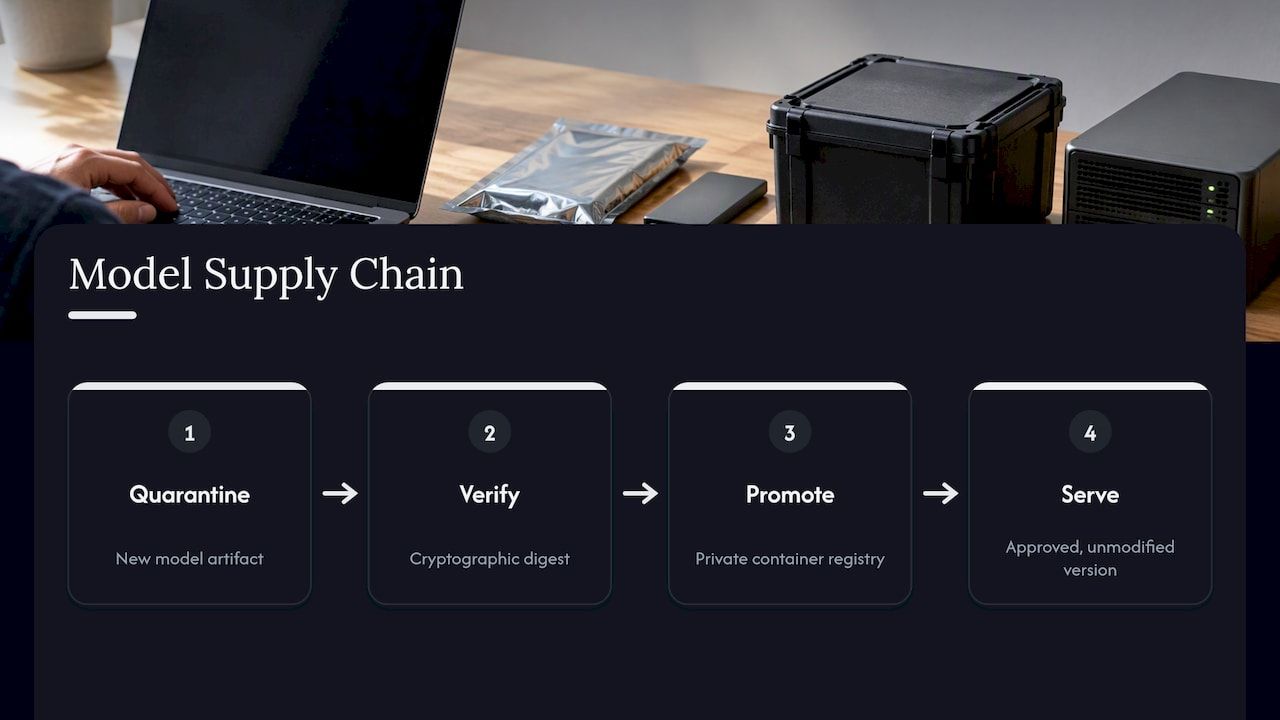
Many teams pull pre-trained models from public repositories without validation. A safer pattern, described in the same Vegard IT guidance, is to quarantine new artifacts, verify their cryptographic digest and promote them through a private container registry so that only approved, unmodified versions are served. A model’s publisher or jurisdiction does not by itself prove it is safe.
Map trust boundaries
Every component in the stack has its own identity and its own failure modes. The retrieval service, the vector database and the agent runtime each need scoped credentials, and policy enforcement belongs at runtime, not only at the network perimeter. This matters most when an assistant can act, not just answer. For a deeper look at identity for software agents, see this piece on AI agent authorization and trust, which covers how to verify what an automated actor is allowed to do.
Grant autonomy in steps
New Zealand’s National Cyber Security Centre advocates graduated autonomy for agentic systems in its guidance on careful adoption of agentic AI: human-in-the-loop controls and continuous evaluation, widening an agent’s scope only after performance and safety thresholds are validated in the specific environment. The guidance comes from a non-US agency, but the principle travels well. Start with read-only retrieval, add drafting, then add actions with approval, and only then consider unattended execution.
For the control layer itself, our write-up on AI guardrails aligned with NIST and OWASP shows how to add policy enforcement without rebuilding what you have. The broader issue of protecting automated processes is covered in why security in automation matters for complex workflows.
Audit logging and governance in the US context
In a SaaS product, the vendor supplies audit logs. In a self-hosted stack, you must implement and maintain immutable audit logs for every model call, tool invocation and agent decision if you want to satisfy enterprise compliance requirements. That means deciding up front what is logged, who can read it, how long it is retained and how tampering is detected.
On the governance side, the NIST AI Risk Management Framework has become a common baseline for US organizations. It is voluntary, but according to one implementation guide it is increasingly built into procurement standards, state AI laws and cyber insurance underwriting. The same guide points to inventories of self-hosted models and data-flow records as practical documentation. The framework rests on NIST AI 100-1 and the Generative AI Profile, NIST AI 600-1.
If your assistant touches regulated data, such as patient records, payment data or privileged legal files, involve your compliance officer or outside counsel before go-live. Self-hosting helps with data residency questions, but it does not by itself make a deployment compliant with HIPAA, GLBA or state privacy laws.
A minimum governance checklist for a first release:
- A model inventory with version, source, digest and owner.
- A data-flow diagram covering prompts, retrieved documents and outputs.
- Role-based access with document-level permissions in retrieval.
- Immutable logs for model calls and tool actions.
- A documented approval path for new models and new tool permissions.
- A recurring evaluation set that catches regressions after model or prompt changes.
Build, assemble or buy
There are three honest routes, and each relocates complexity somewhere different.
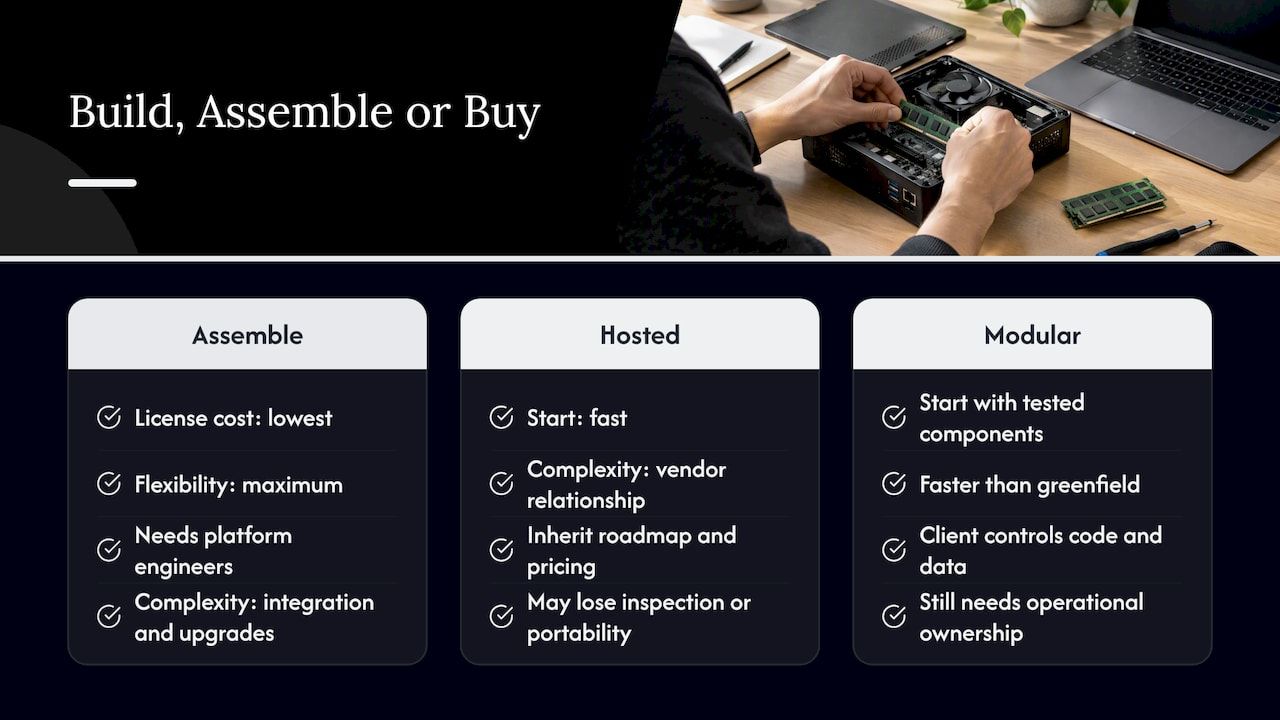
Assemble open-source parts yourself. Lowest license cost and maximum flexibility. It suits a team with strong platform engineers and time to spare. The cost shows up later as integration glue, upgrade churn and the long tail of permissions, logging and connectors.
Buy a closed, hosted product. Fast to start, but a black-box platform relocates complexity into the vendor relationship. You inherit their roadmap, their data handling and their pricing, and you may lose the ability to inspect or move the system.
Build on a modular foundation. Start from tested components for the parts every enterprise assistant needs, then customize the business-specific layer. This is the route we advocate, because it accelerates work without accelerating chaos: the boilerplate is handled, and the code and data stay under the client’s control.
The trade-off is real. A modular base is faster than a greenfield build, yet it still requires decisions about models, hosting and integration. It does not replace operational ownership. For a structured way to compare vendors and approaches, our enterprise AI assistant procurement guide lists the questions to ask, and the integration guide covers connecting an assistant to existing systems.
Our perspective
We see the same pattern in assistant projects. The model choice gets the meetings, while the unglamorous layers decide the outcome: permissions, connectors, audit trails and an honest plan for who patches what. Teams that treat the assistant as a product with an owner do well. Teams that treat it as a weekend experiment promoted to production do not.
Bitecode builds enterprise systems from modular, ready-made components, and we can start a project with up to 60% of the baseline system already in place. For assistants, that means an AI Assistant module, a Workflow Automation module and, where the use case needs them, financial and CRM modules, deployed as self-hosted systems that are audit-ready and controlled by the client. We would rather say plainly what this does not do: it does not remove the need for an infrastructure owner, and it does not make every use case suitable for automation. A sensible first project is narrow, measurable and read-only, and it earns the right to act on systems later.
Our view on model choice is just as plain. Pick the smallest model that passes your evaluation set, put the engineering effort into retrieval quality and permissions, and keep the option to swap models as better open-weight releases appear. A modular architecture makes that swap a configuration change rather than a rewrite.
— Bitecode
Where Bitecode fits
If you want a self-hosted assistant connected to your own workflows, our AI Assistant and automation modules are the starting point, and our AI solutions for business page describes how projects are scoped. For process-heavy use cases, see AI business process automation workflows. We scope each engagement individually, so there is no published price list. Describe your use case and constraints, and we will outline an approach.
A practical rollout path
A pattern that holds up across industries:
- Pick one use case with a clear metric. Internal policy Q&A, support-ticket triage or contract summarization work well. Define success before building.
- Choose the hosting topology. Decide on-premises, colocation or private cloud based on data class, latency and budget.
- Stand up the stack in a sandbox. Inference server, interface, retrieval and identity, with synthetic or low-risk documents first.
- Build an evaluation set. Fifty to a few hundred real questions with expected answers, rerun after every change.
- Load-test for concurrency. Measure latency at peak simultaneous users, not at one.
- Enable logging and review. Confirm that every call and tool action lands in tamper-resistant storage before real data arrives.
- Pilot with a small group, then widen. Expand autonomy in steps, as the graduated-autonomy guidance recommends.
When the assistant begins triggering actions, the question of where AI ends and rule-based automation begins comes up. Our analysis of RPA versus AI automation tradeoffs helps you place each task in the right tool, and the guide to AI workflow automation covers design patterns for enterprise teams.
FAQ
Is a self-hosted AI assistant more secure than a SaaS one?
It removes the third-party data exposure, which is a real gain for sensitive material. It also makes you responsible for patching, access control, model validation and logging. A well-run SaaS product can be safer than a neglected self-hosted server, so the answer depends on your operations.
What hardware do I need to run a private assistant?
It depends on model size and user count. A 70B model at 4-bit quantization needs roughly 40 to 45 GB of VRAM, while smaller models fit on a single mid-range GPU. For a team-wide rollout, size for peak concurrent users and test your serving engine under load.
Can a self-hosted chatbot answer questions from our own documents?
Yes, through a retrieval layer that indexes your documents in a vector database and passes relevant passages to the model. The critical part is enforcing the asking user’s permissions at retrieval time, so the assistant never surfaces files that user could not open directly.
Do we need to follow NIST guidance if we self-host?
The NIST AI Risk Management Framework is voluntary, but it is increasingly referenced in procurement requirements, state laws and insurance underwriting. Even if no one requires it today, a model inventory and data-flow records are useful from day one. Your counsel can tell you which rules apply to your sector.
Should we build it ourselves or work with a development partner?
If you have a platform team with spare capacity, assembling open-source components is viable. If you need a production system with integrations, permissions and audit trails on a deadline, starting from pre-built modules reduces time and risk.
Sources
- Operationalizing the NIST AI RMF for LLM Security, Penaxtra
- Securing and Operating a Private LLM System, Vegard IT
- Careful adoption of agentic AI services, NCSC New Zealand
- AI deployment frameworks: NIST AI RMF and OWASP Agentic AI Top Ten alignment, Prediction Guard
- NIST AI RMF 1.0: translating the framework into daily operations, Efros
- How to Run 70B AI Models Locally: Multi-GPU Ollama Setup Guide, Markaicode
- Open WebUI: Self-Hosted AI Platform


