
Multi-currency invoicing means issuing an invoice in the currency your customer expects to pay, while your books stay in US dollars. The billing part is easy. The hard part is the accounting that follows: which exchange rate you recorded, when you recorded it, and what happens to the difference when cash arrives. This guide covers how to set the process up, which accounting rules apply to US companies, and where off-the-shelf tools stop being enough.
TL;DR
- Assign a billing currency to each customer record, so quotes, invoices and reminders come out in that currency without manual conversion.
- Decide how the exchange rate is fixed: a rate locked at issuance, or a static price per currency. Floating rates on large invoices invite disputes.
- US taxpayers must track the rate on the booking date and on the payment date. The difference is a realized gain or loss under IRC Section 988.
- Store the rate applied on every document. An audit-ready system never recalculates history.
- Basic invoicing tools often record the foreign amount only. If you need rate history, reconciliation and ledger integrity, a purpose-built module is the safer route.
What multi-currency invoicing covers, and what it does not
Two things are often mixed up. Invoicing is the billing event: a document with an amount, a currency, a due date and a payment instruction. Multi-currency pricing is the storefront or quote layer, where a price is shown to a buyer in local currency before any purchase. Stripe’s documentation on localizing prices describes three presentment modes: automatic conversion, an FX quotes API that lets you lock a rate, and manual prices per currency. Those modes map neatly onto the choices a B2B finance team faces when it invoices abroad.
For most B2B companies the question is narrower. A German customer wants an invoice in euros. A Canadian one wants Canadian dollars. Your ledger, your tax return and your financial statements remain in dollars. Everything else in this article follows from that gap between the currency on the document and the currency in the books.
Why invoice in the customer’s currency at all
There are three practical reasons.
- Payment friction. A customer who has to convert and wire dollars often pays late or short. Paying in their own currency removes a step on their side.
- Price clarity. The customer sees the exact amount that will leave their account, which cuts down on disputes about what the invoice “really” cost.
- Trust. Documents in the customer’s own currency, and ideally their own language, read as a sign of a serious supplier. A sound implementation separates the document language from the interface language, so a German customer receives a German-language invoice in euros while your US team works in English and dollars.
There is a cost. You take on exchange rate exposure between the invoice date and the payment date. That exposure is not a reason to avoid the practice, but it has to be handled on purpose rather than discovered at month-end.
Setting it up: the building blocks
A default currency per customer
The cleanest pattern is to attach a billing currency to the customer record. Every quote, invoice, credit note and payment reminder then inherits it. Nobody picks a currency from a dropdown at the point of sale, and nobody converts by hand. Mature platforms handle well over 150 currencies, according to one invoicing vendor’s multi-currency overview, but the number matters less than the rule: one customer, one billing currency, changed only deliberately.
Two edge cases deserve a decision up front. What happens when a customer asks to switch currency mid-contract? And can the same customer hold open invoices in two currencies? If the answer to the second is yes, your credit notes and payment allocation logic need to know which currency each document belongs to.
Where exchange rates come from
Most systems pull daily reference rates, often from central banks, and apply them automatically. That is fine for internal reporting. For customer-facing documents, pick a rate policy and write it down:
- Rate at invoice date, fixed on the document. The customer pays the stated amount in their currency. You carry the risk until cash arrives.
- Static price list per currency. You set round prices, such as 1,000 EUR or 1,100 CAD, and review them quarterly. No conversion is visible to the customer.
- Quoted rate with a lock window. Useful for large one-off deals. Providers differ, but Stripe’s FX quote documentation describes locks lasting from 5 minutes up to 24 hours depending on duration, and notes that a lock can lapse if the market moves past a threshold.
The point of all three is the same: the customer sees one fixed number. Fiserv’s multi-currency pricing guidance makes a related point about presentation: once a currency is selected, show only that currency. Mixing local and foreign amounts on one page invites confusion and complicates audits.
Document language and layout
Currency is only part of a compliant foreign invoice. Tax identifiers, VAT or GST wording, bank details and payment terms vary by country. Check what the customer’s jurisdiction requires with a local adviser before you issue the first document, and keep the template per country rather than per currency. Euro invoices to Germany and to Ireland are not the same document.
The accounting gap most tools leave open
Here is where many teams get caught. Issuing the invoice is the easy event. Two later events create the accounting work.
Under the IRS framework for Section 988 nonfunctional currency transactions, a US taxpayer measures its results in a functional currency, typically the dollar. A receivable denominated in euros is recorded in dollars at the rate on the booking date. When the customer pays, you convert again at the rate on that day. The difference is a realized foreign currency gain or loss. The same IRS material states that these amounts are generally ordinary income or loss, not capital.
The IRS concept unit on exchange gains or losses on payables and receivables walks through the booking date, the spot rate and the treatment of receivables in detail. For financial reporting, US GAAP’s ASC 830 asks for transaction gains and losses to flow through net income in the period of settlement, as one practical accounting guide explains for small businesses.
A worked example makes the mechanics concrete. Suppose you invoice a customer 10,000 EUR on March 1, when 1 EUR is worth 1.08 USD. You book a receivable of 10,800 USD. The customer pays on April 15, when 1 EUR is worth 1.05 USD, so the 10,000 EUR you receive converts to 10,500 USD. The 300 USD difference is a realized exchange loss. The numbers are illustrative, not market data, but the shape is real: two rates, two dates, one difference that must land in the right account.
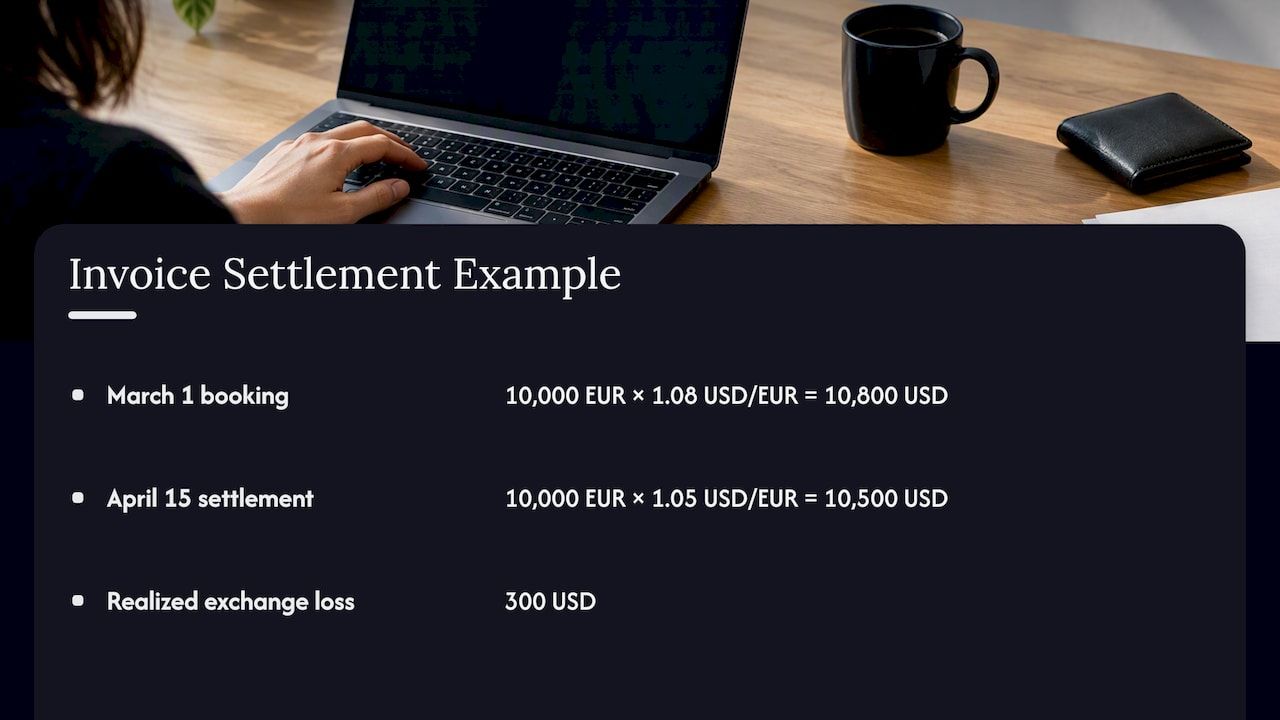
A system that stores only the foreign amount cannot produce that entry. Finance then reconciles manually, usually in a spreadsheet, which is exactly where audit questions begin. If your company runs foreign branches that keep their own books, the picture changes again: such units may fall under the rules in IRC 987 for branch operations, which is a conversation for your tax adviser, not a software setting.
This is general information, not tax advice. Treatment depends on your entity structure, elections and facts, so confirm it with a CPA before you design the ledger.
What an audit-ready invoice record contains
Whatever tool you use, check that each invoice and payment stores:
- The invoice currency and amount.
- The functional-currency (USD) amount at booking, and the exchange rate and its source and date.
- The payment currency, amount, date and rate at settlement.
- The realized gain or loss, posted automatically to a dedicated account.
- An immutable history. Changing today’s rate must never rewrite last quarter’s documents.
That last item matters most. If a system recalculates old invoices when rates update, your reported results drift away from what was actually booked. Clean receipt and invoice records also make year-end work faster; this walkthrough on audit-ready document management in Xero shows the discipline from a bookkeeping angle. For the ledger side, our guide to an audit-ready double-entry ledger explains how traceability is built in.
Common mistakes
Using floating rates on large invoices. The customer expects one amount and pays another after the market moves. Lock the rate or use static prices.
Letting each salesperson choose the currency. You end up with the same customer billed in three currencies and a payment-matching problem. Fix the currency on the customer record.
Ignoring the payment-date rate. Booking the invoice correctly but never computing the gain or loss at settlement leaves unreconciled receivables on the balance sheet.
Treating multi-currency pricing and invoicing as one feature. The first is a commercial decision about what buyers see. The second is a record-keeping obligation. Different owners, different controls.
Forgetting downstream processes. Sales tax, refunds, credit notes and bank reconciliation all inherit the currency logic. Our pieces on sales tax integration for US sellers and financial reconciliation automation cover two of the places this breaks first.
Off-the-shelf tool or custom system?
For a small company with a handful of foreign customers, a standard accounting package with multi-currency enabled is usually enough. Turn on a currency per customer, use the built-in rate feed, and have your accountant review the gain and loss postings monthly.
The case for something more tailored appears when one or more of these is true:
| Situation | Why standard tools strain |
|---|---|
| Invoicing is part of your product, such as a SaaS with usage or subscription billing | Billing logic, tax and currency must live inside your own flows |
| You need locked rates, static price lists and settlement in the same workflow | These are often separate settings in separate tools |
| Customers pay in crypto or stablecoins as well as fiat | Few invoicing packages handle both on one ledger |
| Compliance requires self-hosting or tight data control | Many platforms are hosted only |
| Several entities, approval chains or ERP integrations | Workflow rules outgrow configuration screens |
There is also a trade-off worth stating plainly. A custom build relocates complexity into your own roadmap, so it has to earn its place. The question is whether the base you build on is a blank page or a proven modular foundation. Our longer guide to multi-currency accounting for finance teams goes deeper on the finance-side setup, and the business software selection checklist helps frame the build-or-buy decision.
Our perspective
We see the same pattern in finance projects. Teams treat currency as a field on the invoice, and months later discover it is a property of the whole ledger. The invoice is the visible part. The expensive part is everything behind it: the rate stored at booking, the rate at settlement, the automatic posting of the difference, and an audit trail nobody can edit.
That is why we build financial systems on a modular foundation rather than from a blank repository. A multi-currency, audit-ready ledger is not where a business should spend its first six months of a greenfield build. Starting with up to 60% of the baseline system already in place lets a team spend its effort on the parts that are specific to its business: its pricing model, its customers’ payment habits, its approval flow.
We also hold a firm view on lock-in. Finance systems should be maintainable by the company that depends on them, which is why we support client-controlled customization and self-hosted modules. A black-box platform that hides how rates are applied is hard to defend in front of an auditor.
Not every company needs this. If a standard accounting package covers your volume and your workflows, use it. If invoicing sits inside your product or your compliance model, a modular build is faster and lower risk than a conventional software house engagement.
— Bitecode
Building multi-currency invoicing with Bitecode
Our Financial Module brings multi-currency, audit-ready processing into a custom system, and it pairs with the Automation Module for approvals and reconciliation workflows. For end-to-end builds, see our custom business software service, or talk to us about your project if you are scoping an MVP or a larger system. Pricing is scoped per engagement, so there is no published rate card.
A practical rollout sequence
- Inventory your customers by currency. Count how many bill in each currency and the invoice volume per month.
- Pick the rate policy. Fixed at invoice date, static price list, or a lock window for large deals.
- Set the customer-level default currency and block ad hoc overrides.
- Configure gain and loss accounts with your accountant, and test one full invoice-to-payment cycle in a sandbox.
- Localize the documents. Language, tax wording and bank details per country.
- Automate reconciliation. Match foreign payments to open invoices by currency and post the difference.
- Review monthly. Spot-check rates against the source, and review static prices every quarter.
If you bill by subscription, the mechanics of recurring charges add another layer; our guide to subscription billing integration covers it from the engineering side.
FAQ
Can you invoice in a different currency?
Yes. In the US, nothing prevents you from invoicing a customer in a foreign currency, provided the contract and the invoice state the currency clearly. Your books still need to be kept in your functional currency, usually the dollar, so each foreign invoice must also be recorded in USD at the booking-date rate.
Is double invoicing illegal?
Issuing two invoices for the same sale, one in each currency, creates a duplicate receivable and is a recipe for errors, and deliberately billing twice for the same goods is improper. The correct approach is one invoice in one currency, with the dollar equivalent recorded internally. If you have a billing question with legal consequences, ask your attorney.
How do exchange gains and losses on invoices get taxed?
For US taxpayers, gains and losses on foreign-currency receivables are generally computed under IRC Section 988 as the difference between the booking-date and payment-date rates, and are usually ordinary rather than capital. Elections and exceptions exist, so have your CPA confirm the treatment for your entity.
Should I show prices at a floating exchange rate?
For B2B invoices, generally no. A floating amount means the customer cannot know what they will owe. Lock the rate at issuance or publish static prices per currency, so the number on the invoice is the number that is paid.
Sources
- IRS: Overview of IRC Section 988 Nonfunctional Currency Transactions
- IRS: Exchange Gains or Losses on Payables and Receivables
- IRS: Overview of IRC 987 and Branch Operations in a Foreign Currency
- Fiserv: Multi-Currency Pricing documentation
- Stripe: Localize prices
- Holded: Multi-currency invoicing overview
- Beancount.io: Foreign Exchange Gains and Losses guide


