
TL;DR:
- Disjointed systems and manual workflows hinder enterprise growth, but automation modules can improve efficiency when properly integrated. A deliberate, stepwise approach to defining objectives, assessing readiness, selecting methods, and maintaining integrations ensures reliability and scalability. Investing in reusable libraries and collaborative design accelerates future automation efforts while reducing technical debt and operational risks.
Disjointed systems and manual workflows remain among the top obstacles blocking enterprise growth. When finance reconciles data by hand, when HR exports spreadsheets to trigger onboarding sequences, or when IT teams patch together point-to-point connections with no shared logic, the result is fragility at scale. Automation modules can eliminate most of this friction, but only when integrated with a structured, deliberate approach. This guide walks IT managers and business executives through a clear, step-wise framework for selecting, deploying, and sustaining automation modules that actually hold up under enterprise conditions.
Key Takeaways
| Point | Details |
|---|---|
| Strategic alignment first | Success depends on matching business needs and IT readiness before integration. |
| Choose the right tools | Using accelerators, adapters, and correct module types saves major development time. |
| Execute with best practices | Standardize, phase, and document integrations to avoid costly errors. |
| Prioritize reliability | Testing, monitoring, and handling edge cases safeguard your automation from downtime. |
| Build for scale | Reusable logic and shared collaboration models create faster, future-ready automation. |
Clarify objectives and assess readiness
With the challenge clearly defined, you need to lay the foundation for integration success by understanding your objectives and current state. Jumping straight to implementation without this groundwork is one of the most common reasons automation projects stall or require expensive rework months after go-live.
Start by defining the specific business problems the integration must solve. Vague goals like “improve efficiency” produce vague outcomes. Concrete objectives, such as reducing invoice processing time from five days to eight hours or eliminating manual data entry between the CRM and the ERP, give teams a measurable baseline and a clear definition of success. Well-defined automation strategies at this stage prevent scope creep later.
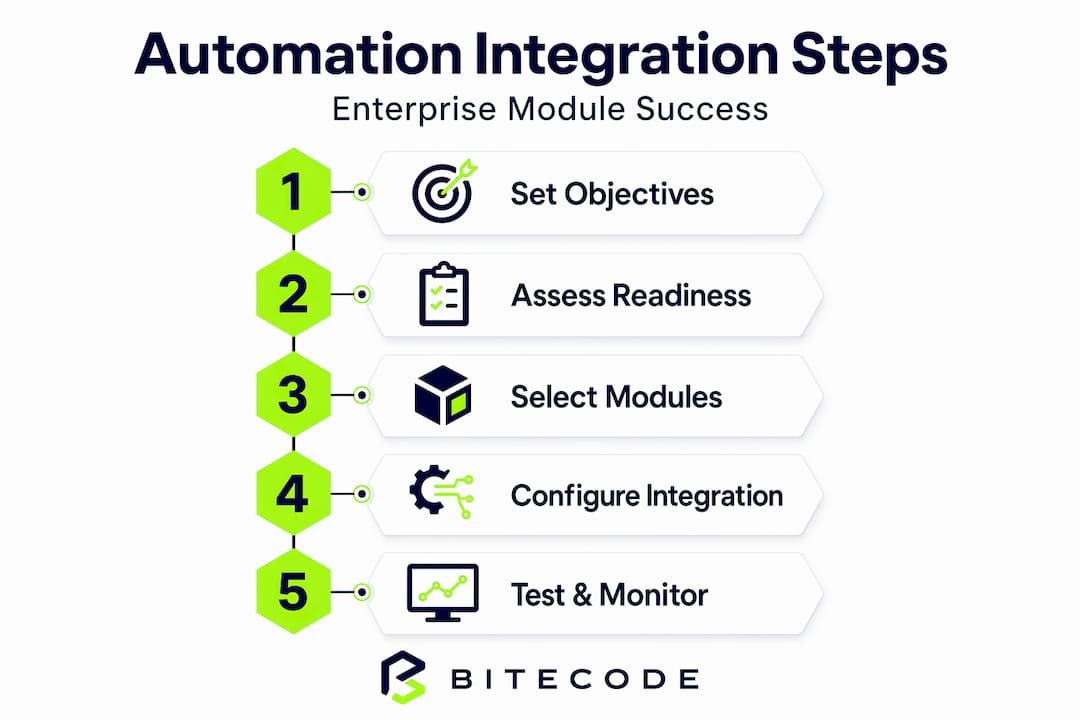
Next, assess your technical readiness. Review the current stack: which systems expose APIs, which rely on legacy interfaces, and which have no documented integration points at all. Evaluate data standards across systems. Inconsistent date formats, mismatched field naming conventions, and duplicate customer IDs across platforms will create failures mid-integration that are difficult to trace after the fact.
Identifying processes ripe for automation is equally important. Consider these criteria when building your shortlist:
- High volume, low variability: Processes that repeat frequently and follow predictable rules are prime candidates.
- Data handoff between systems: Any step that requires a human to copy, reformat, or re-enter data is an integration opportunity.
- Clear input/output boundaries: Processes where the beginning and end states are well understood integrate cleanly.
- Current error rate: Manual steps with documented error rates signal both risk and ROI potential.
The principle here is well stated in Oracle’s guidance on automation planning: as they recommend, design automation modules as part of an end-to-end automation strategy, covering what to automate, pre and post analysis, lifecycle management, and environment management. This framing prevents teams from treating module integration as a one-time event rather than an ongoing capability.
| Readiness dimension | What to evaluate | Target state |
|---|---|---|
| API availability | REST, SOAP, webhooks per system | All core systems documented |
| Data standards | Field formats, naming conventions | Unified schema defined |
| IT and business alignment | Shared KPIs for automation | Joint sign-off on objectives |
| Security and permissions | Role-based access per module | Least privilege applied |
| Documentation | Existing integration maps | Current state diagrammed |
Pro Tip: Schedule a two-hour joint session with IT architects and process owners before any tooling decisions. This single meeting often uncovers conflicting assumptions that would otherwise surface as production incidents.
Studying real-world integration examples from other organizations can also surface edge cases your internal assessment might miss, particularly around legacy middleware and data transformation layers.
The enterprise system features your platform supports will directly constrain which integration patterns are feasible. Understanding those boundaries upfront avoids mid-project architectural pivots.
Select integration methods and required modules
With your objectives and baseline clear, the next step is picking the integration methods and automation modules that fit your enterprise needs. The wrong choice here does not just slow delivery; it creates architectural decisions that are expensive to reverse.
There are three primary integration mechanisms available to most enterprise environments:
- Direct API integration: System A calls System B’s published API. This method is reliable, fast, and predictable when both systems expose stable, well-documented interfaces. It works best for real-time data exchange and transactional operations.
- Robot-based (UI automation): A software robot interacts with application interfaces the way a human would. This approach is the right fit for legacy systems that have no API layer, or for desktop applications that will not be replaced in the near term.
- Hybrid integration: Combines API calls for systems that support them with UI robots for those that do not. This is the most common pattern in medium to large enterprises running a mix of modern SaaS platforms and legacy on-premise software.
Understanding types of business automation is necessary before committing to any particular method. Organizations that skip this step frequently over-invest in UI robots for systems that actually have workable APIs, adding unnecessary fragility.
| Integration method | Best fit scenario | Key risk | Typical stakeholders |
|---|---|---|---|
| Direct API | Modern SaaS, stable interfaces | API versioning changes | IT architects, vendors |
| UI robot | Legacy systems, no API access | UI change breaks robot | IT, operations teams |
| Hybrid | Mixed technology environments | Complexity of dual maintenance | IT, business process owners |
| Adapter/accelerator | Common system pairs (ERP + CRM) | Vendor lock-in risk | IT procurement, architects |
Oracle’s integration planning guidance is direct on this point: plan for integration by using available adapters, recipes, and accelerators where possible, and explicitly decide whether to implement integrations, robots, and decision logic. Prebuilt accelerators exist for many common system pairs and can reduce integration development time by 40 to 60 percent compared to building from scratch.
When selecting modules, involve both business and IT stakeholders from the outset. Business teams understand the process logic, exception scenarios, and compliance requirements. IT teams understand what the infrastructure can reliably support. Separating these conversations produces integrations that work technically but fail operationally.
Here is a practical selection sequence to follow:
- Map each target process to one of the three integration mechanism types.
- Check whether a prebuilt adapter or accelerator exists for the relevant system pair.
- Evaluate the adapter’s coverage against your specific use case, not just its general description.
- Assign a business process owner and a technical owner to each selected module before any configuration begins.
- Document the decision rationale, including what was considered and rejected, so future teams have context.
Pro Tip: Resist the pull toward UI robots for speed. They are faster to stand up initially, but every UI change in the target application becomes a maintenance event. If an API path exists, invest the extra time now.
A complete integration guide covering enterprise-grade patterns can help teams stress-test their selections before committing to a build plan.
Implementing and configuring integrations
After selecting integration methods and planning modules, it is time to execute the integration and configuration. This phase is where good planning pays off and where skipped groundwork becomes visible as production problems.

Follow a staged rollout approach. Begin in a sandbox environment that mirrors production data structures without exposing live records. This allows teams to validate module behavior, test error scenarios, and iterate on configuration without business risk. Staging environments follow sandbox, and production release happens only after defined acceptance criteria are met.
A practical implementation sequence looks like this:
- Configure the module in sandbox with representative test data covering both typical and edge case records.
- Standardize naming conventions and data formats across all integration points before connecting systems.
- Test each connection independently before testing the end-to-end flow. Isolating failures at the individual integration level is far easier than diagnosing a multi-system breakdown.
- Assign permissions using least privilege. Each module should access only the data and functions it needs, no more.
- Document every integration point including field mappings, transformation logic, authentication methods, and known limitations.
- Move to staging and repeat the test sequence with a broader stakeholder group, including business users who know what correct outputs look like.
- Release to production incrementally, starting with a subset of transactions or a single business unit before full deployment.
For organizations building on modern platforms, end-to-end automation requires that each module in the chain maintains its own accountability. A failure at step three of a seven-step workflow should not silently corrupt data in steps four through seven.
Kaseya’s integration documentation is specific on this: for module-to-module integrations, standardize data, phase implementation, assign adequate permissions, review integration sync health regularly, and maintain documentation per integration point. These are not optional polish steps; they are the baseline for operational stability.
Key configuration practices to enforce across every module:
- Use consistent timestamp formats (ISO 8601 is the widely adopted standard).
- Validate field lengths and data types at the integration layer, not just at the application layer.
- Log every transaction with a unique identifier that persists across systems.
- Set integration sync health alerts with defined thresholds so problems surface before users notice them.
- Review automation security best practices before enabling any external-facing integration endpoints.
Real-world evidence on automation for operational efficiency consistently shows that the teams achieving the highest reliability are those who treat documentation as a deliverable, not an afterthought. When a configuration needs to change six months later, that documentation becomes the difference between a two-hour update and a two-week investigation.
Testing, monitoring, and future-proofing automation
Once your integrations are running, success depends on continuous testing and adapting as your systems evolve. An integration that works on go-live day can silently degrade as systems update, data volumes grow, or business rules change.
Build a test plan that covers more than the happy path. Every integration has edge cases: what happens when the source system sends a null value, a duplicate record, or a payload that exceeds expected size limits? Untested edge cases become production incidents.
“Edge cases and failure modes commonly break naive automation; robust designs include idempotency, retry/backoff controls, and explicit handling of partial success to prevent cascading failures.” The workflow that broke prod
Idempotency means that running the same integration operation twice produces the same result as running it once. Without this guarantee, retry logic, which every production integration needs, becomes a source of duplicate records, duplicate transactions, and corrupted state. Design idempotency into every integration that handles writes or state changes.
Monitoring should be active, not passive. Reviewing logs manually once a week is not monitoring. Effective monitoring includes:
- Real-time alerting when integration error rates exceed defined thresholds.
- Latency tracking to detect performance degradation before it becomes an outage.
- Data volume anomaly detection to flag unexpected spikes or drops in transaction counts.
- Daily summary reports for business stakeholders showing key integration KPIs.
- API endpoint health checks running on scheduled intervals.
Use the automation API documentation for your integrated systems to identify which telemetry endpoints are available and incorporate them into your monitoring stack.
For future-proofing, treat your integration layer as a living system. Every time a connected application releases a major update, review whether field mappings, authentication methods, or data structures have changed. Assign a named owner to each integration who is responsible for tracking those updates. Document the reconfiguration steps for each module so that future changes can be executed by a competent team member without requiring the original architect.
Mastering automation processes at an enterprise level means planning for the scenario where a partial failure in one module should not cascade into a full system outage. Implement circuit breaker patterns to isolate failing integrations, and ensure that business-critical workflows have defined fallback procedures.
Pro Tip: Run a quarterly “break the integration” exercise where your team intentionally triggers known failure scenarios in a staging environment. This keeps failure handling code paths warm and validates that alerts and rollback procedures actually work.
Why reusable integration libraries and collaborative design beat ad-hoc pipelines
Beyond technical best practices, lasting integration success comes from a strategic shift in how teams build and collaborate. Most enterprises arrive at this realization the hard way: after accumulating a collection of point-to-point, custom-built pipelines that nobody fully understands and everyone is afraid to modify.
Custom, one-off integration pipelines create technical debt that compounds quietly. Each new project that bypasses shared libraries and builds its own connection logic adds another thread to an increasingly tangled codebase. When a shared dependency changes, the cost of updating seven separate custom pipelines is seven times the cost of updating one reusable module. That math eventually becomes a hiring problem, a delivery problem, and a risk management problem simultaneously.
Reusable integration libraries solve this by centralizing transformation logic, authentication handling, error management, and logging into shared components that every new integration can consume. The upfront investment is higher. The long-term cost is dramatically lower. Teams that maintain reusable libraries consistently report faster delivery on subsequent integrations because the hard, generic problems are already solved.
The collaboration dimension is equally important. Enterprises that run IT and business teams in separate silos produce integrations that are technically sound but operationally misaligned. API-focused IT teams understand what the systems can do. Business teams understand what the processes require. Neither group alone produces an integration that is both reliable and genuinely useful. Building shared ownership, joint review sessions, and cross-functional documentation into the integration workflow is not soft practice; it is the mechanism that prevents rework.
Modern enterprise software best practices consistently validate this shift toward abstraction and shared logic. The “quick” direct integration that bypasses the shared library saves a few hours today and costs weeks of troubleshooting later. That trade-off is rarely worth making.
Organizations that invest in building and maintaining integration abstractions, along with the documentation and ownership structures that support them, find that each subsequent automation project moves faster and carries less risk. The goal is to accelerate work without accelerating chaos.
Scale automation with purpose-built modules from Bitecode
If your team has worked through this framework and is ready to move beyond planning into execution, the integration complexity described here does not have to be built from scratch.
Bitecode offers ready-to-integrate AI automation module and blockchain payment integration capabilities designed specifically for enterprise environments. These are not generic tools requiring extensive configuration from a blank slate. Bitecode’s modular approach starts projects with up to 60% of the baseline system pre-built, meaning your team spends effort on business-domain customization rather than boilerplate infrastructure. For IT leaders who need to demonstrate results without multi-year development cycles, that head start is a meaningful operational advantage. Explore the module catalog to find the components that fit directly into your integration roadmap.
Frequently asked questions
What is the first step in integrating automation modules?
Clarifying business objectives and evaluating your current system readiness are essential first steps. As Oracle’s automation strategy guidance outlines, you should design automation modules within an end-to-end strategy before any tooling selection begins.
How do you choose the right integration method?
Selection depends on your applications’ tech stack and whether UI robots, direct APIs, or both are supported by the target systems. Oracle’s planning guidance recommends that teams plan for integration using available adapters and accelerators before committing to custom builds.
What are common mistakes during automation integration?
Skipping data standardization, not phasing implementations, and lacking documentation consistently lead to failures in production. Kaseya’s integration documentation is explicit: teams must standardize data, phase implementation, and maintain documentation per integration point.
How can I ensure long-term automation reliability?
Test all integrations thoroughly, manage edge cases explicitly, and include robust failure handling with retries and partial success tracking. Robust designs that include idempotency and retry controls are the baseline for preventing cascading failures.
Why invest in reusable integration logic?
Reusable libraries cut down delivery times on subsequent projects and avoid the technical debt that accumulates from repeatedly custom-building integrations. Shared logic also enables cross-functional teams to collaborate on a common foundation rather than maintaining overlapping, incompatible pipelines.


