
TL;DR:
- Most SaaS teams should embed a white-labeled workflow SDK instead of building from scratch unless automation is their core product.
- A quick two-week spike can validate integration complexity and determine if embedding is the faster, lower-risk approach.
For most SaaS teams, the right path is to embed a white-labeled workflow SDK rather than build from scratch. Build only when workflow automation is the core product, not a feature within it. The immediate next step: run a one-to-two week technical spike to validate your integration surface against your existing stack (PostgreSQL, Docker, your queue layer) and confirm whether your team has a greenfield build demands substantial engineering hours. Two quick checks settle the decision: Is workflow the primary reason users choose your product? And does your team have dedicated capacity for a multi-quarter build? If both answers are no, embedding is the faster, lower-risk path. Bitecode’s modular foundation and LLMs for AI-assisted workflow generation are worth evaluating during that spike.
What is a SaaS platform workflow, technically?
A SaaS workflow is a machine-readable orchestration of triggers, nodes, state, and executors that runs asynchronously against tenant data. It is not a script or a cron job. It is a durable, inspectable process that can pause, retry, branch, and resume across system boundaries without losing state.
The component stack breaks down as follows:
- Visual editor: drag-and-drop canvas (typically React Flow or a comparable library) that serializes to a JSON workflow model
- Workflow model (JSON schema): the portable definition of nodes, edges, conditions, and metadata
- Execution engine: the runtime that traverses the JSON graph and dispatches tasks to workers
- Persistence layer: PostgreSQL or a document store for workflow definitions, run state, and history
- Queue and retry system: BullMQ with Redis, or a comparable queue, for durable task dispatch and exponential backoff
- Connectors: typed adapters for webhooks, REST APIs, databases, and third-party services
- Observability and logging: structured logs, distributed traces, and metrics per run and per node
- RBAC and audit trail: role-based access control and immutable per-run records scoped to tenant ID
Architecturally, these map to three layers: the UI layer (visual editor, JSON output), the execution layer (engine, queue, workers), and the data and observability layer (Postgres, logs, traces). LLMs fit at the UI layer, where natural language converts to structured JSON that renders on the canvas before any execution occurs.
Pro Tip: Use Drizzle ORM with PostgreSQL for your workflow definitions table. Its typed schema migrations make it straightforward to evolve the JSON model without breaking existing tenant runs.
Why workflow automation moves the needle for SaaS products
The primary business case is straightforward: workflow automation removes manual handoffs, which are the single largest source of latency and error in operational processes. Teams that instrument SaaS automation consistently report faster time-to-value for new customers and measurable reductions in support load.
Concrete use cases where automation has the most impact:
- IT operations: automated provisioning, access requests, and deprovisioning tied to HR events
- Customer support: ticket routing by category and SLA tier, escalation chains, and auto-resolution for known patterns
- Finance and procurement: invoice approval chains, PO matching, and payment release gates with human-in-the-loop steps
- HR and onboarding: multi-step employee onboarding sequences that coordinate across HRIS, IT, and facilities
- Marketing orchestration: lead scoring, nurture sequence branching, and campaign trigger logic
- ML and AI pipelines: human review checkpoints between model inference and downstream action
Enterprise buyers add a second layer of requirements on top of these use cases: white-label UX so the workflow builder feels native to the product, data residency controls, high-availability SLAs, and strict tenant isolation. AI-powered workflow creation is also becoming a product differentiator at the platform level, with buyers expecting natural language workflow generation as a baseline capability rather than a premium add-on.
What features does a production workflow subsystem require?
The non-negotiables for any production deployment are: a visual editor with a JSON output model, configurable triggers and connectors, durable execution with retries and exponential backoff, immutable audit logs, RBAC with tenant separation, and observability at the run and node level. Everything else is phased.
MVP feature set
- Visual canvas with at least 3–5 trigger types and 5–10 action types (focus on high-value integrations first)
- JSON workflow model with versioning
- Webhook trigger contract (POST endpoint, payload schema, signature verification)
- Basic retry logic with configurable backoff
- Per-run execution log with status, timestamps, and error messages
Version 1.0 additions
- Conditional branching and loop constructs
- Connector library expansion (REST, database, email, Slack)
- RBAC: at minimum, three roles (admin, editor, viewer) scoped per tenant
- Audit trail with immutable records storing owner, tenant ID, node-level outcomes, and timestamps
- Dead-letter queue (DLQ) with manual replay
Enterprise tier
- Multi-tenant data isolation at the schema or row level
- Encryption at rest and in transit, with key management per tenant
- SLA-backed execution guarantees and circuit breakers
- AI-assisted workflow generation with a human approval checkpoint before nodes are persisted
- White-label theming and custom node types driven by JSON Schema
Statistic callout: Production-grade canvas engineering, including edge routing, node configuration, auto-layout, and validation, requires a substantial engineering effort before reaching enterprise-ready quality. That figure does not include the execution engine, connectors, or observability layer.
Which architecture pattern fits your execution model?
The recommended default for most SaaS products is decoupled, queue-backed execution with async status updates. The UI triggers a job, the queue dispatches it to a worker, and the worker posts status back via a webhook or polling endpoint. This pattern keeps the UI responsive, isolates failure to the worker layer, and scales horizontally without touching the application server.

Pattern comparison
| Pattern | Latency | Cost shape | Scaling model | Control | Data residency |
|---|---|---|---|---|---|
| Queue-backed workers (BullMQ + Redis) | Low-medium | Fixed infra | Horizontal worker scale | High | Your infra |
| Serverless functions (AWS Lambda, Vercel) | Low (cold start caveat) | Per-execution | Automatic | Medium | Cloud provider |
| Orchestration engine (Temporal, Camunda) | Low | License + infra | Engine-managed | High | Self-host or cloud |
| Hosted automation platform | Low | Recurring SaaS fee | Platform-managed | Low | Platform’s servers |
Treat the workflow engine as a decoupled background worker layer. The UI should never wait synchronously for execution to complete. Use queues, status endpoints, and dead-letter queues for resilience — not synchronous HTTP calls that time out under load.
Queue-backed workers (BullMQ with Redis) suit most mid-market SaaS products: predictable cost, straightforward ops, and no external orchestration dependency. Serverless functions work well for spiky, low-frequency workloads but introduce cold-start latency and stateless execution constraints that complicate long-running workflows. Orchestration engines like Temporal or Camunda handle complex state machines, parallelism, and long-running processes natively, but they add operational overhead and a steeper learning curve. The Vercel Workflow Builder template demonstrates how a Next.js application can wire a visual editor to an execution graph with end-to-end observability, which is a useful reference architecture for teams evaluating the serverless path.
Place observability at the queue boundary and at the worker boundary. Log job enqueue, dequeue, execution start, node-level outcomes, and final status. SLOs belong at the run level (success rate, p95 latency) and at the queue level (queue depth, age of oldest job).
Build, buy, or embed an SDK: which path is right for your team?
Embed an SDK for most feature-add scenarios. Build from scratch only when workflow is the core product. Buy a hosted platform when pre-built integrations and time-to-demo outweigh brand and UX control.
Decision checklist
Build from scratch if all of these are true:
- The workflow editor is the primary product, not a feature within it
- The team has a dedicated React engineer with canvas experience
- A 4–6 month timeline to production is acceptable
- Architectural control requirements exceed what any SDK provides
- Long-term maintenance overhead is staffed for
Buy a hosted platform if all of these are true:
- Hundreds of pre-built connectors are required immediately
- White-label UX is not a requirement
- Recurring platform cost fits unit economics
- Platform lock-in at the UX and data layer is acceptable
Embed an SDK if most of these are true:
- Workflow automation is being added to an existing SaaS product
- The editor must match the product’s brand and design system
- Custom node types specific to the domain are needed
- The team has 1–4 weeks available for integration and customization
- A one-time cost structure is preferred over ongoing platform fees
- Time to production matters
Timeline and cost buckets
| Path | Time to first demo | Time to production | Cost shape |
|---|---|---|---|
| Build from scratch | 4–8 weeks | 4–6 months | High upfront eng time; ongoing maintenance |
| Buy hosted platform | Days | Weeks (with limitations) | — |
| Embed SDK | 1–2 weeks | 3–6 weeks | One-time license; low recurring |
The build path sounds like the lowest-cost option because there is no license fee. In practice, it carries the highest total cost of ownership once maintenance, feature parity work, and the opportunity cost of diverted engineering capacity are factored in. Platform solutions relocate complexity into the vendor relationship. SDK solutions front-load the integration investment and reduce the recurring burden while preserving UX ownership.
Pro Tip: Before committing to any path, run a two-week spike. Wire a minimal workflow JSON model to your existing PostgreSQL schema, stand up a BullMQ worker, and test one end-to-end execution. The integration friction you discover in that spike is the most accurate signal you will get about actual build cost.
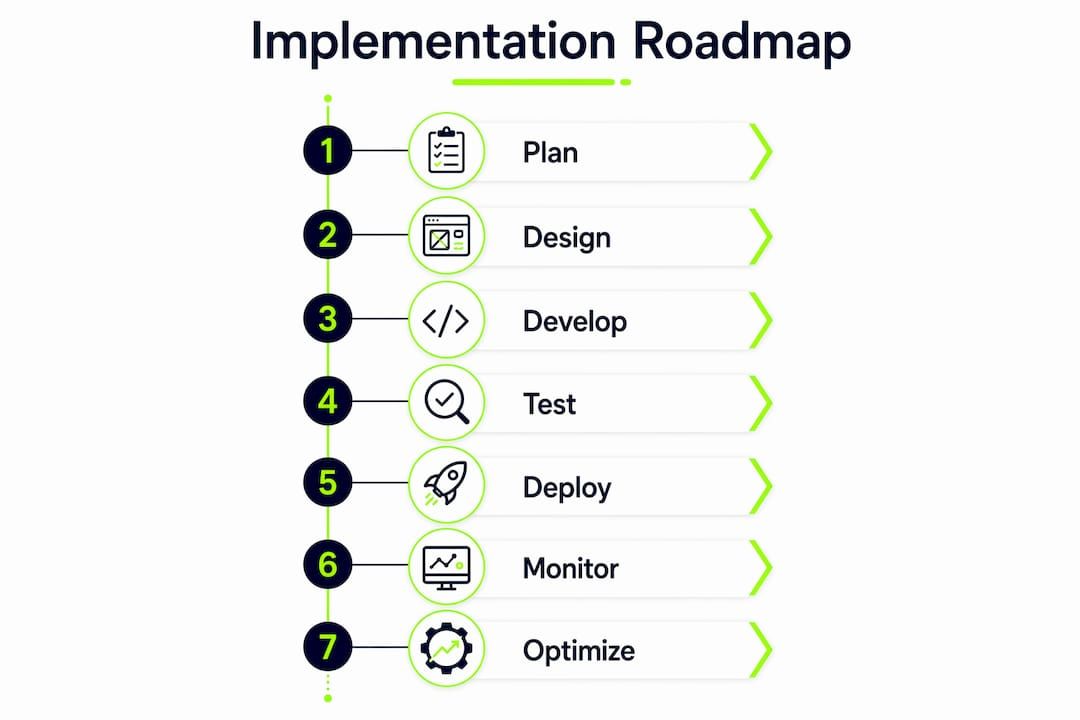
The 9-step implementation roadmap
The recommended sequence moves from discovery through a POC spike to production, with observability and security built in from step four onward rather than retrofitted at the end.
-
Discovery and template audit: Map the 3–5 highest-value workflow use cases with PMs and domain experts. Define the trigger types, action types, and connector surface for the MVP. Avoid scope creep at this stage.
-
POC spike (1–2 weeks): Stand up a minimal visual editor, serialize one workflow to JSON, enqueue a job via BullMQ, and execute it against a test connector. The goal is to validate the integration surface and expose failure modes before design work begins.
-
Data model and JSON schema design: Define the workflow definition schema (nodes, edges, conditions, metadata), the run record schema (run ID, tenant ID, status, timestamps, error payload), and the connector contract. Version the schema from day one.
-
Execution runner and queue implementation: Build or integrate the execution engine. Wire BullMQ with Redis for job dispatch. Implement exponential backoff, max retry limits, and DLQ routing. Keep the runner stateless so it scales horizontally.
-
Connector integration: Implement the MVP connector set (webhook inbound, REST outbound, database read/write). Use a typed adapter pattern so new connectors follow a consistent contract. Secure transaction workflows require authentication at the connector layer, not just at the API gateway.
-
Observability and SLOs: Instrument structured logs at job enqueue, dequeue, node execution, and run completion. Add distributed tracing (OpenTelemetry is the standard). Define SLOs: target 99.5% run success rate, p95 execution latency under 5 seconds for synchronous-feeling workflows. Set up alerts on queue depth and DLQ growth.
-
RBAC and audit trail: Implement role-based access (admin, editor, viewer) scoped per tenant. Every run record must store owner, tenant ID, and an immutable audit log of node-level outcomes. For US-regulated industries (HIPAA, SOC 2, PCI DSS), the audit trail is not optional and must be tamper-evident.
-
Testing and chaos scenarios: Write unit tests for each node type’s execution logic. Write integration tests for each connector. Add contract tests for webhook trigger payloads. Run chaos scenarios: kill a worker mid-execution, exhaust the retry limit, send a malformed payload. Verify DLQ behavior and manual replay.
-
Rollout, pricing, and instrumentation: Deploy behind a feature flag. Instrument execution metrics for the pilot (executions per day, error rate, mean time to resolution, cost per execution). If workflow automation is a paid tier, wire usage metrics to the billing system from day one.
Suggested tech stack: PostgreSQL with Drizzle ORM for persistence, BullMQ with Redis for queuing, Docker for containerized workers, CI/CD on Vercel or a self-hosted pipeline (GitHub Actions + Docker Compose for staging). For complex orchestration requirements, map the JSON workflow model to Temporal or AWS Step Functions rather than building a custom state machine.
Pro Tip: The most common non-obvious pitfall is connector authentication drift. Third-party APIs rotate tokens, deprecate endpoints, and change payload schemas. Build a connector health check that runs on a schedule and alerts before a live workflow hits a broken connector.
How do you keep workflows reliable in production?
Observability and retry semantics must be designed in from the POC, not added after the first production incident. A workflow system that fails silently is worse than one that fails loudly, because silent failures accumulate in tenant data before anyone notices.
Testing checklist:
- Unit tests for every node type’s execution logic, including edge cases and null inputs
- Integration tests for each connector against a sandbox or recorded fixture
- Contract tests for webhook trigger payloads (verify schema, signature, and idempotency key handling)
- End-to-end replay tests that execute a full workflow definition against a test tenant and assert on final state
- Chaos tests: worker crash mid-run, Redis unavailability, connector timeout, malformed JSON definition
SLO metrics and alerting:
- Run success rate: alert when 5-minute rolling rate drops below 99%
- p95 execution latency: alert when it exceeds the SLO threshold for the workflow tier
- Queue depth: alert when the pending job count exceeds a defined ceiling (signals worker starvation)
- DLQ growth rate: alert on any increase (each DLQ entry is a failed customer workflow)
- Retry rate per run: a sustained high retry rate signals a connector or schema issue before it becomes a failure
A dead-letter queue is not a graveyard. It is a diagnostic surface. Every entry should trigger an alert, carry a structured error payload, and be replayable with a single API call once the root cause is resolved.
For long-running workflows, implement state checkpoints at each node boundary. Store intermediate outputs in the run record so a resumed execution does not re-process completed nodes. Surface partial results to users via a status endpoint rather than making them wait for full completion. This pattern, described in the Vercel Workflow Builder architecture, keeps the UX responsive even when backend execution spans minutes or hours.
How do you measure ROI and build a business case?

A well-scoped pilot with 3–5 workflows proves value quickly. The metrics that matter are execution cost, time saved per workflow run, and error rate reduction. These feed both the technical SLO dashboard and the business case for the next investment cycle.
Simple ROI formula:
(Time saved per month × operational cost per hour) + (avoided error costs per month) + (upsell or retention revenue attributable to workflow features) − implementation cost = 12-month net ROI
Pilot metrics table
| Metric | What it measures | Target for a healthy pilot |
|---|---|---|
| Executions per day | Adoption rate and volume | Growing week-over-week |
| Run success rate | Execution reliability | ≥ 99% after week 2 |
| Mean time to resolution (MTTR) | Incident response speed | Decreasing trend |
| Customer time saved per run | Direct user value | Measurable vs. manual baseline |
| Cost per execution | Infrastructure efficiency | Stable or declining as volume grows |
Instrument these metrics from the POC. Build the audit trail and observability layer before the pilot goes live, not after. Stakeholders will ask for the data; having it ready from day one is what turns a pilot into a funded roadmap item.
What trends should you plan for over the next 12–24 months?
AI-assisted workflow generation is the most consequential near-term shift. The ability to describe an automation in plain language and receive a structured workflow JSON that renders on the canvas is already production-ready in several platforms. The Vercel Workflow Builder template demonstrates this pattern: LLM output maps directly to a node-and-edge JSON model that a visual editor can render without additional transformation.
Trends to track:
- Natural language to workflow JSON: LLM-generated workflow definitions reduce configuration time and lower the skill floor for non-technical users building automations
- AI-suggested remediation: execution logs fed back to an LLM to suggest fixes for failed runs or optimization opportunities in high-latency paths
- No-code and low-code embedding: buyer expectations are shifting toward self-service workflow builders that feel native to the product, not bolted on
- Real-time event-driven integrations: polling-based connectors are giving way to webhook-first and event-stream architectures that reduce latency and infrastructure cost
Guardrails that cannot be skipped: Any AI-generated workflow must pass through a human approval checkpoint before nodes are persisted or executed. Auto-generated actions that touch financial data, user records, or external APIs carry real risk if the LLM misinterprets intent. Build the approval gate into the UX flow, not as an afterthought. Data residency is a second constraint: LLM API calls that include workflow definitions or tenant data must comply with the data handling agreements in place for each customer.
Adopt AI-assisted generation conservatively in regulated industries (finance, healthcare, insurance) and more aggressively in lower-risk domains (marketing automation, internal tooling). The pattern is the same; the approval gate is tighter.
What are the concrete next steps for most teams?
Most teams should embed a workflow SDK, then follow a three-step immediate plan: run the POC spike, map the execution model to the existing stack, and deploy a pilot with 3–5 workflows instrumented for the metrics above.
Recommended action plan:
- Week 1–2 (Engineering lead + PM): Run the technical spike. Validate JSON model, queue integration, and one end-to-end connector. Confirm staffing capacity.
- Week 3–8 (Engineering): Customize the visual editor to match the product design system. Build domain-specific node types. Connect the execution backend.
- Week 6–12 (Engineering + Infra + Security): Integrate the orchestration engine, implement RBAC and audit trail, set up observability and SLOs.
- Month 4–6 (All roles): Production readiness review, chaos testing, compliance sign-off, and staged rollout.
Bitecode provides modular, pre-built components for workflow automation, AI integration, and secure multi-tenant deployments, which means teams can start with up to 60% of the baseline system already in place rather than building boilerplate from scratch. For teams that want a scoped POC or a technical discovery session before committing to a full build, Bitecode’s automation services are the logical starting point.
Key Takeaways
Embedding a workflow SDK delivers the best balance of time to production, UX control, and total cost of ownership for most SaaS teams adding workflow automation as a feature.
| Point | Details |
|---|---|
| Embed SDK for most teams | Build from scratch only when workflow is the core product; embedding cuts time to production from months to weeks. |
| substantial engineering hours | Production-grade canvas engineering requires a substantial engineering effort before reaching enterprise-ready quality. |
| Queue-backed execution by default | Decouple the UI from execution using BullMQ or a comparable queue; never wait synchronously for workflow completion. |
| Instrument the pilot from day one | Track executions per day, success rate, MTTR, and cost per execution to build a credible ROI case for stakeholders. |
| Bitecode as implementation partner | Bitecode’s modular components start teams with up to 60% of the baseline system pre-built, reducing POC time and engineering risk. |
The case for embedding over building
The conventional wisdom in engineering teams is that building in-house maximizes control. That is true in a narrow sense. What it understates is the ongoing cost of exercising that control: every custom node type, every connector update, every edge case in the execution engine becomes a maintenance obligation that compounds over time.
The teams that get the most out of workflow automation are not the ones that built the most sophisticated engine. They are the ones that shipped a reliable, well-observed workflow feature quickly and then used the freed engineering capacity to build the product features that actually differentiate them in the market. An embeddable SDK does not limit what you can build. It limits how much of your roadmap gets consumed by infrastructure that is not your competitive advantage.
There is a legitimate case for building from scratch: when the workflow editor is the product, when the execution model is tightly coupled to a proprietary data format, or when the team has the canvas engineering experience and the multi-quarter timeline to do it properly. Those conditions exist. They are just rarer than most early roadmap conversations assume.
The honest question is not “can we build this?” Almost every team can. The question is “what are we not building if we do?” For most SaaS products in 2026, the answer to that second question is what settles the decision.
Bitecode accelerates your workflow implementation
Shipping a production-grade workflow system from a blank repository is a multi-quarter commitment that pulls engineering capacity away from the features that differentiate your product. Bitecode offers a faster path: modular, pre-built components for workflow automation, AI integration, blockchain-backed audit trails, and secure multi-tenant deployments, with up to 60% of the baseline system already in place at project start.
For technical teams that need a scoped proof of concept before committing to a full implementation, Bitecode’s custom software development and automation services are structured around exactly that: a defined discovery engagement that maps your execution model, validates integration points, and produces a prioritized implementation plan. No open-ended retainer. No black-box platform dependency. Request a technical discovery session with Bitecode to scope your workflow POC and get a clear picture of what production readiness actually requires for your stack.
Useful sources
-
Vercel Workflow Builder template: Open-source Next.js reference architecture showing how LLM output maps to a visual workflow JSON model. Useful for teams evaluating AI-assisted generation patterns.
-
Vercel blog: Build your own workflow automation platform: Detailed walkthrough of the Workflow Development Kit (WDK), execution graph, and observability setup. Strong reference for the serverless execution pattern.
-
Formable: Inside the audit trail: Best practices for immutable audit logs, tenant-aware run metadata, and pilot instrumentation. Directly relevant to the security and ROI measurement sections.
-
Leena AI: Generate workflows with AI: Documents the human approval checkpoint pattern for AI-generated workflows. Essential reading before implementing any LLM-to-workflow feature.
-
CodeLeap: Build a visual workflow automation builder with AI suggestions: Practical MVP scoping guidance (3–5 trigger types, 5–10 action types) and AI suggestion patterns. Useful for the essential features and future trends sections.
-
Bitecode: Unlock enterprise value with advanced workflow automation: Covers white-labeled workflow modules and the business ROI of embedding workflow editors into enterprise SaaS products.
-
Bitecode: AI-powered workflow steps: Examples of AI integration within workflow steps for business and IT teams, relevant for teams planning AI-assisted node types.


