
An air-gapped deployment is a software installation that runs in an environment with no automated connection to the public internet or to any other external network. Everything the system needs, from container images to dependencies to updates, must be carried across the boundary by people, under control. The approach is common in defense, government, industrial and some financial settings. It is also demanding: the work moves from the network to process, and most failures come from process.
This guide explains what the term covers, how to stage and install an application offline, how to handle updates and media, and where an air gap stops protecting you.
TL;DR
- An air-gapped deployment has no automated path in or out. Data crosses only by a manual, controlled step, such as approved removable media or a transfer station.
- Build and verify everything in a connected staging area first: images, charts, packages, models and checksums. Then move it into local registries inside the boundary.
- An air gap blocks ordinary network paths, not every exfiltration path. Infected media, insiders and supply-chain tampering remain the main risks.
- Plan the update cadence, media accountability and key management before go-live, because they decide whether the system stays secure for years.
- Choose software designed for self-hosting. Platforms that assume a vendor cloud will not survive the trip across the gap.
What an air-gapped deployment actually means
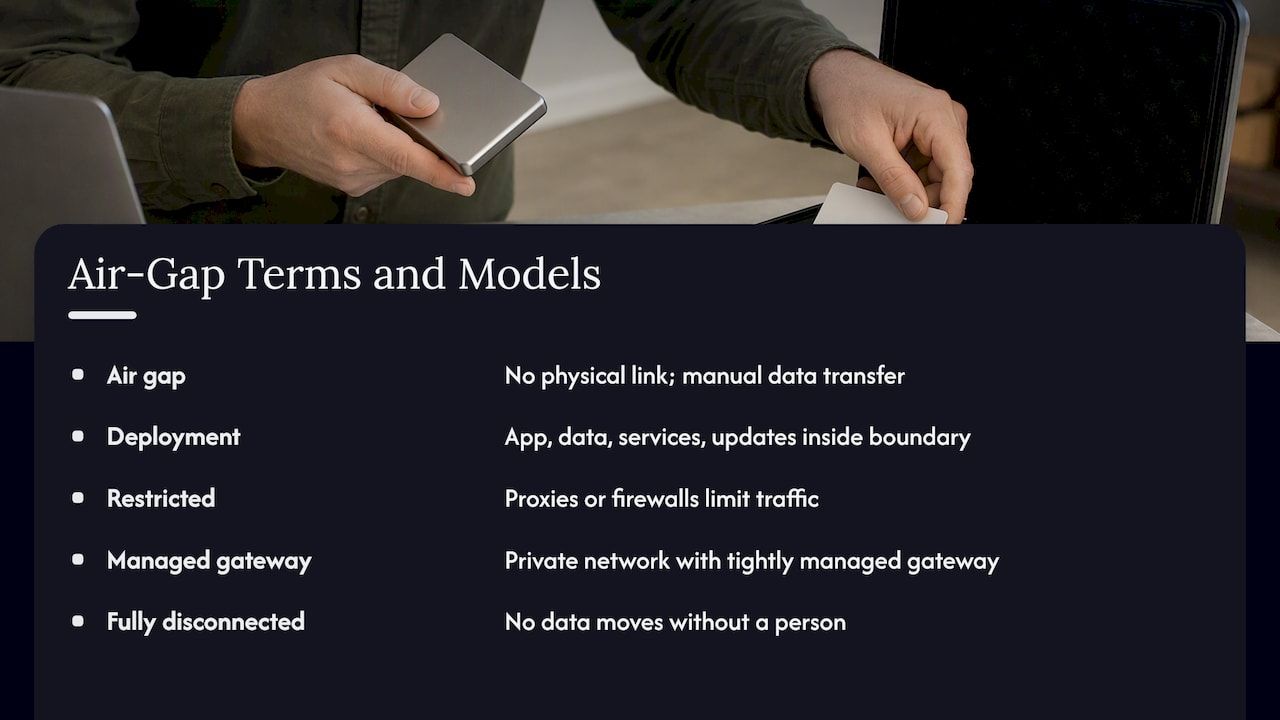
The term borrows from network security. NIST’s glossary defines an air gap as an interface where two systems are not physically connected and any logical connection is not automated, so data moves only manually under human control. An air-gapped deployment applies that idea to a specific piece of software: the application, its data stores, its supporting services and its update path all live inside the isolated boundary.
Three distinctions help.
Air-gapped network versus air-gapped deployment. The network is the environment. The deployment is the act, and the ongoing practice, of getting a particular system to install, run and be maintained inside it. A network can be air-gapped while a poorly prepared application still fails there, because it quietly calls a license server, a package mirror or a telemetry endpoint on first launch.
Air-gapped versus restricted. Air-gapped networks have no wired or wireless route for data to enter or leave, whereas restricted networks use proxies or firewalls to limit rather than block traffic. A firewalled segment with an allow-list is not an air gap, and treating it as one leads to wrong design choices.
Fully disconnected versus controlled endpoint. Ubuntu’s documentation notes that an airgapped environment is isolated from the public internet and, in some cases, from all external networks, and that it may use a controlled endpoint or be fully disconnected. In practice, teams place themselves on a spectrum. At one end sits a private network with a tightly managed gateway. At the other sits a fully disconnected enclave where nothing moves without a person carrying it.
The design target matters, so decide early which of these you have. A deployment procedure written for a gateway-controlled enclave will not work in a fully disconnected one.
Why organizations choose to deploy this way
The purpose of an air gap is to remove the network as an attack path. TechTarget explains that isolating systems from external connections reduces exposure to malware, ransomware, keyloggers and other network-delivered attacks, and that an offline copy of backups can support recovery after a ransomware event.
The same source lists the kinds of systems where the approach appears: stock-market systems, military and government agency systems, and industrial power systems. Beyond those, we see four recurring drivers in enterprise projects:
- Regulated data. Environments handling controlled or classified information, where contracts or rules restrict external connectivity.
- Operational technology. Plants, utilities and facilities where availability and safety outweigh convenience.
- Critical financial processing. Settlement, ledger and key-custody systems where an outside connection is a liability rather than a feature.
- Sovereignty and customer demands. Buyers who require that a vendor’s product run entirely inside their own boundary, with no calls home.
The last driver is increasingly visible in software procurement. Vendors who built for a multi-tenant cloud discover that their largest prospects ask for an offline build, and that retrofitting one is expensive.
What an air gap does not protect against
An honest plan starts with the limits. A 2023 peer-reviewed survey of air-gap attacks describes techniques that extract confidential data from isolated networks through signals generated by computer components and peripherals. Isolation blocks ordinary network paths, not every possible channel.
The practical risks are more mundane than those research techniques. TechTarget’s list includes infected USB devices, human error and insider attacks, outdated software, electromagnetic leakage and supply-chain attacks. A U.S. Department of Energy-hosted security study concludes that an air gap alone is insufficient against a determined adversary, and recommends elevated protection for the nodes that hold access information, plus training and awareness for relevant personnel.
Eric Byres, writing in Communications of the ACM, makes the operational point well: the air-gap strategy is useful in theory but dangerous when treated as a complete security solution, because operational needs tend to create unmanaged bridges. A contractor’s laptop, a maintenance modem or a convenience cable becomes the real perimeter.
Two consequences follow for deployment design:
- Outdated software is built in. Without a deliberate update path, an isolated system ages. The gap protects you from the network and, at the same time, from patches.
- People become the interface. Every transfer is a human action, so the quality of the transfer procedure is the quality of your security.
Architecture: build connected, run isolated
The reliable pattern is a two-zone model. A connected staging zone is where you assemble and verify. The isolated zone is where you run. Between them sits the transfer mechanism.
SUSE’s air-gapped deployment guidance for its AI platform illustrates the pattern: stage the required Helm charts, container images and models in a connected environment, transfer them, and upload the charts and images to local registries. The details differ by product, but the shape holds for almost any containerized system.
Inside the boundary you typically need:
- A local container registry that holds every image, so no pull ever leaves the enclave.
- A local package and dependency mirror for operating-system packages and language libraries.
- Internal time and name services, since many applications fail oddly when they cannot reach public time or DNS.
- Local identity and secrets management, including key custody that never depends on an external service.
- Local observability: logs, metrics and audit trails stored and reviewed inside the boundary.
A useful test during design: list every hostname your application contacts at startup, at login, on license check and on error. Anything outside the enclave is a defect to remove or replace before the transfer, not after.
What to ask of the software itself
Not every product can run this way. Before choosing a platform, confirm that it:
- ships as self-hosted components under your control, with no mandatory vendor cloud;
- licenses offline, without periodic validation calls;
- can run its models, workflows and integrations locally;
- exposes versioned, signed release artifacts you can verify;
- supports audit logging that stays inside your environment.
Black-box platforms fail most of these. They relocate complexity into the vendor relationship, and in an air-gapped setting that relationship cannot be exercised in real time.
A step-by-step deployment sequence
This sequence works for most application stacks. Adapt the specifics to your accreditation rules.
- Define the boundary and the transfer policy. Write down what is inside, what may cross, in which direction, and who approves each crossing. Decide whether a one-way gateway, a transfer station or removable media is the approved route.
- Inventory every dependency. Images, charts, libraries, operating-system packages, machine-learning models, fonts, certificates and documentation. Missing items are the most common cause of failed first installs.
- Build a staging environment that mirrors the target. Same operating system, same orchestrator version, same hardware class where possible. Install from the offline bundle there, with outbound traffic blocked, to prove it works without the internet.
- Create the release bundle. Pin versions, record hashes for every artifact, sign the bundle if your process allows, and write a manifest.
- Scan and review before transfer. Run vulnerability and malware scans in the connected zone. Review the manifest against the inventory.
- Transfer under control. Use the approved mechanism, log who moved what and when, and keep the media under accountability.
- Verify on arrival. Check hashes and signatures inside the boundary, then load images into the local registry and charts into the local repository.
- Install, then test in isolation. Run functional, failover and restore tests with nothing connected. CISA’s CI Fortify guidance, as summarized by a network-analysis vendor, recommends testing complete isolation because partial testing misses shared infrastructure and hidden dependencies.
- Record the as-built state. Keep an offline copy of the configuration, runbooks and recovery steps. The same guidance advises keeping secure, offline or printed copies of isolation plans, so continuity does not rely on network access that may be unavailable.
Moving data and updates across the gap
The transfer step deserves its own policy. Traditional transfers rely on portable storage such as USB, which is exactly why infected devices are a recognized route for leaking data out of an isolated system.
A sound transfer procedure has these features:
- Dedicated media that never leaves the controlled process, labeled and tracked.
- Verification on both sides. Hash and signature checks in the staging zone before the transfer, and again inside the boundary on arrival, so tampering in transit shows up.
- A one-way gateway or transfer station where policy allows, so that content is scanned and format-checked automatically at the crossing.
- Separation of duties. The person who builds the bundle is not the only person who approves its import.
- A defined cadence. Updates arrive on a planned schedule, bundled and tested, rather than ad hoc.
Collaboration tools deserve a note here. Teams on both sides of the boundary still need to talk, and a careless meeting or phone setup can become the very bridge the air gap was meant to prevent. Reviewing security controls for conferencing tools belongs in the same conversation as media handling.
For encryption of what travels and what rests, our engineering notes on data encryption at rest cover key management service, envelope and backup steps that translate directly to an offline environment.
Compliance and operations after go-live
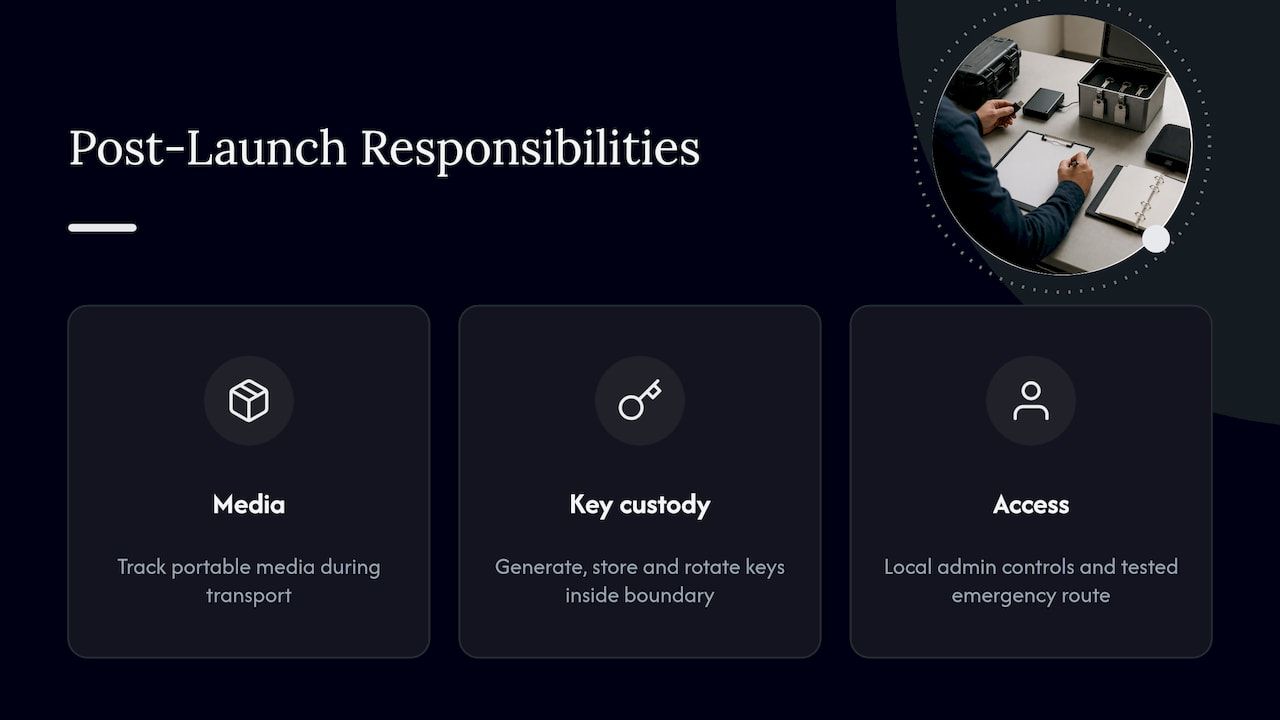
Go-live is the start of the harder part. Three areas need owners.
Media accountability. For U.S. organizations handling Controlled Unclassified Information, NIST SP 800-171 requires protection of media, including controlling portable storage and maintaining accountability during transport. The NIST small-business primer also points to cryptographic protection for data in transport and procedures for sanitizing or destroying media that held sensitive information. Whether these rules apply to you depends on your contracts, so confirm with your compliance officer or contracting authority.
Key custody. Keys should be generated, stored and rotated inside the boundary, ideally in hardware security modules. Our four-phase HSM rollout walks through standards-backed key management that suits this requirement.
Access and emergencies. With no external identity provider, you need local administrator controls and a tested emergency route. See our guide to break glass access for setting up emergency accounts without leaving a permanent back door.
Around these sit routine duties: patch review and import cycles, backup restore drills, log review, and periodic reassessment of whether the boundary still matches the policy. Teams that automate inside the boundary should also apply governance to the automation itself; our IT automation governance checklist is a practical starting point.
Common failure points and how to prevent them
| Failure point | How it shows up | Prevention |
|---|---|---|
| Hidden outbound calls | App hangs at startup or on login | Block egress in staging and trace every hostname |
| Missing dependency | Install stops halfway on the target | Full inventory and a staging rehearsal from the offline bundle |
| Unverified media | Tampered or infected files enter | Hash and signature checks on both sides, dedicated media |
| Stale software | Known vulnerabilities persist for years | Planned update cadence with tested bundles |
| Shadow bridges | Temporary cable or device becomes permanent | Periodic boundary audits and strict change control |
| Untested recovery | Backups cannot restore on site | Restore drills in full isolation |
Most items in this table are process problems. None needs exotic technology to fix.
Our perspective: modular and self-hosted wins offline
We build business systems from modular, ready-made components, and air-gapped requirements show why that foundation matters. When a system starts with a large share of its baseline already built and its modules are self-hostable, the dependency inventory is short, known and ours to verify. There is far less to discover at the boundary.
The pattern we advise is simple. Treat the isolated environment as a first-class deployment target from day one, not an afterthought. Keep modules independent so each can be versioned, signed and imported on its own. Keep audit trails, key custody and workflow logic inside the client’s control. And resist the temptation to rely on the air gap as the only control: it accelerates trust in a perimeter, and a perimeter alone does not deliver security.
We also think teams underestimate the maintenance side. A deployment that is easy to install but painful to update will be left unpatched, and an unpatched enclave is a liability. Plan the second and tenth update, not just the first install. Our overview of secure software deployment and the notes on secure software integration cover the practices that carry over.
— Bitecode
Building a system meant to run behind the gap
If you need custom business software that can live inside your own boundary, Bitecode builds on a modular foundation with self-hosted modules, audit-ready design and client-controlled customization. That covers custom business software, advanced cloud applications and components such as the AI assistant, financial, automation, CRM and token modules described on our modules page. Scope and fees are set per engagement, so the practical first step is a conversation about your boundary, your transfer policy and your update cadence.
FAQ
What is the difference between air-gapped and offline?
Offline usually means a system is simply not connected at the moment. Air-gapped means isolation is designed and enforced, and that any data crossing the boundary does so manually under human control, as NIST’s definition puts it. An offline laptop with a forgotten Wi-Fi setting is not air-gapped.
Can an air-gapped system still be breached?
Yes. Research on air-gap attacks shows data can leave isolated networks through signals from components and peripherals, and practical incidents tend to involve infected removable media, insiders or tampered supply chains. An air gap reduces exposure but works best alongside least privilege, training and encryption of data at rest.
How do you update software in an air-gapped environment?
You assemble and verify updates in a connected staging zone, transfer them by an approved mechanism such as dedicated media or a transfer station, check hashes and signatures on arrival, and import them into local registries. Teams usually run this on a planned, tested cadence rather than continuously.
Which industries need air-gapped deployments?
Common examples include military and government agencies, industrial power operators and stock-market systems. Financial institutions and any organization handling regulated or sovereign data may also require isolated deployments, depending on contracts and regulation.
Sources
- air gap - Glossary | CSRC (NIST)
- About airgapped environments - Airgapped documentation
- What Is an Air-Gapped Network? - Mattermost
- A Survey on Air-Gap Attacks: Fundamentals, Transport Means, and Countermeasures
- What is an Air Gap? | TechTarget
- Computer Security - Indirect Vulnerabilities and Threat (OSTI)
- The Air Gap - Communications of the ACM
- Deploying SUSE AI Factory in air-gapped environments
- NIST SP 800-171 R3 SMB Primer
- CISA’s CI Fortify Guidance on Isolating Vital Systems


