AI in accounts payable (AP) reads incoming invoices, extracts the data, checks it against purchase orders and receipts, routes exceptions to the right person and prepares approved invoices for payment. It does the high-volume, pattern-heavy work. People keep the judgment calls: policy interpretation, unusual circumstances and material exceptions. This guide explains how that split works in practice, what to measure, which controls to put in place and how to roll it out without accelerating chaos.
TL;DR
- AI is strongest where AP data is messy or variable (invoice layouts, missing fields, anomalies). Rules-based automation is strongest where steps must run the same way every time.
- A typical flow covers capture, validation, matching, approval routing, exception handling, payment and reconciliation. AI sits mostly in the first three and in anomaly detection.
- Benchmarks give you a baseline: one 2026 report puts average cost at $9.84 per invoice and the exception rate at 18.4%.
- Define where human review is mandatory, document overrides and expand automation authority only as monitoring matures.
- Roll out in phases: use case, control review, data cleanup, controlled prototype, staged launch, measurement.
What AI changes in accounts payable
Traditional AP automation moves documents through a fixed workflow: an invoice arrives, a rule fires, an approver gets a task. That works until the input stops being predictable. A supplier changes its invoice template, a PDF arrives as a phone photo, a line item description does not match the purchase order wording. Rules break on variability, and people absorb the breakage.
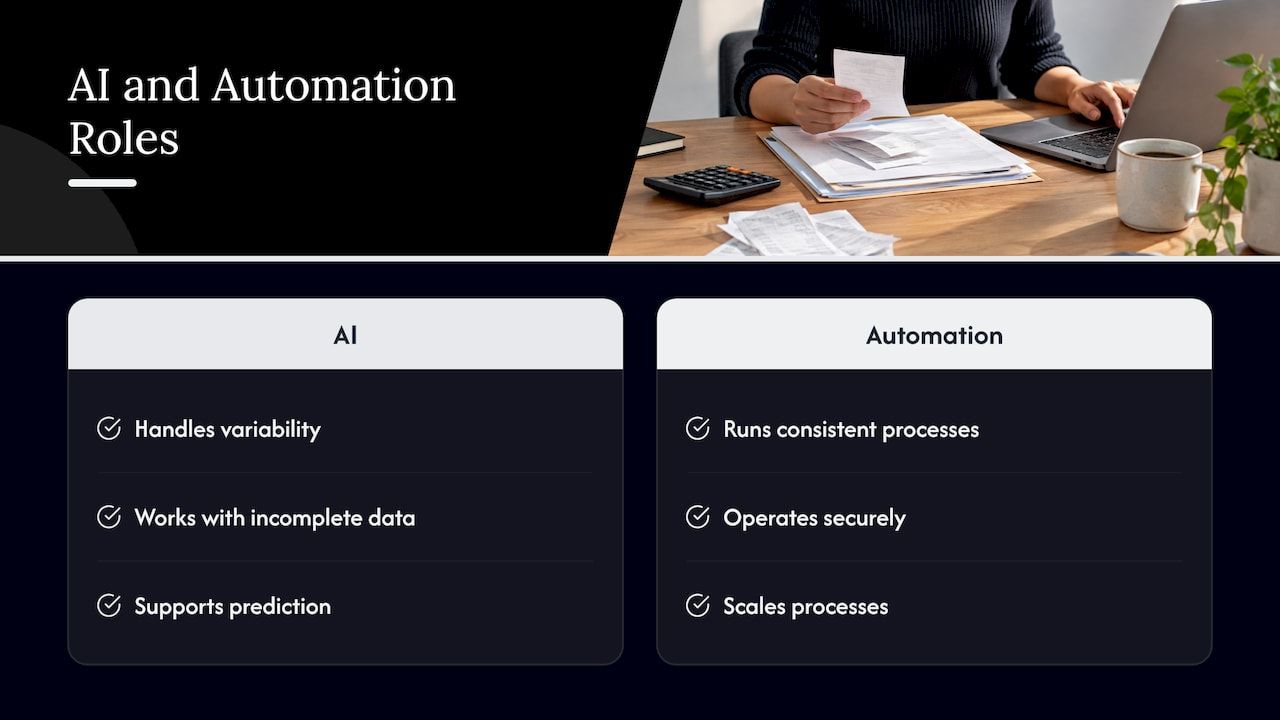
AI addresses that gap. Bank of America’s business division frames the distinction this way: AI is most effective where there is variability, incomplete data or a need for prediction, while automation delivers the most value where processes must run consistently, securely and at scale. The two are complements, not rivals.
The same source adds a useful caution. AI may help prepare an invoice for payment, but it does not by itself decide how suppliers are paid, how payment methods are optimized or how working capital and rebate value are captured. Those outcomes depend on the payment automation model behind the invoice. A team that buys “AI for AP” and ignores the payment side has improved the front half of the process only.
How AI processes an invoice, step by step
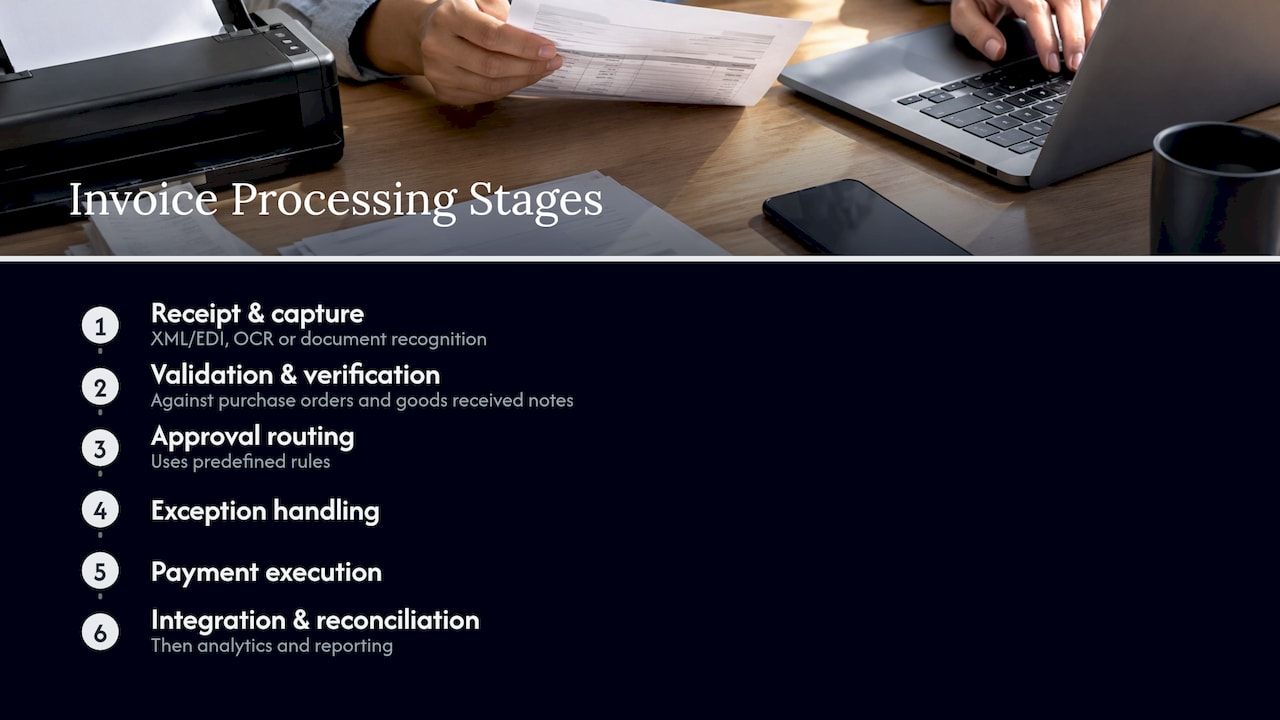
Automated invoice processing is a chain of stages. Stripe’s guide lists them as invoice receipt, data capture (via XML/EDI or OCR and intelligent document recognition), validation and verification against purchase orders and goods received notes, approval routing on predefined rules, exception handling, payment execution, integration and reconciliation, and analytics and reporting. Here is where AI earns its place in each.
Capture and extraction
This is the stage most people mean by AI invoice extraction. Instead of templates built per supplier, a trained model locates the fields on a document it has never seen: vendor name and address, tax ID, bank details, invoice number, invoice and due dates, currency, totals, purchase order reference, tax amounts and line items with quantity, unit price and description. Structured formats such as EDI or XML skip the reading step entirely, so a sound design uses them wherever suppliers can provide them and reserves AI reading for the rest.
The practical question is not whether a model can read an invoice but what happens to the fields it is unsure about. Good implementations attach a confidence score to each field and send low-confidence values to a person, whose correction feeds back into the model.
Validation and matching
Extracted data is only useful if it is right. Validation checks the vendor against the master file, confirms the tax ID and bank details have not changed unexpectedly, tests for duplicate invoice numbers and compares totals against arithmetic. Matching then compares the invoice with the purchase order (two-way) and with the goods or service receipt (three-way).
AI helps most when the match is not exact: a line described differently, a unit of measure converted, a partial delivery spread over two invoices. A rules engine flags all of these as mismatches. A model can propose the likely correspondence and let a reviewer confirm it in seconds.
Routing and exceptions
Approval routing is mostly rules: amount thresholds, cost centers, budget owners. AI adds value by predicting coding (which general ledger account and cost center an invoice usually belongs to), by routing an exception to the person who has resolved similar ones and by attaching the context so nobody has to reconstruct the story.
Anomaly detection
Pattern recognition is where AI does what a human reviewer cannot do at volume: spotting an invoice amount that is out of range for a vendor, a new bank account on a familiar supplier, or a cluster of invoices just below an approval threshold. The same logic underlies transaction monitoring and fraud prevention in other parts of finance.
Which AP tasks AI can automate, and where people stay
UHY’s August 2026 article on AI in public-sector accounts payable draws the line clearly: AI is particularly effective at volume processing, pattern recognition and transaction routing, while judgment remains essential when transactions involve policy interpretation, unusual circumstances or material exceptions. It also recommends that organizations explicitly define where human review is required and document override decisions.
| AP task | AI role | Human role |
|---|---|---|
| Invoice capture and field extraction | Reads any layout, scores confidence | Corrects low-confidence fields |
| Vendor and duplicate checks | Flags likely duplicates and changed details | Confirms vendor changes by independent contact |
| Two- and three-way matching | Proposes matches for non-exact lines | Approves material variances |
| GL coding | Predicts account and cost center | Reviews new or unusual spend |
| Approval routing | Routes by rules and history | Approves per authority limits |
| Exceptions | Classifies, prioritizes, adds context | Decides policy-sensitive cases |
| Payment scheduling and execution | Optimizes timing and method inside set rules | Releases high-value or first-time payments |
| Reconciliation | Matches transactions to bank statements | Resolves unmatched items |
The payment end of the chain is largely automatable once an invoice is approved. The Association for Financial Professionals’ 2024 Financial Operations Guide describes the AP system facilitating payment through the ERP or accounting system: scheduling payments to optimize cash flow, selecting the preferred payment method, executing automatically or with minimal human intervention, then reconciling transactions against bank statements. For a deeper look at that last step, see these financial reconciliation automation examples.
The same integration discipline applies to any system that moves money. Payroll is a close cousin of AP, and teams hiring abroad can see how HRIS and payroll integration is handled for one market, a useful reference point for how payment data should flow between systems.
Benchmarks: what to measure before you start
You cannot show improvement without a baseline. Ardent Partners’ State of ePayables report, published in January 2026, gives three reference points: an average invoice processing cost of $9.84, an average processing time of 8.2 days and an average exception rate of 18.4%. It also reports that best-in-class teams reach per-invoice costs 79% lower and processing times 79% faster than their peers.
Use those as context, not targets. Your own numbers matter more. Before any pilot, record:
- Cost per invoice, fully loaded: labor, software, correction time, late-payment fees.
- Cycle time from receipt to approved, and from approved to paid.
- Exception rate, split by cause (missing PO, price variance, duplicate, coding).
- Touchless rate, the share of invoices that reach payment with no human action.
- Early-payment discounts captured and late fees paid.
The exception rate is the most revealing. A high rate usually points to upstream problems (purchase orders created after the fact, poor vendor master data) that no model can fix on its own. For a structured view of the economics, our guide to finance automation ROI walks through how to build the business case.
Controls that make AP automation audit-ready
Automation without controls moves errors faster. The controls below keep speed from turning into exposure.
- Explicit human-in-the-loop points. UHY’s readiness presentation argues that these controls should be written down and that automation authority should grow only as confidence and monitoring mature. Start with the model suggesting and a person approving, then relax by invoice type and amount.
- Segregation of duties. The person or system that changes vendor bank details should not be the one that releases payments to them.
- Complete audit trail. Every extracted value, model suggestion, human correction and override needs a timestamp and a user or system identity.
- Vendor change verification. Changes to bank details are verified through an independent channel, never through the email that requested them.
- Threshold-based release. High-value, first-time-vendor and out-of-pattern payments always pause for review.
- Model monitoring. Track extraction accuracy and exception causes over time, and re-check after a supplier or format shift.
- Data privacy and access. Invoices carry bank details and tax IDs. Limit who and what can read them, and decide whether the system runs in your own environment.
Implementing AI in accounts payable
The phased approach outlined in the UHY presentation is a sound skeleton: plan and design the use case and desired outcomes, conduct an ethical, regulatory, privacy and control review, prepare, audit and cleanse data before deployment, prototype and test in a controlled environment, then roll out in phases and measure results. Here is how that translates for a mid-sized or large AP team.
- Pick one narrow use case. Invoice capture and coding for the top 20 suppliers by volume is a common start. The outcome should be a number: touchless rate, cycle time or cost per invoice.
- Review controls first. Map existing approval limits, segregation of duties and audit requirements before you configure anything.
- Clean the data. Deduplicate the vendor master, remove inactive suppliers and reconcile open purchase orders. Models inherit the quality of the records they check against.
- Prototype on historical invoices. Run last quarter’s invoices through the pipeline in a sandbox and compare outputs with what your team actually posted.
- Launch in phases. Add suppliers, invoice types and approval tiers in stages, keeping a human check on the new tier until the exception data supports removing it.
- Measure against the baseline monthly. Review results with finance, procurement and internal audit together.
For the technical side of this plan, our step-by-step AI integration guide and the financial process automation checklist cover systems, data and rollout in more depth.
Off-the-shelf tool or a tailored build?
AP teams generally choose among three routes: the AP module of an existing ERP, a packaged AP automation product, or a system built around their own workflow. The right answer depends on how standard your process is.
A packaged tool suits companies whose approval chains, entities and payment methods fit a common pattern. A tailored build suits organizations with multi-entity structures, multi-currency payments, unusual approval logic, integration into proprietary systems or requirements to host data themselves. The risk with a black-box platform is that it relocates complexity into the vendor relationship: you depend on the vendor’s roadmap for every exception your business generates.
That is the problem a modular foundation is meant to solve. Starting from tested components rather than a blank page shortens the path to a working system, while leaving the business logic yours to shape.
Our perspective
Most AP automation projects stall for the same reason: the invoice reader works, but the business around it does not fit the product. Approval rules differ by entity, payments run through several rails, and auditors want to see why a decision was made.
We build custom business systems from modular, ready-made components, so a project can start with up to 60% of the baseline system already in place. For AP, that means the financial processing, workflow automation and AI assistant layers are not invented from scratch, and the team’s effort goes into the part that is unique: your approval logic, your vendors, your controls.
We design for multi-currency operation, audit-ready records and self-hosted deployment where data must stay inside your environment. Our view is that AI should accelerate work without accelerating chaos: suggest first, approve with a person, then widen automation as monitoring earns the trust.
Bitecode
Building AP automation with Bitecode
If your team has outgrown manual invoice handling, or a packaged product does not fit your workflow, we can scope a system around it. Our AI business process automation workflows cover capture-to-approval flows, and the Financial Module provides accounting, audit and multi-currency foundations. Projects can range from a small MVP for a single AP workflow to larger programs across entities. Pricing is scoped per engagement, so the first step is a conversation about your volumes and systems.
To see the wider picture of where AI fits in the finance function, read our overview of AI applications transforming finance, or explore AI solutions for business. Teams who want to talk through a build can start from our main page.
FAQ
Is AI for invoice processing the same as OCR?
No. OCR converts an image into text. AI invoice extraction goes further by identifying which text is the vendor, the due date, the tax amount or a line item, regardless of layout. It can also score its own confidence and learn from corrections, which plain OCR cannot do.
Can AI approve and pay invoices without anyone looking?
It can for low-risk, well-understood invoices, and that is what a touchless rate measures. Most teams still require human review for high-value payments, new vendors, changed bank details and policy-sensitive exceptions. Authority should expand only as monitoring shows the system is reliable.
What should we measure to know it is working?
Track cost per invoice, cycle time, exception rate, touchless rate and discounts captured, all against a baseline taken before launch. Industry reports such as the 2026 ePayables benchmarks give context, but your own trend line is the real test.
What has to be in place before we start?
Clean vendor and purchase order data, written approval limits and a defined list of where human review is required. A control review before configuration prevents most rework later.
Sources
- AI vs. Automation in Accounts Payable: Where to Start
- How automation works in invoice processing
- AI in Accounts Payable: Building the Foundation for Smarter Public Sector Finance
- Financial Operations Guide: Automating Accounts Payable Processing
- State of ePayables (Part Nine): AP Benchmarks and Best-in-Class Performance
- Readying Your Accounts Payable for Artificial Intelligence
- HRIS integration for South Africa payroll