
Procure-to-pay automation removes manual work from every step between a purchase requisition and the final payment, cutting invoice cycle times, reducing matching errors, and lowering the cost of processing each transaction. The immediate action for most finance and procurement teams: prioritize touchless invoice automation and solid ERP integration before chasing every module a platform offers. Standard building blocks already do the heavy lifting: optical character recognition (OCR) pulls data off invoices, three-way matching cross-checks purchase order, receipt, and invoice, and robotic process automation (RPA) handles the repetitive routing in between.
Where packaged software cannot bend to a company’s ERP setup, unusual approval hierarchies, or audit-hosting requirements, a modular low-code build from a partner like Bitecode often closes the gap faster than a rip-and-replace platform migration.
What this looks like in practice:
- Invoices get captured and coded without a human touching a keyboard, in the majority of cases.
- Purchase orders, receipts, and invoices reconcile automatically, with exceptions kicked to a queue instead of a person’s inbox.
- Supplier onboarding and payment scheduling run on rules set once and adjusted rarely.
Key Takeaways
P2P automation cuts cycle time, error rates, and cost per invoice by replacing manual handoffs with OCR, three-way matching, and rules-based routing across the full requisition-to-payment cycle.
| Point | Details |
|---|---|
| Start with invoices | Prioritize touchless invoice processing and ERP connectors before adding other modules. |
| Clean data first | Master-data hygiene determines automation success more than any platform feature. |
| Pilot before scaling | Test on a defined supplier set and measure touchless rate and cycle time before expanding. |
| Match tool to complexity | Use packaged platforms for standard workflows; consider low-code custom builds like Bitecode for unusual ERP or audit needs. |
| Track the right metrics | Monitor touchless rate, invoice cycle time, cost per invoice, and exception rate continuously. |
What Is Procure-to-Pay Automation and Where Does It Apply?
Procure-to-pay (P2P) automation digitizes the full purchasing lifecycle. That means requisition, sourcing, purchase order issuance, goods or services receipt, invoice processing, and payment, replacing manual handoffs with software that moves data and triggers approvals on its own. IBM frames it as a way to reduce manual steps and tighten control across the entire chain, not just the invoice stage most people associate with “AP automation.”
Each stage in the cycle has its own automation opportunity:
- Requisition. Guided buying interfaces steer employees toward pre-approved catalogs and suppliers, cutting off rogue spend before it starts.
- Sourcing and PO creation. Rules engines auto-generate purchase orders from approved requisitions, applying the right approval chain based on amount or category.
- Receipt. Barcode or RFID scanning confirms delivery against the PO, feeding a live record into the matching engine.
- Invoice processing. OCR extracts line-item data from PDFs or paper invoices, and coding logic assigns the right general ledger account automatically.
- Three-way match. Software compares PO, receipt, and invoice, releasing payment on a match and flagging anything outside tolerance.
- Payment. Scheduling logic batches payments by due date, discount window, or cash-flow priority.
None of this works cleanly without master-data hygiene. Duplicate vendor records, inconsistent unit-of-measure codes, and stale pricing tables cause more automation failures than any software limitation. Most platforms now ship prebuilt connectors for major ERPs like SAP, Oracle, and NetSuite, which shortens integration timelines, but a connector only helps if the data flowing through it is clean.
What Benefits Does P2P Automation Actually Deliver?
The financial case rests on three levers: faster cycle times, lower cost per invoice, and better capture of early-payment discounts. Organizations that automate end to end typically report meaningfully faster invoice cycles and freed-up staff time that shifts toward supplier management and sourcing strategy rather than data entry, according to Tradeshift.
By the Numbers: Modular P2P platforms that automate invoice capture, matching, and approvals report measurable productivity and cost gains for the organizations that adopt them, per Tradeshift’s product data. The exact percentage varies by starting process maturity, but the direction is consistent: less manual touch, lower cost per transaction.
Beyond the balance sheet, automation improves compliance posture. A three-way match enforced by software catches pricing discrepancies and duplicate payments before they clear, which matters more once transaction volume outpaces what a manual reviewer can realistically audit. It also improves supplier relationships. Faster, more predictable payment timing gives suppliers a reason to offer better terms, and fewer disputes over mismatched invoices means fewer awkward phone calls from your AP team.
Track these metrics to know if automation is actually working:
- Touchless invoice rate: the share of invoices processed with zero human intervention. A strong target is well above half of all invoice volume once automation matures.
- Invoice cycle time: days from receipt to approval. This should compress significantly compared to a manual baseline.
- Cost per invoice processed: a blended figure covering labor, software, and error correction.
- Exception rate: the percentage of invoices kicked out of the automated flow, which tells you where your data or supplier onboarding still needs work.
How Does Automation Change Day-to-Day P2P Work?
The clearest way to see the value is to walk through what changes at each step once automation takes over the repetitive parts.
OCR and AI coding. Instead of an AP clerk retyping invoice line items, OCR extracts vendor name, amount, line-item detail, and tax data directly from a scanned document or PDF. Machine-learning coding logic then assigns the general ledger account based on historical patterns, learning from corrections over time.
Three-way matching. The system pulls the purchase order, the receipt confirmation, and the invoice, and checks all three against defined tolerance thresholds. Automation Anywhere points to RPA and agentic AI as the technologies now handling this matching along with the exception routing that follows when something does not line up.
Guided buying. Employees requisitioning supplies see a curated catalog with pre-negotiated pricing, so the sourcing decision is made once by procurement and enforced automatically at the point of purchase.
Supplier portal automation. New vendors submit banking details, tax forms, and compliance documents through a self-service portal instead of emailing PDFs back and forth, and the system validates the submission against internal rules before activating the vendor record.
Here’s a short example of how exception handling plays out. An invoice arrives $40 over the matched purchase order because of a shipping surcharge the vendor added without amending the PO. The matching engine flags the variance, checks it against a preset tolerance band, and routes it to the category manager who approved the original PO rather than a general AP queue. The manager approves the surcharge in two clicks, and the invoice clears without ever landing in a person’s overflowing inbox for review.
Pro Tip: *Set tolerance thresholds by spend category, not as one flat percentage across the board.
How Do You Roll Out P2P Automation Step by Step?
Skipping the assessment phase is the single most common reason P2P automation projects stall midway. Here is the sequence that actually holds up.
- Assess. Map the current process end to end, including every manual handoff and approval delay. Inventory your ERP landscape, catalog data quality issues, and establish your baseline metrics (cycle time, cost per invoice, touchless rate) before changing anything.
- Design and prioritize. Pick two or three high-volume, low-complexity use cases for the first wave. Recurring purchase orders from your top ten suppliers are a better starting point than the one-off, highly negotiated capital equipment order.
- Pilot. Run the automation against a sample supplier set, typically 10 to 20 vendors representing a meaningful share of invoice volume, and measure touchless rate and cycle time against your baseline before expanding further.
- Integrate. Connect the automation layer to your ERP through APIs, EDI, or prebuilt connectors, and establish data governance rules so master data stays clean as volume scales.
- Scale. Extend to the full supplier base, formalize governance (who owns exception rules, who approves tolerance changes), and build in a continuous improvement cycle to revisit thresholds quarterly.
A realistic phased timeline looks like assessment and design running four to six weeks, a pilot running another six to eight weeks, and full integration and scaling stretched across a couple of quarters depending on ERP complexity and supplier count. Rushing the pilot to hit an arbitrary go-live date is the second most common failure mode, right behind skipping the assessment.
Common pitfalls worth naming directly:
- Treating the pilot supplier set as representative when it’s actually your cleanest, easiest data.
- Underestimating change management. Approvers who’ve done manual sign-off for a decade don’t switch habits because a system prompt tells them to.
- Letting master-data cleanup slide because it feels like someone else’s job.
- Failing to assign clear ownership for exception-handling rules once the system is live.
Bitecode’s financial process automation checklist walks through the assessment questions worth asking before committing to a platform or a build.
How Do You Choose the Right P2P Solution?
The decision usually comes down to fit, not features. A platform with fifty modules is worthless if the three your organization actually needs don’t integrate cleanly with your ERP.
Run every option through these core criteria:
- ERP compatibility. Confirm actual connector support for your specific ERP version, not just a generic “integrates with SAP” claim.
- Touchless invoice capability. Ask for a realistic touchless rate based on your invoice mix, not a marketing figure from a different industry.
- Configurability. Can approval hierarchies, tolerance thresholds, and coding rules be adjusted without a vendor service ticket?
- Supplier onboarding. Does the platform support self-service vendor registration, or does every new supplier require manual setup?
- Security and compliance. Ask whether the vendor holds a current SOC report, since AICPA’s SOC framework is the standard trust signal for any hosted financial data platform.
- Total cost of ownership. Include implementation, per-transaction fees, and the cost of the customization you’ll inevitably need.
Off-the-shelf platforms work well when your workflows are standard and your ERP is mainstream. Low-code custom development becomes the stronger option when you’re running a legacy or heavily modified ERP, when audit or data-residency requirements demand self-hosting, or when your approval workflows are genuinely unusual rather than just “not what the vendor’s demo showed.”
Pro Tip: Before signing anything, ask the vendor for their upgrade path and data retention policy in writing, not verbally in a sales call. Review sites like G2’s AP automation rankings are worth scanning for recurring integration complaints, since patterns across dozens of reviews tell you more than any single testimonial.
How Does Bitecode Approach Custom P2P Automation?
Bitecode builds procure-to-pay automation on a modular foundation, starting engagements with up to 60% of the baseline system already built rather than coding from a blank slate. That head start matters most for organizations whose ERP setup, approval hierarchy, or audit-hosting requirement doesn’t fit neatly into a packaged platform’s assumptions.
The typical engagement moves through four phases:
- Discovery: process mapping, ERP inventory, and data-health assessment.
- MVP: a working pilot covering your highest-volume, lowest-complexity invoice flows.
- Integration: API or connector work tying the automation layer into your existing ERP and financial systems.
- Scale: extending coverage to the full supplier base with governance and monitoring in place.
Bitecode’s low-code approach also supports AI assistants for approval routing and exception handling, along with self-hosted deployment for organizations with strict data-residency or audit requirements. Detailed client case studies and proprietary deployment metrics for specific engagements are available on request during a discovery conversation.
What Adoption Risks Should You Watch For?
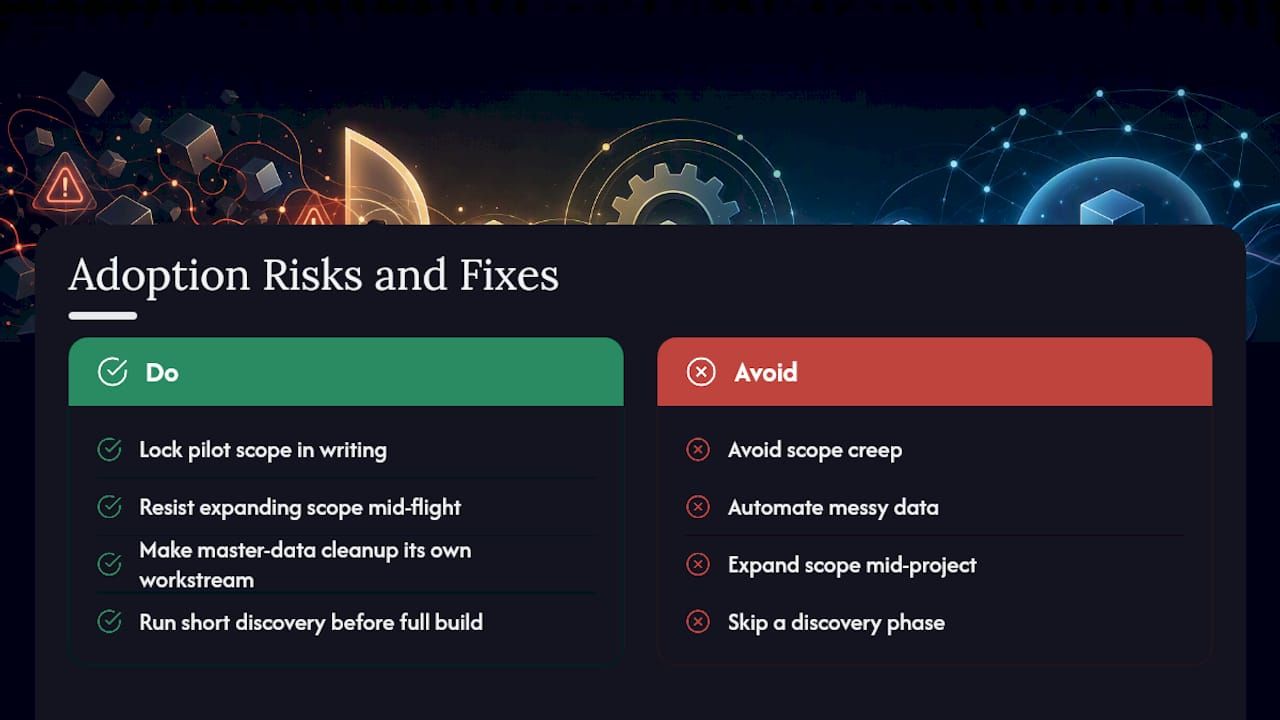
Scope creep kills more P2P automation projects than any technical limitation. A team sets out to automate invoice matching and ends up trying to rebuild the entire procurement org chart in the same phase. Bitecode’s view, drawn from how these projects typically unravel: fix your data hygiene and pilot scope before you touch anything else, because a clean pilot on messy data just automates the mess faster.
The mitigation is unglamorous but effective. Lock the pilot scope in writing, resist the urge to expand it mid-flight, and treat master-data cleanup as its own workstream with its own owner. A short discovery engagement run before any commitment to a full build tends to surface these risks while they’re still cheap to fix.
How Can Bitecode Help You Automate P2P Workflows?
If your ERP setup doesn’t match what off-the-shelf P2P platforms assume, or your audit requirements demand a self-hosted deployment, Bitecode builds the automation layer around your actual constraints instead of asking you to adapt to a vendor’s template.
Two services matter most here. Custom business software development covers the end-to-end build, from requisition workflows through invoice matching and payment scheduling, using Bitecode’s modular components to skip months of groundwork. AI business process automation adds the intelligent layer, agentic routing for exceptions, automated coding, and supplier communication, on top of that foundation.
A typical first engagement starts with a discovery conversation to map your current process and ERP landscape, followed by a scoped MVP covering your highest-impact invoice flows. From there, integration and scaling follow the roadmap outlined earlier in this guide. If your team is evaluating whether to buy a platform or build something that actually fits, request a pilot discussion with Bitecode’s team to see what a scoped engagement looks like for your ERP and supplier setup.
Where Can You Learn More About P2P Automation?
- IBM: Procure to Pay Automation — overview of the P2P lifecycle and its automation points.
- SAP Ariba: Procure-to-Pay Software — guided buying and AI-driven spend visibility features.
- Tradeshift: Procure to Pay Software — modular automation and supplier collaboration benefits.
- Automation Anywhere: P2P Automation Platform — RPA and agentic AI applied to matching and exceptions.
Frequently Asked Questions
What is the difference between procure-to-pay automation and accounts payable automation? AP automation covers only the invoice-to-payment portion of the cycle. Procure-to-pay automation spans the full process starting at requisition, including sourcing, purchase orders, and receipt matching before the invoice ever arrives.
How long does a P2P automation implementation typically take? Assessment and design usually run four to six weeks, a pilot adds another six to eight weeks, and full integration and scaling can stretch across a couple of quarters depending on ERP complexity and supplier count.
Does P2P automation replace revenue recognition automation? No. Automated revenue recognition and ASC 606 automation address how a company records revenue after a sale, a separate accounting function from the purchasing and payment cycle P2P automation covers, though both often live inside the same finance automation strategy.
Can small and mid-sized companies benefit from P2P automation, or is it only for large enterprises? Mid-sized companies often see faster payback because their processes are less entrenched. A modular approach lets you automate your highest-volume flows first, such as recurring purchase orders, without committing to enterprise-scale platform costs upfront.
What happens to jobs currently doing manual invoice processing? Most organizations shift AP staff toward exception handling, supplier relationship management, and sourcing analysis rather than eliminating the roles outright. Automation removes the repetitive data entry, not the judgment calls that still need a person.
Sources
- Procure to Pay (P2P) Automation | IBM
- Spend Management | SAP Ariba Procure-to-Pay Software
- Procure-to-Pay (P2P) Automation Software Platform | Automation Anywhere


