
Enable row level security when your application must enforce per-user or per-tenant row access from inside the database itself, rather than trusting every calling application to filter correctly. Row level security (RLS) is a database engine feature that applies a filter or check to every query against a table, restricting which rows a given session can see or modify. It works alongside the SQL privilege system, not instead of it: GRANT controls table-level access, while RLS policies control which specific rows within that table are visible.
The first move isn’t writing a policy. It’s inventorying which tables hold multi-tenant or per-user data, confirming how your application passes identity into a database session, and staging a single policy against a copy of production data before touching anything live.
- Inventory first: list every table where one row’s contents should be invisible to another user or tenant.
- Identify session context: decide how the database will know who’s asking (a session variable, a JWT claim, an application role).
- Stage before you enable: test the policy in a non-production environment with real role switching before flipping it on in production.
Pro Tip: Enable row level security on a staging clone with production-shaped data before you touch a live table. A policy that looks correct in isolation can silently return zero rows once real foreign keys and joins get involved.
Key Takeaways
Row-level security enforces per-user or per-tenant data visibility inside the database engine itself, using default-deny policies that require explicit USING and WITH CHECK rules to grant any access.
| Point | Details |
|---|---|
| Default-deny is automatic | Enabling RLS without a policy hides every row from every non-owner role until a policy explicitly allows access. |
| USING and WITH CHECK differ | USING filters what a session can read; WITH CHECK validates what it’s allowed to write, and both need separate testing. |
| Force enforcement for owners | Run FORCE ROW LEVEL SECURITY in Postgres, or the platform equivalent, or table owners bypass policies entirely. |
| Keep predicates cheap | Expensive subqueries inside policies slow every query on the table; use indexed lookups or security-definer functions instead. |
| Pair RLS with other controls | Combine row-level filtering with column masking and audit logging rather than treating RLS as a complete security solution. |
| Bitecode supports full rollout | Bitecode designs RLS policies, CI test suites, and monitoring integration as part of its custom software development work. |
What Row Level Security Actually Controls at the Database Level
Row level security works through a small set of primitives, and understanding them is the difference between a policy that protects data and one that quietly breaks your application. You turn the feature on with ALTER TABLE ... ENABLE ROW LEVEL SECURITY, then define the actual rules with CREATE POLICY, ALTER POLICY, or DROP POLICY. Each policy carries two possible clauses: USING, which filters what a session can read, and WITH CHECK, which validates what a session is allowed to write. These aren’t interchangeable. A USING clause can quietly hide rows from a SELECT, while a WITH CHECK clause actively blocks an INSERT or UPDATE that would violate the rule, an important distinction for SQL Server’s implementation as much as for Postgres.
Multiple policies on the same table combine differently depending on their type. Permissive policies (the default) combine with OR, meaning a row is visible if any permissive policy allows it. Restrictive policies combine with AND, meaning all of them must pass. Get this backward and you’ll either overexpose data or lock out legitimate users.
The default posture matters as much as the policies themselves. Once RLS is enabled on a table, the engine assumes a default-deny posture: if no policy applies to a given role and command, that role does not see or modify any rows on that table.
- Default-deny is the safety net, not the policy logic itself.
- Owners and superusers typically bypass RLS unless you explicitly force enforcement (Postgres’s
FORCE ROW LEVEL SECURITY, for instance). - Roles with
BYPASSRLSprivilege skip policy evaluation entirely, which matters enormously for backup jobs and admin tooling. - Policy expressions run with the querying user’s own privileges, unless you deliberately route through a security-definer function.
Postgres’s own documentation is explicit that when row security is enabled and no policy exists for a table, a default-deny rule applies so that no rows are visible or modifiable at all. That single behavior explains most “why did my query return nothing” support tickets involving RLS.
Which Database and BI Platforms Support Row-Level Security?
Row-level security isn’t a Postgres-only concept. It shows up across relational databases and analytics platforms, but the implementation details differ enough that copying a pattern from one platform to another can break silently.
- Postgres: native policy-based RLS with
CREATE POLICY, fullUSING/WITH CHECKsupport, and owner-bypass controls viaFORCE ROW LEVEL SECURITY. - Supabase: built on Postgres, so it inherits native RLS directly, which is why it’s become a default recommendation for teams building multi-tenant apps on top of a managed Postgres backend.
- BigQuery: implements row-level access policies that behave like an appended filter, support subqueries against other tables, but come with documented limits on subquery complexity and interactions with BI Engine and materialized views.
- CockroachDB: evaluates policy expressions per row with the same permissive-OR/restrictive-AND combination logic and default-deny fallback as Postgres, given its Postgres-compatible lineage.
- Microsoft Power BI: applies RLS at the semantic-model layer using DAX filter expressions tied to roles, a fundamentally different mechanism from SQL predicates since it filters visualization data rather than raw table rows.
- Databricks: supports row-level security through view-based filtering and dynamic views layered on Unity Catalog governance, applying access rules closer to the catalog than the storage engine itself.
The practical takeaway: SQL-native platforms (Postgres, Supabase, CockroachDB) let you write policies as boolean SQL expressions evaluated per row. Power BI applies filters at the reporting layer using DAX. BigQuery sits in between, with policies that resemble SQL predicates but carry platform-specific quirks around partition pruning and caching that you need to test explicitly rather than assume away.
How Do You Enable and Configure Row Level Security in Postgres?
Postgres remains the reference implementation most teams build against, including Supabase users who inherit it directly. Here’s the actual command sequence.
First, turn the feature on for a table:
ALTER TABLE invoices ENABLE ROW LEVEL SECURITY;
At this point, with no policies defined, the table becomes invisible to everyone except the owner and roles with BYPASSRLS, thanks to the default-deny behavior documented by Postgres. Next, define a policy. A common multi-tenant pattern filters rows by a tenant_id column matched against a session-supplied value:
CREATE POLICY tenant_isolation ON invoices
  USING (tenant_id = current_setting('app.current_tenant')::uuid)
  WITH CHECK (tenant_id = current_setting('app.current_tenant')::uuid);
Your application sets that session variable once per connection, typically right after authentication:
SET LOCAL app.current_tenant = '3f29...';
Using SET LOCAL inside a transaction, rather than a plain SET, keeps the value scoped to that transaction and avoids bleeding tenant context across pooled connections, a mistake that’s easy to make with connection poolers like PgBouncer.
Policies can scope to specific commands instead of applying to everything:
CREATE POLICY read_own_rows ON invoices
  FOR SELECT
  USING (owner_id = current_user_id());

CREATE POLICY write_own_rows ON invoices
  FOR INSERT
  WITH CHECK (owner_id = current_user_id());
FOR ALL applies both USING and WITH CHECK to every command type; scoping to SELECT, INSERT, UPDATE, or DELETE individually gives you finer control when read and write rules genuinely differ.
One detail trips up almost every team the first time: table owners bypass RLS by default. If your application connects as the table’s owning role (common in simpler setups), your policies do nothing at all until you run:
ALTER TABLE invoices FORCE ROW LEVEL SECURITY;
This forces even the owner to respect policies, unless that role also carries BYPASSRLS. For genuine tenant isolation, FORCE ROW LEVEL SECURITY isn’t optional. It’s the line between a policy that protects data and one that only protects data from non-owner connections nobody actually uses.
Pro Tip: Keep policy predicates cheap. A USING clause that runs a correlated subquery against another large table gets evaluated on every row of every query touching the table. Precompute tenant or ownership lookups into an indexed column, or push the logic into a SECURITY DEFINER function that queries a small, indexed reference table instead of joining live.
Setting Up Row-Level Security in Power BI Semantic Models
Power BI enforces row-level security at the semantic-model layer, filtering the data a report shows rather than filtering rows inside a database engine. The workflow has three parts: defining roles, writing DAX filter rules, and assigning users or groups to those roles after publishing.
- Create roles in the model. In Power BI Desktop, open Manage Roles and define a role per access pattern, such as
RegionalManagerorTenantUser. - Write the DAX filter expression. A user-scoped filter commonly uses
USERPRINCIPALNAME(), comparing the logged-in user’s email against a mapping table:[UserEmail] = USERPRINCIPALNAME(). Group-based filters instead check membership through a bridge table joined to security groups. - Publish and assign role membership. After publishing to the Power BI service, an admin maps actual users or Microsoft Entra groups to each role from the workspace settings, since role definitions travel with the model but membership doesn’t.
- Validate with “View As Roles.” Before trusting a rule, test it directly in the report by viewing it as each role to confirm filtered results match expectations.
Validation matters more here than in most SQL-based RLS because dataset caching and service principals can change how filters actually apply once a model is live, a gap between desktop behavior and service behavior that catches teams off guard.
- Confirm behavior for service accounts and service principals separately. They often don’t carry the same claims a human
USERPRINCIPALNAME()would. - Re-test after any dataset refresh or gateway change, since caching layers can mask a broken rule until the underlying data changes.
- Watch for B2B guest users, whose principal names may not match your internal mapping table’s expected format.
Which RLS Policy Pattern Fits Your Data Model?
Four patterns cover most real deployments, and picking the wrong one for your architecture is more common than getting the SQL syntax wrong.
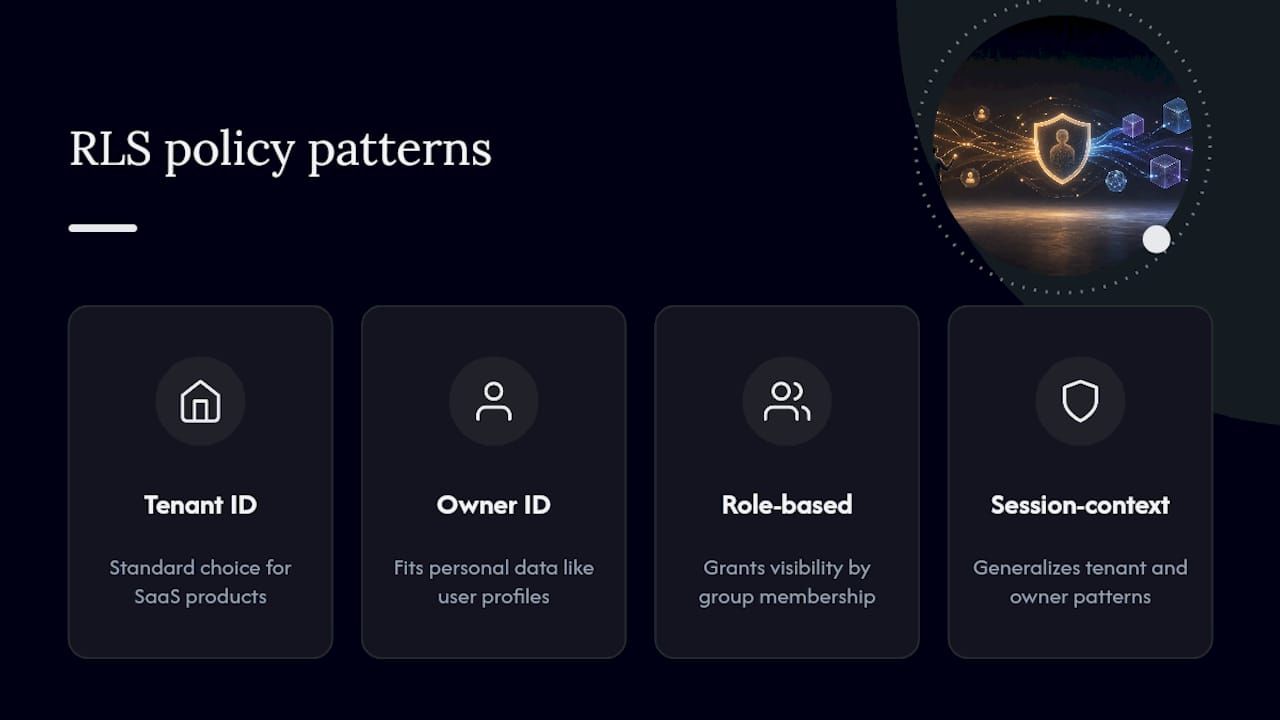
Tenant ID isolation filters every row by a tenant_id column matched against session context: USING (tenant_id = current_setting('app.current_tenant')::uuid). It’s the standard choice for SaaS products sharing tables across customers. The upside is simplicity: one predicate, one column, easy to reason about. The risk is that it only works if you’ve also run FORCE ROW LEVEL SECURITY, since a forgotten owner-bypass silently defeats the entire pattern.
Owner ID filtering restricts rows to their creator: USING (owner_id = current_user_id()). It fits personal data like user profiles or private documents well, but gets fragile fast across joins. A join to a table without an equivalent policy can leak existence information even when the base table is protected.
Role-based predicates grant visibility by group membership rather than identity: USING (current_role_group() = ANY(allowed_roles)). This suits shared resources like admin dashboards or cross-tenant support tooling where multiple people legitimately need the same access.
Session-context filtering generalizes tenant and owner patterns into arbitrary session variables set at connection time. It’s flexible, but only as secure as your session population. CockroachDB’s guidance on this is worth internalizing: prefer securely-populated variables like set_config over anything a client could tamper with directly.
Pro Tip: Whichever pattern you choose, keep the predicate itself boring. A policy that joins across three tables to determine visibility is a policy that’s slow at scale and hard to audit at 2 a.m. when something breaks.
How Do You Test and Debug Row-Level Security Before Going Live?
Testing RLS requires actually switching roles, not just reading the policy definition and assuming it’s correct.
- Inventory every table with RLS enabled or planned, and list which roles need access to each.
- Create dedicated test roles or users for each access pattern (tenant A, tenant B, admin, anonymous).
- Enable RLS in a staging environment that mirrors production schema and data volume.
- Run
SELECT,INSERT,UPDATE, andDELETEas each test role, confirming both that allowed rows are visible and that disallowed rows genuinely return nothing. - Explicitly test
WITH CHECKenforcement by attempting writes that should fail, not just reads that should be filtered.
- Use
SET ROLEorSET SESSION AUTHORIZATIONto switch identity within a test session without reconnecting. - Where supported, use a
row_security = offsetting to compare filtered versus unfiltered results, which is the fastest way to catch silent over-filtering. - Watch for permission errors on tables or functions referenced inside a policy predicate; the querying user needs access to everything the predicate touches, unless routed through a security-definer function.
- Check backup jobs specifically. A backup process running under a restricted role can silently produce an incomplete backup if RLS filters rows it should have captured.
What Are the Real Risks and Limitations of Row-Level Security?
RLS is a strong control, but it has genuine blind spots worth planning around rather than discovering in production.
- Administrative bypass: superusers, table owners, and roles with
BYPASSRLSskip policy evaluation entirely. Mitigate by tightly controlling privileged accounts and applyingFORCE ROW LEVEL SECURITYwherever the platform supports it. - Referential-integrity leaks: foreign key and unique constraint checks in several databases bypass RLS to preserve data integrity, which can leak the existence of a row through a constraint error even when its contents stay hidden.
- Performance cost: because policies evaluate per row on every query, expensive predicates with unindexed joins or nested subqueries degrade performance broadly, not just on the queries that trigger the slow path.
- Analytics and caching side effects: BI Engine, materialized views, and dataset caching can interact with row-level policies in ways that aren’t obvious until tested against the specific analytics stack in use.
Treat RLS as one layer of a broader control set. Security teams generally recommend pairing it with defense-in-depth practices like column-level masking and consistent audit logging, rather than relying on any single mechanism to carry the full weight of access control. Bitecode’s guide on PII data masking covers how masking complements row-level filtering when sensitive columns need protection even from users who legitimately see the row.
A Deployment Checklist: From Design to Production Monitoring
Rolling out row-level security safely follows a four-phase arc, and skipping straight to “enable and hope” is the most common way teams get burned.
Design. Inventory every table holding tenant or user-specific data. Define exactly how session context reaches the database, whether through a connection-time variable, an application role, or claims passed from your auth layer. Choose a pattern (tenant ID, owner ID, or role-based) per table, and set a rough performance budget for policy evaluation before writing a single CREATE POLICY statement.
Stage. Apply RLS in a staging environment using the test roles described earlier. Build automated tests that assert both visibility (allowed rows appear) and restriction (disallowed rows don’t), and wire them into CI so a future schema change can’t silently break isolation. Run load tests that include policy predicates in the query path, since staging without realistic query volume hides the exact performance problems RLS tends to cause.
- Design: inventory tables, define session context, choose patterns, set performance budgets.
- Stage: apply policies in staging, build CI tests asserting visibility and restriction, load-test with predicates active.
- Deploy: enable RLS with a documented rollback plan, monitor query latency immediately after cutover.
- Monitor: track policy-evaluation time, denied write attempts, and audit logs of any policy change going forward.
Deploy. Enable RLS with a documented rollback plan, since a policy that behaves unexpectedly under real traffic needs a fast path back to a known-good state. Confirm backup jobs run with awareness of row_security settings so a scheduled backup doesn’t silently capture a filtered, incomplete dataset. Bitecode’s SaaS security compliance checklist is a useful companion here for multi-tenant deployments that need to demonstrate isolation controls to auditors or enterprise customers.
Monitor. Track query latency and policy-evaluation time as ongoing KPIs, not one-time deployment checks. Log denied write attempts, since a spike often signals either an attack attempt or a broken client integration. Review policy change history on a set cadence, treating CREATE POLICY and ALTER POLICY statements with the same audit rigor as schema migrations.
Pro Tip: Add a role-based smoke test to your release pipeline that runs a handful of representative queries as each defined role before every deploy. It catches the class of bug where a schema migration adds a column or join that quietly breaks an existing policy’s assumptions.
When Does Row-Level Security Beat the Alternatives?
Bitecode’s rule of thumb is straightforward: reach for row-level security when multiple tenants or users must legitimately share the same physical table, and the cost of maintaining separate schemas or duplicated tables outweighs the complexity of writing and testing policies. That’s most SaaS products with a shared multi-tenant database design, where one invoices table serving a thousand tenants is far easier to operate than a thousand near-identical tables.
Separate tables or authorized views make more sense when the existence of a row needs to stay secret, not just its contents. Authorized views offer flexibility but remain vulnerable to crafted queries and timing side channels in ways that a genuinely separate table, with its own access grants, simply avoids by design.
The trade-off comes down to three factors: cost of schema duplication, tolerance for policy-evaluation overhead on every query, and how strict your existence-secrecy requirements actually are. RLS wins on operational simplicity at scale. Separate tables win when you can’t accept even a probabilistic leak. Bitecode’s architecture reviews for enterprise clients weigh this exact trade-off before recommending either approach, and the answer changes depending on whether you’re building a shared SaaS backend or an internal system with strict compartmentalization requirements.
Get Help Designing and Deploying Row-Level Security at Scale
Writing a correct RLS policy is the easy part. Keeping it correct across every schema migration, every new microservice, and every analytics pipeline that touches the same tables is where most teams actually struggle. Bitecode builds custom data access layers as part of its modular software development approach, starting from pre-built security and workflow components rather than writing policy logic from scratch on every project.
Bitecode’s engineering teams design tenant isolation policies matched to your actual schema, build CI test suites that catch broken policies before they reach production, and integrate monitoring and audit logging so denied writes and policy changes show up where your team already watches for incidents — see Security Overview · The Therapy Canvas for an example of tenant isolation and application-to-database security practices. Deliverables typically include policy design and review, an automated test suite wired into your pipeline, monitoring and alerting integration, and support through a staged rollout rather than a single risky cutover. For teams building or hardening a custom web application that needs this kind of database-level access control done right the first time, that’s where Bitecode’s application development work starts. Get in touch to scope a data access review for your current schema.
Where to Find Authoritative Row-Level Security Documentation
For exact syntax and version-specific behavior, go straight to primary vendor documentation rather than third-party summaries.
- Postgres row security policies covers conceptual behavior, default-deny logic, and owner/BYPASSRLS rules.
- Postgres CREATE POLICY reference is the syntax source for writing and scoping actual policies.
- BigQuery row-level security introduction explains platform-specific limits around subqueries, BI Engine, and materialized views.
- SQL Server row-level security documentation details predicate-based security for Microsoft’s relational engine.
- CockroachDB row-level security overview covers policy evaluation and default-deny behavior in a distributed SQL context.
- Power BI row-level security guidance is the reference for DAX-based role filters and service-side validation.
Frequently Asked Questions About Row-Level Security
What is row-level security in a database? Row-level security is a database engine feature that restricts which specific rows a user or session can read or modify, enforced automatically on every query rather than relying on application code to filter results correctly.
How is row-level security different from column-level permissions?
Column-level permissions and GRANT statements control access to entire tables or columns, while RLS controls access to individual rows within a table a user already has permission to query.
Do superusers bypass row-level security policies?
Yes, in most implementations. Postgres superusers and roles with BYPASSRLS skip policy evaluation entirely, and table owners bypass RLS unless you explicitly run FORCE ROW LEVEL SECURITY.
Can row-level security hurt query performance? It can, particularly when policy predicates include unindexed joins or nested subqueries evaluated on every row of every query. Precomputed lookup tables and session variables keep the overhead manageable.
Is row-level security available outside Postgres? Yes. Supabase inherits it directly from Postgres, BigQuery and CockroachDB implement their own row-level access policies, and Power BI applies row-level filtering at the semantic-model layer using DAX rather than SQL predicates.
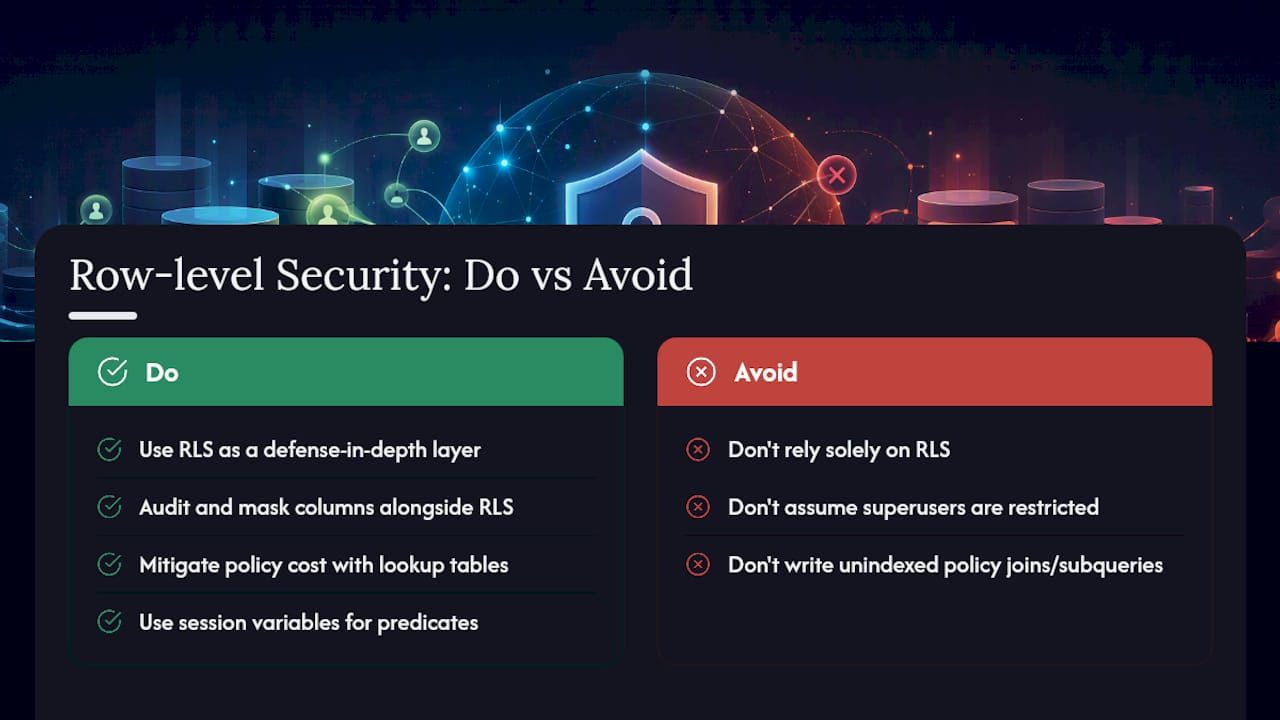
Should row-level security replace application-level access checks? No. Treat it as one layer in a defense-in-depth strategy alongside application authorization, column masking, and audit logging, since administrative bypass paths mean RLS alone can’t guarantee complete enforcement.
Sources
- PostgreSQL: Documentation: Row Security Policies
- Introduction to BigQuery row-level security | Google Cloud Documentation
- Row-Level Security (RLS) Overview - CockroachDB
- Row-level security (RLS) with Power BI - Microsoft Learn


