
TL;DR:
- A low code automation process uses visual tools and minimal coding to build business workflows efficiently. Success depends on thorough mapping, incremental development, and strong collaboration between business and IT teams. Blockchain integration requires asynchronous design and specialized middleware to handle consensus latency and security needs.
A low code automation process is a visual, minimal-coding method for building and deploying business workflows that replaces hand-written scripts with drag-and-drop logic, prebuilt connectors, and conditional routing. Platforms like Make, Zapier, n8n, and Microsoft Power Automate have made this approach accessible to operational teams without deep engineering backgrounds. The result is faster deployment, reduced development overhead, and workflows that business users can actually own and modify. This guide walks through the six core steps, platform selection criteria, common pitfalls, and advanced use cases including blockchain integration, so your team can build automation that holds up under real operational load.
What are the core steps in the low code automation process?
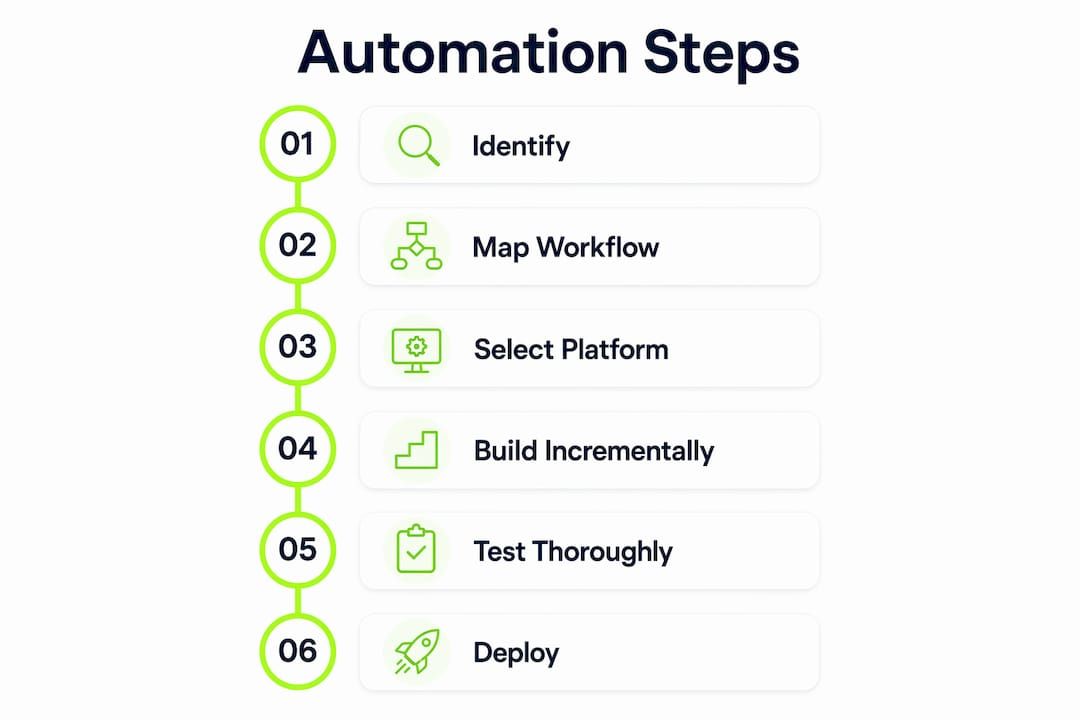
A six-step automation process covers the full lifecycle from identifying a broken workflow to continuously optimizing a live one. Each step builds on the last, and skipping any one of them is where most implementations go sideways.
-
Identify the target process. Choose a workflow that is repetitive, rule-based, and currently consuming disproportionate manual effort. Invoice routing, lead assignment, employee onboarding notifications, and data sync between CRM and ERP are strong candidates. Avoid processes with high exception rates or significant human judgment requirements at the outset.
-
Map the workflow before touching any platform. Mapping conditional paths and integration points on paper before platform configuration reduces logic errors significantly. Use a simple flowchart or BPMN diagram to define the trigger, each step, decision branches, and the expected output. This step forces clarity on data dependencies that visual builders tend to obscure.
-
Select the right platform. Match the platform to your integration requirements, not just the interface. A workflow connecting Salesforce, NetSuite, and Slack has different connector requirements than one linking a Google Sheet to an email service. Platform selection is covered in depth in the next section.
-
Build incrementally, starting with one trigger and one action. The incremental build approach maximizes early success and minimizes debugging complexity. Add branching logic, filters, and secondary actions only after the core path runs cleanly. This is the single most effective way to avoid the debugging spiral that kills early automation projects.
-
Test with real data and add error handling. Testing with real data and adding guardrails like error handlers and exception logging is critical before deployment. Synthetic test data misses edge cases that real records expose immediately. Configure fallback routes and alert notifications for failed runs before going live.
-
Deploy, monitor, and iterate. Treat the first deployment as a baseline, not a finished product. Track run success rates, execution times, and error frequency. Revisit the workflow every 30 to 60 days to account for upstream system changes or new business requirements.
Pro Tip: Before building in any platform, write out the workflow as a numbered list in plain language. If you cannot explain each step clearly in one sentence, the logic is not ready to build.
| Phase | Key action | Success indicator |
|---|---|---|
| Identify | Select a rule-based, repetitive process | Clear trigger and output defined |
| Map | Diagram all branches and data inputs | No ambiguous decision points |
| Build | Start with one trigger, one action | Core path runs without errors |
| Test | Use real production data | Error handlers cover all failure modes |
| Deploy | Go live with monitoring active | Run success rate above 95% |
| Optimize | Review every 30 to 60 days | Execution time and error rate declining |

How to choose the right low code automation platform
Platform selection is the decision that most directly determines whether a low code workflow automation project scales or stalls. The wrong platform relocates complexity into the vendor relationship rather than eliminating it.
The features that matter most for enterprise-grade use are visual drag-and-drop builders with support for branching logic, iterators, aggregators, and AI orchestration capabilities. Platforms that cap out at simple linear trigger-action chains will force workarounds the moment your workflows involve conditional routing or multi-system data transformation.
Integration depth is the second filter. Evaluate each platform against your actual system stack. Consider the following when comparing options:
- Native connectors: Does the platform have prebuilt, maintained connectors for your CRM, ERP, HRIS, and communication tools? Native connectors are more reliable than generic HTTP modules.
- API flexibility: For systems without native connectors, how well does the platform handle REST and GraphQL calls, authentication flows, and pagination?
- Error handling and logging: Enterprise workflows need configurable retry logic, dead-letter queues, and alerting. Platforms that treat error handling as an afterthought create operational risk.
- Scalability and execution limits: Check monthly operation caps, concurrent execution limits, and pricing tiers. What costs $50 per month at low volume can reach $2,000 per month at enterprise scale.
The table below compares five platforms across the criteria that matter most for business-grade automation:
| Platform | Best for | Blockchain support | Code extensibility |
|---|---|---|---|
| Make | Complex multi-step workflows | Via HTTP modules | JavaScript in custom modules |
| Zapier | Simple integrations, fast setup | Limited | No native code execution |
| n8n | Self-hosted, developer-friendly | Via custom nodes | Full JavaScript/Python |
| Microsoft Power Automate | Microsoft 365 environments | Limited | Power Fx, Azure Functions |
| Custom middleware | IoT and blockchain orchestration | Native | Full stack |
For teams that need low code blockchain automation or IoT data verification, standard platforms typically require custom middleware or purpose-built orchestration layers. This is a niche but growing requirement, particularly in financial services and supply chain.
What are common mistakes in low code automation and how to avoid them?
The failure modes in low code automation projects are predictable. Most stem from moving too fast in the build phase and too slow in the governance phase.
The most common mistake is attempting to automate an entire complex workflow at once. Starting incrementally with one trigger and one action aids early error detection and simplifies debugging. Teams that try to replicate a 15-step manual process in a single build session typically produce a fragile workflow that breaks on the first edge case and is difficult to diagnose.
Skipping workflow mapping is the second most common error. Jumping directly into a visual builder without a documented process map leads to aimless configuration and missed conditional logic. The workflow looks functional in testing but fails in production when data arrives in an unexpected format or a downstream system returns an error.
Neglecting IT governance is a structural risk that grows with adoption. Successful scaling relies on a hybrid model where operational teams handle workflow logic and IT manages system architecture and security. When business users build automations that touch sensitive data or financial systems without IT review, the organization accumulates compliance exposure that is expensive to unwind.
Pro Tip: Establish a lightweight automation review checklist that every new workflow must pass before deployment. Include data classification, error handling verification, and a named owner responsible for ongoing monitoring.
Automating a broken process at scale produces broken results faster. Fix the process logic first, then automate it.
Additional pitfalls to address before deployment:
- Failing to document the workflow for future maintainers
- Using personal API credentials instead of service accounts
- Not setting execution limits to prevent runaway loops
- Ignoring platform update logs that may deprecate connectors
Involving both business and IT teams from the start, as outlined in hybrid team practices, accelerates adoption while keeping architecture and security stable.
How does blockchain integration expand low code automation possibilities?
Blockchain integration represents one of the more technically demanding extensions of the low code automation model, but it unlocks use cases that standard API-based workflows cannot address. Secure audit trails, smart contract execution, tokenized asset transfers, and IoT sensor data verification all require the immutability and consensus mechanisms that blockchain provides.
Low code orchestration middleware can support 12 concurrent data streams with average latency around 37.4 seconds, dominated by blockchain consensus time rather than application processing. This latency profile is the defining constraint for blockchain-connected workflows. It means these automations are suited for asynchronous processing patterns, not real-time transactional flows.
The practical steps for building low code blockchain automation follow a modified version of the standard process:
- Define the on-chain event or transaction that will serve as the trigger or output. Smart contract events, token transfers, and block confirmations are the most common entry points.
- Select middleware that supports blockchain node connectivity. Standard platforms like Make or Zapier require custom HTTP modules or third-party connectors. Purpose-built orchestration layers handle authentication, retry logic, and consensus waiting natively.
- Design for asynchronous processing. Build the workflow to submit a transaction and then poll for confirmation rather than expecting a synchronous response.
- Add audit logging at every step. The value of blockchain integration is traceability. Capture transaction hashes, timestamps, and state changes in a separate log store for compliance and debugging.
| Use case | Blockchain function | Low code role |
|---|---|---|
| Supply chain verification | Immutable shipment records | Trigger on IoT sensor data, write to chain |
| Financial settlement | Smart contract execution | Automate payment release on condition met |
| Document authentication | Hash-based audit trail | Generate and store document hashes on-chain |
| Tokenized asset transfer | Token minting and transfer | Orchestrate wallet interactions via middleware |
The low code development benefits in blockchain scenarios are concentrated in the orchestration layer. Teams do not need deep Solidity or Web3 expertise to build the surrounding workflow logic. They need a clear understanding of the asynchronous nature of on-chain operations and a middleware layer that handles the blockchain-specific complexity.
Key takeaways
A successful low code automation process requires upfront workflow mapping, incremental build discipline, and a hybrid governance model that keeps business agility and IT control in balance.
| Point | Details |
|---|---|
| Map before you build | Document all branches and data dependencies before opening any platform. |
| Build incrementally | Start with one trigger and one action, then expand after the core path is stable. |
| Test with real data | Synthetic data misses edge cases; use production records before deployment. |
| Govern with IT | Operational teams own workflow logic; IT owns architecture and security review. |
| Design blockchain async | Blockchain-connected workflows require asynchronous patterns due to consensus latency. |
What Bitecode has learned from building automation at scale
The teams that get the most out of low code automation are not the ones with the most sophisticated platforms. They are the ones that invest the most time in the mapping phase. Every hour spent diagramming conditional paths, exit points, and integration dependencies before touching a builder saves three hours of debugging after deployment. That ratio holds whether the workflow connects two SaaS tools or orchestrates a blockchain-based payment settlement.
The second lesson is harder to internalize: low code does not eliminate technical debt. It relocates it. When a black-box platform handles connector maintenance, error routing, and execution infrastructure, the organization gains speed but accepts dependency on a vendor’s roadmap and pricing decisions. That trade-off is often worth making, particularly for workflows that need to be live in days rather than months. But teams should enter it with clear eyes, not the assumption that visual builders remove all architectural risk.
Bitecode’s experience building modular enterprise systems confirms that the most durable automation implementations combine a prebuilt modular foundation with targeted custom code at the integration boundaries. The low code layer accelerates work without accelerating chaos, provided the governance model keeps pace with adoption. Start with one high-impact workflow, prove the value, then scale the model with IT as a structural partner rather than a gatekeeper.
— Bitecode
Accelerate your automation with Bitecode’s ready-built modules
Bitecode’s modular platform lets organizations deploy automation with up to 60% of the baseline system already built. For teams exploring intelligent workflow automation, the AI Assistant module provides a chat-based interface that connects directly to your business logic, reducing the configuration overhead that slows most automation projects. For organizations that need secure financial workflows or on-chain audit trails, the blockchain payment module handles the orchestration complexity that standard low code platforms cannot address natively. Both modules are designed to integrate with existing systems rather than replace them, giving your team a fast path to production without a greenfield build. Explore how Bitecode’s automation module fits your current workflow stack.
FAQ
What is a low code automation process?
A low code automation process is a method for building business workflows using visual, drag-and-drop tools with minimal hand-written code. Platforms like Make, Zapier, and n8n provide prebuilt connectors and conditional logic that operational teams can configure without engineering support.
How many steps does a standard low code automation workflow involve?
A standard low code process consists of six steps: identify the process, map the workflow, select a platform, build incrementally, test with real data, and deploy with ongoing optimization.
What is the biggest mistake in low code automation projects?
The most common mistake is attempting to automate an entire complex workflow at once instead of starting with one trigger and one action. Incremental building catches errors early and makes debugging significantly faster.
Can low code tools handle blockchain integration?
Yes, but with constraints. Low code orchestration middleware can support blockchain workflows, though average latency of 37.4 seconds per transaction reflects blockchain consensus time. These workflows require asynchronous design patterns rather than real-time processing.
How do business teams and IT collaborate on low code automation?
Hybrid development teams work best when operational staff own workflow logic and IT manages system architecture, security, and compliance review. This model accelerates adoption while preventing the governance gaps that create compliance risk at scale.


