
An AI agent for operations is a system that observes live operational data, plans a course of action, and executes it through connected tools, without waiting for a human to click “approve” on every step. The verdict: this technology is production-ready today for bounded, data-rich workflows with clear KPIs, but only when paired with orchestration and governance. Adoption is accelerating fast enough that Gartner tracks it as a distinct enterprise category, and some vendors build these systems from modular baselines rather than from scratch.
TL;DR:
- AI agents work best in workflows with clear KPIs, reliable integrations, and comprehensive governance, particularly for bounded and data-rich tasks.
- The most effective first use cases are workforce scheduling, IT incident response, and process documentation because they are low in complexity and quick to deploy.
- Success depends more on establishing proper orchestration, role-based control, and audit trails than on model capabilities alone, with pilot projects typically lasting a few weeks.
- Modular frameworks like Bitecode’s can cut deployment times by up to 60%, allowing real data testing and scaling within weeks instead of months.
- Key risks include model drift, hallucinated actions, permission creep, and cascade failures, which require organizational discipline and thorough planning to mitigate.
What Is an AI Agent, and How Does It Work in Operations?
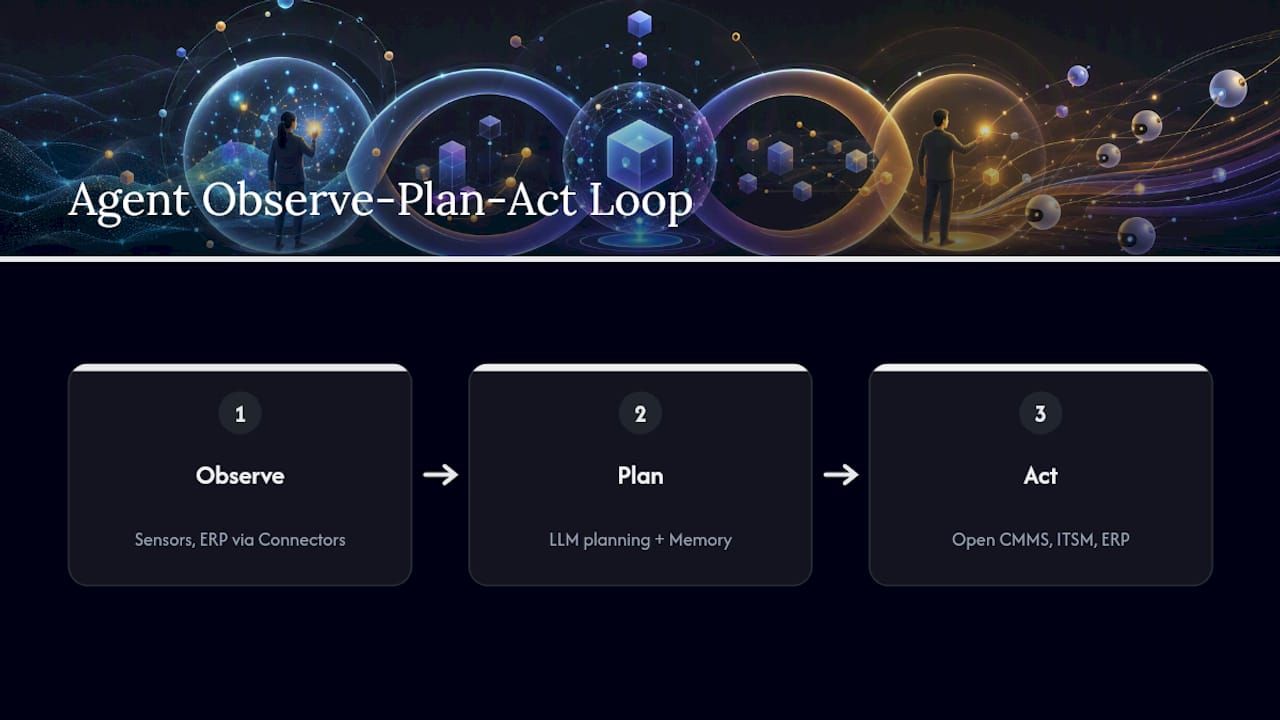
Every functioning operations agent runs the same loop: it observes a data stream, plans a response, and acts on a system of record. A predictive maintenance agent, for example, observes vibration sensor readings on a conveyor motor, plans a work order based on failure thresholds, and acts by opening that ticket directly in the CMMS. No dashboard, no analyst reviewing a chart at 9 a.m. The agent already moved.
Underneath that loop sit four components. Memory holds context from prior interactions so the agent does not treat every event as a first encounter. A planning module, typically a large language model, decides what sequence of steps solves the problem. Tool-calling or action modules carry out those steps against real systems. Connectors link the agent to the ERP, ITSM platform, or sensor network it needs to read and write. MIT Sloan’s framing of this observe-plan-act lifecycle is the clearest starting point for operations teams evaluating whether a workflow qualifies as agentic or is just automated scripting with extra branding.
Agents also come in different behavioral flavors. Goal-based agents pursue a fixed objective, like minimizing downtime. Utility-based agents weigh tradeoffs, such as balancing repair cost against urgency. Learning agents adjust their own decision rules over time as outcomes accumulate. Most enterprise deployments start with a single bounded agent handling one workflow, then expand into multi-agent orchestration once that agent proves reliable. IBM’s architecture guidance describes a manager, or manager-of-agents, pattern where a central coordinator delegates subtasks to specialized agents. Planning techniques like ReAct (reason, then act, then observe the result) and ReWOO (plan the full sequence before acting) shape how much an agent second-guesses itself mid-task, which matters when latency and cost both count.
Which AI Agent Use Cases Deliver the Fastest Operational Payoff?
Eight use cases dominate current deployments, and they are not equally easy to pilot. Picking the wrong one first is the most common reason operations teams abandon agentic automation after a rocky quarter.
- Predictive maintenance. Ingests vibration, temperature, and runtime sensor data to flag equipment likely to fail before it does, then auto-generates a work order. Expect gains in first-time fix rate and fewer emergency callouts. Pilot complexity: medium, since it depends on sensor coverage.
- Quality inspection. Uses computer vision or process data to flag defects in real time, routing exceptions to a human reviewer. Expect reduced scrap rate and faster defect detection. Pilot complexity: medium to high, depending on image data quality.
- Resource allocation. Reallocates labor, equipment, or inventory across sites based on live demand signals. Expect better asset utilization. Pilot complexity: high, because it touches multiple systems at once.
- Workforce scheduling. Builds and adjusts shift schedules against skill requirements, labor rules, and absenteeism patterns. Expect reduced overtime spend and fewer coverage gaps. Pilot complexity: low, since scheduling data is usually clean and centralized.
- Supply chain optimization. Monitors supplier lead times and inventory levels, then triggers reorders or reroutes shipments. Expect shorter cycle time and fewer stockouts. Pilot complexity: high, given the number of external data feeds involved.
- Incident response and IT operations. Detects anomalies in system logs, diagnoses likely root cause, and either remediates automatically or escalates with context attached. Expect faster mean time to resolution. Pilot complexity: low to medium.
- Compliance and governance monitoring. Continuously checks transactions or processes against regulatory rules and flags exceptions for review. Expect fewer missed filings and faster audit prep. Pilot complexity: medium, and always needs human sign-off on anything customer-facing.
- Process documentation and knowledge agents. Captures how work actually gets done and answers employee questions against that living documentation. Expect reduced onboarding time. Pilot complexity: low.
For a first pilot, prioritize workforce scheduling, IT incident response, or process documentation. All three sit in the low-complexity column, run on data you already have clean access to, and produce KPI movement within weeks rather than quarters. Save supply chain optimization and resource allocation for phase two, once your orchestration layer and governance model have already survived contact with a live agent.
Facilities management offers a useful real-world signal here. One CMMS platform reports 70 to 80 percent organic adoption when maintenance agents are grounded directly in the technician’s existing workflow instead of a separate tool they have to remember to open. Adoption, not accuracy, is usually the bottleneck operations leaders underestimate.
How Do AI Agents Deliver Measurable Value in Operations?
The KPIs that matter here are the ones operations teams already track, just moved by a new lever. Watch these six:
- Time reclaimed per employee or team, measured in hours per week freed from manual triage.
- First-time fix rate for maintenance and field service tickets.
- Mean time to resolution (MTTR) for IT incidents and equipment failures.
- Unplanned downtime, tracked as a percentage reduction against baseline.
- Cycle time for processes like order fulfillment or invoice approval.
- Cost per transaction, which tends to be the metric finance actually cares about.
Pro Tip: Run your pilot for at least one full business cycle, not two weeks, before calculating ROI. Agent performance improves as memory and tuning accumulate, and a two-week snapshot almost always understates the real number.
Translating a pilot into enterprise ROI is a matter of multiplication, not magic. If an agent reclaims four hours a week for 50 technicians, that is 200 hours weekly, or roughly five full-time equivalents worth of capacity. BCG’s analysis of agentic deployments points out that realizing this value still requires real investment in data engineering and system integration. The math works, but it is not free.
Reclaimed time is not the same as headcount reduction, and treating it that way is the fastest way to sabotage adoption. MIT Sloan’s research frames agents as augmenting human capacity rather than replacing it outright, which means the real planning work is redeployment, not layoffs. Technicians freed from routine triage should move into root-cause work, training, or the exception cases agents are worse at handling than a human ever will be.
How Do You Roll Out AI Agents from Pilot to Production?
A five-stage sequence keeps the rollout controlled instead of chaotic. Skip a stage and you will pay for it later, usually during an audit or an outage.
- Select a bounded workflow. Choose a process with clean, accessible data, a clear owner, and a KPI you already measure. Avoid your messiest process for pilot number one, no matter how tempting the payoff looks on paper.
- Design the guardrails before the agent. Define what the agent is allowed to do autonomously, what requires human sign-off, and what counts as a failure state that triggers a rollback. Human-in-the-loop checkpoints belong in the design phase, not bolted on after a near-miss.
- Build with grounded data. Connect the agent to your actual systems of record through retrieval-augmented generation rather than a static knowledge base, and connect it to your ERP, CMMS, or ITSM platform through real connectors. Test it against a simulation harness before it ever touches production data. Databricks’ guidance on production-grade agents treats this grounding step as the single most common point of failure in rushed deployments.
- Operate through an orchestration control plane. Every agent action should pass through role-based access control, get logged for audit, and stay observable in real time. This is the layer that turns a clever demo into something an operations team can actually trust at 2 a.m.
- Scale in phases, not all at once. Add agents or expand scope only after a defined evaluation window, with drift detection running continuously and a governance board reviewing outcomes on a set cadence.
This sequence pairs naturally with a broader workflow automation strategy, since agents rarely operate in isolation from the automation already running around them.
What Architecture and Orchestration Do Production Agents Need?
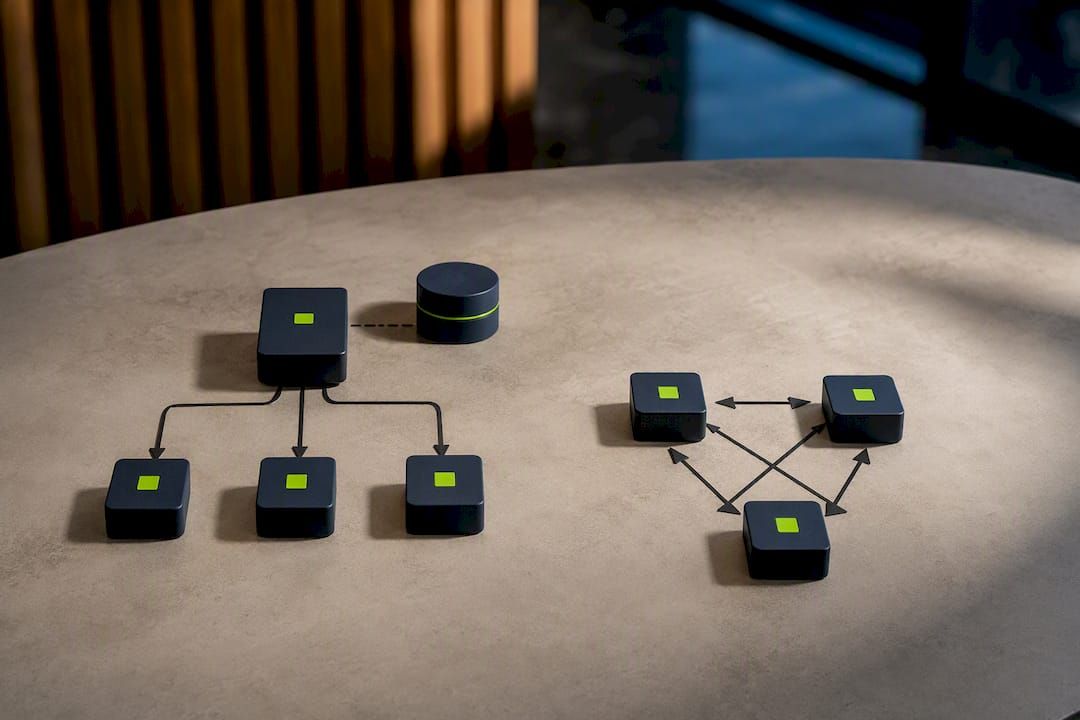
Two architectural patterns dominate enterprise deployments, and the choice between them shapes how easy your system is to debug six months in. The manager, or manager-of-agents, pattern uses a central coordinator that delegates subtasks to specialized agents while retaining full context. OpenAI’s guidance for enterprise builders treats this as the safer default, since a single point of coordination makes both control and observability far simpler. Peer-to-peer multi-agent designs, where agents negotiate directly with each other, scale well for narrow tasks but get genuinely hard to trace once more than a handful of agents are involved.
Whichever pattern you choose, the integration list is largely fixed: ERP for financial and inventory data, CMMS for maintenance, ITSM for IT operations, MES for manufacturing execution, an identity provider for access control, and an event bus to carry real-time signals between systems.
The orchestration layer, sometimes called a service orchestration and automation platform, functions as the control plane. Stonebranch’s framing of orchestration describes it as the piece that enforces role-based permissions, keeps an audit trail, and allows a clean rollback when an agent takes an action it should not have.
- Log every decision an agent makes, not just its final action, so you can replay what happened during an incident review.
- Build a test harness that can simulate edge cases before they hit production, not after.
- Treat observability as a first-class requirement, not a monitoring dashboard added post-launch.
Pro Tip: If you are running more than three agents, adopt a standard integration protocol like the Model Context Protocol early. Retrofitting a common interface across agents built independently is far more painful than starting with one.
What Are the Main Risks of AI Agents, and How Do You Mitigate Them?
Four failure modes account for most agent incidents worth worrying about: model drift as conditions change from what the agent was tuned on, hallucinated actions taken on bad or incomplete information, permission creep as an agent’s access expands past its original scope, and cascade failures where one agent’s mistake triggers a chain reaction across a multi-agent system.
Mitigation is mostly organizational discipline, not exotic technology.
- Keep human-in-the-loop approval gates on any action with financial, safety, or regulatory consequences.
- Enforce role-based access control so an agent can only touch the systems its task actually requires.
- Maintain audit trails and run periodic reviews against a fixed testing protocol, not just when something breaks.
- Write incident playbooks and rollback procedures before the agent goes live, not during the outage.
- Assign clear ownership for each agent’s decisions. Someone’s name needs to be on it.
For workflows touching financial reporting, healthcare, or regulated data, confirm your agent’s decision trail meets your industry’s specific audit and retention requirements before scaling past pilot, since general-purpose governance frameworks rarely cover sector-specific obligations out of the box.
How Bitecode’s Modular Approach Shortens the Path to a Working Agent
Most agent projects stall in the same place: months spent building connectors and workflow scaffolding before a single agent ever runs against real data. Bitecode addresses that directly by starting projects with up to 60% of the baseline system already pre-built, which turns the connector and workflow-engine work described in the roadmap above from a build phase into a configuration phase.
That matters because the components mapped through this guide, agent modules, ERP and CMMS connectors, the workflow engine, RBAC, and audit logging, are exactly what some modular frameworks ship pre-assembled. A vendor checklist worth applying to any implementation partner:
- Does the platform already support your core integrations (ERP, ITSM, CMMS), or is that custom work?
- Can it demonstrate governance capabilities: audit trails, role-based permissions, rollback procedures?
- What SLAs cover uptime and support once the agent is in production?
- Is there evidence of comparable enterprise deployments, not just pilot demos?
Bitecode’s AI solutions practice applies this modular baseline across fintech, blockchain, and workflow automation projects, which shortens the distance between a use-case decision and a running pilot.
The Real Bottleneck Isn’t the Model
Every operations leader evaluating agentic automation focuses on model capability first, and that is the wrong place to spend the worry. The technology in 2026 is good enough for the eight use cases covered here. What actually determines success is whether governance and orchestration get built before the agent, not after an incident forces the issue.
Start with the highest-impact, lowest-complexity pilot on your list, not the flashiest one. Budget for monitoring as a permanent operating cost, not a one-time setup task, because model drift does not announce itself. And plan the human side with the same rigor as the technical side: retraining and redeployment programs need to exist before reclaimed hours show up, or that capacity quietly evaporates into slack instead of value. Teams that treat agentic automation as a two-year maturity curve, not a quarterly project, are the ones still running these systems confidently three years from now.
— Bitecode
Ready to Move from Pilot to Production?
Reading a roadmap and building one are different problems. Modular frameworks exist specifically to close that gap, taking the connectors, workflow engine, and governance scaffolding described throughout this guide and starting your project with most of that foundation already built rather than scoped from zero.
That head start compresses what typically takes months of infrastructure work into a matter of weeks, so your first agent pilot runs against real operational data instead of a slide deck. Bitecode’s automation services cover the full path from a bounded pilot workflow through orchestration, RBAC, and audit logging needed to scale safely. If you are ready to scope a pilot around one of the use cases in this guide, start with a custom software consultation and bring your current workflow map to the first conversation.
Sources
- Agentic AI, explained | MIT Sloan
- Practical AI agents examples for business & how to get started | Databricks Blog
- IBM: AI agent use cases and architecture
FAQ
What Are the Main Types of AI Agents?
Common categories include goal-based agents, utility-based agents, learning agents, and multi-agent systems coordinated through a manager pattern, plus hybrid variants combining reactive and planning behaviors depending on the source and framework referenced.
What Is the 30% Rule in AI?
There is no single agreed-upon “30% rule” in agentic AI; the phrase gets used inconsistently across vendor marketing, so treat any specific figure attached to it with caution rather than as an established standard.
What Are the Top AI Agents Operations Teams Use Today?
The highest-adoption categories are predictive maintenance agents, IT incident response agents, and workforce scheduling agents, largely because they run on clean, centralized data and produce fast, measurable KPI movement.
Is ChatGPT an Agent or a Large Language Model?
ChatGPT is fundamentally a large language model interface; it becomes agentic only when connected to tools, memory, and action modules that let it observe data and execute tasks autonomously, which is exactly the architecture this guide describes for operations use cases.
How Long Does It Take to Deploy an AI Agent in Operations?
A bounded pilot with clean data typically reaches production in weeks rather than months, though timelines depend heavily on integration complexity. Bitecode’s modular baselines, which start projects up to 60% pre-built, are designed specifically to shorten that window.


