
A transactional outbox solves one problem: your service must update its database and tell other services about it, and those two writes cannot be made atomic. The fix is to write the event into an outbox table in the same database transaction as the business change, then have a separate process publish it to the broker. The database commit becomes the single source of truth, and the event follows it reliably, at least once.
This guide covers the failure the pattern removes, the mechanics, the two main relay designs, how to handle duplicates and ordering, and the operational work teams tend to underestimate.
TL;DR
- A naive “save, then publish” sequence can lose an event or emit a phantom one. The outbox removes that window by making the event part of the database commit.
- A relay (a poller or a log-based change-data-capture reader) forwards outbox rows to the broker afterward.
- Delivery is at least once. Consumers must be idempotent, and ordering needs a deliberate design.
- The pattern fits event-driven systems where a state change must trigger a notification. It does not replace a saga when a business transaction spans several data stores.
- Plan for the operations: relay lag, retries, dead-letter handling and outbox cleanup.
The dual-write problem the outbox removes
Imagine an order service. A customer pays, the service marks the order as paid, and it publishes an OrderPaid event so shipping and invoicing can react. Two systems are touched: the database and the message broker. No single transaction covers both.
AWS Prescriptive Guidance describes both failure modes. If the database update succeeds but the notification fails, the downstream service never learns of the change. If the database update fails but the notification goes out, downstream data can be corrupted. Microsoft’s Cosmos DB sample frames the same window as a crash between the state write and the event publication, which produces either a lost event or a phantom event.
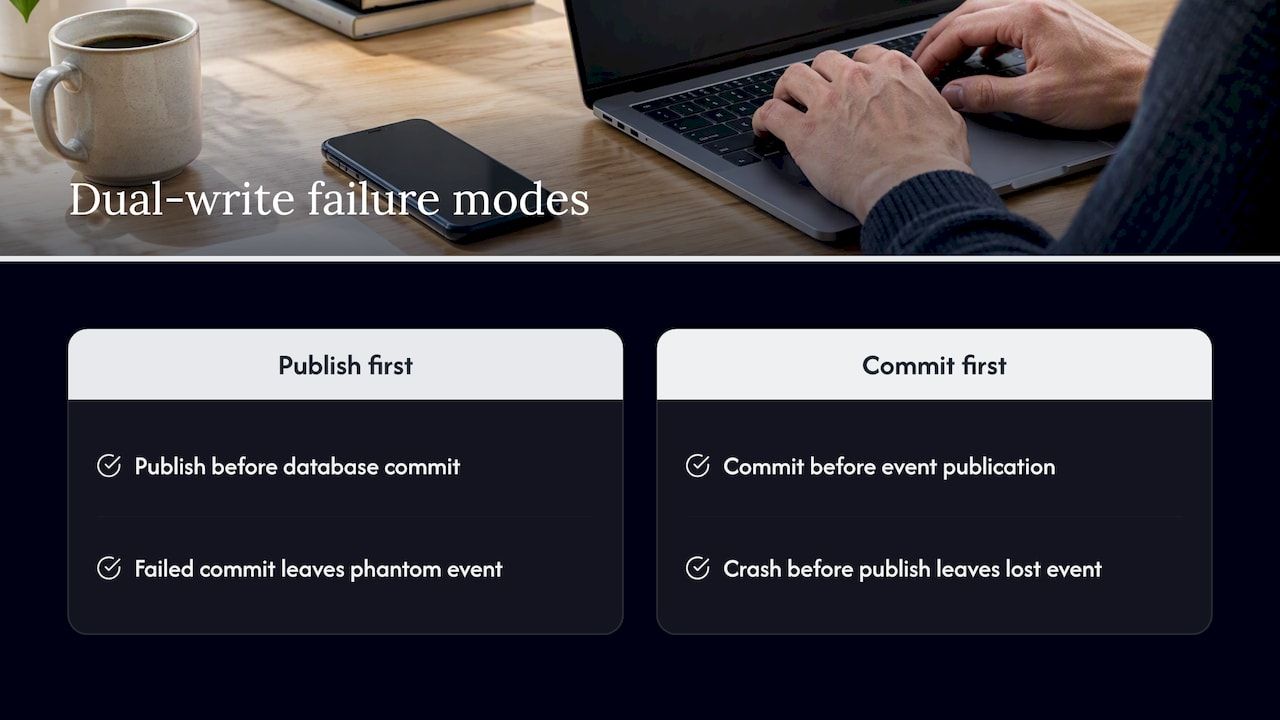
Reordering the two calls does not help. Publish first and a failed commit leaves a phantom event. Commit first and a crash before publishing leaves a lost event. Wrapping both in a distributed two-phase commit is possible only when every participant supports it, and it couples your availability to every participant. Most modern brokers and managed services do not offer it, so teams look for another route.
How the transactional outbox works
The idea is to stop writing to two places in the request path. You write to one place, the database, and let a second step move the data on.
- Create an outbox table in the same database as your business tables.
- Write the event in the same transaction as the state change.
- Run a relay that reads unprocessed outbox rows, publishes them to the broker and marks them processed.
Microsoft’s Azure Architecture Center guidance explains that the business-object change and its event are stored in one transaction, which commits both or rolls both back, so the event cannot be lost. A separate message relay or background worker then reads unhandled entries, publishes them to the broker and marks them as processed.
Cockroach Labs’ write-up on the dual-write problem describes the same shape: the business row and a second copy of the event go into an outbox table in one transaction, and the durable record is forwarded to the queue asynchronously.
A minimal outbox table
The exact columns depend on your stack, but a workable starting point looks like this:
CREATE TABLE outbox (
  id            UUID PRIMARY KEY,
  aggregate_id  TEXT NOT NULL,
  event_type    TEXT NOT NULL,
  payload       JSONB NOT NULL,
  created_at    TIMESTAMP NOT NULL DEFAULT now(),
  sequence_no   BIGSERIAL,
  processed_at  TIMESTAMP NULL
);
The id doubles as the event ID consumers use for deduplication. The aggregate ID gives you a key for ordering per entity. The sequence number and timestamp support ordering, and processed_at lets the relay track progress.
The write path
In application code, the two inserts share one transaction:
BEGIN;
  UPDATE orders SET status = 'PAID' WHERE id = 'ord_123';
  INSERT INTO outbox (id, aggregate_id, event_type, payload)
  VALUES (gen_random_uuid(), 'ord_123', 'OrderPaid', '{"orderId":"ord_123"}');
COMMIT;
If the transaction rolls back, neither row exists, so no event leaves. That matches the rule in the AWS sample repository: rolled-back transactions must not emit events.
The reliability here comes from committing durable intent together with the business state. The database and the broker never become one transaction. Only the first half is atomic, and the second half is made repeatable.
Choosing a relay: polling or change-data capture
The relay is where most design decisions live. There are two common approaches.
| Criterion | Polling relay | Log-based change-data capture |
|---|---|---|
| How it reads | Periodically queries unprocessed outbox rows | Tails the database transaction log |
| Added database load | Repeated queries, grows with poll frequency | Low, no repeated queries |
| Latency | Bounded by the poll interval | Typically closer to commit time |
| Ordering | Needs a sequence column and careful batching | Follows commit order |
| Operational footprint | A small worker in your own code | Extra infrastructure and connector management |
| Marking rows processed | Required | Often unnecessary, rows can be deleted or left to a cleanup job |
Microsoft’s guidance describes the polling variant for relational databases: query new rows on a schedule, publish them and mark them processed. For Cosmos DB, it uses the change feed instead, with progress tracked in leases and failed batches re-read. On AWS, EventBridge Pipes can integrate with DynamoDB Streams to capture table events without code or a separate process reading the stream.
A 2024 analysis from Decodable contrasts the two. Polling repeatedly queries the outbox and can add load and latency. Log-based CDC tails the transaction log, cutting that overhead and preserving commit order. The same analysis prefers CDC whenever possible and calls polling deceptively simple.
Our practical reading: start with polling when volume is modest and the team wants to keep the moving parts inside one codebase. Move to log-based capture when poll load, latency or ordering needs start to hurt. Either way, put the relay behind an interface so the switch is a deployment change and not a rewrite.
Polling details that bite later
- Batch size and interval. Small batches at short intervals raise load. Large batches raise latency and the cost of a retried batch.
- Row claiming. If you run more than one relay instance, claim rows safely, for example with row-level locking that skips locked rows, or you will publish the same row twice and break ordering.
- Index the unprocessed set. A partial index on rows where
processed_atis null keeps the poll query cheap as the table grows.
At-least-once delivery and idempotent consumers
The outbox guarantees that the event is recorded if and only if the business change commits. It does not guarantee the broker receives it exactly once. The relay can publish a message and crash before marking the row as processed, so on restart it publishes again. The microservices.io pattern description names this exact case.
The Azure guidance says the same: the pattern prevents data loss but requires handling reprocessing duplicates. Its Cosmos DB example uses event IDs together with Service Bus duplicate detection. The AWS guidance is to make consuming services idempotent by tracking processed messages.
In practice that means:
- Every event carries a stable unique ID, assigned when the outbox row is written and never regenerated on retry.
- Each consumer records processed IDs, ideally in the same transaction as its own state change.
- Side effects that cannot be rolled back, such as charging a card or sending an email, are guarded by the same ID.
For money movement, this is not optional. We cover the consumer side in detail in our guide to idempotency keys and duplicate charge prevention.
Ordering: what you can and cannot promise
Consumers often assume events arrive in the order the database changed. The AWS sample states that notifications should follow the order of database updates, and the AWS guidance says the pattern preserves ordering using timestamps and sequence numbers. Treat that as a design goal you must engineer, not a free property.
What holds up in practice:
- Order per entity, not globally. Use the aggregate ID as the broker partition or message key so all events for one order stay in sequence.
- A single relay path per key. Parallel relays and parallel consumers can reorder events unless they are keyed.
- Sequence numbers in the payload. They let a consumer detect a gap or discard a stale event.
- Broker features. Azure’s example uses sessions to preserve first-in-first-out order for related messages.
One consequence is worth planning for. The NestJS outbox documentation notes that retrying a message can block other messages with the same key, and that once the message is dead-lettered, the messages behind it go out. Strict per-key order and fast recovery pull against each other, so decide which one wins for each event type.
Failure handling and cleanup
The happy path is easy. The outbox earns its keep on the unhappy path, so design these cases before launch.
Retries and dead letters
Transient broker failures should be retried with backoff. Poison messages, such as a payload the broker rejects, need a destination other than an endless retry loop. The AWS EventBridge Pipes example supports retries and sends failed events to a dead-letter queue for analysis and reprocessing. Whatever you build, alert on dead-letter depth and make replay a documented, tested procedure.
Timeouts and stuck handlers
The NestJS docs flag a subtle case. A handler that ignores the abort signal can keep running after a publish timeout, and if a retry reaches the same process it waits for that handler. Pass cancellation signals all the way down, and set timeouts that reflect the real latency of your broker. A relay that hangs quietly is worse than one that fails loudly. Pair it with the timeout and breaker practices in our piece on circuit breaker tuning for Java teams.
Relay lag and cleanup
- Monitor lag. Track the age of the oldest unprocessed row. This single metric tells you whether downstream systems are current.
- Prune the table. Processed rows pile up. Delete or archive them on a schedule, in small batches, so cleanup does not lock the table or bloat indexes.
- Keep a retention window long enough to replay after a downstream incident, but bounded.
Forgetting to write the event
The microservices.io description lists an honest drawback: it can be error-prone because a developer might forget to write the message after updating the database. Reduce the risk by routing state changes through one domain layer that writes both rows, and cover it with tests that assert an outbox row exists for each state transition.
When the transactional outbox is the right tool
AWS lists the typical fits: event-driven applications where a database update initiates an event notification, cases where atomicity is needed across two services, and event sourcing implementations. A few signals that it belongs in your design:
- A state change must reliably trigger a downstream action, such as a payment, a ledger entry or a webhook.
- You cannot accept silent event loss, and you cannot use distributed transactions.
- You already run a relational database that gives you local ACID transactions.
It is not the answer to everything. AWS notes that when a transaction spans services that update their own data stores, the saga orchestration pattern is the tool for preserving data integrity across them. The outbox is often a building block inside a saga, since each step still has to publish its result reliably. Confluent’s course material describes the pattern as pushing transactional logic into the database by updating state and the outbox table together.
The broader trade-off is that queues add complexity but let messages wait until a downstream component is available, as Particular Software discusses. If you are still deciding between synchronous calls, queues and streams, our five-dimension rubric for microservices communication and our overview of event-driven architecture patterns and trade-offs help you place the outbox in the larger picture.
A rollout checklist
- Identify state changes that must emit events, and list the consumers of each.
- Define the event contract: ID, type, aggregate key, sequence, version and payload.
- Add the outbox table and write both rows inside the same transaction.
- Ship a polling relay with safe row claiming, or a CDC connector if your platform supports one.
- Make every consumer idempotent and test with deliberately duplicated events.
- Add dead-letter handling, lag alerts and a tested replay procedure.
- Schedule outbox cleanup and verify it under load.
Our perspective
We see the transactional outbox misunderstood in two opposite ways. Some teams treat it as a heavy architectural commitment and keep living with silent event loss. Others treat it as a magic guarantee and skip idempotent consumers. Both positions relocate complexity into places nobody is watching.
Our view is that the outbox belongs in the modular foundation of any system where state changes drive money, compliance or customer-facing automation. It is small, well understood and testable. That is why we build it into the reusable components we start projects from, so a client’s financial, automation and workflow modules inherit reliable event publication from day one, instead of retrofitting it after the first incident.
We design it with audit-readiness in mind. An outbox row is a durable, timestamped record of intent, which helps when a team needs to explain what the system did and when. We also keep the relay behind a clean interface and the infrastructure under the client’s control, including self-hosted deployments, so moving from polling to log-based capture is a planned step and not a migration crisis.
The goal is to accelerate work without accelerating chaos: reuse the proven parts, and spend the project budget on the business-domain complexity that is unique to you.
Bitecode
Building this into a system you own
If you are planning an event-driven platform, a payment flow or an internal system where lost or duplicated events carry real cost, we can start from pre-built modules rather than a blank repository. Our custom business software and advanced cloud applications work covers the service layer, and our financial and automation modules cover the domain pieces that depend on dependable messaging. Our approach is designed to begin with a large share of the baseline system already in place, so the design conversation can focus on your workflows.
Tell us about the flow you need to make reliable and we will scope it with you on the Bitecode home page.
FAQ
What is the difference between the outbox pattern and the transactional outbox pattern?
They refer to the same idea. The “transactional” part stresses that the event is written in the same database transaction as the business change. Teams use both terms interchangeably in documentation and conversation.
Does the transactional outbox give exactly-once delivery?
No. It guarantees the event is recorded if and only if the business transaction commits, and the relay delivers it at least once. A relay crash between publishing and marking the row processed can cause a duplicate, so consumers must be idempotent and track processed message IDs.
Should I use polling or change-data capture for the relay?
Polling is simpler to build and fine at moderate volume, but it adds query load and latency. Log-based capture reads the transaction log, reduces polling overhead and keeps commit order, at the price of more infrastructure. Many teams start with polling and move to capture as volume or ordering needs grow.
When should I use a saga instead of an outbox?
Use a saga when one business transaction spans several services that each update their own data store, because the saga coordinates the steps and compensations. The outbox still helps inside a saga by making each step’s event publication reliable.
Sources
- Transactional outbox pattern, AWS Prescriptive Guidance
- Transactional outbox sample, Azure Cosmos DB design patterns
- Implement the Transactional Outbox Pattern by using Azure, Microsoft Learn
- Message queuing and the database: solving the dual write, Cockroach Labs
- aws-samples/transactional-outbox-pattern, GitHub
- Implementing the transactional outbox pattern with Amazon EventBridge Pipes
- Revisiting the Outbox Pattern, Decodable
- Pattern: Transactional outbox, microservices.io
- Transactional outbox, NestJS documentation
- The Transactional Outbox Pattern, Confluent Developer
- Patterns in Messaging Systems, Particular Software


