
TL;DR:
- Pre-built software modules handle standard functions and help teams focus on unique product features. They reduce costs by 60-80% and enable faster deployment, often in 45-90 days. However, teams must manage risks like vendor lock-in and limited customization to maintain flexible, scalable systems.
Pre-built software modules are ready-made, reusable components that handle standard application functions so development teams can focus on what makes their product unique. Understanding what pre-built software modules are matters because the build-versus-buy decision shapes project timelines, budgets, and long-term architecture. These modules cover functions like authentication, payment processing, notifications, and localization. Teams that use them correctly accelerate development cycles without sacrificing control over their core product logic.
What are pre-built software modules?
Pre-built software modules are off-the-shelf software units that deliver a complete, tested function within a larger application. The industry also calls them ready-made components, software libraries, or packaged modules. All of these terms describe the same concept: code that someone else wrote, tested, and maintains, which your team drops into a project to handle a defined task.
The distinction from greenfield development is direct. Building an authentication system from scratch requires designing session management, password hashing, token refresh logic, and security audits. A pre-built authentication module ships with all of that already done. Teams configure it, connect it through an API, and move on to the features that differentiate their product.

Off-the-shelf solutions are designed for broad, standardized use across many applications and industries. That breadth is both their strength and their constraint. A payments module built to handle Stripe, PayPal, and ACH transfers works for thousands of applications, but it will not handle a proprietary settlement workflow without modification.
Pre-built modules sit at the intersection of speed and standardization. They represent the accumulated engineering effort of solving a problem that most applications share. Using them means your team does not pay that engineering cost twice.
How do pre-built modules differ from modular components?
The terms “module” and “component” appear interchangeable in casual conversation, but they describe different architectural concepts. Modules are tightly coupled internal units with high cohesion, designed to work within a single system. Components are self-contained, deployable units with explicit API contracts, versioning, and the ability to operate across different environments and systems.
A practical example makes this concrete. An authentication module inside a monolithic application is a module: it lives within the codebase, shares the same runtime, and is not designed to be consumed by external systems. An authentication service exposed through a REST API with versioned endpoints and published documentation is a component. It can be consumed by a mobile app, a web front end, and a third-party integration simultaneously.
Pro Tip: When evaluating a pre-built solution, check whether it behaves as a true component with explicit versioning and documented contracts. A module that lacks these properties will create upgrade pain as your system grows.
The difference between module and component matters most when planning for scalability. Teams that treat a tightly coupled module as if it were a portable component often discover the mismatch during a major refactor, not during initial integration. Knowing which you are adopting shapes how you design the rest of your architecture around it.
Pre-built software solutions can be either modules or components depending on how the vendor packages them. Enterprise authentication platforms like OAuth 2.0 implementations typically ship as components with full API contracts. Simpler UI libraries ship as modules that live inside your front-end codebase. Identifying which type you are working with before integration prevents architectural surprises later.
What are the key advantages of using pre-built software modules?
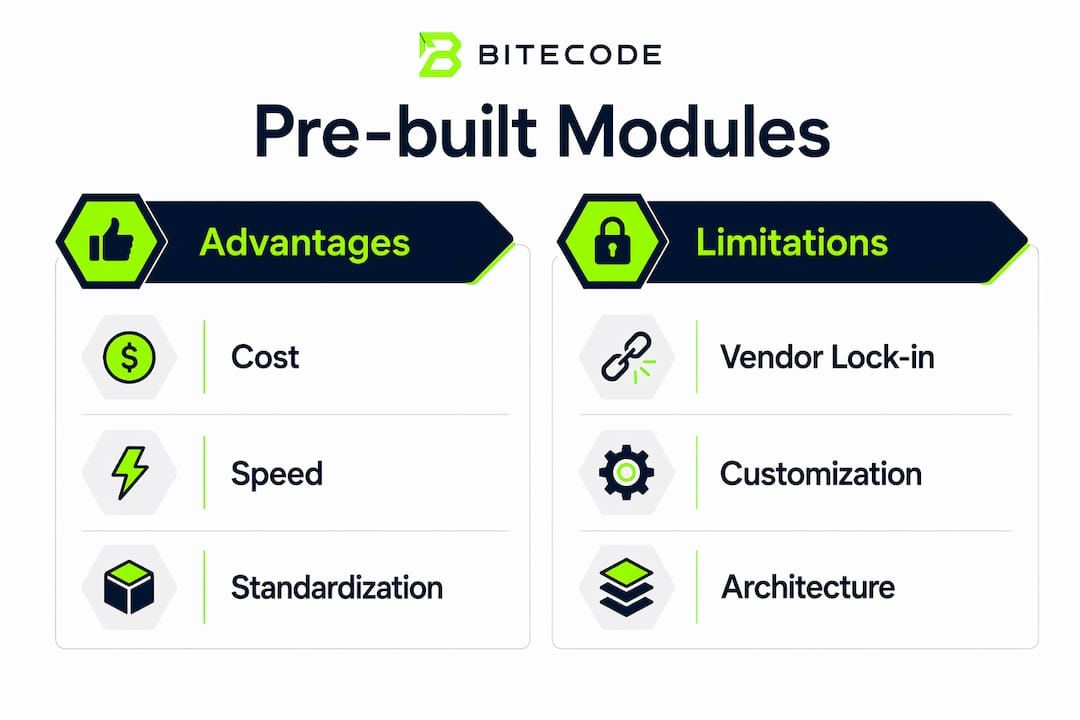
The cost argument for pre-built modules is direct. Integrating pre-built solutions can achieve a 60–80% cost reduction compared to custom-building the same features. That figure reflects the engineering hours, QA cycles, and security audits that the vendor has already absorbed.
Speed is the second major benefit. Pre-built components enable market deployment in 45–90 days versus 6–12 months for full custom development. For teams under pressure to ship, that gap is the difference between capturing a market window and missing it.
The advantages of pre-built modules extend beyond cost and speed:
- Battle-tested security. Pre-built solutions come with security protocols tested by thousands of users across production environments. Your team inherits that testing history rather than discovering vulnerabilities in your own users’ data.
- Vendor-managed updates. Purchasing pre-built software reduces upfront costs and delivers ongoing vendor support, security patches, and feature updates under a recurring license. Your team does not own the maintenance burden.
- Compliance coverage. Modules built for payments or healthcare often ship with PCI DSS or HIPAA compliance built in. Building that compliance from scratch requires specialized legal and engineering resources most teams do not have.
- Faster onboarding. New developers joining a project that uses well-documented pre-built modules reach productivity faster than they would on a fully custom codebase.
Common functions well-suited to pre-built modules include user authentication, payment processing, push notifications, email delivery, localization, file storage, and audit logging. These are commodity functions. Every application needs them, but none of them differentiate one product from another.
The efficiency and cost gains from pre-built modules compound over time. Teams that avoid rebuilding commodity infrastructure redirect that engineering capacity toward the features that actually win customers.
What are the important limitations of pre-built modules?
Pre-built modules introduce real trade-offs that teams must evaluate before committing. Vendor lock-in is the most cited risk. When a module’s internal logic is opaque and its API is proprietary, replacing it later requires significant rework. Choosing modules with well-documented, swappable APIs mitigates this risk from the start.
Architectural rigidity is a related concern. A pre-built module designed for a specific data model may force your schema into a shape that does not fit your domain. Teams that discover this mismatch after six months of development face a painful choice between refactoring and accepting a suboptimal design.
The limitations worth tracking before adoption include:
- Customization ceilings. Most pre-built modules support configuration, not modification. Forking the vendor’s code to add a custom behavior means you own that fork forever and lose access to upstream updates.
- Performance assumptions. A module built for general use may not perform well under your specific load profile. Benchmark before committing, not after.
- Dependency sprawl. Each module brings its own dependencies. Without active management, a project accumulates conflicting library versions that slow builds and introduce security exposure.
- Support gaps. Vendor support quality varies. A module with poor documentation or an inactive community becomes a liability when something breaks in production.
Pro Tip: Apply the “buy for commodity, build for differentiation” rule before every module decision. If the function is standard across your industry, buy it. If it is the reason customers choose your product, build it.
Teams should avoid heavy customization of pre-built module core code. Customizing beyond configuration breaks maintainability and blocks security updates. The best starting point for evaluating any pre-built solution is its API surface: clean contracts signal a vendor that understands how their module will be consumed in real architectures.
How to effectively integrate pre-built modules into your development workflow
Effective integration starts with a clear boundary between commodity and differentiated code. Teams that define this boundary before writing a line of code make better module decisions throughout the project.
A practical integration workflow follows this sequence:
- Map your feature list against commodity functions. Authentication, payments, notifications, and file handling are almost always commodity. List every feature your application needs and mark which ones appear in dozens of other applications.
- Evaluate modules against API quality, not just feature lists. A module with clean versioning, published changelogs, and an active community will cost less to maintain than a feature-rich module with poor documentation.
- Adopt a modular architecture from the start. Wrapping each pre-built module behind an internal interface layer means you can swap the underlying vendor without touching the rest of your codebase.
- Pin dependency versions and review updates on a schedule. Unmanaged updates break builds. A monthly dependency review catches breaking changes before they reach production.
- Test the module under your actual load conditions before full integration. General-purpose modules carry general-purpose performance assumptions. Validate them against your specific traffic patterns early.
Combining pre-built modules with modular architectures allows teams to swap components without rebuilding the entire system. That flexibility is the real payoff of disciplined integration. The hybrid model reserves custom engineering for the features that create competitive advantage and uses pre-built modules for everything else. Teams that follow this model accelerate work without accelerating chaos.
Key Takeaways
Pre-built software modules deliver the greatest value when teams apply them to commodity functions and reserve custom engineering for the features that differentiate their product.
| Point | Details |
|---|---|
| Definition is precise | Pre-built modules are ready-made units handling standard functions; they are not the same as modular components with explicit API contracts. |
| Cost and speed gains are real | Using pre-built solutions can cut costs by 60–80% and compress deployment timelines from months to weeks. |
| Vendor lock-in is manageable | Choose modules with clean, well-documented APIs and wrap them behind internal interfaces to preserve the ability to swap vendors. |
| Customization has a hard limit | Modifying core module code beyond configuration breaks maintainability and blocks security updates from the vendor. |
| Hybrid strategy wins | Build what differentiates your product; buy pre-built modules for authentication, payments, notifications, and other commodity functions. |
The uncomfortable truth about pre-built modules
Teams often adopt pre-built modules for the wrong reason: speed. Speed is a real benefit, but it is a byproduct of a better reason, which is that commodity problems have already been solved well. When teams choose a module purely to ship faster, they skip the evaluation steps that determine whether the module fits their architecture. That shortcut relocates complexity into the vendor relationship rather than eliminating it.
The mistake I see most often is treating a pre-built module as a black-box platform. Teams integrate it, build features on top of it, and then discover two years later that the module’s data model has become load-bearing in ways nobody planned. Replacing it at that point is a major project, not a configuration change.
The teams that use pre-built modules well treat them as a starting point, not a foundation. They wrap every module behind an internal interface, document the boundary explicitly, and review the vendor relationship on a regular cadence. That discipline is what separates teams that accelerate cleanly from teams that accumulate technical debt at speed.
The future of this space points toward API-first integration and modular marketplaces where vetted, composable modules can be assembled into a working baseline system quickly. Bitecode already operates on this model, starting projects with up to 60% of the baseline system pre-built. The teams that understand module boundaries now will be the ones who use that model effectively.
— Bitecode
How Bitecode accelerates development with pre-built modules
Bitecode combines pre-built modules with custom engineering to give organizations a working baseline system from day one.
Bitecode’s custom software development approach starts projects with up to 60% of the system already built using vetted, modular components covering authentication, financial processing, workflow automation, and AI integration. Teams get the speed of pre-built modules without surrendering control over the features that define their product. For organizations that need AI-driven process automation layered into their workflows, Bitecode’s modular foundation supports that integration without a greenfield build. The result is a system that ships faster, costs less to build, and remains maintainable as requirements evolve.
FAQ
What is a pre-built software module?
A pre-built software module is a ready-made code unit that handles a standard application function, such as authentication, payments, or notifications. Teams integrate it into their project rather than building the same functionality from scratch.
How do pre-built modules reduce development costs?
Integrating pre-built solutions can achieve a 60–80% cost reduction compared to custom-building the same features, because the vendor absorbs the engineering, testing, and security audit costs.
What is the difference between a module and a software component?
Modules are tightly coupled internal units designed for use within a single system. Components are self-contained, deployable units with explicit API contracts and versioning, designed for reuse across multiple environments.
What are the main risks of using pre-built software modules?
Vendor lock-in and architectural rigidity are the primary risks. Choosing modules with clean, well-documented APIs and wrapping them behind internal interfaces reduces both risks significantly.
When should teams build custom code instead of using pre-built modules?
Teams should build custom code for features that directly differentiate their product in the market. Standard functions like authentication, file storage, and email delivery are better served by pre-built modules.


