
A NACHA file is a fixed-width, ASCII-encoded text file where every record runs exactly 94 characters, organized in a strict hierarchy: File Header, then one or more batches (Batch Header, Entry Detail, optional Addenda, Batch Control), closed by a File Control record. Records are grouped into physical blocks of 10 and padded with 9s when a file falls short. Before submission, every batch and file total, especially the hash total, must reconcile exactly, and effective entry dates must respect Same Day ACH cutoffs and Nacha’s current risk rules.
TL;DR:
- Accurate calculation of hash totals is critical, as they sum routing numbers across entries and can cause validation failures if miscomputed.
- Files must strictly follow formatting rules: alpha fields left-justified with space padding, numeric fields right-justified with zero padding, and record length exactly 94 characters.
- Batch separation relies on SEC code, effective date, and company ID, with Same Day ACH limits and cutoffs affecting the submission timing and settlement date.
- Proper nesting of batches and records, as well as verifying block counts and pad records, prevents rejection during downstream processing.
- Implementers should validate all totals and formatting with independent tools before submission, ensuring compliance with updated 2026 Nacha rules and audit requirements.
Understanding the NACHA File Format’s Structure
Every ACH file is built like a nested envelope. The outermost layer is the file itself, bookended by a File Header Record and a File Control Record. Inside that envelope sit one or more batches, and each batch groups entries that share a Standard Entry Class (SEC) code, an effective entry date, and a company identifier. Nesting batches this way lets a single file carry payroll for one client and vendor payments for another, without the receiving bank confusing the two.
Batches exist because ACH processing rules, settlement timing, and reporting obligations often differ by transaction type. A batch of payroll direct deposits and a batch of consumer bill payments cannot legally share a batch even if they originate from the same company, because their SEC codes differ.
The blocking factor governs physical file size: records get grouped into blocks of 10, and Nacha’s specification calls for padding incomplete blocks with filler records made entirely of 9s until the block count divides evenly. Miss this step and some legacy downstream processors will bounce the file outright.
A few structural details trip up new implementers:
- File-level fields (immediate destination, immediate origin, file creation date) live only in the File Header and File Control records.
- Batch-level fields (company name, SEC code, effective entry date) repeat for every batch, even within the same file.
- ODFI-specific formatting, such as how a bank populates the File ID modifier, can vary slightly from one financial institution to another.
- Some banks require additional identifying metadata in the company/batch header beyond what the base specification mandates, so confirm expectations with your originating institution before your first live transmission.
The Six Record Types: A Field-by-Field Breakdown
Each record type opens with a one-digit record type code in position 1, which is how a parser knows what it’s looking at before reading anything else. Here is what implementers need to get right for each one.
-
File Header Record (Type 1). Position 1 holds the “1.” Positions 4 through 13 carry the Immediate Destination (the receiving bank’s routing number, prefixed with a space), and positions 14 through 23 carry the Immediate Origin. The File Creation Date and Time follow in YYMMDD and HHMM format, and a single-character File ID Modifier (often “A”) lets you resend a corrected file the same day without a duplicate-file rejection.
-
Batch Header Record (Type 5). This record carries the Service Class Code (200 for mixed debits/credits, 220 for credits only, 225 for debits only), the Company Name, Company Identification (typically an IRS-assigned EIN), and the SEC code (PPD, CCD, WEB, and so on). The Effective Entry Date sits in positions 70 through 75, and the Originating DFI Identification occupies the last eight digits before the Batch Number.
-
Entry Detail Record (Type 6). The Transaction Code (positions 2 to 3) tells the receiving bank whether this is a checking credit (22), checking debit (27), savings credit (32), or one of several other codes. The Receiving DFI Routing Number, the DDA account number, the Amount (in cents, zero-padded), and the Individual Name follow in sequence. The Trace Number, the final 15 digits, combines the ODFI’s routing number with a sequential number your system assigns, and it must be unique within the batch and strictly ascending.
-
Addenda Record (Type 7). Required for certain SEC codes (like CCD with remittance data, or IAT) and optional for others. It carries free-form payment-related information plus an Addenda Sequence Number that must match the Entry Detail record it follows.
-
Batch Control Record (Type 8). This is where the batch’s Entry/Addenda Count, Entry Hash, Total Debit Entry Dollar Amount, and Total Credit Entry Dollar Amount all get totaled and cross-checked.
-
File Control Record (Type 9). The final record rolls up every batch into file-wide totals: Batch Count, Block Count, Entry/Addenda Count, Entry Hash, and the grand debit and credit dollar totals.
Annotated layouts like the one maintained in the moov-io/ach project on GitHub are worth bookmarking. They map every position range against real sample data, which is faster to reference than scrolling through prose specifications while you’re mid-build.
Formatting Rules That Determine Whether a File Gets Accepted
The NACHA format is unforgiving about alignment. Alpha and alphanumeric fields (names, company identifiers) are left-justified and padded with spaces on the right. Numeric fields (amounts, counts, routing numbers) are right-justified, unsigned, and zero-padded on the left. Mixing these up is the single most common reason a homegrown generator fails ODFI validation.
- Alpha fields: left-justify, pad remaining space with blanks, never zeros.
- Numeric fields: right-justify, pad remaining space with leading zeros, never spaces.
- Codes like Transaction Code and Service Class Code use uppercase or fixed numeric values exactly as specified, with no substitutions.
- Unused or optional alphanumeric fields get filled with spaces; unused numeric fields get filled with zeros, never left blank.
- File Creation Date and Time follow YYMMDD/HHMM strictly, and the File ID Modifier is a single alphanumeric character your system increments for same-day resubmissions.
Consider a Company Name field with an eight-character company name in a 16-character field. Correct formatting appends eight trailing spaces. A common bug pads with zeros instead, or truncates the field entirely because the padding routine assumed numeric behavior everywhere.
SEC Codes, Batching Rules, and Same Day ACH Limits
SEC codes determine both the required addenda structure and whether entries can share a batch at all. PPD (Prearranged Payment and Deposit) covers consumer transactions like payroll and bill pay. CCD (Corporate Credit or Debit) handles business-to-business transfers, sometimes with a CCD+ addenda carrying remittance detail. WEB covers consumer-initiated internet transactions and requires additional authorization recordkeeping. TEL covers phone-initiated debits under similarly strict authorization rules.
Batches must separate whenever any of these differ:
- SEC code (you cannot mix PPD and CCD entries in one batch).
- Effective entry date (same-day and future-dated entries cannot share a batch).
- Company identification, when a processor originates on behalf of multiple clients.
- Service class code, if a batch is strictly debits versus strictly credits versus mixed.
Same Day ACH narrows your effective-date flexibility further. Entries submitted after your ODFI’s Same Day processing window fall to next-day settlement automatically, and per-transaction dollar limits apply to Same Day entries that don’t apply to standard ACH.
Pro Tip: Validate the effective entry date against your bank’s published cutoff schedule before you ever generate the file, not after. Build a small rules table (cutoff time, time zone, dollar ceiling) into your pipeline so a late-afternoon batch automatically rolls to the next valid settlement date instead of getting silently rejected at the bank.
Getting the Control Totals and Hash Totals Right
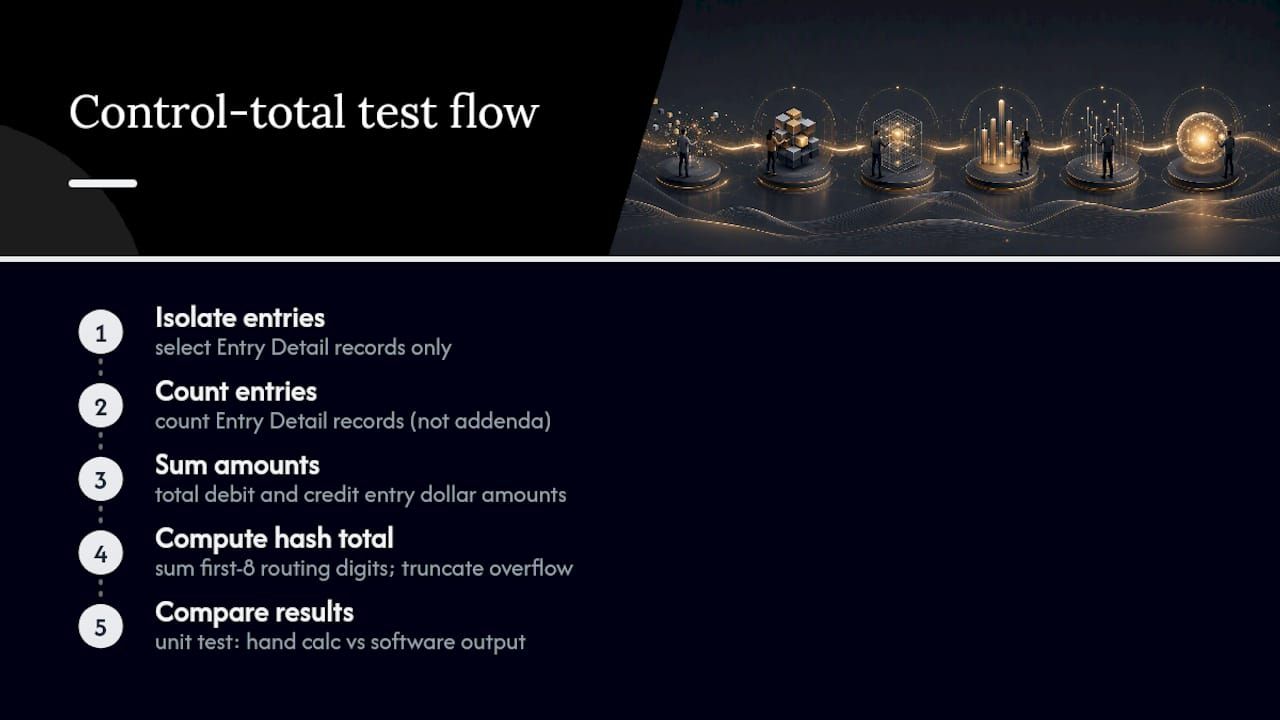
The hash total is the field that trips up the most engineers, largely because the name is misleading. It is not a cryptographic hash. It is the sum of the eight-digit routing/transit numbers (the first eight digits of the nine-digit routing number) across every Entry Detail record in a batch, with overflow truncated to fit the field width, and the same aggregation repeats at the file level across all entries.
Hash totals are a numeric sum of routing numbers, not a checksum or cryptographic digest. Treat them as arithmetic validation, not security.
Beyond the hash, each Batch Control and File Control record needs an accurate Entry/Addenda Count, Total Debit Entry Dollar Amount, and Total Credit Entry Dollar Amount, and the file level simply rolls up every batch’s totals. The Block Count is the number of 94-character records, including 9-filled padding, divided by 10.
The most common miscalculation isn’t the math itself, it’s scope: developers sum amounts across the wrong record type, include addenda records in an entry count that should only count Entry Detail records, or forget that hash totals truncate rather than round when they exceed the field width. Unit tests that generate a known batch, compute totals by hand, and diff against your code’s output catch these errors before a bank ever sees the file.
A Testing Checklist Before You Submit Your First File
That means testing formatting first pays off faster than testing transaction logic.
- Verify every record is exactly 94 characters, with no trailing newline discrepancies from your file-writing library.
- Confirm the block count math: total records (including 9-fill padding) divided by 10 with no remainder.
- Recompute the hash total independently and diff it against your generator’s output.
- Check alpha fields are space-padded and numeric fields are zero-padded, not the reverse.
- Confirm trace numbers are unique and ascending within each batch.
- Parse a return or Notification of Change (NOC) file from a test transmission and confirm your system reads the return reason code correctly and flags the originating entry for correction.
Pro Tip: Build your validation suite to run cheapest checks first: character length and block math take microseconds, while hash and dollar-total reconciliation take a bit longer. Failing fast on the free checks saves debugging time on every subsequent test run.
Compliance Obligations Your Software Needs to Support
Nacha’s operational rules have shifted from static formatting requirements toward active proof-of-audit and fraud-monitoring obligations. Operations Bulletin #3-2025 automated the request-for-proof-of-audit process through Nacha’s Risk Management Portal starting in October 2025, giving recipients 30 calendar days to attest to their annual ACH compliance audit. Separately, Nacha’s New Rules assign risk-based fraud monitoring duties to originators, third-party senders, and ODFIs on a phased schedule running through 2026, with one milestone landing March 20, 2026.
Software supporting ACH origination should retain, at minimum:
- Transaction-level logs showing who submitted each file and when.
- Audit reports and attestation records tied to each compliance cycle.
- Return and NOC handling history, linked back to the originating entry.
- Provenance metadata for every batch, since risk-based rules now expect originators to trace responsibility down to the submitting system or user.
Tools like automated compliance workflow platforms and an enterprise security compliance checklist give a useful baseline for what retention and logging should look like before an audit request ever arrives.
Why Modular Architecture Matters for ACH Pipelines
Building a NACHA pipeline from scratch means reimplementing the same fragile pieces every team gets wrong: hash total math, blocking logic, return parsing, and audit logging. An approach treats each of these as a reusable component rather than a one-off script; for teams looking to streamline payment processing, exploring the Best Invoice Processing Software for Finance Teams can provide valuable automation benefits. A dedicated module handles the formatting and control-total logic natively, while an exception-handling layer catches malformed returns before they reach a human. Pairing that with traceable audit logs isn’t optional anymore given where Nacha’s proof-of-audit rules are headed. Pre-built components exist to help engineering teams avoid rebuilding hash-total validation from scratch on every new integration.
— Bitecode
Where to Verify the Specification Yourself
The Nacha ACH Guide for Developers is the canonical source for file structure and field definitions. Cross-reference it against the 2026 Nacha Operating Rules & Guidelines for rule updates, and consult annotated implementations like moov-io/ach or the Usio NACHA layout reference for practical field-position examples.
Sources
FAQ
Can You Create a NACHA File in Excel?
Technically yes, if you export fixed-width text with exact character positions and correct zero/space padding, but Excel’s formatting engine fights against fixed-width output by default. Most implementers use a scripting language or dedicated library instead, because a single misaligned column in Excel silently corrupts every downstream field.
What Are the Different Types of NACHA Files?
NACHA files aren’t categorized by “type” so much as by the SEC codes their batches carry, such as PPD for consumer payments, CCD for business-to-business transfers, and WEB for internet-initiated debits. A single file can contain multiple batches with different SEC codes, as long as each batch stays internally consistent.
How Do You Read a NACHA File Format?
Reading a NACHA file means parsing it line by line, checking the first character of each 94-character record to identify its type (1, 5, 6, 7, 8, or 9), then extracting fields by their fixed position ranges as defined in the Nacha developer guide. Libraries like moov-io/ach automate this position mapping rather than requiring manual byte-offset parsing.
What Are the New Nacha Rules for 2026?
Nacha’s phased fraud-monitoring rules assign new risk-based responsibilities to originators, third-party senders, and ODFIs, with one implementation milestone landing March 20, 2026. Alongside that, Nacha’s automated proof-of-audit process through its Risk Management Portal requires organizations to attest to compliance audits within 30 calendar days of a request.


